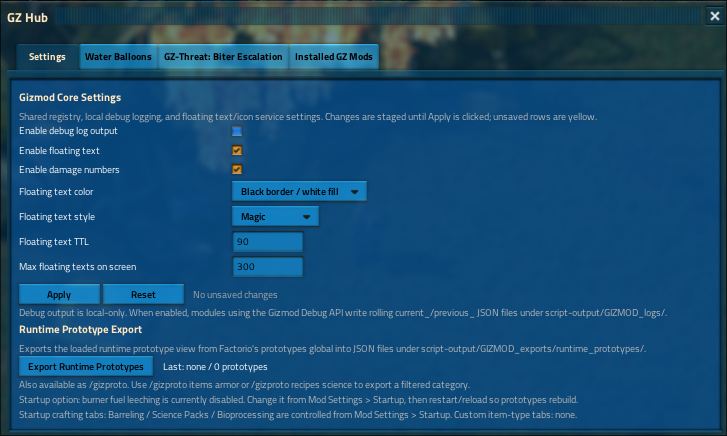
^Use the button!
Easy Runtime Prototype Export
GIZMOD also includes a runtime prototype exporter in the debugger.
Open the GIZMOD hub, go to the debugger/settings area, and click Export Runtime Prototypes.
The export is written locally to:
script-output/GIZMOD_exports/runtime_prototypes/
Use this when reporting mod conflicts where an item, recipe, entity, technology, tile, fluid, equipment, or other runtime prototype may be missing or different from expected.
GIZMOD Debug API
Lightweight local debug snapshots for Factorio mods.
Clean bug reports. No print spam. No timestamp-file garbage pile.
Overview
GIZMOD exposes a lightweight local debug logging API for mods that want cleaner bug-report diagnostics.
Mods may use the Debug API in two ways:
- Optional integration
- Guaranteed player-facing debugger
1. Optional Integration
Note: using the debugger and listing GIZMOD as a dependency does not trigger the License condition. Using the debugger does not make a modder's work a Gizmod, and they do not need to use the [gz] tag unless they choose to do so.
Important exception:
GPL-licensed mods that depend on GIZMOD will be marked incompatible immediately. It is highly recommended and for the health of the Mod Portal that mods use either a defensive/protective license, or otherwise use a permissive license. MIT is the gold standard for this. It is never necessary to apply an offensive and toxic license agreement to your mod.
Mods do not need to depend on GIZMOD.
They can safely probe:
remote.interfaces["gizmod"]
If GIZMOD is installed and debug logging is enabled, diagnostics are written.
If GIZMOD is missing, nothing happens.
2. Guaranteed Player-Facing Debugger
Mods that want players to always have the GIZMOD hub, debug toggle, and local log output should list GIZMOD as a required dependency.
{
  "dependencies": [
    "gizmod >= 0.2.25"
  ]
}
This guarantees:
- GIZMOD is installed
- The GIZMOD hub is available
- The debug toggle exists
- The debug remote API exists
Local-Only Logging
Debug logging is controlled by the player or admin inside the GIZMOD interface.
GIZMOD writes local rolling JSON snapshots to:
script-output/GIZMOD_logs/
Instead of creating endless timestamped files, GIZMOD keeps only:
current_<module>.json
previous_<module>.json
Example:
script-output/GIZMOD_logs/current_gz-biter-mutagenesis.json
script-output/GIZMOD_logs/previous_gz-biter-mutagenesis.json
This keeps bug reports useful without filling the player's drive with log spam.
Optional Integration Example
Use this if your mod can run perfectly fine without GIZMOD, but should output better diagnostics when GIZMOD is present.
No dependency is required.
Safely probe the remote interface before calling it.
local function gizmod_debug_log(diagnostic_data)
  local iface = remote.interfaces["gizmod"]

  if not (iface and iface.write_debug_log) then
    return false, "gizmod-debug-api-missing"
  end

  return remote.call(
    "gizmod",
    "write_debug_log",
    script.mod_name,
    diagnostic_data or {}
  )
end
Hot-Path Guard
Use this before expensive diagnostic assembly, especially inside:
on_tick- enemy spawning
- entity scanning
- pathing logic
- large force loops
- large surface loops
- large player loops
local function gizmod_debug_enabled()
  local iface = remote.interfaces["gizmod"]

  if not (iface and iface.is_debug_logging_enabled) then
    return false
  end

  return remote.call("gizmod", "is_debug_logging_enabled") == true
end
Example Usage
if gizmod_debug_enabled() then
  gizmod_debug_log({
    trigger = "unit_spawned",
    tick = game.tick,
    surface = surface and surface.valid and surface.name or "unknown",
    force = force and force.valid and force.name or "unknown",
    unit_name = unit and unit.valid and unit.name or "unknown",
    quality_tier = tier,
    size_scale = size_scale,
    health_scale = health_scale,
    damage_scale = damage_scale,
    movement_speed_scale = movement_speed_scale,
    swarm_count = swarm_count
  })
end
Direct Call Form
For mods that prefer calling the API directly:
remote.call("gizmod", "write_debug_log", script.mod_name, {
  trigger = "example_event",
  tick = game.tick,
  message = "Something useful for a bug report"
})
API Reference
write_debug_log
Writes a rolling debug snapshot for the calling mod.
remote.call("gizmod", "write_debug_log", module_name, diagnostic_data)
Parameters
Returns
true-
Log was written.
-
false
- Logging is disabled or unavailable.
is_debug_logging_enabled
Checks whether GIZMOD debug logging is currently enabled.
remote.call("gizmod", "is_debug_logging_enabled")
Returns
Output Files
For a mod named:
gz-biter-mutagenesis
GIZMOD writes:
script-output/GIZMOD_logs/current_gz-biter-mutagenesis.json
script-output/GIZMOD_logs/previous_gz-biter-mutagenesis.json
The current_ file contains the latest diagnostic snapshot.
The previous_ file contains the snapshot before that.
Design Rules
- Debug logging is off unless enabled in GIZMOD.
- Missing GIZMOD is not an error when using the guarded wrapper.
- The Debug API is local-only.
- GIZMOD does not phone home.
- GIZMOD does not append endless logs.
- GIZMOD keeps one current and one previous diagnostic snapshot per module.
- Mods that want guaranteed player-facing debug controls should require GIZMOD.
- Mods that only want optional diagnostics can safely probe the remote interface.
Recommended Bug Report Instruction
Ask users to attach the relevant files from:
script-output/GIZMOD_logs/
For example:
current_my-mod-name.json
previous_my-mod-name.json
These files provide compact state snapshots without requiring the user to copy console spam or upload massive log dumps.