

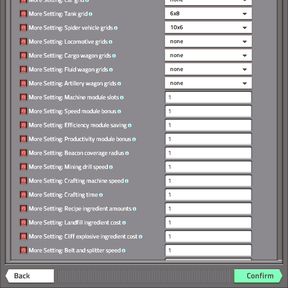
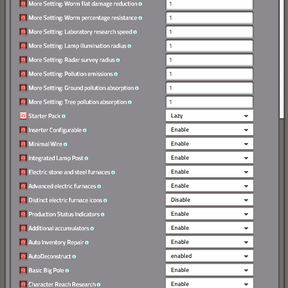
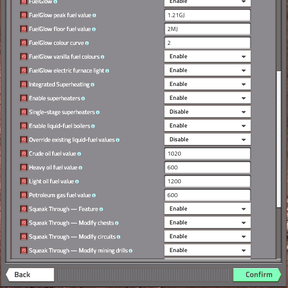
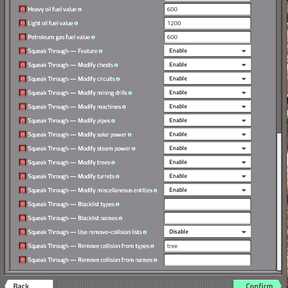
More Setting
More Setting combines configurable gameplay settings with additional machines, research, tools and visual features. Adjust your engineer, equipment grids, production, transport, combat and environment, then enable the extra features you want.
Requires Factorio 2.1.24 or later in the 2.1 series. Works with or without Space Age and does not require The Cave.
Before starting a game
Open Settings → Mod settings and review your options.
Most integrated features are enabled by default. The default Lighting Mode is Permanent Night, Darkness Infestation is enabled, and the default Starter Pack is Medium. Resource Eraser is disabled.
Features have their own switches or settings, with one important exception: vanilla Night Vision is removed whenever More Setting is active.
Startup settings require a restart. Map and per-player settings can be adjusted where available.
Core gameplay settings
More Setting includes controls for:
- Your engineer: maximum health, health regeneration, recovery delay, base inventory capacity, building and interaction distance, hand-mining distance and hand-mining speed.
- Equipment grids: choose grid dimensions for light armour, heavy armour, modular armour, power armour, Power Armour MK2, Mech Armour, cars, tanks, spider vehicles, locomotives, cargo wagons, fluid wagons and artillery wagons. Mech Armour requires Space Age. Grid sizes are applied when the game loads.
- Production: mining-drill speed, assembling-machine and furnace speed, rocket-silo crafting speed, recipe crafting time and ingredient costs.
- Modules and beacons: change existing machine module-slot counts, speed-module bonuses, efficiency-module savings, productivity-module bonuses and beacon coverage.
- Transport: adjust belt, underground-belt, splitter, existing loader and inserter speeds.
- Weapons and enemies: adjust bullet-magazine capacity, shotgun-shell capacity, shotgun pellet count and cannon minimum/maximum range. Separate settings control flat damage reduction and percentage resistance for enemy units, nests and worms, with a resistance ceiling.
- Research, visibility and pollution: laboratory speed, lamp illumination radius, radar survey radius, pollution emissions, ground absorption and tree absorption. Increasing radar survey range also increases its electricity and scanning-energy requirements. Pollution controls do not change Space Age spore emissions.
Landfill and cliff explosives have separate cost multipliers. Setting either to 0 disables that recipe.
Module-slot settings scale existing slots; they do not give module slots to machines that normally have none. Equipment-grid settings offer fixed Startup sizes rather than research-driven grid upgrades.
Engineer upgrades and starting equipment
Character Reach Research
A ten-stage research chain improves building reach, entity interaction, resource reach, item-dropping distance, automatic loot-pickup distance, running speed and hand-crafting speed.
Each level adds two tiles to the affected distance bonuses, reaching an additional 20 tiles at level 10. Research progresses through the normal pre-space science packs, and bonuses apply separately to each force. Manual F-key pickup range is unchanged.
Research Difficulty
Choose how many science packs finite research requires:
| Difficulty | Science-pack cost |
|---|---|
| Very Easy | ×0.25 |
| Easy | ×0.5 |
| Medium | ×1 |
| Hard | ×2 |
| Very Hard | ×3 |
| Marathon | ×6 |
This changes fixed research counts. Research time, formula-based counts and trigger-based technologies are unchanged. Laboratory speed has its own setting.
Starter Packs
Choose Disabled, Small, Medium, Large or Lazy.
Packs contain standard Factorio supplies for construction, production, power and defence. Recycler and Quality Module supplies are included only when Space Age is active.
Each new player receives one pack. Updating the mod or changing the selected pack does not give established players another one. Items that do not fit in the inventory are dropped nearby.
Engine hand crafting
Ordinary engine units can be crafted by hand after their usual research unlock. Assembling-machine crafting remains available.
Auto Inventory Repair
Uses repair packs from your main inventory to repair damaged placeable items carried there. Repair-pack durability is consumed. This does not repair placed buildings or worn armour.
Factory construction and production
Configurable inserters
Choose pickup and drop positions through the inserter configuration interface. Four research stages provide the progression, including extended straight positions, diagonal positions, the complete supported position grid and precise drop offsets.
Keyboard controls are available in the Controls menu. Selecting an inserter keeps Ctrl+R assigned to its pickup-rotation function.
Expanded productivity
Allows productivity modules for eligible item-producing assembler recipes, including belts, inserters and ammunition.
The machine must still support productivity and have module slots. Recycling recipes are excluded.
Additional electric furnaces
Adds:
- Electric Stone Furnace
- Electric Steel Furnace
- Electric Furnace 2
- Electric Furnace 3
The original electric furnace remains available. The additional furnaces have crafting recipes and research unlocks. Electric stone/steel furnaces and advanced furnaces have separate switches, with an optional setting for more distinct electric-furnace icons.
Chest inventory filters
Adds slot filters to ordinary and logistic chests while retaining their inventory capacity and slot bar.
Production Status Indicators
Adds visible status lights to supported assembling machines, furnaces, rocket silos and mining drills:
- Green: working.
- Yellow: output full.
- Orange: low power.
- Red: stopped, disabled, missing inputs, without power or out of mineable resources.
Mining and resource tools
Mixed Resource Patches
Mixes iron ore, copper ore, coal and stone within newly generated Nauvis deposits.
Factorio’s map generator remains responsible for the original deposit locations, footprints and quantities. Oil and uranium are unchanged, and already generated chunks are not rewritten.
The resulting mixture can contain all four basic resources, regardless of the original deposit type.
Filter Mining Drills
Use the toolbar selection tool, drag over your force’s mining drills and choose the resource they should extract. Select No filter to return them to ordinary extraction.
The selected resource appears in ALT mode. Changing a filter preserves the drill’s quality, health, modules, fuel, input fluid and circuit connections. Drills already marked for upgrade or deconstruction are left alone.
This works with mixed deposits and integrates with AutoDeconstruct.
AutoDeconstruct
Automatically marks exhausted mining drills for normal construction-robot deconstruction. It does not instantly delete them or move them into your inventory.
Settings control optional handling of output chests, unused beacons, belts, paving, fluid-using drills, circuit-connected entities and replacement pipe ghosts. Entity and resource blacklists are included.
Filtered drills respect their selected resource, and a base-drill blacklist also covers its filtered variants.
Resource Eraser
Permanently removes resource entities from a selected area while leaving buildings in place. This includes ores, oil and compatible modded resources.
Access modes are Disabled, Admins Only and All Players. A selection containing more than 10,000 resource entities is rejected. Shift-selection performs no action.
Resource Eraser starts disabled.
Power, lighting and electrical connections
Additional accumulators
Four larger accumulators are unlocked through accumulator research.
| Accumulator footprint | Capacity at Normal quality | Charge/discharge limit at Normal quality |
|---|---|---|
| 3×3 | 50 MJ | 3 MW |
| 6×6 | 250 MJ | 6 MW |
| 10×10 | 1 GJ | 60 MW |
| 20×20 | 5 GJ | 300 MW |
These custom accumulators retain their stored electricity and quality when mined and placed again. Charged accumulator items occupy one inventory slot each.
Superheating
Adds solid-fuel superheaters, oil-fired boilers and oil-fired superheaters. Superheaters raise steam temperature to 465°C.
Settings control the machine groups, supported liquid-fuel values and an optional single-stage mode that heats water directly. Overriding liquid-fuel values supplied by other mods is a separate option.
Additional lamps and poles
- Lamp Post: wide-area lighting.
- Lamp Pole: combines an electric pole and a lamp.
- Basic Big Pole: an additional long-range power pole.
- Small Metal Electric Pole: a metal alternative to the small wooden pole.
Powered Lamp Posts and Lamp Poles also provide wider protection against Darkness Infestation.
Minimal Wire
Reorganises nearby copper power connections when poles are built, removed or replaced. Red and green circuit wires are preserved.
Search radius, the number of poles considered and the amount of connection work processed per tick are configurable.
FuelGlow
Changes the glow colour of supported burner machinery and reactors according to their fuel. Includes tuned colours for standard fuels, automatic colours for compatible modded fuels, adjustable colour settings and an optional working light for the vanilla electric furnace.
Lighting and darkness
Lighting Mode offers:
- Normal: the natural day/night cycle.
- Permanent Day
- Permanent Night
- Pitch Black
Without Space Age, lighting control applies to Nauvis. With Space Age, it applies to planet surfaces. Interior surfaces and space platforms are excluded.
The fixed night modes intentionally retain some solar generation. Under normal Nauvis solar conditions, Permanent Night provides 50% and Pitch Black 25% of daytime output.
Darkness Infestation
Outside your force’s starting safe zone, remaining in unprotected darkness for 30 seconds can cause enemies to emerge and attack.
Powered small lamps protect within 12 tiles along each axis; Lamp Posts and Lamp Poles protect within 30 tiles. These protection areas are square. The starting safe zone covers five by five chunks around the force’s spawn chunk.
Daylight resets the darkness timer, so lamps are not required for this protection during the day. Driving provides temporary safety. Enemies that have already appeared remain after dawn.
Night Vision removal
Vanilla Night Vision’s research, recipe, item and equipment are removed while More Setting is active. Existing vanilla night-vision items and installed equipment are removed when a save is loaded with the mod.
This is not limited to the dark lighting modes. Other equipment in your armour is preserved.
Combat and everyday tools
Gun turret autoload and reload
Placing a gun turret loads up to 10 magazines from your main inventory.
Press Ctrl+R, or use the gun-turret toolbar shortcut, to distribute up to 10 additional magazines per same-force gun turret in a nearby 20×20 area, subject to available ammunition and inventory space.
Ammunition is taken from your inventory; none is created. Quality and remaining rounds in partially used magazines are preserved. When an inserter is selected, Ctrl+R keeps its inserter action; the toolbar button remains available for turret reloading.
Nearby ammunition counts
Shows loaded magazine counts above friendly ammunition turrets within 100 tiles while ALT mode is enabled. Empty turrets show a red zero. This counts magazines, not individual rounds, and can be disabled per player.
Damage Indicator
Displays floating damage numbers during combat. Per-player options include visibility, range, minimum damage, number formatting, colours, display lifetime, animation speed and killing-blow markers.
Visibility can show nearby damage, damage involving your force or outgoing damage. Server display overrides are also available.
Chemical Rocket and Incendiary Rocket
Unlocked through Explosive Rocketry:
- Chemical Rockets release poison gas and apply an area slowdown.
- Incendiary Rockets create a burning area on impact.
Both ammunition types share a feature switch.
Squeak Through
Reduces selected collision boxes so you can move through narrow gaps between machinery and other entities.
Includes switches for different entity groups, name/type blacklists and optional collision-removal lists. Complete collision removal is an advanced option and can also affect enemy movement.
Corpse cleaner
Press Backspace, or use the toolbar shortcut, to remove nearby temporary corpses and remnants. The default radius is 80 tiles and can be changed per player.
Player corpses and dropped items are preserved.
Existing saves and compatibility
Back up your save before changing Startup settings.
- Disabling features that add buildings or ammunition can remove their entities, items and stored contents. Re-enabling the feature does not recover deleted contents.
- Shrinking or removing equipment grids can displace installed equipment.
- Disabling inserter configuration resets custom pickup/drop positions to native positions.
- Disabling chest filtering removes its filtering capability.
- Disabling Character Reach Research removes its research bonuses.
- Disabling drill filtering removes the resource restriction and restores registered drills to their ordinary form where possible, preserving their contents.
- Disabling AutoDeconstruct does not cancel deconstruction orders already issued.
- Changing Mixed Resource Patches affects newly generated terrain.
- After changing Superheating’s single-stage mode, existing superheaters may need to be rebuilt and reconnected.
If you use another inserter-control mod, disable More Setting’s Inserter Configurable feature to avoid overlapping controls. The integrated AutoDeconstruct, FuelGlow and Squeak Through implementations defer to their recognised standalone counterparts when installed.
Server and clients must use matching mod versions and Startup settings. Quality and Space Age support are included, but compatibility with every third-party mod combination is not guaranteed.
English and Russian locale files are included. Component credits and licences are supplied with the mod.