
Mobile Factory Space Age
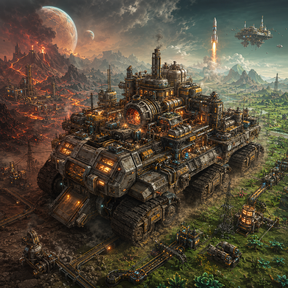
Turn your base into a vehicle. Mobile Factory Space Age gives you a drivablefactory with its own expandable interior, a second-floor Control Centre,configurable item, fluid and power links, dimensional technology, virtualstorage, Quatron-powered automation, resource collection, long-range travel andoptional Space Age cargo-rocket support.
A complete factory that travels with you
Mobile Factory Space Age is a large progression and logistics mod for Factorio2.0. Its centrepiece is a vehicle that carries a persistent factory interior.You can drive to a new site, walk into the vehicle, continue building on theinside, deploy connections to the outside world and pack those connections awayagain when it is time to move.
This is more than a large inventory on wheels. The Mobile Factory has internalenergy and Quatron storage, an expandable floor, specialised production areas,a programmable deployment system, upgradeable transfer lasers, a virtual DataNetwork, deep item and fluid storage, automated resource gathering and a JumpDrive. The technology tree develops these systems gradually through DimensionalOre, Dimensional Fluid and a complete range of new materials, machines andenergy technologies.
The old Mobile Factory, MF Base and Mobile Factory Graphics packages are nowcombined into one download. Install one mod and you have the code, base content,graphics, sounds and English locale required to play.
Three Mobile Factory models
Base Mobile Factory
The standard model is the durable, general-purpose choice. It has 2,500 health,10 vehicle inventory slots and an enormous 30x30 equipment grid. It is intendedfor players who want the greatest equipment capacity and a strong all-roundmobile base.
Mobile Factory GT
The GT is the fast, light version. Its bi-turbocharged setup accelerates,turns and brakes much more aggressively than the standard model. The trade-offis lower durability and capacity: 1,000 health, 3 vehicle inventory slots and a4x4 equipment grid.
Hovering Factory
The Hovering Factory is slower and heavier, but its collision-free hoveringsystem lets it travel over water and structures. It has 2,000 health, 8 vehicleinventory slots and a 12x12 equipment grid.
All three models keep their vehicle handling values separate from cargo-rocketweight. When Space Age is active, a packed Mobile Factory weighs one tonne, soone factory fits in a standard cargo rocket and uses its full normal payload.This lets you launch it from Nauvis to another planet, unpack it there and laterlaunch it onwards again.
Persistent factory interior
Walking into the vehicle teleports you to a dedicated interior surface thatremains attached to that Mobile Factory wherever the vehicle travels. Theinterior is a real buildable factory floor, not a temporary menu or a hiddeninventory.
The interior system includes:
Automatic entry when you walk onto the vehicle, with an option to enable ordisable inside teleportation.
A control for leaving the interior. Right-clicking the outside-teleport buttonattempts to place you directly in the driver or passenger seat.
A factory lock that controls whether other players may enter.
A persistent internal build area for machines, belts, pipes, power andlogistics.
Internal pollution handling: pollution produced on the factory surface istransferred back to the outside world around the vehicle.
A repair/rescan command that can recover the vehicle, interior or relatedsystems if something becomes lost or damaged.
Expand the floor
Atomic Reconstitution research unlocks progressively larger floor-buildingcapsules:
Tier 1 places a 1x1 section.
Tier 2 places a 5x5 section.
Tier 3 places a 9x9 section.
Lab Tiles extend the usable internal floor, while Void Tiles remove sectionsthat are no longer wanted. The separate Dimensional Tile provides a 50% movementspeed bonus and is also the safe surface used by the optional Floor Is Lavachallenge.
Control Centre
The Control Centre is a second floor reached from inside the factory. Furtherresearch extends it with dedicated wings and constructible areas for advancedsystems, including:
The Network Controller and Data Network infrastructure.
Deep Storage areas.
Deep Tank areas.
The Jump Drive.
Two additional constructible areas for special structures and upgrades.
The Control Centre begins with the factory's Internal Energy Cube and InternalQuatron Cube, making it the operational heart of the mobile base.
Deployment: connect the inside to the outside
When the vehicle is stationary, it can deploy a configurable ring of linkedconnections around itself. Matching entities appear beside the vehicle and atthe corresponding positions inside the factory.
Deployment supports:
Dimensional Belts for item input or output.
Dimensional Pipes for fluid input or output.
Dimensional Poles for electric power and copper, red and green circuitconnections.
Three technology tiers for belts, pipes and poles.
Four initial connection slots, expandable through research to a total of 20.
Individual configuration of every slot, including connection type anddirection.
Right-click deployment from the main control button, plus a dedicated layoutwindow and refresh control.
The factory cannot deploy while moving. If it starts moving or changesorientation, the deployed entities are automatically repacked. This allows youto relocate the vehicle without leaving temporary connectors behind.
Mobile Factory transfer lasers
The Mobile Factory can scan friendly structures around the vehicle and moveresources with visible transfer beams. Each system can be switched on or off andthe energy and Quatron systems can be set to drain from nearby structures orsend resources back out.
Energy lasers
Energy lasers exchange electricity between the Internal Energy Cube and nearbyEnergy Cubes. They can charge the factory from an external energy installationor power compatible structures from the factory's internal reserve.
Quatron lasers
Quatron lasers exchange Quatron with nearby Quatron Cubes, Network Access Pointsand Resources Collectors. Quatron purity is preserved and mixed as it movesthrough the system.
Fluid lasers
Fluid lasers drain compatible fluids from nearby storage tanks and place them ina selected Deep Tank inside the factory. The target Deep Tank can be chosen inthe Mobile Factory interface.
Logistic lasers
Logistic lasers collect items from nearby normal or logistic chests and sendthem to the factory's internal virtual inventory.
Laser equipment upgrades
The vehicle begins with a 10-tile scan radius and one active transfer beam.Equipment-grid modules expand the system:
Every Power Module adds two tiles of laser range.
Every Focus Module adds one simultaneous transfer beam.
Every Efficiency Module increases transfer throughput.
The extended information panel shows the current beam count, radius, transferrates, consumption and installed upgrades.
Electricity and energy logistics
The Mobile Factory has a 3 GJ Internal Energy Cube. It begins half charged andacts as the battery for internal systems, transfer lasers, shields, the JumpDrive and vehicle refuelling. If the vehicle's burner has no ordinary fuel inits slot, internal energy can keep the selected burner fuel charged.
The wider energy system includes:
Energy Cube MK1: 2 MJ storage.
Energy Cube MK2: 15 MJ storage.
Energy Cube MK3: 50 MJ storage.
Automatic energy equalisation between neighbouring Energy Cubes.
Energy Laser MK1: up to 200 kJ/s transfer.
Energy Laser MK2: up to 1.5 MJ/s transfer.
Energy Laser MK3: up to 5 MJ/s transfer.
Energy Dispenser: powers compatible structures across a 128x128 area afterbeing charged by an Energy Cube or Energy Laser.
Dimensional Substation: a large substation with a 64-tile supply radius.
Basic Solar Panel: a compact early source of electricity.
Quatron production and logistics
Quatron is the mod's high-density energy medium. It powers the Data Network,Resources Collectors, Data Assemblers and several advanced Mobile Factorysystems.
The Quatron chain contains twenty purity levels in both solid-cell and liquidforms. Higher-purity Quatron improves the performance of systems that scale withits energy level.
Quatron infrastructure includes:
Quatron Cubes MK1, MK2 and MK3 with 2K, 15K and 50K storage respectively.
Quatron Lasers MK1, MK2 and MK3 with transfer rates of 200/s, 1,500/s and5,000/s.
A Quatron Reactor that converts Liquid Quatron into usable Quatron energy andsupplies nearby Quatron Cubes or lasers.
An Internal Quatron Cube carried by the Mobile Factory.
Visible charge and purity information throughout the relevant interfaces.
Matter Serialization and the Data Network
Matter Serialization turns items and fluids into a shared virtual logisticssystem. Each Mobile Factory owns a Data Network, and authorised players canselect accessible networks when configuring compatible structures.
Network Controller and virtual inventory
The Network Controller is the core of the system. The virtual item inventorystarts with capacity for 10,000 items. Each connected Data Storage adds another1,000 item spaces.
Network Access Point
A Network Access Point brings the selected Data Network to structures within 50tiles. It must be supplied with Quatron. Its interface can display the coveragearea, connected structures, remaining Quatron, purity, total consumption and theconsumption of each attached machine.
Deep Storage
Deep Storage holds an unlimited quantity of one selected item and can be given auser-defined maximum. It is built in the specialised Control Centre area and isincluded in Data Network item searches, inputs and outputs.
Deep Tank
A Deep Tank stores one fluid, up to 10,000,000 fluid units, and can also use auser-defined maximum. Deep Tanks are built in their own Control Centre area andprovide the fluid side of the Data Network.
Matter Interactor
The Matter Interactor is the physical item interface. Choose an item filter, aninput or output direction and a target: the main virtual inventory or a specificDeep Storage. It then sends items into the network or retrieves them to itsone-slot physical inventory.
Fluid Interactor
The Fluid Interactor performs the equivalent task for fluids. It can send fluidto or retrieve fluid from a selected Deep Tank while connected to the samenetwork through a powered Access Point.
Data Assembler
The Data Assembler is a Quatron-powered crafting machine that works directlyagainst the Data Network:
Add any researched, permitted recipe.
Draw item and fluid ingredients directly from network storage.
Return item and fluid products to the network.
Run a queue of recipes and inspect each recipe's progress.
Pause, resume or remove individual recipes.
Set a maximum stored amount for each product.
Automatically stop when ingredients are missing, the network is full or aproduct limit has been reached.
Preserve compatible recipe settings in blueprints.
Server administrators can blacklist crafting categories that should not beavailable to Data Assemblers. They can also switch between the mod's filteredrecipe browser and Factorio's standard recipe selector.
Network Explorer
The Network Explorer is a searchable interface for browsing the entire DataNetwork and transferring items between it and the player:
Left-click transfers one item.
Alt + left-click transfers 10.
Ctrl + left-click transfers 100.
Shift + left-click transfers one stack.
Right-click transfers half.
Shift + right-click transfers all.
It also shows the network's used and total item capacity.
Automated resource gathering
Resources Collector
The Resources Collector scans a 50-tile radius and uses Quatron to gather orepatches and fluid resources. Its collection speed scales with Quatron purity.Ore and fluid collection can be switched independently.
Collected ore can be:
Kept out of the network.
Routed automatically to suitable Deep Storage.
Sent to the main Data Network inventory when no Deep Storage is available.
Restricted to a specific Deep Storage.
Collected fluids can be kept local, routed automatically or sent to a selectedDeep Tank. The collector also has a 50-slot physical chest and four internal10,000-unit fluid tanks. Its interface reports scan results, collection speed,charge, purity, storage state and any out-of-Quatron or inventory-fullcondition.
Resource Catcher
Place a Resource Catcher over an ore patch, fluid resource or supported watertile to capture it. Mine the filled catcher, carry it elsewhere, then place itover Dimensional Tile to release the captured resource. Existing resourcepatches can be merged when the stored resource is released.
Jump Drive
The Jump Drive teleports the complete Mobile Factory vehicle to saveddestinations.
Its controls allow you to:
Save the current vehicle position under a unique name.
Assign an optional item or fluid icon to a saved destination.
View the destination surface, coordinates, required charge and availability.
Left-click a saved destination to begin the jump.
Right-click a destination to remove it.
The vehicle must have a driver and the destination must have a validnon-colliding position. Travel costs one Jump Charge per tile. A jump to adifferent surface also costs 1,000 Quatron.
The base Jump Drive holds 500 charge and recharges from internal factory energy.Each Jump Charger placed in a permitted Control Centre constructible area adds150 maximum charge and one charge per second to the recharge rate.
Dimensional materials and chemistry
The mod adds a substantial research and production chain rather than handingevery system to the player immediately.
Core dimensional progression includes:
Dimensional Ore and Dimensional Fluid.
Dimensional Samples for the Dimensional Analyzer.
Dimensional Plates, Crystals, Wire and Circuits.
Crystallised Circuits.
Machine Frames MK1, MK2 and MK3.
Overcharged Energy Cores.
A Dimensional Furnace and Crystallizer.
The Dimensional Plant handles a separate chemistry tree, including:
Water electrolysis into oxygen and hydrogen, and the reverse water reaction.
Oxycoal and Hydrocoal fuel upgrades.
Stone crushing and salt production.
Salt decomposition into chlorine and sodium.
Sodium hydration to produce sodium hydroxide.
Uranium liquefaction.
Silicon, graphite, sand and nanopore silicon processing.
Clorodin, Hydroxyclorodin and three Fluorodin stages.
Alternative chemistry routes for Automation and Logistic science packs.
Liquid and solid Quatron creation and purification through twenty levels.
Combat and equipment
The Mobile Factory can act as a fighting vehicle as well as a base:
A longer-ranged Mobile Factory machine gun.
Unlockable longer-ranged cannon and flamethrower options.
A dedicated Mobile Factory shield for the equipment grid.
Shield recharging from the Internal Energy Cube.
A visible shield effect around the vehicle while protection remains.
Large equipment capacity on the Base model for shields and laser modules.
Interface and player controls
The original draggable top control panel is retained. It can be moved by holdingits drag area, and its contents can be customised per player.
The panel and its related windows provide:
Enter/exit and internal-teleportation controls.
Factory lock/unlock.
Deployment configuration and manual deployment.
Separate toggles for energy, Quatron, fluid and logistic lasers.
Input/output selection for energy and Quatron.
Deep Tank selection for fluid transfer.
Jump Drive destinations and charge information.
Mobile Factory switching and naming.
Health, shield, energy, Quatron and Jump Charge status.
Extended lists for internal inventory, Deep Storage and Deep Tanks.
Upgrade and transfer-rate details.
A repair/rescan command for factory components.
Players can choose which buttons appear, select the button size and the number ofbuttons per row, and show or hide position, time and individual progress bars.
Multiplayer and server administration
Mobile Factory Space Age includes server-oriented access controls:
Each factory has an owner and a custom name of 3 to 30 characters.
Owners can add or remove players from an allowed-users list.
Players may switch to another factory only when its owner has authorised them.
The factory can be locked to prevent unauthorised entry.
Compatible Data Network structures can be assigned to accessible factories.
All players and the server must use the same mod version and matching mod set.
Administrators can:
Enable the optional Floor Is Lava challenge. Ordinary ground then hurtsplayers; Dimensional Tile and the Mobile Factory interior remain safe.
Add or remove Data Assembler crafting-category restrictions.
Adjust how many Mobile Factory entities are updated per tick to balanceresponsiveness and server performance.
Use Factorio's standard recipe selector in the Data Assembler if preferred.
Startup options
The startup settings allow a host or solo player to decide:
Whether the first Mobile Factory is given when a player is created or must becrafted.
Whether the Dimensional Analyzer accepts all science packs, adds vanilla packsto the dimensional set, or accepts dimensional research material only.
Whether the initial Mobile Factory research and starting content are alreadyunlocked, which is useful for difficulty changes and research-overhaulcompatibility.
Factorio 2.0 and Space Age compatibility
Built for Factorio 2.0.
Works with the Factorio base game.
Space Age is an optional dependency, not a requirement.
All three Mobile Factory items are cargo-rocket compatible when Space Age isenabled.
One Mobile Factory uses one standard cargo rocket's full normal payload.
Distributed as one package; the old separate Base and Graphics downloads arenot required.
This edition is intended for new games. It does not provide migration supportfor saves created with the old Factorio 1.x releases. Legacy compatibility hooksfor older third-party mods are not guaranteed in this first unified Factorio 2edition.
Installation
Place Mobile_Factory_Space_Age MOD (.ZIP) in the Factorio mods directory without extracting it. In multiplayer, install the same version on the serverand join with the matching mod set.
Credits and licence
Mobile Factory Space Age is maintained and packaged by BEHROOZZX.
The original Mobile Factory and MF Base work was created by Mugiwaxar.Factorio 2 porting work from the public killzoms fork was used as a technicalreference while preparing this unified edition.
Distributed under the MIT License. The original copyright and licence noticeare preserved in the package.