
Sky Freight
Big cargo drones fly whole shipping containers between docks. A loading dock fills a container from your belts, a drone carries it to an unloading dock that asks for that item, and the unloading dock tips it out onto belts. Empties go back to be filled again. Fluids travel the same way in tank containers, filled and emptied by pumps at fluid docks. Slower than a train, but there are no tracks to lay, and nothing waits to be unloaded: a drone sets its container down and leaves. Stock yards keep full containers ready for when they're asked for, and storage sheds pass belts of items straight through a buffer.
How it works
- Shipping container. One item per container. Holds a cargo wagon's worth. Containers live in container yards and on docks; drones move them.
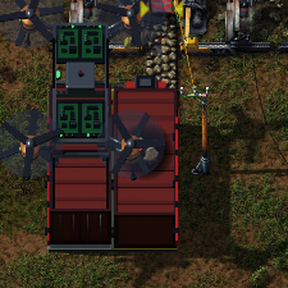
- Loading dock Belts go in at its front end. Pick the item it takes, or leave it empty and it chooses the first item its belts bring. When the container is full, or holds as much as you've set ("Send when it holds at least: n items / stacks"), a drone takes it to the nearest unloading dock that asks for that item. Send now sends whatever is loaded, and waits if no dock is asking.
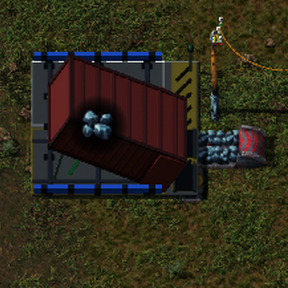
- Unloading dock Pick the item it asks for. A full container is set down, tipped up, and poured out onto the belts at its front end: both belts, or the left or right one only.
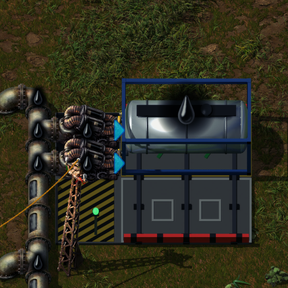
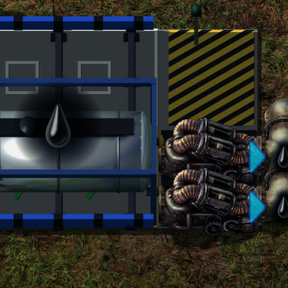
- The empty side. Each dock holds two containers side by side: one at work, and an empty waiting on the side marked with white boxes, where a green lamp lights. A pusher on rails shoves containers across. Unloading docks send their empties away; loading docks keep a spare ready, so the next container is waiting before the last one leaves.
- Tank container. One fluid per tank, 50,000 units: a fluid wagon's worth. Empty tanks wait in a tank yard, and drones carry them just as they carry shipping containers.
- Fluid loading and unloading docks. Two real pumps side by side at the front end, so your pipes connect straight to them: pumping in on a loading dock, out on an unloading dock. Pick the fluid in the dock's window, or let a loading dock take the first fluid its pipes bring. "Send when it holds at least" counts units of fluid.
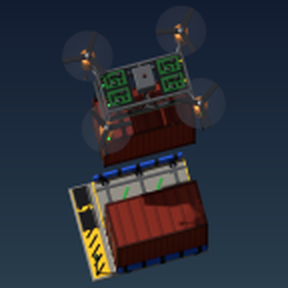
- Cargo drone. Carries one container or tank at a time and flies in a straight line over anything: water, cliffs, buildings. It turns to line up with a dock, lowers or lifts the container on four cables, and flies off. A full container shows its item's icon on its roof, on the dock and under the drone. Flying drones show on the map.
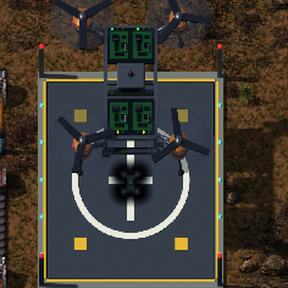
- Drone port Holds 4 drones (put them in by hand or with inserters) and charges them from your electric network, up to 4 MW. A drone takes off only once there's charge for its whole trip, 40 kJ for every tile. While it's charging for the next trip, a low-charge icon blinks over it. Drones land on its lift and go down into the bay.
- Container yard and tank yard Each holds 14 empties, stacked by its crane: shipping containers in a container yard, tank containers in a tank yard. Drones fetch empties from it for loading docks that need one and bring spares back. Put containers in by hand or with inserters.
- Stock yard Holds up to 6 full shipping containers of one item that you pick, and you can set it to keep fewer. When no unloading dock has taken a full container after 10 seconds, a drone flies it to the nearest stock yard for its item, so its loading dock can start filling again. When an unloading dock asks, it gets the nearest full container, from a stock yard or a loading dock.
- Small and Large storage Warehouse sheds that items pass straight through: belts feed the doors on the back, and the doors on the front put items out onto belts. Small storage holds 40 slots with 2 belts each way; Large storage holds 80 slots with 4 belts each way. Turn it to set the way items flow. Like any chest, you can limit its slots, read its contents with wires, and put items in or take them out by hand. A light on its roof vent shows what it's doing: green while items go in or out, yellow when it holds items that aren't moving, red when it's empty, and dark without power.
Power
- Docks and yards use 150 kW each while they work. Storage uses 100 kW all the time, and its belts stop without power. A pole whose supply area reaches any part of the building powers it, as with any machine.
Drones, enemies, and speed
- Drones fly slowly on purpose and can be shot down: biters and other enemies attack them. Plan your routes, or defend them.
- Six "Cargo drone speed" research levels add 15% each. The last two also need production and space science. Better quality drones have more health.
Circuit network
- Dock combinator. Place this console touching a dock to connect wires to it. Click it to open the dock. It can read the container's contents, the dock's item (or the tank's fluid), the free slots (F) and drones on the way (D), and set the dock's item from the strongest item signal on its wires.
- Drone port. Reads the drones it holds, plus statistics for the planet, like a roboport: total drones (D), drones waiting in ports (E), drone ports (P), and free port slots once every flying drone is home (Q). Each signal can be changed or cleared.
- Container yard and tank yard. Read how many empties they hold, plus totals for the planet: containers (or tanks) in use (T), in yards (S), and free yard room once every one is back in a yard (F). Each signal can be changed or cleared.
- Stock yard. Reads how many full containers it holds, as their item.
- Storage. Reads its contents, like any chest.
Good to know
- Removing a dock or a stock yard spills its containers' contents on the ground. Removing a fluid dock loses the fluid in its tank.
- Map alerts tell you when the container or tank yards are full, when no unloading dock asks for a waiting container, when a drone has no drone port to land in, and when a trip is too long for a fully charged drone port.
- Blueprints and copy-paste keep each dock's item or fluid, send setting, belts, and circuit settings, each port's and yard's statistics signals, and each stock yard's item and limit.
- A dock turns only half a turn where it stands (north and south, or east and west). Turn it before placing it for the other way. A dock turns only while its containers are empty and no drone is on its way to it.
- Research "Sky freight" (red, green, and blue science, after Robotics, Concrete, and Electric energy accumulators) for the drones, docks, ports, container yard, stock yard, and Small storage. "Large storage" comes after it. "Sky freight for fluids" (after Sky freight and Fluid handling) brings tank containers, fluid docks, and the tank yard.
- Works with or without Space Age. Drones fly between docks on the same planet.
More mods by ThandirBH
Starting out
- SmoothStart: a starter armor kit and fast construction robots for freeplay.
- Default Quickbar: your own quickbar layout in every new game.
- Research Autopilot: starts the cheapest research your labs can do whenever nothing is being researched.
- Soil Autopilot: ghosts-in artificial and overgrowth soil around your agricultural towers on Gleba, automatically.
- Fill4Me Continued: fuel and ammo go in by themselves when you place things.
Finding things
- Sanity Check: one button lists what's broken in your factory and the gaps in your defenses.
- Where dat is!?: help find ore patches & oil, enemy bases, and nearby lakes.
- That's no rock!: Better visibility: highlight rocks, worms, nests, and land mines.
- Solar Calculator: how many solar panels and accumulators you really need.
Enemies
- Peaceful Planets: enemies normal, peaceful, or passive, planet by planet.
- This Is My Island: start on an island, safe from biters until you're ready.
- Night Raids: biters attack more at night, after Nightfall.
- Laser Fence: walls of laser beams between powered posts.
- Jurassic Nauvis: Nauvis's enemies become dinosaurs.
New content
- Timber & Industry: wood, magnesium, and silver become part of your factory.
- Subterrania: dig down to caves beneath your planets, with new ores and new enemies.
- Power Logistics: carry electricity by train. Beam power to and from space platforms or over long distances.