
🌐 Languages / 支持语言
English | 简体中文 | 日本語
- If you encounter any usage problems, please read the FAQ first.
- 如果有使用问题,请先阅读FAQ.
相关文档/DOC
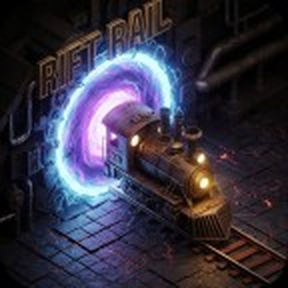
Rift Rail - 裂隙铁路
Interdimensional Train Transportation
Create seamless railway connections across surfaces and spaceships. Rift Rail offers a compact, high-tech solution for logistics in sprawling bases or multi-surface empires.
Unlike traditional bidirectional connections, Rift Rail utilizes an asymmetric, one-way teleportation system. This design allows for flexible network topologies, enabling you to build complex one-way loops or simple point-to-point transfers with ease.
Core Features
🌌 Asymmetric Teleportation
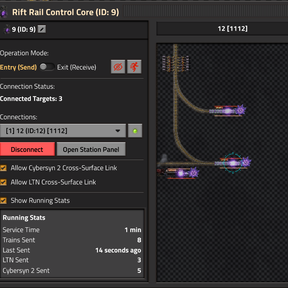
Configure each portal as Entry, Exit, via a simple GUI. This flexibility allows you to design traffic flows that suit your specific needs, from simple shortcuts to complex cross-surface routing.
🚂 Full Transport Support
Works flawlessly with locomotives, cargo wagons, fluid wagons, and artillery wagons. Players inside the train are teleported instantly along with the vehicle.
Extreme Compatibility Statement: Unmatched support for modded trains! Whether you have adorable 1-tile mini-wagons or massive behemoths up to 12 tiles long (double the vanilla length), Rift Rail effortlessly adapts to let them glide through portals smoothly.
🎨 Organization & UX
- Customization: Assign custom names and icons to portals for easy identification.
- Grid Snapping: Forced 2×2 rail grid alignment ensures perfect track connections every time.
Logistics Integration & Routing
🚀 Space Exploration
Deep integration. Portals function correctly on spaceships and maintain connections seamlessly through liftoff, landing, and cloning events.
📦 Logistic Train Network (LTN)
Native support for cross-surface deliveries. With the new N-to-M architecture, trains will automatically select the closest available portal to their destination.
🤖 Cybersyn 2 (CS2)
Re-introduced in v0.12 with native support. Integrates via CS2's route plugin API to enable cross-surface dispatching, with automatic global-optimal portal selection based on combined approach and exit-to-destination distances.
- Note on Cybersyn: Support for Cybersyn has been removed in v0.10 due to fundamental architectural conflicts.
🌐 Many-to-Many Routing
As of v0.10, Rift Rail supports complex routing
- Many-to-One (up to 5): Connect multiple Entry portals to a single Exit.
- One-to-Many (up to 5): Connect a single Entry to multiple Exits and control routing via circuit signals or let LTN auto-select the best path.
Balancing & Progression
This mod now features multiple balancing modes to fit your desired playstyle, accessible via the Mod Settings (Startup). A huge thank you to Ldmf for designing and implementing this comprehensive progression system!
- Normal Mode (Default): The standard Rift Rail experience. The recipe and technology are designed to be unlocked in the mid-game.
- Easy Mode: For those who want to build without constraints. The recipe is extremely cheap.
- Hardcore Modes (SE, K2, Space Age): Integrates Rift Rail deep into the endgame of major overhaul mods. You will need access to late-game resources (like Naquium or Matter) to build your first portal.
Important: Changing this setting requires a game restart.
💡 Advanced: Performance & UPS Tuning
For megabase builders pushing for maximum performance, Rift Rail now inherently features an ultimate "Zero-Copy" architecture. Regardless of whether portals are placed parallel or at a 90-degree intersection, the system uses stateless mathematical prediction to utilize the ultra-fast native Factorio clone API for all entities. The teleportation action itself consumes almost zero UPS, meaning you can place portals in any orientation without performance penalties.
- Tip: Balancing "Teleport Speed" and "Placement Interval"
You can adjust these core parameters in the Mod Settings. Increasing the Placement Interval (e.g., to 2 or 3) significantly reduces overall script CPU polling usage but delays carriage connection. Higher Teleport Speeds increase throughput but MUST be paired with lower intervals to prevent trains from snapping.- Recommended High Throughput (Default): Interval
1, Speed1.0~2.4. - Recommended UPS-Eco (Megabases): Interval
3or4, Speed0.5~1.0. This drastically reduces script polling frequency.
- Recommended High Throughput (Default): Interval
Acknowledgments
- Special thanks to:
- Ldmf for the massive contribution on overhauling recipes, technologies, and data structure for Vanilla, SE, K2, and Space Age.
- Harag (author of
se-ltn-glue) for pioneering the event-driven cross-surface delivery design pattern that heavily inspired our integration approach. - The creators of: Cybersyn, LTN, and Space Exploration for providing the robust frameworks that make this mod possible.
- hgschmie for helpful guidance on LTN cross-surface integration.
裂隙铁路 - Rift Rail
跨维度列车运输系统
在不同的地表和飞船之间建立无缝的铁路连接。Rift Rail 为庞大的基地或多地表帝国提供了一种紧凑、高科技的物流解决方案。
与传统的双向连接不同,Rift Rail 采用非对称的单向传送系统。这种设计允许极高的拓扑灵活性,让你能够轻松构建复杂的单向循环或简单的点对点传送。
核心特性
🌌 非对称传送
通过 GUI 将每个传送门配置为 入口、出口 模式。这种灵活性允许你根据具体需求设计交通流,无论是简单的捷径还是复杂的跨地表路由。
🚂 全类型支持
完美支持机车、货运车厢、流体车厢和大炮车厢。坐在车内的玩家也会随车辆瞬间传送。
极限兼容声明:完美兼容各路模组中的特殊列车配置!最短支持单格迷你车厢,最长支持达到 12 格(约为原生长度的 2 倍)的极限巨型车辆,依然保持毫秒级丝滑护盾穿行。
🎨 管理与交互
- 自定义标识:为传送门设置自定义名称和图标,便于识别。
- 网格对齐:强制 2×2 铁轨网格对齐,确保每次都能完美连接铁轨。
物流集成与路由
🚀 Space Exploration
深度集成。传送门可以在飞船上正常工作,并在飞船起飞、降落和克隆事件中无缝保持连接。
📦 Logistic Train Network (LTN)
原生支持跨地表运输。在新的多对多架构下,列车会自动选择距离其目的地最近的可用传送门。
🤖 Cybersyn 2 (CS2)
自 v0.12 起重新原生支持 Cybersyn 2。通过 CS2 的 route plugin 接口实现跨地表调度,系统会综合入口距离与出口到目标站距离,自动选择全局最优传送路径。
- 关于 Cybersyn: 由于底层架构冲突,v0.10 版本已移除对 Cybersyn 的支持。
🌐 多对多路由
从 v0.10 开始,Rift Rail 支持复杂的路由网络:
- 多对一 (最多5个): 将多个入口连接到单个出口。
- 一对多(最多5个): 将单个入口连接到多个出口,并通过电路信号控制路由,或让 LTN 自动选择最佳路径。
平衡性与游戏进程
本模组现已支持多种平衡模式,以适应您期望的游戏风格。您可以在 模组设置 (启动项) 中进行选择。非常感谢玩家 Ldmf 为我们设计并实现了这套完善的进程系统!
- 普通模式 (默认): 标准体验。配方和科技被设计在游戏中期解锁。
- 简单模式: 配方极其廉价,适合不受限制的建设。
- 硬核模式 (SE, K2, 太空时代): 将 Rift Rail 深度整合进大型模组的大后期。您将需要纳奎矿或物质等终局资源才能建造您的第一个传送门。
重要提示: 更改此设置需要重启游戏。
💡 进阶:性能与 UPS 优化指南
对于追求极致性能的巨型基地玩家,Rift Rail 在底层已经实现了终极的“零拷贝 (Zero-Copy)”架构。无论传送门是平行摆放还是 90 度交错,系统都会通过瞬时数学推演全量使用原生 clone API,自身传送过程几乎不消耗任何 UPS。因此,你可以自由地摆放传送门而无需顾虑方向惩罚。
- 核心技巧:平衡“传送速度”与“检测频率”
您可以在模组设置中调整这两个核心参数。提高放置检测间隔(如 2 或 3)可大幅降低脚本对于循环传送带事件的 CPU 消耗,但会导致车厢连接延迟。较高的传送时车辆速度会增加吞吐量,但必须配合极低的检测间隔,否则会导致列车拉断。- 推荐高吞吐量模式(默认):检测间隔
1,传送速度1.0~2.4。 - 推荐终极 UPS 环保模式(千瓶基地):检测间隔
3或4,传送速度0.5~1.0。搭配全维度克隆优化,极大降低底层轮询的运算频率。
- 推荐高吞吐量模式(默认):检测间隔
致谢
- 特别感谢:
- Ldmf:感谢其对原版、SE、K2 和 Space Age 的配方、科技及数据结构进行的全面重构与巨大贡献。
- Harag (
se-ltn-glue的作者):感谢其开创的事件驱动型跨地表交付设计模式,为本模组的集成方案提供了重要启发。 - Cybersyn、LTN 和 Space Exploration 的创作者:感谢你们提供的强大框架,使本模组成为可能。
- hgschmie 在 LTN 跨地表集成方面提供的宝贵指导。
Support Space Exploration:
Earendel's Patreon: https://www.patreon.com/earendel
Try the Space Exploration mod: https://mods.factorio.com/mod/space-exploration
支持 Space Exploration:
Earendel 的 Patreon:https://www.patreon.com/earendel
尝试 Space Exploration 模组:https://mods.factorio.com/mod/space-exploration