
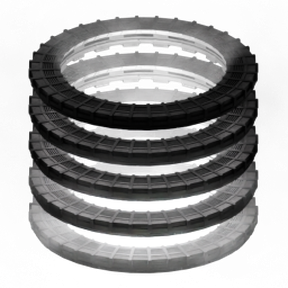
Adds animated transport rings, that teleport everything inside (players, chests, trains, buildings, biters). Endgame tech unlocks rings deployable from space platforms. Stargate design, SG.
Mods introducing new content into the game.
Transportation of the player, be it vehicles or teleporters.
Augmented or new ways of transporting materials - belts, inserters, pipes!
Trains are great, but what if they could do even more?
Entities which interact with the circuit network.
Play it your way.

Hi, love the mod so much that I've built over 600 in my current megabase spanning all the vanilla worlds.
The problem is - the management of them in the Manual Dialing UI and how they can cause "30-tick jitters" doing mass batch processing.
I offer the following changelog as what changes I've made and would do as a github pull request. If interested, we can work out how I can get the update to you or with permission I will release it as a separate mod.
Version: 0.4.0 WIP
Date: 06.12.2025 WIP (TBD on release)
Features:
- Overhauled Manual Dialing UI for advanced users managing large teleporter networks:
- Separates ring-id from location;
- New columns to show teleporter signals: ring-id, goto-id, timer and, protection status (shield);
- Added filtering options for location (surface), ring-id, goto-id, protected status, nicknames (including supporting icons) and, force;
- Header, filter and, viewing teleporter always stay at the top of the UI window when scrolling;
- Selected teleporter is in the header and never filtered out;
- Sending/Receiving/Low power/Waiting status shown in teleport button.
- Custom status area of the teleporter (the mouse-over sidebar) will now show:
- LED status (see changes below);
- Protection status: circle = open, shield = protected;
- Teleporter nickname;
- Teleporter signals: ring-id, goto-id and, wait timer (and remaining timeout).
- Added "teleporter ring output" to get feedback from the teleporter, jam wires into the front grill of the display and read:
- LED status (1=green, 2=yellow, 3=red);
- Low power (1 = low power);
- Occupied status (0 = unoccupied, 1 = sending, -1 = recieving);
- Waiting (timeout remaining in seconds);
- Custom status shows same LED status, protection and, name as the display;
- Recorded in blueprints so wiring is maintained;
- Will open the manual dialing for the teleporter when clicked on.
- Placement item now has graphics and collision.
- A fake train stop is created for the teleporter:
- Shows the teleporter name on the map with the teleporter icon prefixed to it's nickname;
- This is also the base graphic entity of the teleporter (effects blueprinting, see Known "Features" below);
- Clicking on the stop on the map will open the Manual Dialing UI for the teleporter;
- Gives the teleporter parameterized blueprint support for it's nickname (see below).
- Full blueprint support:
- Through the fake train stop, the teleporter nickname is saved in the blueprint and applied on placement and is fully parameterized;
- Teleporter output port is properly blueprinted so complete wiring of your design isn't an issue.
Changes:
- Status LED (both in custom status and manual dialing UI) - green = ready, yellow = not ready (sending/receiving/waiting), red = low charge.
- "Charge Level" in manual dialing UI now shows the actual accumulator charge level - exactly the same as you see in the mouse-over sidebar information.
- Teleportation animations from "simple-entity-with-force" to "animation" using frame offsets, meaning, teleportations can happen as soon decided instead of waiting for key framing every 5th second (multiples of 300 game ticks) - This means instantly for manual dialing and no more than 30 ticks for circuit control.
- Teleporters will no longer "remember" signals and try to teleport when power is charged enough. Now, if there isn't enough power and a teleport is signaled, it will just be ignored. This is to make the teleporters behave in a manner consistent with vanilla entities as well as allow for circuit logic to cancel the request (by setting the value to 0).
- Input circuit signals are combined between red and green wires instead of returning the red or green value (in that order), to behave consistently with vanilla end-point entities that use the combined values (assemblers, train stops, etc).
- Major code overhaul to optimize and smooth out gameplay to prevent jitters caused by bulk batch processing.
Bugfixes:
- There is now proper visual representation of the teleporter when placing and in blueprints, you will need to place your old blueprints and remake them for this change to take effect.
Known "Features":
- Blueprinted teleporters with the "name parameter" (fake train stop) have a couple caveats:
- First, the blueprint will be restricted to placement on the 2x2 rail grid;
- Second, removing it from the blueprint means there will be no teleporter sprite in the blueprint and the teleporter will be given a random backer name on placement, and the teleporters blueprinted [parameterized] nickname will be lost;
- Note: Neither of these "features" will effect the function of the teleporter or circuit wiring of the blueprint;
- Bear these details in mind when designing blueprints.
Known Bugs:
- Placement item does not show power connection.

I don't have much time for modding right now myself, but you can implement the most important changes and do a pull request. I'll make it public on github soon.
I think I had some problems using animations instead of simple entity due to render layer issues, same with placement of the preview sprite.
If you can help fix such issues, then I'll of course merge it.
I've already made the changes in my local copy. That was a list of what I actually did. : )
But yeah, when you make the git accessible, I'll do a PR.
Well, good job. Can you link your current copy of the mod?
Do you already have a migration system, that makes sure existing saves won't break in any way? Since you have probably changed a lot of entities, UI and queued functions.
I don't want to release something to 4k+ players, that is incompatible with their saves or worst case ruins them.
Yeah, migration is king.
I used my megabase with 600+ circuit driven teleporters across all the vanilla planets built using 0.3.2 of the mod to do "full scale testing" once it worked in small scale tests - I played for several hours in my megabase save and encountered no issues.
For now I stuck a copy on my dropbox for you to review and anybody who wants to try it out:
https://www.dropbox.com/scl/fi/qecw6iiz3s0610sx74arm/transport-ring-teleporter_0.4.0.zip?rlkey=jxwjtehvez5fiyjseizp4dj2p&st=m2wo3svs&dl=0
Shield filter button should probably be wider or the icon somehow scaled? Seems to be cut off for me.
https://ibb.co/C5TjLZ6V
Is there a way to hide the virtual train station names from menus to reduce clutter? Perhaps at least somehow disabling them / marking full or whatever on the train schedule UI.
Other than that, seems to work :)
Check if you can fix these, I'll do some testing on the weekend, then merge and release.
Shield filter button should probably be wider or the icon somehow scaled? Seems to be cut off for me.
https://ibb.co/C5TjLZ6V
Ah yeah, that is a little cut off, isn't it?
It's not actually supposed to show it in the drop-down itself without clicking the down arrow and then, only wide enough for the icon (the mouse-over will show the text).
What language and UI scale are you using? For English at 75% and 100% it shows correctly for me.
https://ibb.co/kg951yc6
https://ibb.co/Ld8znRRt
Is there a way to hide the virtual train station names from menus to reduce clutter? Perhaps at least somehow disabling them / marking full or whatever on the train schedule UI.
Unfortunately, I could not find a way around that - but, that is why I prefix the fake train stop name with the teleporter icon.
I use the LTN mod to manage my trains so I never actually open the train stop UI. But, I understand that not everyone is using that mod and station clutter in the list could get annoying.
I'm not sure what can be done about that, honestly, and I personally think the benefits far outweigh this particular issue.
At 100% it indeed works like that. I am using 4k, so UI scale is 200%.
Fair - my monitors are 1080p so I can't test at that high a scale.
I'll check if there is a way to get the UI scale to adjust the width for it.
I released it as 0.4.0 on my mod page. If something can be improved or fixed, it can just go to a 0.4.1 patch in the future.

Wow, what a big update!
Wow, my respects for the work done!
Would you by any chance like to make graphics for the second level of the teleporter, the white one? :)))) It looks absolutely stunning!

cool update, though id like a player option to revert to the old UI, since i don't use lots of them (usualy just one per planet) most of the filtering just adds clutter
cool update, though id like a player option to revert to the old UI, since i don't use lots of them (usualy just one per planet) most of the filtering isn't needed for me
I did consider putting in an "advanced mode" toggle into the title bar, but then I forgot with trying to get everything working as intended.
I'll try to remember to do so once the edge case bugs I introduced and didn't discover start getting reported and fixed.
Edit: Window mode toggle implemented, I will submit it to estgamer in a day or two, pending any bugs reported that need fixing.
Shield filter button should probably be wider or the icon somehow scaled? Seems to be cut off for me.
https://ibb.co/C5TjLZ6V

I was able to significantly compress texture sizes using pngquant --strip --force --quality 85-95 --ext .png /**/**.png, and the loss of quality is barely noticeable to the naked eye. I compressed a module from 50MB to 20MB. I think compressing the size is necessary, right? Would you consider it?
The sprites are quite large on screen, but if the difference is not noticeable, then I guess it is a reasonable change.
The mod Transport rings (0.4.0) caused a non-recoverable error.
Please report this error to the mod author.
Error while running event transport-ring-teleporter::on_player_setup_blueprint (ID 83)
transport-ring-teleporter/scripts/Teleporter.lua:1493: bad argument #1 of 2 to 'ipairs' (table expected, got nil)
stack traceback:
[C]: in function 'ipairs'
transport-ring-teleporter/scripts/Teleporter.lua:1493: in function <transport-ring-teleporter/scripts/Teleporter.lua:1481>
got this crash on 4.0 after cutting a peice of space platform
its cause tiles aren't entities and theres no guarding for if a blueprint is just tiles
Patched in a 0.4.1 hotfix
The sprites are quite large on screen, but if the difference is not noticeable, then I guess it is a reasonable change.
https://drive.google.com/file/d/1HLg3bbfPQ45tSrb7NgXNczD6srOVmb_d/view?usp=drive_link
This is the compressed image file. I can't see any difference in the game. If you can see the difference on your high-resolution monitor, then I think you don't need to replace it. I have a 2K monitor.
Patched in a 0.4.1 hotfix
You kinda jumped the gun there. I already fixed it, another issue and, implemented the more basic ui feature requested.
But I'll do a PR with these bumped to 0.4.2.
I was specifically holding off on sending these changes to you until you got the git updated and more bug reports could be gathered and squashed.
github is giving me issues with my login and it may take a couple days for me to be able to recover access to my account.
Found my recovery codes - Did a proper Pull Request on github
You kinda jumped the gun there. I already fixed it, another issue and, implemented the more basic ui feature requested.
I just try to patch crashes as soon as possible.
0.4.2 merged, looks good, thanks.
I just try to patch crashes as soon as possible.
I get the urge to do that too - but I learned that sometimes it's a good idea to let them sit for a day or two to catch at many bugs in a single fix as possible. : )
Anyway, all good, I think.
After your rewrite there is another partial issue though, the cursor placement of platforms has no collisions and allows to even place overlapping teleporters. While this is not critical, it may cause problems in-game.
I was experimenting with the prototypes in data.lua and found two small quality-of-life improvements that I think would make the mod even more intuitive to use
1. Enable Pipette Tool (Q key) Support:
Currently, you can't use the pipette tool (Q key) on a placed teleporter to get the item back on your cursor. This can be easily enabled by adding the placeable_by property to the main "ring-teleporter" entity.
data.lua, for the "ring-teleporter" (the accumulator type), adding this line makes it work perfectly:placeable_by = { { item = "ring-teleporter", count = 1 } },2. Enforce 2x2 Grid Alignment for Perfect Rail Integration:
I noticed that when placing the teleporter near existing rails, it can sometimes be difficult to align it perfectly with the 2x2 rail grid. This can cause the internal rails to not line up with the player's external rails.
A very simple fix for this is to enforce grid alignment on the placer entity.
data.lua, for the "ring-teleporter-placer" entity, I only added this single line:build_grid_size = 2,With just this change, the teleporter now snaps perfectly to the rail grid every time, just like train stops or roboports do. It feels much more natural to place.
I've recorded a short video to demonstrate how these two small changes work in-game. I hope you find these suggestions helpful!
After your rewrite there is another partial issue though, the cursor placement of platforms has no collisions and allows to even place overlapping teleporters. While this is not critical, it may cause problems in-game.
Have a solution worked out - now when the teleporter is placed such that it would be overlap another one, the placement is cancelled the the player is given the teleporter item back, or it is spilled on the floor is a robot placed it or the players inventory is full.
1. Enable Pipette Tool (Q key) Support:
Currently, you can't use the pipette tool (Q key) on a placed teleporter to get the item back on your cursor. This can be easily enabled by adding theplaceable_byproperty to the main "ring-teleporter" entity.
- In
data.lua, for the"ring-teleporter"(theaccumulatortype), adding this line makes it work perfectly:
placeable_by = { { item = "ring-teleporter", count = 1 } },
Implemented in my copy.
2. Enforce 2x2 Grid Alignment for Perfect Rail Integration:
I noticed that when placing the teleporter near existing rails, it can sometimes be difficult to align it perfectly with the 2x2 rail grid. This can cause the internal rails to not line up with the player's external rails.A very simple fix for this is to enforce grid alignment on the placer entity.
- In
data.lua, for the"ring-teleporter-placer"entity, I only added this single line:
build_grid_size = 2,With just this change, the teleporter now snaps perfectly to the rail grid every time, just like train stops or roboports do. It feels much more natural to place.
This is actually an unintended side effect, not intentional that blueprinted teleporters are on the 2x2 grid. You may not have noticed the train-stop sets that value except it's ignored because of the hard-coded override.
That being said, I implemented it as a startup option and those who don't want it can turn it off (default: true).
Will do a PR likely tomorrow, then it will be a few more hours before estgamer does a release.
After your rewrite there is another partial issue though, the cursor placement of platforms has no collisions and allows to even place overlapping teleporters. While this is not critical, it may cause problems in-game.
Have a solution worked out - now when the teleporter is placed such that it would be overlap another one, the placement is cancelled the the player is given the teleporter item back, or it is spilled on the floor is a robot placed it or the players inventory is full.
1. Enable Pipette Tool (Q key) Support:
Currently, you can't use the pipette tool (Q key) on a placed teleporter to get the item back on your cursor. This can be easily enabled by adding theplaceable_byproperty to the main "ring-teleporter" entity.
- In
data.lua, for the"ring-teleporter"(theaccumulatortype), adding this line makes it work perfectly:
placeable_by = { { item = "ring-teleporter", count = 1 } },Implemented in my copy.
2. Enforce 2x2 Grid Alignment for Perfect Rail Integration:
I noticed that when placing the teleporter near existing rails, it can sometimes be difficult to align it perfectly with the 2x2 rail grid. This can cause the internal rails to not line up with the player's external rails.A very simple fix for this is to enforce grid alignment on the placer entity.
- In
data.lua, for the"ring-teleporter-placer"entity, I only added this single line:
build_grid_size = 2,With just this change, the teleporter now snaps perfectly to the rail grid every time, just like train stops or roboports do. It feels much more natural to place.
This is actually an unintended side effect, not intentional that blueprinted teleporters are on the 2x2 grid. You may not have noticed the train-stop sets that value except it's ignored because of the hard-coded override.
That being said, I implemented it as a startup option and those who don't want it can turn it off (default: true).Will do a PR likely tomorrow, then it will be a few more hours before estgamer does a release.
I assume you already know this method, but are there any other limitations to your application?
The most efficient way to create map labels is by using the LuaSurface.create_chart_tag() function. This creates a lightweight, script-driven map marker that is not a full entity.
This method provides a clean, performant, and flexible way to manage map labels without needing any extra entities defined in data.lua.
tbh, I didn't know that - I am by no means a factorio modding expert, just a dedicated fan with some talent at coding. : )
The only way I could figure out to get blueprintable and parameterizable nicknames given the lack of access to the parameterization table and placement mappings, was a train-stop.
The train-stop also gives the benefit of being able to open the Manual Dialing UI while zoomed out on the map. Not that this was a particular goal of mine, just a nice side-benefit to the use of the train-stop to blueprint the nickname and be the base graphics entity. Though, that may be possible with the tag too, I don't know.
Though, I don't think the mod is that heavy as a result of these extra entities compared to just the nature of what it has to do regardless of the number of entities there are.
I also think the train station clutter in the list isn't a huge issue, first off because it's rare to have that drop-down open, two the station names are all prefixed with the teleporter icon so it's fairly easy to skip them at a glance and third, I am biased in not being effected by it as I use LTN to manage trains - so take that last one with a grain of salt. : )
tbh, I didn't know that - I am by no means a factorio modding expert, just a dedicated fan with some talent at coding. : )
The only way I could figure out to get blueprintable and parameterizable nicknames given the lack of access to the parameterization table and placement mappings, was a train-stop.
The train-stop also gives the benefit of being able to open the Manual Dialing UI while zoomed out on the map. Not that this was a particular goal of mine, just a nice side-benefit to the use of the train-stop to blueprint the nickname and be the base graphics entity. Though, that may be possible with the tag too, I don't know.
Though, I don't think the mod is that heavy as a result of these extra entities compared to just the nature of what it has to do regardless of the number of entities there are.
I also think the train station clutter in the list isn't a huge issue, first off because it's rare to have that drop-down open, two the station names are all prefixed with the teleporter icon so it's fairly easy to skip them at a glance and third, I am biased in not being effected by it as I use LTN to manage trains - so take that last one with a grain of salt. : )
You're far superior to me. I'm completely clueless about programming; even I can't understand the mods I create. Every time an error occurs or a new requirement arises, I have to debug countless times using AI.
I use Cybersyn, so I don't care about the stations. I don't think your approach is bad; in fact, it's more intuitive. I don't think the mod is huge; complex logic deserves complex documentation, doesn't it?
Besides, both the mods created by estgamer and your improved new version are fantastic. By the way, when I said huge, I was referring to the images. Images can be compressed a bit, and besides, players won't notice, will they?
I don't think 50mb is too much overall, but it may affect VRAM on low end systems if they use a lot of mods.
Maybe the best option is to introduce compression and then provide optional graphics override mod with high quality sprites for users who want it.
Here are two processed sprites, using the same method used to create sprites from HD mods.
You can test them and make changes.
https://drive.google.com/file/d/1IN4mTS1bNm1BbattQ0zj_3VHY7UgYzJv/view?usp=sharing
Here are two processed sprites, using the same method used to create sprites from HD mods.
You can test them and make changes.
https://drive.google.com/file/d/1IN4mTS1bNm1BbattQ0zj_3VHY7UgYzJv/view?usp=sharing
Nice bro
I don't think 50mb is too much overall, but it may affect VRAM on low end systems if they use a lot of mods.
It won't save VRAM either - the game repacks all the graphics it loads into device optimized textures and pixel formats, moving actual pixel data around and converting it - that is that whole "building texture atlases" phase when the game loads is doing. How it's stored on disk only effects how it's stored on disk.
Are people these days really starved for 30MB?
Hmm... I wonder, if this doesn't affect video memory, then why does loading HD graphics require about 12 gigs of video memory?
So, 30 MB here, 30 MB there, another 30 MB there, and that adds up to several gigs of space. And yes, there are situations where space may actually be limited.
Moreover, if there's an option to reduce the memory without any consequences, wouldn't it be logical to take advantage of it?
I think you misunderstand the difference between disk storage, main system RAM and, video memory (VRAM) or how textures are loaded from disk, converted in memory and then compressed in VRAM, or the difference between an "SD" texture and an "HD" texture.
HD textures are increasing the number of physical pixels. Doubling the height and width means 2x width, 2x height = 4x pixel data. That means a 16KB "SD" texture will become a 64KB "HD" texture.
Converting a 32-bit image to 8-bit only effects the storage on disk, the game loads it into memory as a full 32-bit image regardless of the pixel depth the file on disk is saved at.
So shaving off 30MB of disk space only saves disk space, NOT RAM, NOT VRAM. In the case of the teleporter animations, the images are decompressed into full 32-bit 8192x6656 images and take up 208MB of RAM each until it is packed into an optimized texture atlas and then uses the GPU to compress the texture in VRAM - but this texture compression is NOT the same compression as the png uses in any way, shape or, form and the png itself does not matter.
The ONLY way to reduce the VRAM used by the textures is to reduce the number of pixels in them and lower the color depth the game renders at (and loads the textures as) - THAT'S IT. If you could lower the game from 32-bpp to 16-bpp you could save HALF the memory, but otherwise; NOTHING else you do matters because DirectX (and other APIs) use the GPU to compress the texture explicitly for that GPU in VRAM. Doesn't matter the game, doesn't matter the platform, this is true because that is how the HARDWARE works.
So the textures can't be pre-optimized like you are trying to do. You can save disk space if you want, but you aren't saving any VRAM.
Also, don't just take my word for it - I'm just some internet rando.
Here's Tim Cain explaining it:
https://www.youtube.com/watch?v=dPVAix4Tusw
that's new ,idk it before
Also, don't just take my word for it - I'm just some internet rando.
On the contrary, I will appreciate your words, considering this to mean that you have sorted out this issue, found explanations, and know what you are writing about :)))
One of the operations performed to prepare a sprite for its HD version is reducing the color depth, known as quantization, then working with the alpha channel, and finally, optimizing the image.
And since you confirmed that reducing the color depth also helps reduce the amount of video memory used, the overall result is what we need:
1. Reduced size
2. Faster sprite loading
3. Reduced RAM and video memory consumption
4. Removing unnecessary "garbage and chaos" from the sprite itself
5. Faster loading from the portal
All the benefits :))))
And since you confirmed that reducing the color depth also helps reduce the amount of video memory used
You may have misread my post, I said precisely the opposite of that. You would have to reduce the color depth the GAME renders at and the texture formats it uses.
So, after some more digging, these are the texture formats used by the game:
Sprites and textures that are NOT flagged as shadow maps:
High quality (default): YCoCg-DXT pairs BC3 (8-bpp chrominance/luma) + BC4 (4-bpp alpha) for 12-bpp total, with pixel shaders converting YCoCg to RGB
Low quality: BC3/DXT5 (8 bpp RGBA)
Shadows: BC4 (4 bpp single-channel)
Both BC3 and BC4 are compressed textures in VRAM.
UI elements: Uncompressed RGBA8 (32-bpp) to prevent texture smearing from compression
The only way to change the VRAM usage is pixel count of the sprites and/or the games graphics settings. See here:
https://ibb.co/spNPLM82
The bpp (8/32) and file size of the sprite on disk does not matter to it's VRAM usage.
Don't get me wrong, saving 30MB on the PNG file size is a good thing, but it does not and will not effect the VRAM usage.
Hmm... yeah, thanks to your advice, I had to dig deeper and realized I'd been wrong all along, since the only way to reduce VRAM is to reduce the number of pixels, which actually means reducing the size of the sprite itself (besides the settings mentioned, of course). :(((
It also follows that if a sprite is used with a scaling less than 1 (scale < 1), for example, a 1024x1024 sprite with a scale of 0.5, then it's physically better to make that sprite 512x512 with a scale of 1.
Thanks for the advice and detailed analysis of this problem, it's definitely useful information!
Yes, a 512x512 at a scale of 1.0 is "the same as" a 1024x1024 at a scale of 0.5, except...
Sub-pixel accuracy.
When the 512x512 is zoomed into a game scale of 2.0, you get pixel doubling or color interpolation. With the 1024 texture, you will see the "missing" pixels rendered because they actually do exist.
Most of the time you aren't playing zoomed in beyond 1.0 in a tile/sprite based game so sub-pixel accuracy isn't as big a deal as a result. But for 3D games, higher resolution textures mapped onto a 3D triangle DO matter when you press your nose right up to the object you are looking at, especially on higher resolution displays, as Tim Cain explains in the video.