
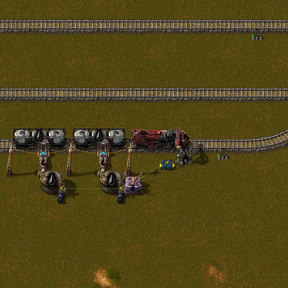
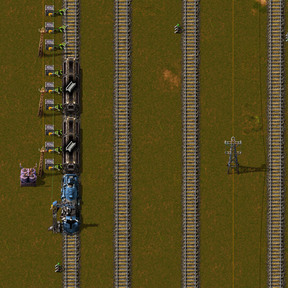
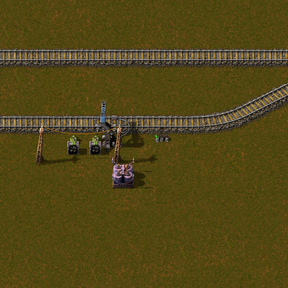
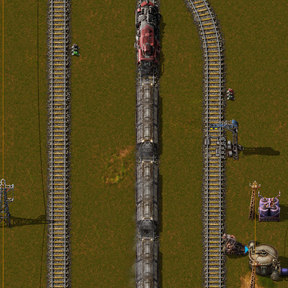
Unified Train Logistics (UTL)



🧪 Beta for mod authors: add-on API. There is a test build with a new interface for other
mods – own station roles, own trips, rebuilding trains (coupling/uncoupling) without losing the
delivery, own parts in the station window and the manager, extra signals for network combinators and
many events. It is not on the mod portal; it is a pre-release on GitHub:
API beta (latest) ·
documentation. Please report bugs and
wishes for the beta as an issue on GitHub, not in
the discussion here. The normal version on this page is not affected.
Automatic train logistics for Factorio 2.1: providers, requesters, depots, fuel stations,
cleanup and an overview window in one mod, built for high UPS.
Auf Deutsch lesen: README-de.md im GitHub-Repository.
📖 Wiki with pictures: github.com/Marcel1853/UTLogistics/wiki – every feature explained step by step, in
English and German, with screenshots. This page is the short version.
- Requires: Factorio 2.1, flib. Space Age is optional.
- Unlock: technology “Unified Train Logistics” (after automated rail transportation and
circuit network). Upgrades: “UTL: Loading control” (wagon filters and job output) and
“UTL: Network links I–III” (link a network with 1, 2 or 3 partner networks) and “UTL: Storage”
(storage stations). The map
setting “UTL features need research” turns this off – then everything is available right away.
How UTL is made
I had tried to build my own train dispatcher several times before – it never quite worked out.
Then YouTuber fiftyshadesofgames was a bit frustrated with the other train dispatchers, and I
thought: come on, let's give it one more try 😄. So I started over from scratch, this time with
Claude Code – and with a lot of tests it finally came together.
UTL is written with the help of AI (Claude by Anthropic): the code and most texts – this README,
the wiki and the in-game help. I (Marcel) decide what UTL should do, open every scenario and my own
saves and test by hand before anything is released, so that as little as possible can break.
- Automated tests (run headless by the AI): self test with 161 checks, every tips & tricks
scene, the load test with 384 trains and an update test with a save from the previous version. - How often so far (counted from the development logs, 18 to 27 September 2026): the self test
ran about 270 times, the tips & tricks test about 85 times, the load test about 90 times, plus
more than 300 other headless Factorio runs (scenarios, update tests, checks). - My own tests in the game: I start the scenarios and my saves again and again, check the
windows and what the AI's tests say – so far I reported more than 60 bugs and findings back,
with about 35 screenshots. How often I started the game myself I cannot say – I did not keep count.
Some features are tested less than others – the testing status above
says which. - The test tools are part of the source:
tools/
on GitHub (self test, load test, tips & tricks test, screenshots). - My PC is anything but a gaming rig: AMD Ryzen 3 2200G (4 cores), 14 GB usable RAM, no graphics
card (only the graphics built into the CPU), Linux Mint. What runs smoothly here should run on
most machines.
UTL lives from the ideas and bug reports of other players – the more come in, the better it gets.
Post them in the discussion.
Along the way, a Factorio modding skill for Claude came out of UTL: checked knowledge and test
tools that help the AI write Factorio mods – not only train mods. It is public now:
factorio-modding-skill.
Quick start
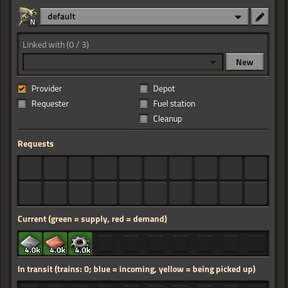
- Depot: place a UTL train stop, open it, tick Depot.
- Train: schedule with only the depot stop (any wait condition, e.g. inactivity 5 s),
automatic mode. The train must be empty. - Provider: UTL train stop, tick Provider, wire a chest (red or green) to the stop.
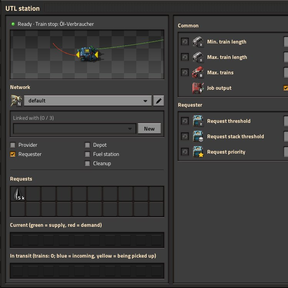
Inserters load the train. - Requester: UTL train stop, tick Requester. Click a request slot, pick an item,
enter an amount (e.g. 8000 iron plates). Inserters unload the train. - Done: as soon as the requester is short enough, a free train goes depot → provider →
requester → depot.
Tip: Shift + right-click a configured station and Shift + left-click another one to
copy all UTL settings (stop ↔ stop, combinator ↔ combinator). Blueprints and
Ctrl + C / Ctrl + V keep the settings as well.
Two station types, same logic
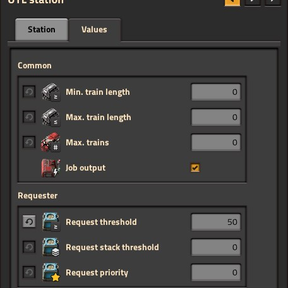
- UTL train stop: replaces the normal stop (can be built over it). Wires go to the stop.
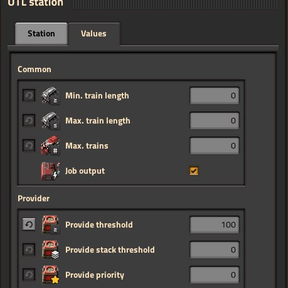
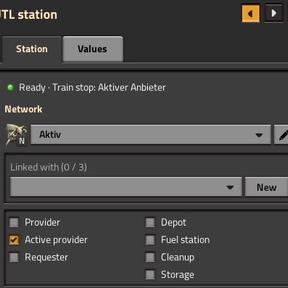
The UTL panel opens to the left of the train stop window (tabs “Station” and “Values”). - UTL station combinator: belongs to a normal train stop – wire its output (red or green) to the stop. Chest wires go to the
combinator input. Own window. Neither needs power.
Roles
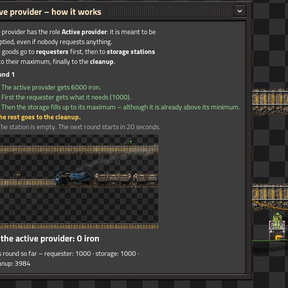
Provider (positive signals are picked up), Active provider (like the active provider chest:
the station is emptied even without a request – first to requesters, then to storages up to their
maximum, the rest to the cleanup), Requester (negative signals or request slots
are delivered), both = buffer, Depot (free trains wait here), Fuel station,
Cleanup (trains with leftover cargo are emptied here), Storage (takes in and gives out
between a minimum and a maximum stock, see below). Depot, fuel station and cleanup exclude each
other and provider/requester; so do provider and active provider.
Requests are a target stock
The amount in a request slot is the stock you want to have. Only the difference
is delivered: demand = target − in stock − already in transit. A train is sent once the
demand reaches the requester threshold. Want several trains at once? Set a higher target.
Values
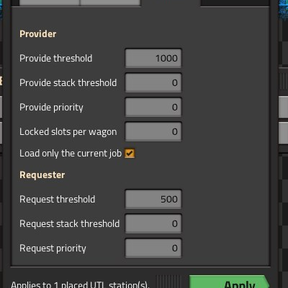
Min./max. train length (0 = any; also for depots, see below), max. trains, supply threshold /
stack threshold, provider priority, locked slots per wagon, demand threshold / stack threshold,
requester priority. The grey ⟲ button resets a value. Math works in every number field:
4000*2, 8000/4, (1+2)*3, 2^3, 1e3. The network name is explained in the next
section.
Networks
Every station has one network name (field “Network” in its window, empty = default). Stations,
depots, fuel stations and cleanups only work with the exact same name – so one map can carry
several separate systems, each with its own depot, fuel station and cleanup. Leave the field empty
everywhere for one big network. A typo or a capital letter is a different network.
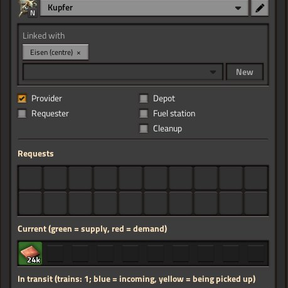
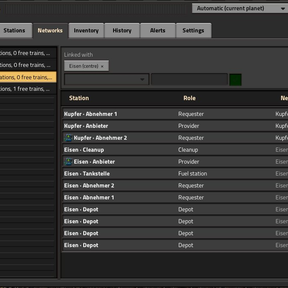
Linking networks (research “UTL: Network links I–III”, 1–3 partners): linked networks help
each other with trains, depots, fuel stations and cleanups. A link is a star – one center,
partners that help the center and are helped by it, but not each other; a network belongs to at
most one star, links count per surface. Set it up in the station window (“Linked with”) or in the
UTL Manager, tab “Networks”. Example: a depot in its own network Reserve linked to Ore and
Plates serves both, while ore and plate stations still ignore each other.
More, with examples and all messages: wiki – Networks.
Mixed providers
Needs research: “UTL: Loading control”.
A provider may keep several goods in one chest:
- Wagon filters (no wiring): while a delivery runs, UTL sets the wagon slots to the goods of that
job, so a plain inserter from a mixed chest loads only what was ordered. Off per station or map-wide;
wagons you filtered yourself are never touched. - Job output: a small output next to every stop carries the running jobs as signals – goods to
load here positive, goods arriving negative; while a delivery train stands there also train number,
length, locomotives, wagons, “train loads here” and “train unloads here”. Use it for filter
inserters, displays and pumps (fluids have no slot filters). Do not wire it to the station's input.
More, with examples: wiki – Mixed providers and job output.
How trains run
- UTL does not overwrite your schedule: provider and requester are inserted as
temporary stops that vanish after departure. Train groups and interrupts are kept. - A rail waypoint in front of each stop makes the train use exactly that stop, even if several
stops share the name. - The train waits at the provider until the ordered amount is loaded, at the requester until
it is empty. - Requests of the same priority are served oldest first, so no requester is left waiting forever.
- Selection: highest provider priority and amount, then a free train that carries as much as
possible in one trip and is close; reachability is checked with the pathfinder. - Reservations prevent several trains from being sent for the same demand.
- Several items per train, fluids (fluid wagons, one fluid per delivery) and next job
right away after unloading or cleanup/fuel stations (map setting). - The stop's train limit (vanilla) applies on top of “max. trains”.
Refueling
If any locomotive is below 40 % (map setting “Refuel below (%)”), the train visits the nearest
fitting fuel station – before its next job, after unloading or from the depot – and waits until
all locomotives are full or nothing changed for 30 s. If none is free or reachable, a low train runs
anyway – only below the minimum fuel (map setting, 10 %) it stays in the depot, with the alert
“fuel missing” and the signal “trains out of fuel” at the depot output. A network with no UTL
fuel station at all refuels your way (interrupts, by hand).
Min./max. train length on fuel stations separates small and large trains.
Fuel station requests fuel (switch per fuel station, off by default): its request slots then work
like a requester's – only what locomotives can burn can be chosen. Unloading inserters into a chest
the refuel inserters take from.
Cleanup
Trains with leftover cargo (back in the depot with cargo, canceled delivery, not fully unloaded) go
to the nearest fitting cleanup station. Its window sets what it accepts: All items / All
fluids (default) or single goods; if one station is not enough, the train visits several. Fluids:
pumps into a storage tank, one cleanup per fluid.
Cleanup gives back. With “Offer contents again” a cleanup offers its chest contents like a
provider – only as a fallback, like any provider or empty first. Leftovers are not
brought back to the same requester for 5 minutes. Map setting: “Cleanup may offer its contents again”.
More: wiki – Fuel, cleanup and depots.
Storage (for advanced players)
Needs research: “UTL: Storage”.
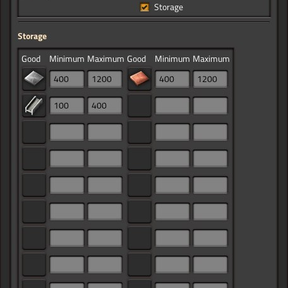
A storage takes in and gives out – a buffer close to the consumers. Per good (8, with the
research “UTL: Storage II–IV” 12, 16 or 20) a
minimum and a maximum: below the minimum it requests up to the maximum, above the minimum it
offers the rest like a normal provider. Two storages never shove goods back and forth. With
“Accept leftover cargo” (on) trains may drop leftovers there, too. Map setting: “Allow storage
stations”.
Inserters in both directions (vanilla, one side of the track): unloading inserter → chest →
transfer inserter → chest → loading inserter. Wire the job output to the unloading and loading
inserters: loading [utl-loading] > 0, unloading [utl-loading] = 0. Scenario “UTL storage”
shows it.
Blueprints with parameters
Like in the base game: make goods, amounts or the role a parameter in the blueprint – Factorio asks
for the values when placing. For this UTL keeps requests, role (signal “UTL: Role”) and changed values
in an invisible combinator at every station that Factorio knows. Factorio matches number parameters by
value – equal numbers become one parameter.
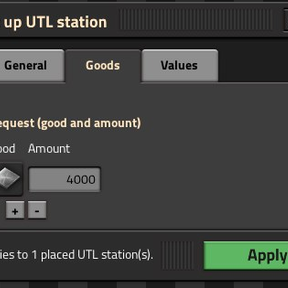
More convenient: the UTL parameter planner (button in the shortcut bar). Drag over an area, tick
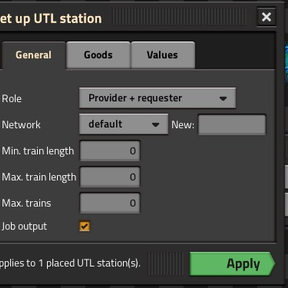
what should be asked when placing → blueprint in the cursor (also in the clipboard, Ctrl + V). When
placing, a small window with tabs (General, Goods, Values) opens and only shows what belongs to the
chosen role – role, network, requests (several goods, “+” / “−”), thresholds, priorities, storage
limits, cleanup goods. The question travels with the blueprint, also in the library.
The panel at the UTL train stop can sit on the left, on the right or free as its own window (arrows in
its title bar).
Network combinator
Needs research: “UTL: Network combinator”. New in 0.0.9.
Outputs the state of a UTL network as circuit signals. In its window pick the network (optionally
with its linked networks) and the mode: stock (what providers offer), storage stock (what is
in storage stations), demand (what requesters request), shortage (what requesters need and nobody offers) or trains (total,
free, on the way, deliveries, low on fuel, without path, trains from linked networks helping out and own trains working elsewhere). What the signals do is up to your own
wiring – a lamp, a display, or in Space Age the shortage to a cargo landing pad (“set requests”).
UTL never controls platforms or pads itself.
Status display at the station
New in 0.0.19.

Wire a normal display panel (red or green wire) directly to a UTL train stop or station combinator –
the same wire as the chests is fine, the panel only reads. UTL takes it over and shows the state: blue = a
train is on its way, green = a train is stopped, cyan = a train waits in the depot, yellow =
nothing going on, red = train stop disabled. Above the panel you see the train and its number, for UTL
deliveries also the goods (e.g. “#134 iron ore 16k”). The colors can be changed in the map settings
(“Display: …”). Panels with your own messages are left alone; remove the wire and UTL clears the panel.
Optional: the startup setting “Colored train stop lamps” (off by default) colors the two small lamps on
top of UTL train stops in the same way – best seen at night.
The station window (“In transit”) and the UTL Manager also name the trains on their way, with the amount
per train in the tooltip.
Cargo Ships
Only with the Cargo Ships mod. New in 0.0.9.
Ports become UTL stations, and ships run deliveries like trains. With Cargo Ships there is the
UTL port (research “Unified Train Logistics”) – a port with built-in UTL logic, like the UTL train
stop. A normal port works too, with a UTL station combinator next to it. Ports and train stops may
share one UTL network: UTL only sends a vehicle that can reach both provider and requester – ships
to ports, trains to train stops. Ships need their own depot (a port with the depot role).
The “Blueprint: rail ↔ waterway” button in the shortcut bar swaps, in the blueprint you hold
(library blueprints too), rails ↔ waterways, signals ↔ buoys and train stops ↔ ports – a second
click swaps back. Waterways can still only be built on water.
Space Exploration (space elevator)
Only with the Space Exploration mod (which runs
without Space Age). New in 0.0.10.
UTL delivers through a finished, powered space elevator between a planet and its orbit, in both
directions. Switch it on per network with “Deliver via space elevator” (station window, network
section, or manager tab “Networks”, off by default); it applies to the network with the same name on
both sides. The train loads at the provider, goes through the elevator to the requester and comes back
through the elevator to its depot – fuel and cleanup stops on the side where it currently is.
Details: wiki – Space elevator.
Depots and train length
Free trains wait empty at stops with the Depot role – every depot stop needs the
role, the name alone is not enough; a train that ends up at a stop with a depot's name but
without the role (also vanilla stops) moves on to a free real depot of that name. If a train
arrives at a depot whose min./max. length does
not fit, it moves to a free matching depot with the same name; if there is none, it stays
and remains available.
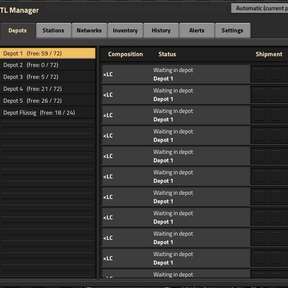
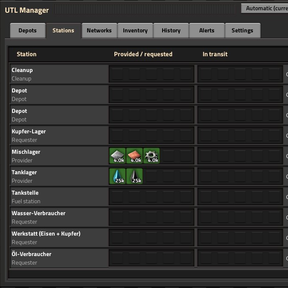
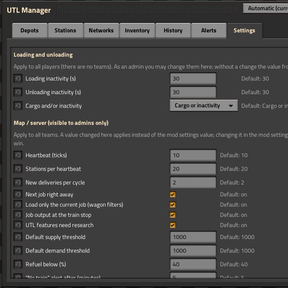
UTL Manager
Open with the locomotive button in the shortcut bar or Ctrl + Shift + U (or Ctrl + Alt + U).
Tabs: Depots, Stations, Networks, Inventory (click a good for details), History
(last 100 deliveries), Statistics (throughput per good over 10 minutes and the last hour,
utilization per train), Alerts (last 100), Settings. The pin button keeps the window open; long lists can be paged. Search by station name, click a station to
see it on the map, click a train to follow it. With Space Age a drop-down picks the planet.
Alerts come as regular Factorio alerts in three groups – no suitable train (after 5 minutes),
leftover/missing cargo, train problems – each can be turned off per player.
More: wiki – UTL Manager and alerts.
Map settings
The most important ones: next job right away (on), load only the current job (on),
job output (on), UTL features need research (on), refuel below (40 %), loading /
unloading inactivity (30 s each, combined with the cargo by or or and), top up while
loading (off), second provider (off, with a maximum detour of 50 %), minimum load per trip (0 % = off), “train stuck”
alert after (5 minutes), cleanup may offer its contents again (on), allow storage stations (on).
Startup setting “Trains” tab: automatic – UTL's own tab, unless another mod already has a train
tab; then the UTL items go there. Startup setting UTL signal style: classic (default) or flat.
The loading values can also be set in the UTL Manager, tab “Settings” – per team with teams;
admins use /utl-admin.
All settings: wiki – Settings.
Performance
Measured headless (no graphics, so no FPS) with the load test scenario:
| Network | Run | UTL per tick (avg.) | whole game per tick (avg.) | ticks below 60 UPS |
|---|---|---|---|---|
| 9 × 9, 180 trains, 340 stations | 40 min, ~1300 deliveries | 0.045 ms | – | 0 |
| 12 × 12, 384 trains (24 fluid), 496 stations incl. 8 storages, 3 linked networks, topping up | 10 min | 0.072 ms | 2.9 ms | 5 of 36,000 |
| 12 × 12, 384 trains, 880 stations, 3 linked networks (0.0.19) | 10 min | 0.24 ms | 3.2 ms | 8 of 35,400 |
| same, with a display panel at every one of the 880 stations (status display, 0.0.19) | 10 min | 0.28 ms | 3.4 ms | 41 of 35,400 |
The 0.0.19 rows include the small script of the test scenario itself; 0.0.18 measured the same 0.24 ms on
this map, so the new status display costs nothing as long as no display panel is wired to a station.
UTL itself peaks at about 13 ms when it sends trains (sending triggers the game's pathfinding).
Most of the time is spent by the game's own trains (movement and pathfinding).
Important: the map is otherwise almost empty (no factory, belts or biters) – the numbers show
what UTL and the trains need, not the UPS of a whole megabase.
Scenarios
New game → Scenarios (everything researched, cheat mode on, display panels with explanations). All of them
also run without Space Age, only the planet test needs it:
- UTL examples (mixed provider) – mixed provider with the job output, two goods in one trip,
oil and water with switched pumps. - UTL network links – four networks, a star with a partner that has no trains of its own.
- UTL teams – four teams with the same station and network names;
/utl-team rotswitches. - UTL top up (to watch) – with and without topping up, round by round, with an explanation window.
- UTL active provider (to watch) – an active provider is emptied: first the requester, then the
storage up to its maximum, the rest to the cleanup, with an explanation window. - UTL storage (to watch) – new in 0.0.8: storage, a cleanup that gives back and four small
example lines, with an explanation window. - UTL planet test (Space Age) – the same network on Nauvis, Vulcanus and Gleba.
- UTL load test (384 trains) – 12 × 12 city blocks for measuring, with storages, cleanups that
give back, linked networks, topping up and fixed train lengths; starts in a few seconds.
Details and pictures: wiki – Scenarios and tips.
Tips & tricks
The in-game Tips & tricks menu has a Unified Train Logistics category: seventeen entries,
each with a running example scene – from the first delivery to networks, cleanup giving back,
storage and the manager.
After an update, UTL writes one short line into the chat with the most important news; the link in
it opens the tips & tricks page “New in UTL”. Switch it off per player: Update notes in chat.
FAQ
Questions and troubleshooting step by step: wiki – FAQ and troubleshooting.
Teams and surfaces
Teams (forces) and surfaces are kept apart: trains, depots, fuel and cleanup stations only
work within their own team and surface, network links count per team, and the manager shows only
your team. Two teams may use the same names. Trains cannot change planet, so every surface needs its
own depots and trains (with Space Exploration, trains travel through the space elevator between a
planet and its orbit). Try it: scenario “UTL teams”.
Topping up while loading (optional, off by default)
If a requester's demand grows while its train is still heading to the provider or loading there,
the amount is added to the running load list instead of a second trip (same provider, room in
the train, fluids only of the same kind). It keeps the train longer at the provider, so it is off
by default – map setting or manager “Settings”: Top up while loading. Scenario “UTL top up”
shows it.
Second provider (optional, off by default)
New in 0.0.10. If the best provider does not have enough, the train picks up the rest at a
second provider in the same network – one trip with two loading stops instead of two trips. Only
on the same surface, only if the detour (straight line) is at most the maximum detour (default
50 % of the direct way) and the train can drive first → second → requester. Map setting or manager
“Settings”: Second provider.
Train stuck alert
New in 0.0.10. If a delivery train stands too long without progress – waiting at a signal, no path,
destination full – the alert “train stuck” appears and the manager shows it at the train. UTL does
not cancel anything. Map setting in minutes, default 5, 0 = off.
For mod authors
Remote interface utl (station data, deliveries, alerts, configuring stations and requests, network
links, team and map values, tagging script-made blueprints, trains and stations by filter, cancelling
a delivery) and events for created, changed, completed and cancelled deliveries, plus own icons for UTL signals via mod-data "utl-signal-icons":
wiki – For mod authors.
License
Apache License 2.0. You may use, change
and pass on UTL, also in your own mods – but keep the files LICENSE and NOTICE and name the
original: github.com/Marcel1853/UTLogistics.