

Stack Size Control
Early access. This is an early version: expect bugs and balance changes. Please report problems on the mod
page (Discussion tab) with the Factorio log (%APPDATA%\Factorio\factorio-current.log).
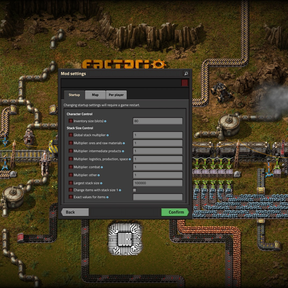
Change item stack sizes in Factorio 2.1 from the startup settings. Works with items from other mods.
Features
- Global multiplier for every item (×0.01 to ×1000).
- Multipliers per category: ores and raw materials, intermediate products, buildings (logistics, production,
space), combat, everything else. - Largest stack size cap.
- Exact values for single items, e.g.
iron-plate=1000, wood=500, transport-belt=400(they win over the
multipliers). - Items with stack size 1 (vehicles, trains, spidertron, platform starter packs) are left alone unless you turn
that on. Armor, blueprints, blueprint books and selection tools are never changed.
How to use
- Main menu → Settings → Mod settings → Startup.
- Set the multipliers. Result = original stack × global × category multiplier, rounded, at least 1, at most the cap.
- For exact values fill Exact values for items with
internal-name=countpairs separated by commas. Internal
names show in item tooltips after F4 → show-debug-info-in-tooltips. - Confirm: the game restarts and loads with the new stack sizes. The log (
factorio-current.log) lists how many
items changed and any name it could not find.
Notes
- Startup settings are the same for everyone in a multiplayer game (the server's values are used).
- Making stacks smaller in an existing save does not delete items: oversized stacks stay until you move them.
Recommended mods (same author)
- Military Support: military economy, 3x3 military drills, loaders, big storage tanks, hyper belts/beacon/modules, military crates, pipes, power grid.
- Military Trucks: trucks with stops and schedules on military roads; fuel stations, fluid stations and tankers, parking lots.
- SU-100: SU-100 self-propelled gun with its own shells.
- T-90: T-90 main battle tank, turret turns all round, 125 mm gun, BPS and OFS / OFZ shells, own sounds.
- Smerch MLRS: BM-30 Smerch multiple rocket launcher, 400-tile salvos, fire-control radar network.
- Character Control: inventory size, mining, crafting and running speed, pickup / build / reach distance from a panel next to the inventory.
- Kupidon MLRS: heavy 6x6 MLRS, 3 missiles up to 800 tiles, a huge folding long-range radar (400 tiles), one fire-control network with the Smerch.
- Military Core: the shared base of all our military mods (fuels, engines, radios, batteries, vehicle window).
- Military Crates: military crates that merge up to 10x5.
- Military Teleport: teleport pads, travel between them with a click.
- Colossal Drill: an 11x11 drill with a turning toothed ring; ore onto belts through 8 corner outlets.
- Military MLRS: BM-30 Smerch, BM-21 Grad and Kupidon MLRS, two radar trucks, one fire-control network - and the Chimera and Segun strategic ballistic missile complexes (up to 2000 tiles).
- Military MLRS: Chimera: Chimera, the heavy strategic missile complex for Military MLRS: 6x6 truck, vertical launcher, 150-2000 tiles.
- Military MLRS: Segun: Segun, the second strategic missile complex for Military MLRS: wheeled truck, raising missile pack, 100-1200 tiles.
- Military Heavy Tanks: SU-100, T-90, M1 Abrams, M2 Bradley, BTR-82A, Stryker and Stryker Dragoon.
- Military Aviation: Forward Air Base with B-2 Spirit bombers and «Udarnik» drones; right click an enemy on the map to strike it from the air or with your MLRS.
- Inserter Control: set where every inserter picks up and drops.
Requirements
Factorio 2.1. Space Age is not needed; items of Space Age and other mods are covered too.
Install / uninstall
Install from the in-game mod portal or drop the zip into %APPDATA%\Factorio\mods. Removing the mod puts the
stack sizes back to the defaults.
Languages
English, Russian, German, French, Spanish, Brazilian Portuguese, Italian, Polish, Ukrainian, Chinese (simplified),
Japanese, Korean. The non-English/Russian translations were machine-assisted; corrections are welcome.
Credits and AI disclosure
Code and art were made by the author together with an AI coding agent: Claude Code (Anthropic, Claude Opus 5.5).
License
MIT (see LICENSE).