

Military Heavy Tanks
Early access. This is an early version: expect bugs and balance changes. Please report problems on the mod
page (Discussion tab) with the Factorio log (%APPDATA%\Factorio\factorio-current.log).
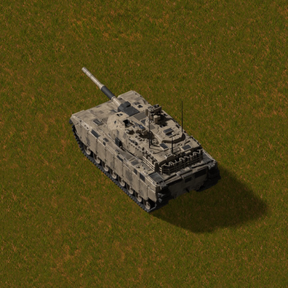
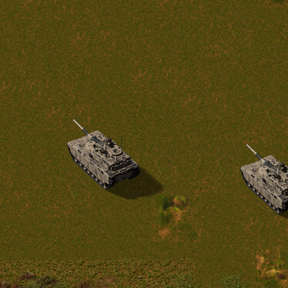
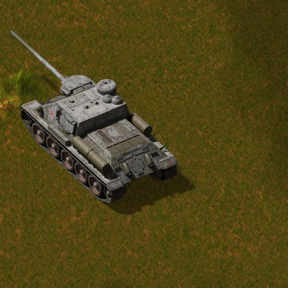
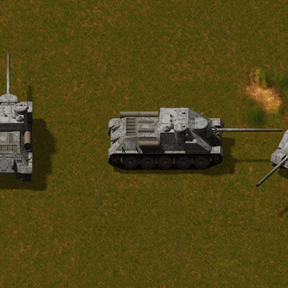
Heavy armour for Factorio 2.1: the SU-100 self-propelled gun and the T-90 main battle tank. Replaces the
separate SU-100 and T-90 mods (see "Coming from SU-100 / T-90" below).
Features
- SU-100: drives like a tank; the 100 mm gun is fixed in the hull (±8°): aim by turning the vehicle. Range 90.
Own shells: BR-412B armour-piercing (pierces several targets) and OF-412 high-explosive (6.5-tile blast). - T-90: the turret turns all round after the cursor; 125 mm gun with an autoloader, range 60, reloads
faster than the SU-100. Own shells: BPS armour-piercing dart (pierces a whole row of targets) and OFS / OFZ
high-explosive fragmentation (6-tile blast). Own sounds: V-12 diesel and tracks, engine start and stop, gun shots,
turret traverse. - Tank shells fit both guns.
- Liquid fuel only: light oil; with Military Trucks also military diesel and gasoline. Refuels next to storage
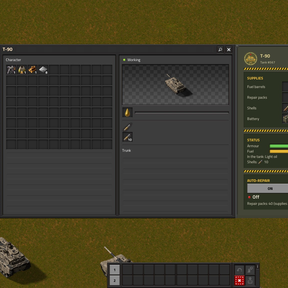
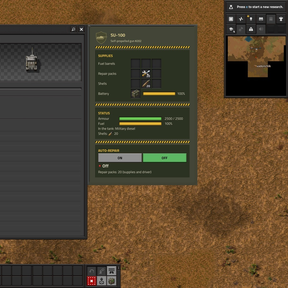
tanks and fuel stations, or from fuel barrels in its supplies. - Supplies window next to the vehicle window: labelled slots for fuel barrels, repair packs, spare shells (fed to
the gun automatically) and a 5 kW battery with an energy bar. Ctrl + click loads them like in vanilla:
Ctrl + click on the vehicle, or Ctrl + click in your inventory while its window is open. - Auto-repair from repair packs, muzzle flash, burnt-out wrecks. All items are in the shared crafting tab
Military.
How to use
- Research SU-100 and/or T-90 (after Tank) and build the vehicle. Get in like into a tank.
- Open the vehicle (E): the Supplies section has labelled slots for fuel barrels, repair packs, spare shells and
the vehicle battery. Click a slot with an item in hand, or Ctrl + click to load everything that fits. - SU-100: aim by turning the whole vehicle (the gun moves ±8°). T-90: the turret follows the cursor. Spare shells are
loaded into the gun automatically while the battery has charge. - Auto-repair (button in the window) uses repair packs from the supplies. The battery recharges while you drive.
Coming from SU-100 / T-90
Disable SU-100 (military-su100) and T-90 (military-t90) and enable Military Heavy Tanks - they cannot be on
together. Your vehicles and shells stay in the save (same item and vehicle names). Only the contents of the vehicles'
supply slots are lost - take batteries and barrels out before switching.
Recommended mods (same author)
These mods are made to work together:
- Military Support: military economy, 3x3 military drills, loaders, big storage tanks, hyper belts/beacon/modules, military crates, pipes, power grid.
- Military Trucks: trucks with stops and schedules on military roads; fuel stations, fluid stations and tankers, parking lots.
- Military MLRS: BM-30 Smerch (12-rocket salvos, 400 tiles) and Kupidon heavy MLRS (missiles up to 800 tiles), two radar trucks, one fire-control network and remote.
- Character Control: inventory size, mining, crafting and running speed, pickup / build / reach distance from a panel next to the inventory.
- Stack Size Control: change item stack sizes with multipliers per category, a cap and exact values.
Requirements
- Factorio 2.1. Space Age is optional. Optional: Military Trucks (fuels), Military Support (its market sells the
shells and batteries, military bases order the tanks and shells).
Install / uninstall
Install from the in-game mod portal or drop the zip into %APPDATA%\Factorio\mods. Removing the mod removes the
vehicles, their supplies and shells from your save.
Compatibility and known issues
- Tested in single player. Multiplayer has not been tested yet.
- The vehicles have no trunk (the supplies replace it); the game's own vehicle window still shows an empty "Trunk"
heading.
Languages
English, Russian, German, French, Spanish, Brazilian Portuguese, Italian, Polish, Ukrainian, Chinese (simplified),
Japanese, Korean. The non-English/Russian translations were machine-assisted; corrections are welcome.
Credits and AI disclosure
- 3D model of the SU-100: a free model from CGTrader; 3D model of the T-90: a free model from a public 3D model site
(both downloaded by the author). Code and the rest of the art were made by the author together with an AI coding
agent: Claude Code (Anthropic, Claude Opus 5.5). - Icons and GUI art generated with fal (fal.ai) using Google Nano Banana 2.1; T-90 sounds generated with fal
using ElevenLabs Sound Effects v3. Sprites rendered in Blender.
License
Code: MIT (see LICENSE). Generated assets follow the terms of the models that produced them.