
AI disclosure: this mod was made with the help of AI (Claude by Anthropic).
Planet Zoo
Testing tools for planets: teleport to any planet, and see everything it can generate in one place.
Planet Zoo builds a flat showroom surface for any planet. Every tile, decorative, resource, cliff and entity that the planet's map generation can place is laid out in neat, labelled rows. You can look at a whole planet's palette in a minute, without flying there or searching the map for that one rare rock.
It's useful for planet mod authors who want to check their map generation, and for anyone who wants to see what a modded planet has before going there.
Features
- Instant teleport. One click takes you to any planet, with no research or rocket needed. Its surface is generated if it doesn't exist yet. Going back lands you where you last left that planet by teleport; on the first visit, or if you are already there, you land at its spawn point. It works from remote view, a vehicle or a space platform hub.
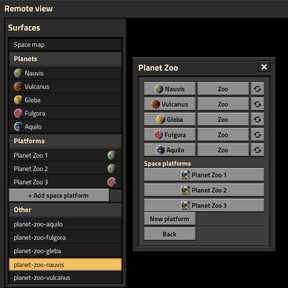
- Space platforms. The panel lists your platforms, and one click takes you into a platform's hub. New platform creates a ready one above the current planet and takes you there, with no rocket needed.
- A zoo for every planet. Vanilla and modded planets are all listed. The contents come from each planet's own map generation settings, so planet mods work without any extra support.
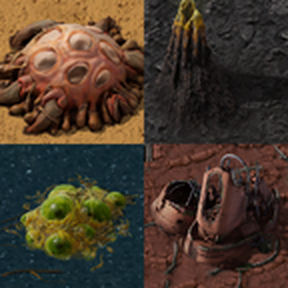
- Four labelled sections. Tiles, Decoratives, Resources and Entities (trees, plants, rocks, enemy nests, worms, fish, ruins, cliffs and so on), each with a count in its heading.
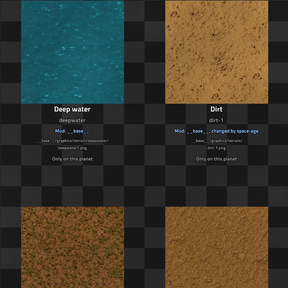
- Each thing on its own ground. Every item stands on a small patch of the tile it really grows on. Fish swim in water, and plants that only grow on certain tiles get those tiles. Below each one you see its name and its internal prototype name.
- Where it comes from. Each label also shows which mod adds the thing (and which mods change it), the path of its sprite file (for example
__base__/graphics/entity/coal/coal.png), and which other planets have it too, or Only on this planet. Handy for finding the graphics or tracking down which mod changed something. - Safe to walk around. The zoo is always daytime and peaceful, and enemy nests and worms are switched off.
- One-click panel. A shortcut-bar button opens a panel with a row for each planet: teleport, visit its zoo, or rebuild the zoo. Use Back to return from a zoo to the exact spot where you were before.
- Rebuild. The refresh button next to a planet deletes its zoo and builds it again from scratch. Anyone inside the zoo is sent back first and then brought into the new one.
- Always up to date. A zoo is built the first time you visit it. When your mod list changes, every zoo is deleted, so the next visit matches the mods you have now. Players standing in a zoo at that moment are sent back to where they came from.
- Admin-only by default. On multiplayer servers only admins can use it, unless the map setting allows everyone.
How to use
- Click the Planet Zoo button on the shortcut bar.
- Click a planet's name to teleport there, or its Zoo button to visit its zoo. The zoo is built and you are moved there.
- Walk around or zoom out to see the rows. Hop to another planet's zoo straight from the panel.
- Press Back to return to where you were before your first zoo visit.
You can also use the console, with the planet's internal name: /planet-teleport vulcanus teleports you there and /planet-zoo vulcanus visits its zoo. Without a name both open the panel.
Settings
| Setting | Type | Default | What it does |
|---|---|---|---|
| Everyone can use Planet Zoo | Map | Off | Off: only admins can open the panel, teleport, visit or rebuild zoos and use the commands. On: every player can. |
Requirements and compatibility
- Required: Space Age
- Planet mods: any planet with map generation shows up in the list automatically.
- Versions: the 2.0 and 2.1 versions are released together with the same features (1.0.2 for Factorio 2.0 and 1.0.3 for Factorio 2.1). Factorio 2.1 adds new things to some vanilla planets, and the zoo shows them automatically.
- Existing saves: can be added at any time. It doesn't change your normal surfaces, only adds its own zoo surfaces. Teleporting to a planet you haven't reached yet does generate that planet's surface.
- Removing the mod: go Back from any zoo first. The zoo surfaces stay in the save after the mod is removed.
What is not shown
- Things placed by scripts instead of map generation (for example the Nauvis crash site) are not in the zoo.
- Space platforms and asteroids have no map generation, so they have no zoo.
Languages
- English
- Magyar (Hungarian)
Feedback
Ideas, bug reports and suggestions are very welcome in the Discussion tab. If a modded planet's zoo looks wrong or is missing something, please tell me which mod it is!