

Inserter Control
Early access. This is an early version: expect bugs. Please report problems on the mod page (Discussion tab)
with the Factorio log (%APPDATA%\Factorio\factorio-current.log).
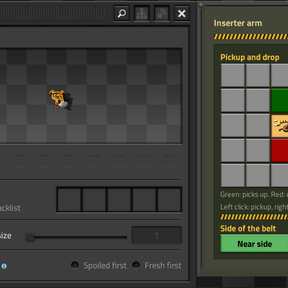
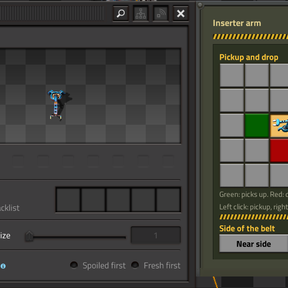
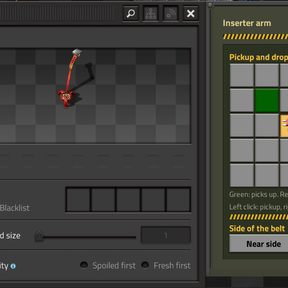
Choose where every inserter picks up and where it drops, in Factorio 2.1: from the side, one cell further, on a
diagonal, on the near or the far side of a belt. A cell grid opens right next to the inserter window; hotkeys work
on the inserter under the mouse.
Features
- Cell grid next to the vanilla inserter window: left click a cell = pick up there (green), right click = drop
there (red). Clicking the other end swaps pickup and drop. - Belt side: drop on the near or the far side of a belt (vanilla always uses the far side).
- Hotkeys on the inserter under the mouse:
- Ctrl + R turn the pickup, Ctrl + Shift + R turn the drop;
- Shift + P / Shift + O pickup / drop on the near or far cell;
- Shift + L near / far side of the belt.
- Researches: Inserter control (turning and belt side), Long inserter arm (any inserter reaches the near and
the far cell, 5x5 grid), Diagonal inserter arms. A map setting opens everything from the start. - Settings are kept when you rotate the inserter, copy-paste its settings (also onto an inserter facing
another way), use blueprints and upgrade it to a faster inserter. - Works with every vanilla and Space Age inserter and with inserters from other mods. Inserter speed is not changed.
No work every tick: the mod only runs when you click or press a key.
How to use
- Research Inserter control (red science) or switch on All inserter settings without research in
Settings → Mod settings → Map. - Open an inserter: the Inserter arm window is on the right. Left click a cell for the pickup, right click for
the drop; choose Near side or Far side of the belt. - Or point at an inserter and use the hotkeys (they can be changed in Settings → Controls).
Notes
- Not compatible with Bob's Adjustable Inserters, Inserter Configuration and Change Inserter Drop Lane (same job).
Recommended mods (same author)
- Military Support: military economy, 3x3 military drills, loaders, big storage tanks, hyper belts/beacon/modules, military crates, pipes, power grid.
- Military Trucks: trucks with stops and schedules on military roads; fuel stations, fluid stations and tankers, parking lots.
- Character Control: inventory size, mining, crafting and running speed, pickup / build / reach distance from a panel next to the inventory.
- Stack Size Control: change item stack sizes with multipliers per category, a cap and exact values.
- Military Core: the shared base of all our military mods (fuels, engines, radios, batteries, vehicle window).
- Military Crates: military crates that merge up to 10x5.
- Military Teleport: teleport pads, travel between them with a click.
- Colossal Drill: an 11x11 drill with a turning toothed ring; ore onto belts through 8 corner outlets.
- Military MLRS: BM-30 Smerch, BM-21 Grad and Kupidon MLRS, two radar trucks, one fire-control network - and the Chimera and Segun strategic ballistic missile complexes (up to 2000 tiles).
- Military MLRS: Chimera: Chimera, the heavy strategic missile complex for Military MLRS: 6x6 truck, vertical launcher, 150-2000 tiles.
- Military MLRS: Segun: Segun, the second strategic missile complex for Military MLRS: wheeled truck, raising missile pack, 100-1200 tiles.
- Military Heavy Tanks: SU-100, T-90, M1 Abrams, M2 Bradley, BTR-82A, Stryker and Stryker Dragoon.
- Military Aviation: Forward Air Base with B-2 Spirit bombers and «Udarnik» drones; right click an enemy on the map to strike it from the air or with your MLRS.
Requirements
Factorio 2.1. Space Age is not needed.
Install / uninstall
Install from the in-game mod portal or drop the zip into %APPDATA%\Factorio\mods.
Languages
English, Russian, German, French, Spanish, Brazilian Portuguese, Italian, Polish, Ukrainian, Chinese (simplified),
Japanese, Korean. The non-English/Russian translations were machine-assisted; corrections are welcome.
Credits and AI disclosure
Ideas from Bob's Adjustable Inserters (Bobingabout), Inserter Configuration (Dr_Pepper) and Change Inserter Drop Lane
(raiguard); no code or art was copied. Code and art were made by the author together with an AI coding agent:
Claude Code (Anthropic, Claude Opus 5.5).
License
MIT (see LICENSE).