
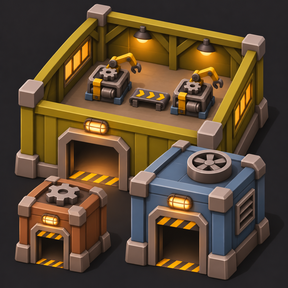
Factorissimo Space Age adds three tiers of factory buildings that you can enter and build inside. Each building provides a separate interior for production, storage and automation, while belts, pipes, chests, circuit signals and electricity connect it to the outside.
Expand your interiors through research, install modules that affect compatible machines throughout a hall, and unlock the ability to place factories inside other factories.
Works with Factorio 2.1.23 and later 2.1 releases, with or without Space Age.
Three factory tiers
Each tier has its own exterior footprint, interior size and connection ports.
| Factory | Exterior footprint | Starting interior | Maximum researched interior | Connection ports |
|---|---|---|---|---|
| MK1 | 8 × 8 tiles | 30 × 30 tiles | 90 × 90 tiles | 16 |
| MK2 | 12 × 12 tiles | 46 × 46 tiles | 110 × 110 tiles | 24 |
| MK3 | 16 × 16 tiles | 60 × 60 tiles | 120 × 120 tiles | 32 |
Interior expansion does not increase the exterior footprint or add more connection ports. You can keep the same outdoor layout while making more room inside.
Permanent expansion through research
Each factory tier has five expansion researches, giving it six interior sizes including the starting size.
| Expansion level | MK1 interior | MK2 interior | MK3 interior |
|---|---|---|---|
| Starting size | 30 × 30 | 46 × 46 | 60 × 60 |
| Expansion 1 | 42 × 42 | 58 × 58 | 72 × 72 |
| Expansion 2 | 54 × 54 | 72 × 72 | 84 × 84 |
| Expansion 3 | 66 × 66 | 84 × 84 | 96 × 96 |
| Expansion 4 | 78 × 78 | 98 × 98 | 108 × 108 |
| Expansion 5 | 90 × 90 | 110 × 110 | 120 × 120 |
Every expansion costs 200 research units for MK1, 300 for MK2 and 400 for MK3, with 30 seconds per unit.
The required science packs increase with each expansion:
| Expansion | Required science packs |
|---|---|
| 1 | Automation — red |
| 2 | Automation + Logistic — red and green |
| 3 | Automation + Logistic + Chemical — red, green and blue |
| 4 | Automation + Logistic + Chemical + Production — red, green, blue and purple |
| 5 | Automation + Logistic + Chemical + Production + Utility — red, green, blue, purple and yellow |
Research applies to eligible factories of the matching tier belonging to your force. Existing eligible halls expand automatically, including packed and nested factories. Newly created interiors start at the size already researched by their force.
Growth adds space around the existing production area. Machines, chests and circuit endpoints stay in place. Belt and pipe connections are extended towards the new walls, and built-in utilities move to their updated positions.
If a connection cannot be extended safely, the affected hall waits and displays a message. Clear the obstruction so expansion can continue.
Existing saves and older factories
Factories created before version 3.0.12 retain their saved interior dimensions permanently. This includes packed factories and factories inside other factories.
Placing an old packed factory again does not convert its interior to the research-growth system. Its original size remains protected.
This protection concerns floor dimensions. Older factories can still use the applicable module and utility features.
The former manual Factory Scale setting has been replaced by research-based expansion.
Factory-wide modules
Each tier has a separate module-beacon research. Once unlocked, modules installed through the exterior factory panel affect compatible machines throughout that factory’s own interior.
| Factory | Initial slots | Capacity upgrade 1 | Capacity upgrade 2 | Capacity upgrade 3 | Capacity upgrade 4 |
|---|---|---|---|---|---|
| MK1 | 4 | 5 | 6 | 7 | 8 |
| MK2 | 6 | 7 | 8 | 9 | 10 |
| MK3 | 8 | 9 | 10 | 11 | 12 |
The initial module unlock costs 300 research units. Each tier then has four capacity upgrades costing 400, 500, 600 and 700 units respectively. All use 30 seconds per research unit.
The initial unlock and capacity upgrades use these science packs:
| Factory | Required science packs |
|---|---|
| MK1 | Red, green and blue |
| MK2 | Red, green, blue and purple |
| MK3 | Red, green, blue, purple and yellow |
Each tier’s module research chain is independent. You can fully upgrade MK1 modules without researching MK2 modules, or research MK3 modules without completing the other tiers’ module chains. The normal architecture and science prerequisites still apply.
A capacity upgrade adds one empty slot. Installed modules retain their positions, quantities and quality. Packed factories also receive researched capacity upgrades while retaining their modules.
The module system supports speed, efficiency and productivity effects, plus quality effects when the relevant modules are available. Normal machine and recipe restrictions still apply: productivity modules do not make an otherwise ineligible recipe productive.
Factory effects combine with modules installed directly in the machines. Effects are transmitted at 100% strength, without a separate electrical charge for the hidden factory beacon. Machines use their normal module-adjusted running consumption.
Nested factories do not inherit their parent’s module effects. Every interior uses its own installed factory modules, so nesting does not repeatedly multiply the same bonuses.
If research is reversed or reset, modules in excess slots are retained. Their factory-wide effects pause until the excess modules are removed or the required capacity research is restored.
Module panel and hover display
Hover over one of your force’s factories to see a read-only module card below its entrance. It shows occupied and empty slots, including module-quality indicators, and expands as capacity increases.
Click the factory to open its editable module panel. From there you can:
- Click a module in your inventory list to insert one.
- Shift-click a module to fill available slots.
- Click an occupied slot to return its module to your inventory.
- Click an empty slot while holding a module on the cursor.
You must be within reach to insert or remove modules. Module management is restricted to factories belonging to your own force.
Connections between the inside and outside
Factories have matching ports around their exterior and interior walls. Enable Alt-mode, hover over a factory and press R to toggle its port markers.
Belt connections are available without an additional connection research. Matching transport belts or underground belts move items across the factory boundary. Their direction determines whether items enter or leave. Transfers preserve item quality, item data and physical belt stacks.
Fluid connections are unlocked through research. Pipes, underground pipes and storage tanks can connect through matching ports. Dedicated factory input and output pipes are also available. Connections support input, output and balancing modes, with adjustable update intervals.
Chest connections link a chest outside to a matching chest inside. Ordinary and logistic chests are supported. Choose input, output or balance mode, and adjust how often the transfer runs. Transfers preserve item quality and item data.
After expansion, an existing internal chest and its inserters remain where you placed them. The moved wall port stays linked to that original chest. Each port uses one internal chest; remove the original chest before establishing a replacement connection at the new wall.
Circuit connections use dedicated factory circuit input and output connectors. They can transmit signals in either direction across the factory boundary. Red and green input networks are read together, and matching signals contribute to the transmitted result. Signal quality is retained.
Each circuit connection currently transmits up to 15 signal entries across its combined red and green inputs. Update intervals are adjustable. Use frequent updates where they are needed; large numbers of fast circuit connections add simulation work.
A protected connection guide sits beside the main interior power monitor, outside the buildable floor. It explains chest connections and moves with interior expansion.
Built-in interior power distribution
Connect the exterior of a factory to your electricity network to supply its interior. Built-in distribution covers the hall, including its maximum researched size, so you do not need to place ordinary poles throughout the floor.
Each interior has a visible main power monitor near the entrance and four invisible corner substations. The built-in poles retain their electrical connections and coverage, while their wires and blue supply-area overlays are hidden. Ordinary poles placed by players keep their normal appearance.
The default power-transfer limits are:
| Factory | Default transfer limit |
|---|---|
| MK1 | 10 MW |
| MK2 | 20 MW |
| MK3 | 50 MW |
The interior energy indicator lets you switch between importing and exporting electricity and adjust the transfer limit through supported steps from 1 MW to 100 GW.
Power coverage distributes electricity; it does not generate it. Your electricity source and selected transfer limit must still meet the machines’ demand. Export mode allows electricity generated inside a hall to supply the outside.
Interior lighting
Interior Lighting research installs ceiling lighting throughout your force’s halls. Its layout adapts to interior size and expands with eligible factories.
Lighting and electricity distribution are separate systems. You do not need the lighting research to power machines, and unlocking lighting does not replace the need for an electricity supply.
Solar panels do not generate electricity inside factory interiors.
Interior and exterior camera previews
Preview research adds a camera window that lets you inspect a factory without entering it.
With the preview enabled, you can:
- Hover over an exterior factory building to view its interior.
- Hover over the main interior power monitor to view outside.
- Hold a packed factory item to inspect its existing interior before placing it.
Use the factory preview button to toggle the camera. Preview size and zoom can be adjusted in the per-player mod settings.
The camera preview is separate from the module hover card.
Exterior identification display
External Overlay Display research adds an interior overlay controller. Configure its signals or icons to display identifying symbols on the outside of the factory in Alt-mode.
This lets you identify a hall’s purpose from its exterior—for example, gears, circuits, oil processing or science production.
Factories inside factories
Recursion research unlocks nested factories:
- Recursion 1: place lower-tier factories inside higher-tier factories.
- Recursion 2: also place factories inside other factories of the same tier.
Server settings can remove the recursion research requirement, hide recursion technologies, or allow higher-tier factories inside lower-tier factories after the appropriate recursion unlock.
Each nested factory keeps its own interior, connections and modules.
Entering and leaving
Walk into the exterior entrance on foot to enter a factory. You can leave through its interior doorway, or press Ctrl+Enter from anywhere inside.
The quick-exit shortcut looks for a clear position below the exterior entrance. If that position is occupied, it searches nearby. If it cannot find a safe position, it displays a message instead of forcing the player into an obstruction.
Leaving a nested factory returns you to the parent hall containing its exterior building.
An entry message reminds you of the shortcut. Its binding can be changed under Controls → Exit the current factory.
Packing and relocating factories
Pick up a factory to move its existing interior, including machines, stored items, fluids and installed modules. Place its packed item again to reconnect that same interior at the new location.
A packed factory’s module beacon pauses while it is packed and resumes when the factory is placed again.
The researched Factory Requester Chest helps retrieve packed factory items from your force’s logistic system. Hover over it and press R to refresh its requests.
Pollution
Production inside a factory still produces pollution. It is collected from the interior and emitted at the exterior building, including pollution from the outer parts of expanded halls.
Packed factories retain collected pollution until they are placed again. Packing a factory does not erase its accumulated pollution.
Default construction and architecture research costs
| Factory | Construction ingredients | Architecture research |
|---|---|---|
| MK1 | 500 stone, 500 iron plates, 100 copper plates | 200 units of red science; 30 seconds per unit |
| MK2 | 1,000 stone bricks, 250 steel plates, 50 big electric poles | 600 units of red and green science; 45 seconds per unit |
| MK3 | 5,000 concrete, 2,000 steel plates, 100 substations | 2,000 units of red, green and blue science; 60 seconds per unit |
The Cheap Factory Buildings startup setting reduces construction ingredient amounts to one tenth of these values. It also reduces the ingredient costs of the mod’s utility recipes.
Other factory researches have these normal costs:
| Research | Units | Science packs | Seconds per unit |
|---|---|---|---|
| Fluid connections | 100 | Red | 30 |
| Chest connections | 200 | Red, green | 30 |
| Circuit connections | 300 | Red, green, blue | 30 |
| Interior lighting | 50 | Red | 30 |
| External overlay display | 100 | Red, green | 30 |
| Preview | 200 | Red, green | 30 |
| Factory requester chest | 100 | Red, green, blue | 30 |
| Recursion 1 | 2,000 | Red, green | 60 |
| Recursion 2 | 5,000 | Red, green, blue | 60 |
A cost of 400 units means 400 of each listed science pack. Costs shown here are before any map research-cost multiplier. The Easy Research startup setting reduces architecture, connection, utility and recursion research costs; expansion and module research use the costs described above.
Multiplayer and server settings
Expansion progress and module capacity belong to each force. Research completed by one force does not upgrade another force’s factories.
Server settings control whether allied and enemy players may enter factories. Permission to enter another force’s hall does not grant access to its module-management panel.
Available settings include:
- Reduced research costs for the original factory technologies.
- Cheaper factory and utility recipes.
- Free recursion and additional nesting options.
- Hiding either or both recursion technologies.
- Optional protection against exterior damage.
- Allied and enemy player entry permissions.
- Interior surface reuse limits, which control surface allocation rather than the number of factories.
- Power-transfer update frequency.
- Per-player camera size and zoom.
An administrator recovery command, /give-lost-factory-buildings, is available for genuinely lost packed factory items. Use it only when the items are actually missing, since recovering items that still exist elsewhere can create duplicate references to the same interior.
Default controls
| Action | Control |
|---|---|
| Enter a factory | Walk into its exterior entrance |
| Leave through the doorway | Walk out through the interior entrance |
| Quick exit from anywhere inside | Ctrl+Enter |
| Toggle exterior port markers | Hover over the factory and press R, with Alt-mode enabled |
| Change chest or fluid transfer mode | Hover over its interior connection indicator and press R |
| Change power-transfer direction | Hover over the interior energy indicator and press R |
| Increase connection update rate or power limit | Shift+R over the relevant indicator |
| Decrease connection update rate or power limit | Ctrl+R over the relevant indicator |
| Refresh a Factory Requester Chest | Hover over it and press R |
| View installed factory modules | Hover over your force’s exterior factory |
| Manage factory modules | Click your force’s exterior factory |
Belt direction is controlled by belt orientation. Circuit direction is controlled by the placement of its input and output connectors.
Factory artwork
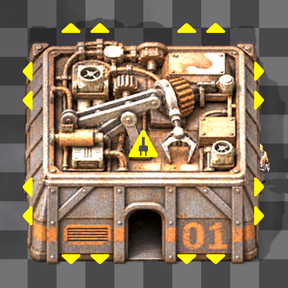
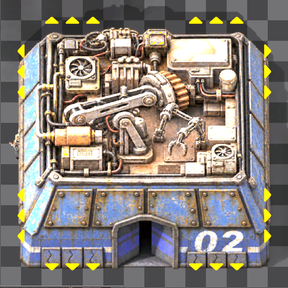
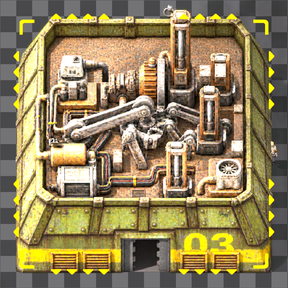
MK1, MK2 and MK3 have distinct assembler-inspired exteriors, separate shadows and matching factory research artwork. Exterior bodies are fitted within their existing side boundaries while preserving the entrance centres and building footprints.
Rooftop fans have rotating impellers with stationary housings: two fans on MK1, two on MK2 and four on MK3. These are decorative animations and do not add an electricity cost or indicate whether the factory is powered.
English and Russian text is included for the expansion, module and connection-guide features.