

Transport Drones (Continued)
A ground-based logistics system for Factorio 2.0. Transport drones haul items and fluids between depots connected by road networks - a flexible alternative to belts and trains for mid-to-late game logistics.
This is a full rewrite of Klonan's Transport Drones for Factorio 2.0, with major new features: quality scaling, priority routing, channel segregation, supply thresholds, load balancing, blueprint persistence, circuit network overhaul, bot integration, Factorissimo 3 cross-surface support, and more.
Graphics by Bubbles from the Factorio discord.
How it works
- Build roads to connect your production areas.
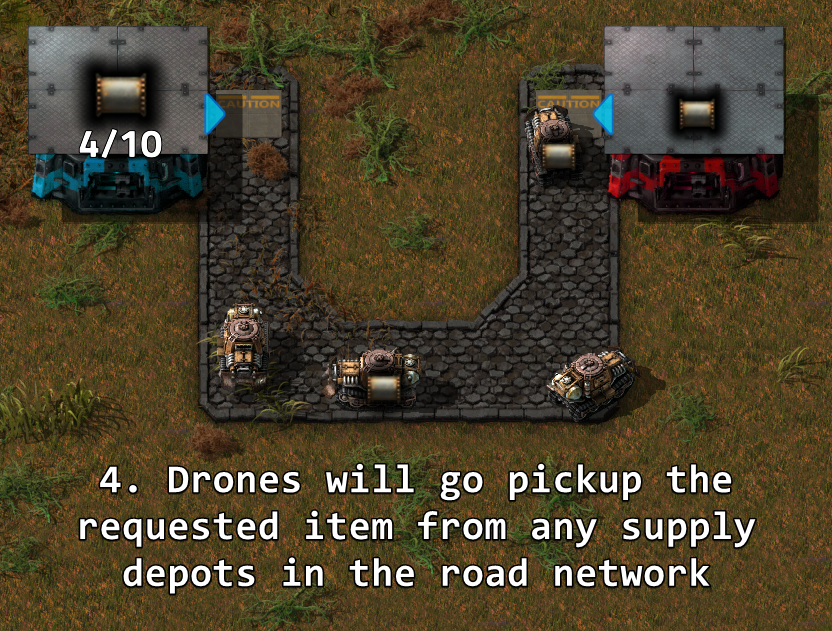
- Place depots on the road network: supply depots offer items, request depots collect them.
- Insert transport drones into depots. Drones autonomously pick up items from supply depots and deliver them to request depots.
- Fuel the network with fuel depots - drones consume fuel proportional to travel distance.

Depot types
Supply depot
Makes its inventory available to the road network. Other depots dispatch drones to collect from it.
- Quality scaling: 80 / 100 / 125 / 175 / 250 inventory slots.
- Optional logistics bot access (passive provider) with the Transport Logistics research.
- Supply threshold: reserves items below a set count, only offering excess to the network.
Request depot
Dispatches drones to collect a selected item from supply depots. The number of drones controls throughput - more drones means more concurrent deliveries.
- Quality scaling: 5 / 6 / 7 / 8 / 10 drone slots.
- Max storage cap, ignore capacity research, and full stack only toggles for fine-tuned control.
- Supports both items and fluids (connect pipes to the output side for fluids).
Buffer depot
Acts as both a request and supply depot. Ideal for collecting resources from distant outposts and redistributing them locally.
- Quality scaling: 5 / 6 / 7 / 8 / 10 drone slots.
- Optional logistics bot access (buffer chest).
Fuel depot
Delivers fuel to all depots on the road network. Fuel type is configurable (petroleum gas by default).
- Quality scaling: 5 / 6 / 7 / 8 / 10 drone slots.
Fluid depot
Makes fluid available to the road network. Connect it to pipes - request depots can request fluids just like items.
Active depot
A push-based supplier for mixed item output. Automatically offers whatever items it contains to the network without needing a recipe - ideal for assembler outputs with multiple products.
- Fluid mode toggle: switch between pushing items (from chest) and pushing fluids (from south pipe). The entity swaps to a furnace variant that auto-detects the piped fluid.
- Confirmation dialog warns before switching when contents would be lost.
- Can be disabled via startup setting.
Storage depot
A passive warehouse for the drone transport network. Accepts overflow from active depots and serves items back when requested.
- Prioritized over supply depots at equal score (preferred sink for excess items).
- Shows zero-count items in the road network GUI so you can see what was stored even when depleted.
- Can be disabled via startup setting.
Drone dispatcher
Holds transport drones and distributes them to other depots on the road network.
- Drone request slider: each depot can request a specific number of drones from the dispatcher.
- Priority-based distribution: higher-priority dispatchers distribute drones first.
- Return slots: locked inventory slots collect excess drones when a depot's slider is reduced. Drones are returned automatically.
- Central dispatch mode: the dispatcher sends its own drones to pick up items from supply/active depots and deliver them to request/buffer/storage depots. Configurable with a drone allocation slider (percentage of inventory available for central deliveries). Each depot has an "Allow central dispatch" toggle to opt in or out.
- Can be disabled via startup setting.
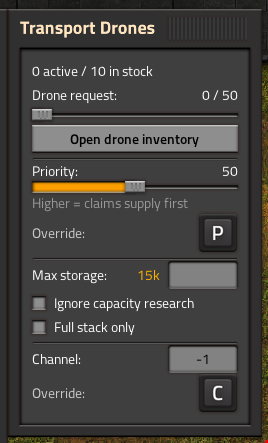
All depot settings - recipe, drones, priority, channel, threshold, and toggles - are configured in a single unified Transport Drones panel that opens when clicking any depot. Removing a depot returns its contents to the player's inventory.
Roads
- Road - Standard tile. Walking speed bonus: 1.5x.
- Fast Road - Upgraded tile. Walking speed bonus: 2.0x. Drones are ~33% faster on fast roads.
Any connected road tiles form a road network. Disconnected road areas are separate networks.
Diagonal crossing prevention (enabled by default) stops drones from connecting road networks diagonally through non-road corners.
Roads can also be placed on space platform foundations (Space Age).
Quality support
Depot quality scales inventory size:
- Supply inventory: 80 / 100 / 125 / 175 / 250 slots (Normal to Legendary)
- Drone slots: 5 / 6 / 7 / 8 / 10 (Normal to Legendary)
Drone quality scales performance:
- Speed bonus: +15% / +30% / +50% / +80% (Uncommon to Legendary)
- Fuel savings: 10% / 20% / 30% / 45% (Uncommon to Legendary)
Any quality drone can be used in any quality depot. Drones are stored in a separate drone inventory that supports logistics robot delivery for automated restocking. Higher-quality drones are dispatched first (legendary before epic, etc.).
Priority system
Every depot has a priority slider (0-100, default 50):
- Supply/fuel depots: higher priority = collected from first, even if farther away.
- Request/buffer depots: higher priority = claims scarce supply first.
Priority can be overridden via circuit network using signal [P].
Load balancing
Two runtime settings fine-tune supply selection:
- Load balance threshold (default: 20) - when greater than 0, supply depots with similar scores are treated as equivalent and one is chosen randomly, spreading load across nearby depots.
- Priority weight (default: 0) - replaces the absolute priority system with a weighted bias, making priority a soft preference that can be outweighed by distance.
Supply threshold
Supplier depots (supply, buffer, fluid, mining) can set a supply threshold - items below this count are reserved and not offered to the network. Only excess above the threshold is available for drones to collect.
- Set in the depot panel or via circuit writer using signal [T].
- Useful for keeping a minimum buffer in supply depots before serving requests.
Channel segregation
LTN-style bitmask channels let you run multiple independent logistics networks on the same physical roads.
- Default: -1 (all channels - everything interacts).
- Assign channels like 1, 2, 4, 8... to segregate traffic.
- Depots only interact when their channels share at least one bit (bitwise AND != 0).
- Fuel depots respect channels - they only fuel depots on matching channels.
- Overridable via circuit network using signal [C].
Circuit network integration
Three circuit entities, unlocked by the Transport Depot Circuits research:
Depot reader
Reads the contents of the attached depot as circuit signals. Works on all depot types (supply, request, buffer, fuel, fluid, active, storage, mining, dispatcher).
Three modes:
1. Network total - total supply across the entire road network.
2. Depot local - only the attached depot's contents.
3. Network minus local - network total excluding the attached depot (prevents feedback loops).
Additional signals (configurable via toggles):
- [D] - drone count
- Active drone count
- Fuel level
- Used stacks / max stacks
- Max capacity ([M])
- Stack size
Depot writer
Controls the attached depot via circuit signals:
- Set Filter mode: force the depot's recipe via circuit signal. Supports Anything/Everything virtual signals. The highest-count item signal wins when multiple are present.
- Enable/disable condition: enable or disable a depot based on signal comparison (signal vs constant, or signal vs signal). Disabled depots show a visual status indicator.
- Override priority, channel, and supply threshold via signals [P], [C], [T].
- Override request count: if the signal matches the requested item with condition =, the depot uses that value as its target.
- Custom GUI with live signal value display (auto-refreshes every 0.5s).
Road network reader
Set one or more item signals in its slots - it continuously outputs the total supply of each item across the entire road network. Useful for enabling/disabling production based on network stock levels.
Compatible depots are highlighted when placing circuit entities.
Blueprint support
Blueprints fully preserve:
- Requested item recipe
- Per-quality drone counts (logistics request proxy created automatically)
- Priority, channel, storage limit, supply threshold, and all toggle settings
- Active depot fluid mode
Paste a blueprint and logistics bots will deliver the correct drones automatically.
Logistics bot integration
With the Transport Logistics research:
- Supply depots can become passive providers - bots take items out.
- Buffer depots can become buffer chests - bots distribute items locally.
Toggle per-depot in the depot panel. Preserved in blueprints.
Road network GUI
Press Ctrl+T (or use the toolbar shortcut) to open the road network overview:
- Surface/planet selector to filter depots by world (Factorissimo factory surfaces resolve to their parent planet).
- Item filter and channel filter in the title bar to narrow results.
- Contents tab: all items across the network with supply/request progress bars and capacity labels.
- Depot tabs (Supply, Mining, Active, Storage, Dispatcher, Fuel, Request, Buffer): minimap + structured depot info panel side by side.
- Item names with capacity progress bars.
- Inline priority sliders (edit in real-time).
- Editable channel fields.
- Drone progress bars with per-quality breakdown.
- Circuit override indicators when priority, channel, or threshold are set by signals.
- Writer status dot (green = enabled, red = disabled).
- Click minimap buttons to teleport directly to any depot.
- Tabs auto-hide when no depots of that type are present.
Factorissimo 3 integration
Road networks bridge across Factorissimo 3 factory building surfaces. Place road tiles at both sides of a factory door to connect inside and outside networks. Drones automatically teleport through factory entrances.
- Cross-surface distance estimation: depot scoring accounts for travel distance through factory portals, preferring closer factories.
- Visual indicators: "Road connected" / "Road disconnected" floating text appears when factory portals activate or deactivate.
- Road network GUI minimap navigates to the correct surface when clicking a depot inside a factory.
Mining Drones integration
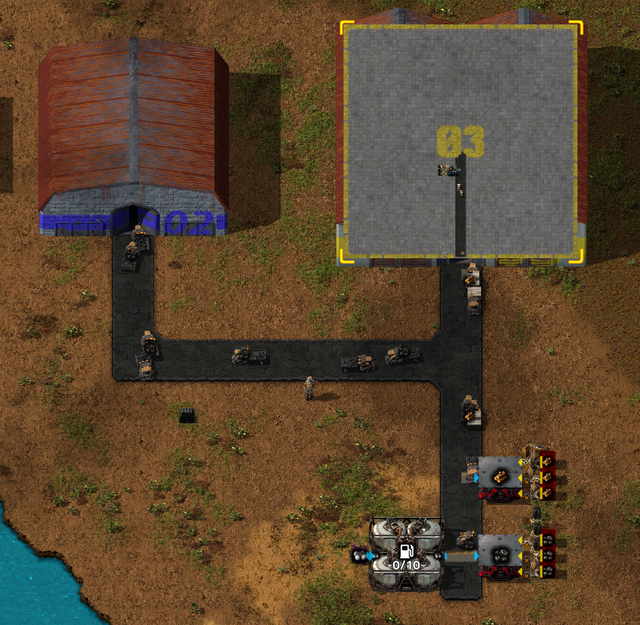
Works with Klonan's Mining Drones and Mining Drones Remastered. Mining depots automatically connect to the transport drone road network when placed adjacent to road tiles - mined resources become available to transport drones with no extra setup. Roads placed after the depot trigger auto-connection too.
Migrating from other Transport Drones forks
Switching from the Meglinge Fork or any other Transport Drones fork? Load your existing save - a "Recover unregistered depots" button appears automatically when orphaned depot entities are detected.
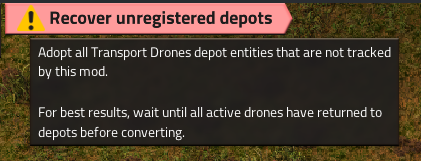
Click it to open a confirmation dialog explaining what will be preserved and what will be lost:
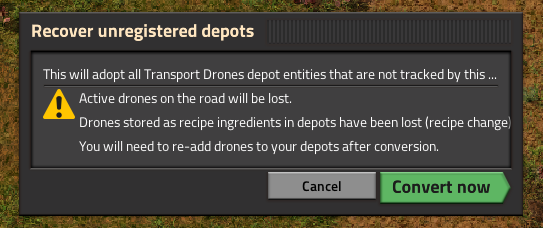
The migration adopts all depot entities, preserves recipes, items, fuel, and circuit connections. Active drones on the road and drones stored as recipe ingredients are lost - you'll need to re-add drones to your depots after conversion.
Spoilable items
Spoil timers are preserved through drone transport. Items like nutrients and biter eggs maintain their freshness - no spoilage reset on delivery.
Third-party road compatibility
Built-in support for road tiles from:
- Asphalt Roads (AsphaltRoadsPatched)
- Dectorio (gravel, wood floor, concrete grid)
- PyIndustry (all py-tiles)
Custom tiles from any mod can be whitelisted via the Road tile whitelist startup setting (comma-separated Lua patterns or @subgroup matches).
Other mods can also register tiles programmatically by setting is_road_tile = true on their item prototype.
Technology tree
Engine
  +-- Transport System (unlocks roads, supply/request/fuel depots, drones, dispatcher)
        |-- Fast Road
        |-- Transport Fluids (requires Fluid Handling) -> Fluid depot
        |-- Transport Buffering -> Buffer depot
        |   +-- Transport Active Supply -> Active depot, Storage depot
        |-- Transport Logistics (requires Logistic Robotics) -> Bot toggle
        |-- Transport Depot Circuits (requires Circuit Network) -> Reader, Writer, Network Reader
        |-- Transport Drone Speed 1-4 (+15% each)
        |   +-- Speed 5+ (infinite research, +15% per level)
        +-- Transport Drone Capacity 1-5 (+1 stack each)
Configuration
Startup settings:
- Fuel type (petroleum gas, water, steam, crude oil, light/heavy oil, sulfuric acid, lubricant)
- Fuel per drone and fuel consumption per meter
- Drone fluid capacity
- Drone pollution per second
- Drone sound volume (0-100%, default 80%)
- Fluid depot storage capacity (default 25,000)
- Request depot fluid output capacity (default 25,000)
- Road tile whitelist (third-party mod compatibility)
- Diagonal corner-cutting prevention
- Space platform roads (default: enabled)
- Enable/disable drone dispatcher, active depot, storage depot (all default: enabled)
Runtime settings:
- Depot update interval (default 60 ticks - lower = more responsive, higher = better UPS)
- Load balance threshold (default 20 - randomize among similarly-scored supply depots)
- Priority weight (default 0 - blend priority with distance instead of absolute priority)
- Max dispatches per depot per tick (default 100)
- Redispatch interval (default 10 ticks)
- Active depot overfill percent (default 25%)
- Pathfinder tuning (max steps, max work, path cache)
Remote interface
The mod exposes a "transport_drones" remote interface with 25+ functions for mod-to-mod integration:
- Query networks, depots, and drones
- Read/write priority, channel, storage limit, bot access, capacity bonus, full-stack-only
- Diagnostics and debugging tools
- Force depot updates and bucket recalculation
Usage: remote.call("transport_drones", "<function_name>", ...)
See the source code for full API documentation.
Localization
Fully translated in 9 languages: English, French, German, Spanish, Russian, Japanese, Korean, Chinese (Simplified), Polish.
Credits
- Original mod: Klonan - Transport Drones (Factorio 1.1)
- Graphics: Bubbles (Factorio Discord)
- Factorio 2.0 port: Shadoxa
- Mod tutorial: Nilaus on YouTube