
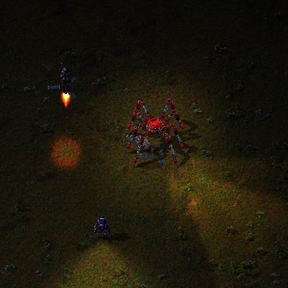
Deploy Spidertrons, cars, tanks and all other vehicles to the planet below, and supply with ammo, fuel and construction robots.
Mods introducing new content into the game.
Version: 2.9.87
Date: 2026-06-06
  Changes:
    - Version bump 2.1
    - Removed debug code in ammo deployment
Version: 2.9.86
Date: 2026-06-06
  Bugfixes:
    - Opening personal armour grid no longer switches to remote view
Version: 2.9.85
Date: 2026-06-05
  Bugfixes:
    - Changelog format fixes
    - Orbital deployment shortcut: exclude spiderbot companion items from platform/cargo scans and only read entity label/color on item-with-entity-data stacks (same guards as chest remote deploy).
Version: 2.9.84
Date: 2026-06-05
  Bugfixes:
    - Clean up for accidently created planets in non Space Exploration versions
    - Remote equipment UI: opening a spider vehicle stack now sets player.opened to the item stack (equipment still shown) instead of LuaEquipmentGrid, avoiding mods that assume opened is an item or entity. Applied in control.lua and map-gui.lua.
    - Remote container deployment: only treat stacks as item-with-entity-data when they are; label, color, and grid are read only for that type. create_entity uses the item prototype place_result so the correct entity is spawned.
    - Remote container deployment: spider-like companion items (e.g. spiderbot / spider-bot) are excluded from chest remote deploy; use is_spider_vehicle_deployable_from_container for scans and deploy.
  Changes:
    - After launching a cargo pod (vehicle or supplies), the game prints a launch message
    - deployment.lua: removed debug game.print of ammo data keys; equipment-grid-fill.lua: commented out noisy on_gui_opened debug prints.
  Compatibility:
    - Maraxsis
    - Submarines now deploy to Maraxsis only
    - No other vehicles can be deployed to Maraxsis
  Locale:
    - Updated
Version: 2.9.83
Date: 2026-01-06
  Locale:
    - Hardcoded values have been added to the locale file
  Changes:
    - Consolidated Space Age and Space Exploration file branches into one as much of the code was repeated
    - SA and SE specific logic is divided where needed
    - SE compatibility has major issues so use at your own risk
Version: 2.9.82
Date: 2025-12-27
  Bugfixes:
    - Change in mod-data storage resulted in the deployment menu equipment button to not work properly. Fixed with the correct mod-data
  Changes:
    - Updates the supplies deployment tab to Robots, and corrected the robot deployment information
Version: 2.9.8
Date: 2025-12-27
  Bugfixes:
    - Fixed deployment menu not opening when clicking vehicle deploy buttons
    - Fixed platform deployment button not appearing when opening platform hub
    - Fixed "No vehicles available" error when returning from extras menu to vehicle list
    - Fixed vehicle revalidation to prevent deployment conflicts in multiplayer
Version: 2.9.7
Date: 2025-12-27
  Features:
    - Remote Container Deployment
    - Remotely deploy Logistic / Construction robots from a container. Rather than needing to manually, or struggle remotely to add robots to a network.
    - Remotely deploy Spider-vehicles from a container. Spider-vehicles only as they have somewhat of their own intelligence and should be able to deploy themselves. Not car vehicle types due to the potential collision complications.
    - Remote Supplies Deployment tab
    - Deploy robots directly to the surface below. Similar to how the mod deploys vehicles.
    - Robots do not auto deploy, you will have to deploy them from the container.
  Notes:
    - Logistic and Construction robots auto-join a roboport network if available. Remain stationary until they in a network construction area.
    - Construction bots prefer to join a vehicle network if available. Logistic bots only join Roboport networks.
Version: 2.9.6
Date: 2025-12-26
  Features:
    - Equipment display now groups by quality and shows unfulfilled requests separately (e.g., "Capacitor [Legendary] x9 (x2 unfulfilled)")
    - Equipment ghosts now display actual equipment names instead of generic "equipment-ghost"
    - Smart deployment flow: clicking Deploy from non-Equipment tabs switches to Equipment tab if unfulfilled equipment requests exist
  Changes:
    - Simplified deployment button layout: removed "Launch Without Add-ons" button (just click Deploy with nothing selected)
    - X button in deployment menu now returns to vehicle list instead of canceling completely (ESC still cancels everything)
    - Removed redundant back buttons to match standard Factorio UI patterns
    - Equipment sorted by name first, then quality level for better organization
    - Deploy button always visible in deployment menu - validation happens on click
  Bugfixes:
    - Fixed multiplayer deployment conflicts - each player now has separate deployment data
    - Added deployment validation to prevent race conditions when multiple players deploy the same vehicle
    - Added item availability validation - shows detailed error if selected items no longer available
    - Fixed equipment ghost detection using equipment.prototype.type instead of name pattern matching
    - Fixed planet display name to use space_location.localised_name for proper localization
  Info:
    - Unfulfilled equipment requests shown in blue with "(unfulfilled)" suffix
    - Warning message displayed when equipment ghosts detected
    - Deploying with unfulfilled equipment will attempt to fill from platform inventory during deployment
Version: 2.9.5
Date: 2025-12-25
  Bugfixes:
    - Initialized temporary deployment data at the start of the show_extras_menu function rather than the end to avoid nil crashes
Version: 2.9.4
Date: 2025-12-21
  Features:
    - Automatic equipment grid initialization
    - When opening container GUIs, all vehicle items in the inventory automatically get their equipment grids initialized
    - Prevents issues where vehicles might not have grids set up when needed
    - Only initializes grids for items that have equipment grid prototypes but don't have grids yet
    - Scans all items in opened container inventories and creates grids for item-with-entity-data items with stack_size == 1
    - Remote Equipment grid management
    - Added button to automatically fill equipment grid ghosts from inventory when viewing vehicle equipment grids
    - Button appears when opening equipment grids for vehicles
    - Matches ghost equipment with items in inventory and fills them automatically
    - Platform deploy button:
    - Added deploy button that appears when opening platform hub GUI (inspired by TFMG's original deploy button)
    - Allows direct deployment to the planet the platform is orbiting
    - Button only shows when platform is stopped above a planet (not in transit)
    - Shows localized planet name
    - Equipment tab in deployment extras menu
    - Added Equipment tab to the deployment extras menu (shown when vehicle has equipment grid and TFMG is active)
    - Displays list of installed equipment with counts (e.g., "Solar Panel x2")
    - Equipment list is sorted alphabetically for easy reading
    - Shows "No equipment installed" message when grid is empty
    - Includes "Manage Equipment Grid" button to open the full equipment grid GUI for management
    - Equipment tab appears last in the tab order (after Utilities, Ammo, and Fuel)
    - Always show extras panel with TFMG:
    - Extras panel now always displays when TFMG is active, regardless of whether items are available
    - Allows access to equipment grid management even when no utilities, ammo, or fuel are available
    - When TFMG is not active, extras panel only shows when items are available (original behavior)
    - Equipment grid GUI
    - Added cargo pod button to equipment grid toolbar
    - Opens orbital deployment menu directly from equipment grid GUI
    - Button appears alongside the equipment fill button
    - Automatically switches to planet surface when viewing from platform
    - Quality compatibility functions correctly
    - Added equipment items toolbar
    - Separate toolbar below main buttons showing all equipment items from the same inventory as the vehicle
    - Lists equipment items vertically in a scrollable pane
    - Clicking an equipment item puts a ghost in the cursor for manual placement
    - Shows item icons and counts in tooltips
    - Supports quality-aware equipment items
    - Equipment removal functionality
    - Confirm button now removes equipment marked for removal/deconstruction
    - Removed equipment is automatically returned to the container inventory
    - Uses grid.take() API to properly remove equipment and convert back to items
    - Preserves equipment quality when returning items to inventory
    - Removal happens before ghost filling when clicking confirm
  Bugfixes:
    - Commented out deployment animations due to inconsistencies with planet surface cargo pod descending animation speeds
Version: 2.9.3
Date: 2025-12-18
  Bugfixes:
    - Fixed nil error when text field slider_maximum is not set
    - Text field input now automatically clamps to available item amount
    - Typing a value higher than available items (e.g., 20 when only 3 available) automatically adjusts to the maximum available
    - Fixed ghost equipment from old TFMG versions being deployed with vehicles
    - Ghost equipment is now automatically detected and removed from vehicle grids before deployment
    - Prevents crashes and unwanted equipment ghosts from being transferred
Version: 2.9.2
Date: 2025-12-15
  Bugfixes:
    - Fixed "Can't place equipment ghost directly" error when deploying vehicles with equipment
    - Equipment selection now filters out ghost equipment prototypes
    - Added safeguards to strip ghost suffixes from equipment names during deployment
Version: 2.9.1
Date: 2025-12-14
  Features:
    - Enhanced deployment logic to handle player surface transitions and ensure proper vehicle deployment from orbit.
    - Script created vehicles are now correct added to the built table
Version: 2.9.0
Date: 2025-12-12
  Features:
    - Same-surface deployment support
    - Vehicles can now be deployed to the same surface they're launched from
    - Uses surface-switching workaround to handle cargo pod limitations
    - Full quality system support
    - Vehicles, equipment, ammo, and all extras now preserve and display quality levels
    - Quality overlays shown in GUI for vehicles and items
    - Quality-aware item selection and deployment
    - Space Exploration compatibility improvements (in preparation)
    - Automatic planet association for SE surfaces (40 planets created for cargo pod support)
    - Cargo bay registration and management system
    - Zone-based deployment validation
  Compatibility:
    - TMFG
  Technical Improvements:
    - Cargo bay tracking system for better surface management
    - Stale deployment cleanup system (prevents memory leaks)
    - Render mode change handling for better GUI persistence
    - Surface change event handling
    - Cargo pod finished ascending event handler for same-surface deployments
Version: 2.8.0
Date: 2025-06-24
  Bugfixes:
    - stack icon no longer reliant on factory planner
Version: 2.7.0
Date: 2025-06-24
  Bugfixes:
    - Orbital deployment corrected to be unlocked with space-platforms
Version: 2.6.0
Date: 2025-05-13
  Bugfixes:
    - Dynamically creates quality icons from modded icons (kind of)
Version: 2.5.0
Date: 2025-05-12
  Bugfixes:
    - Dynamically creates item icons from modded icons
Version: 2.4.0
Date: 2025-05-09
  Features:
    - Expanded Deploy with Extras Capabilites
    - Deploy the vehicle with ammo, fuel, or utilities such as Constructon Robots and Repair Packs
    - Support for to dynamically add custom sprites for other mods
  GUI Updates:
    - Cleaner Deploy with Extras GUI
    - Utitlies, Ammo, and Fuel have their own dedicated tabs
    - Slider with working counts
    - A button to quickly add a full stack
    - Added a back to deployment menu
Version: 2.3.0
Date: 2025-04-26
  Features:
    - Changed orbital delivery technology unlock from Spidertron to Space Platform
    - Early experimental deploy with supplies
Version: 2.2.0
Date: 2025-04-21
  Features:
    - Now seamlessly compatible with modded vehicles
    - Now deploy any vehicle, no longer limited to Spider vehicles
    - Vehicles that require fuel are deployed with a small amount of carbon. (carbon is free in space so it makes sense)
Version: 2.1.0
Date: 2025-04-20
  Bugfixes:
    - Crash fixed when dropping onto a surface before any tiles have generated
Version: 2.0.0
Date: 2025-04-17
  Features:
    - Initial release
    - Complete rewrite for Factorio 2.0 Space Age
Version: 0.1.5
Date: 2024-09-17
  Features:
    - Bug fixes and recipe tuning
Version: 0.1.4
Date: 2024-09-16
  Features:
    - Spidertons are launched and deployed with an animation succesfylly 90% of the time
Version: 0.1.3
Date: 2024-09-14
  Features:
    - other methods
Version: 0.1.2
Date: 2024-09-13
  Features:
    - saves entity details on launch and deploy by using a dummy inventory in space
Version: 0.1.1
Date: 2024-09-13
  Features:
    - saves entity details on launch and deploy
Version: 0.1.0
Date: 2024-09-12
  Initial release:
    - New entities and items
    - Create a spider silo and scale down
    - Handle launch, orbital storage, gui, and deployment