
Simple Train Combinator
Tired of complex circuit logic to manage your train logistics? The Simple Train Combinator is here to help!
No need to redesign your entire network for LTN or Cybersync — just place this combinator, connect it to your station's circuit network, and it will read your storage levels and compute how many trains you need to call.
This mod adds one entity, the Simple Train Combinator.
What It Does
The combinator lets you configure a station as either:
- Loading: trains arrive empty and leave full.
- Unloading: trains arrive full and leave empty.
For either mode, it can track:
- Items (cargo wagons)
- Fluids (fluid wagons)
It then computes:
- Current stored amount (red + green network signal count)
- Total connected storage capacity
- Available storage
- Trains currently needed/callable
And outputs that result as a circuit signal.
Core Features
- Tracks a selected item or fluid signal from connected red/green circuit networks.
- Detects connected train stops and storage entities by walking the circuit network.
- Supports both cargo and fluid station setups.
- Computes per-wagon and per-train capacity from selected wagon type and quality.
- Outputs train-call count signal (slot 1).
- Optional priority output signal (slot 2).
- Min/max train limit controls with text inputs and dual sliders.
- Supports unlimited max/min display as infinity in slider/text UI.
- Live GUI status and values while open.
- Auto-link train stop behaviors (name, train limit, enable/disable, priority).
- Blueprint tagging support so settings survive blueprint copy/build.
- Entity copy-paste support for direct combinator-to-combinator setting transfer.
GUI Overview
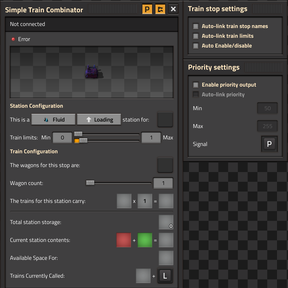
Station Configuration
- Type: Item or Fluid
- Direction: Loading or Unloading
- Handled Item/Fluid: choose signal target
- Train limits: Min and Max trains
Train Configuration
- Wagon type: cargo wagon or fluid wagon (based on station type)
- Wagon count
- Per-wagon capacity (derived)
- Train capacity (derived)
Network and Storage Display
- Red network amount
- Green network amount
- Total amount
- Total storage
- Available storage
- Current trains called
- Output signal selector
Train Stop Settings Panel
- Auto-link train stop names
- Auto-link train limits
- Auto enable/disable train stop
Priority Settings Panel
- Enable priority output
- Auto-link priority to train stops
- Priority min / max (0-255)
- Priority output signal selector
How Train Demand Is Calculated
Loading Stations
- Calls trains based on how many full train-loads are currently stored.
- If storage is completely full but computed trains would be 0, it calls 1 train.
Unloading Stations
- Calls trains based on how many full train-loads fit in remaining space.
- If storage is completely empty but computed trains would be 0, it calls 1 train.
Clamping
- Result is clamped to your Min/Max train settings.
- Max can be unlimited (infinite).
Priority Output
When enabled, a second output signal is emitted using a storage-ratio priority model:
- Loading: priority increases as storage fills.
- Unloading: priority increases as storage empties.
- Clamped to configured min/max (0-255).
Circuit Network Entity Discovery
The combinator scans its connected circuit network and classifies entities:
- Train stops
- Item storage: container, logistic-container, linked-container
- Fluid storage: storage tank
Storage totals are refreshed continuously while GUI is open and periodically in the background for all tracked combinators.
Auto-Linked Train Stop Behavior
When enabled, connected train stops can be automatically configured:
- Train stop name pattern generation
- Train limit driven from the combinator output signal
- Enable/disable condition based on output signal > 0
- Priority signal linkage
Mod Setting
Runtime-global setting:
- Train station name pattern
Default value:
[I][A]
Supported placeholders:
[I]item/fluid icon[N]item/fluid name[A]direction arrow[L]LoadingorUnloading[U]LoadorUnload
Any other text in the pattern is preserved.
Blueprint and Copy/Paste Behavior
Supported
- Direct entity settings copy/paste between combinators (entity copy-paste event path).
- Blueprint creation stores combinator settings as entity tags.
- Building from blueprints restores settings from tags.
Important Engine Limitation
Factorio does not provide a dedicated runtime event for "blueprint placed over already existing matching entities" where only settings would be applied by matching.
So if an existing combinator is matched rather than rebuilt, there is no special blueprint-placement event to hook for applying custom script state.
Technology and Recipe
- Unlock: Simple Train Combinator technology
- Prerequisites: advanced combinators + automated rail transportation
- Recipe: constant combinator + rail signals + electronic circuit
Dependencies
- Factorio 2.0
flib >= 0.16.5
AI Disclosure
AI tools were used to assist in the development of this mod.