
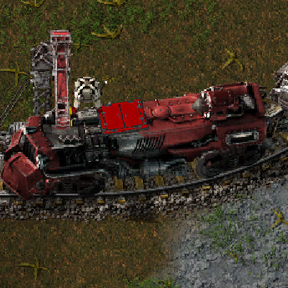
Service Train adds a service locomotive with an onboard roboport, a service battery and supply compartments. Send it to remote parts of your factory to complete ghosts and blueprints, repair damaged structures, and deliver fuel or selected items directly into compatible inventories.
Use individual work orders or set up a repeating supply route. A train can keep outpost furnaces supplied with coal, deliver ore to furnace inputs, or maintain stocks of materials in local chests.
All work uses real items carried by the train. An outpost does not need its own stationary roboport network for the train to service it.
Quick start:
1. Research Rail service trains and craft a Service locomotive.
2. Place it on connected rails. Attach a normal cargo wagon for convenient storage and automatic loading at stations.
3. Park the locomotive inside the electricity coverage of a powered pole. A new service battery starts empty. Charge it to more than 50 MJ before asking the robots to work (you don’t have to wait, but I’m not sure they’ll agree to work for free).
4. Open the locomotive and click Supplies. In the service panel, select the Supplies tab.
5. Load the appropriate robots, repair packs and cargo.
6. Open Orders, choose a mode, click Select work area, and select the area on the map with the order tool. Choose Build and repair for your first construction job.
The work area needs reachable ground-level rails nearby. The train finds a suitable stopping point, performs the available work and recalls its robots.
Opening the controls
Clicking the service locomotive opens its Schedule window. This window contains the Auto / Manual switch, station list and wait conditions. I replaced the default train window with this one because standard factorio window doesn't allow adding new wait conditions in the way I wanted.
You can also open dispatch with Ctrl + Shift + R or the Rail service dispatch shortcut. The key binding can be changed in the control settings.
All work combines construction, repairs and refuelling. Use Deliver selected item for general item deliveries. Holding Shift while selecting with the order tool creates a fuel-only order.
Keep Allow dispatch to call this train enabled for general dispatch requests. A moving train is not assigned a new individual order, so wait until it stops.
Use this when you want to supply a particular chest, furnace, lab or other compatible machine:
1. Open the required train and select Orders.
2. Choose Deliver selected item.
3. Click the item selector below the mode, choose an item, and enter Amount per selected building.
4. In Deliver to a specific recipient, select the destination inventory shown below.
5. Click Choose recipient and use the tool to select exactly one suitable building or chest.
6. When the panel reopens, check the selected recipient and click Dispatch.
The recipient needs free space and must accept the item. Ore belongs in a furnace input, while fuel belongs in its burner inventory.
An individual general-item delivery adds the requested quantity. If a chest contains 30 plates and you order another 100, it will contain 130 after delivery, provided there is enough space and no plates were removed meanwhile.
Refuelling tops up to the requested quantity.** If a furnace already holds 3 fuel items and the target is 5, the train supplies the deficit. Deliver fuel fixes the destination to the fuel inventory. Leave the item selector empty to let the train choose compatible fuel from its supplies.
For several recipients in one order, configure the mode, item, quantity and destination, then use Select work area instead of choosing one recipient. For general item deliveries, the quantity applies to every recipient.
Supply route uses the train's station schedule. At each service stop, it looks for compatible recipients within 40 tiles of the service locomotive and replenishes them to the configured stock level. Range is measured from the locomotive, so station layout and train length matter.
The train uses its own logistic robots, with up to 50 in its delivery network. Normal chests can receive deliveries without being converted to requester chests.
No deliveries are made at Base. At the outposts, the train tops up compatible fuel inventories to 50 items, subject to available cargo and inventory space. A furnace already holding 42 fuel items needs another 8. The next visit uses the stock remaining at that time.
For ore, select Furnace or machine input, the required ore and a target stock. To replenish containers, select Chest. The train then maintains the chosen item stock in each suitable chest near its service stop.
Each route has one selected item type and one destination mode. Use separate service trains to maintain simultaneous coal and ore deliveries. Fuel mode can choose different compatible fuel types when the item selector is left empty.
When the train is already beside its work area, open Orders and enable Build and repair nearby while parked. With sufficient charge, its construction robots service available ghosts and damaged structures nearby using the train's supplies.
This option handles construction and repairs. Configure repeated item and fuel deliveries through Supply route. A running supply route temporarily disables parked local work and restores the previous setting when it finishes.
Battery upgrades are researched for the whole force. The battery and roboport are built into the locomotive, with no separate equipment installation required.
While stopped inside a powered pole's electricity coverage, the train can charge from the grid at up to 8 MW. While moving, its onboard generator supplies up to 1 MW for service systems. Robot work requires more than 50 MJ. The service panel shows the remaining charge and current power source.
Keep room in the train for returning materials. Robots wait when their cargo cannot be unloaded.
After working, the train recalls its robots and returns leftover cargo to the consist. It then restores its previous schedule and control mode. A train originally parked in manual mode with an empty schedule can return near its starting point after a successful order. This is controlled by Return manual trains after successful orders and still requires a valid return route.
Cancel an order with its cross button in the queue. Allow the robots to return and unload their cargo before continuing normal operation.
The default travel-and-work limit for an individual order is 600 seconds. Change Service order timeout (seconds) in the mod settings for longer jobs. This timer does not set a time limit for an entire infinite supply route.
English, Russian, Polish and Simplified Chinese localisations are included.