

🔎 Quicksearch Enhanced
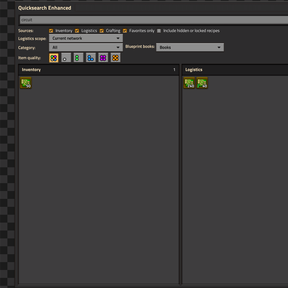
Find and use items without digging through large inventories or crafting menus. Press Control + F, type what you need, then pick it up, craft it, request it, or—when Factory Search is installed—open it there directly from the results.
Search. Filter. Pick up. Craft. Deliver.
✨ What Enhanced adds
Original Quicksearch already searches Inventory, open containers, Logistics networks, and Crafting recipes, with direct actions on its results. Quicksearch Enhanced keeps that foundation and adds:
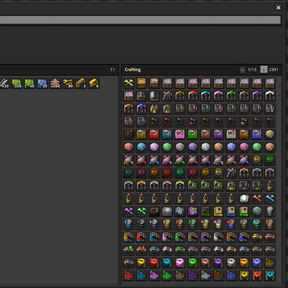
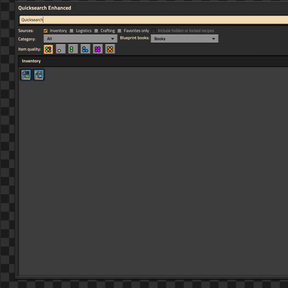
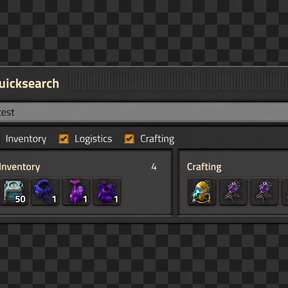
- Full or pinned search: use the responsive three-pane window when you need every filter, or keep a small draggable search bar visible while you play. The pinned bar has its own Inventory, Logistics, and Crafting switches and expands the remaining lanes automatically.
- Useful filters: narrow results by category, favorites, unlocked quality, blueprint-book mode, or Logistics scope. Your choices remain available when you reopen Quicksearch.
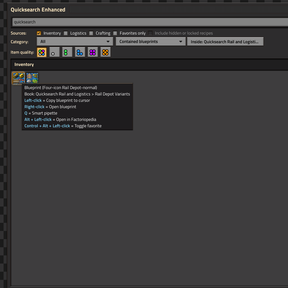
- Blueprint-book browsing: keep each top-level book as one result, search the blueprints inside every book, or right-click one book to browse only its contents. Custom names and up to four preview icons make books and blueprints easier to recognize.
- Open in Factory Search: when Factory Search is installed, use its configured shortcut over an Inventory, open container, Logistics, or Crafting result. Quicksearch closes and Factory Search opens already searching for that item. Blueprints and books stay in Quicksearch.
- Direct actions: pick up, transfer, craft, request, favorite, inspect, or pipette results without navigating another menu. Enter and Escape provide predictable accept and close controls.
- Consistent ordering: exact names appear first, followed by prefixes, contained text, and the closest fuzzy matches, with Factorio's normal item order used to break ties.
- Responsive on large lists: typing filters the results Quicksearch has already found, pages keep the interface manageable, and blueprint-book searches have clear safety limits.
⚡ Predictable results
Results are ranked consistently:
- Exact matches
- Prefix matches
- Contiguous substring matches
- Fewest-gap fuzzy matches
Ties use favorites and Factorio's normal item-group, subgroup, item, and quality order. Searches ignore letter case, keep punctuation meaningful, and support abbreviations such as xtb for express-transport-belt.
Most results search internal prototype names rather than translated display names. Inventory results also match custom item labels and a label-or-name plus quality suffix. In Contained blueprints mode, blueprints inside books are searchable by their custom labels.
🎮 Controls
| Default control | Action |
|---|---|
| Control + F (default) | Open or close Quicksearch Enhanced |
| Enter | Use the first visible result |
| Escape | Close Quicksearch Enhanced |
| Pipette control | Smart-pipette the result under the cursor without closing the window |
| Factory Search shortcut | When Factory Search is installed, open it for the hovered item |
| Alt + left-click | Open the result in Factoriopedia |
| Control + Alt + left-click | Add or remove a favorite |
Rebind the Quicksearch toggle under Settings → Controls → Mods by finding Toggle quicksearch window. Smart pipette follows Factorio's separate Pipette tool binding. Open in Factory Search follows Factory Search's own shortcut, so Quicksearch adds no duplicate control.
🖱️ Result actions
- Inventory or open container: left-click to pick up an item; normal Factorio transfer modifiers remain available. Plain right-click opens an individual blueprint with Factorio's native blueprint GUI. In Books mode, each top-level blueprint book remains one book result; plain right-click enters Contained blueprints scoped to that exact book, and the visible
Inside: <book> ×control returns to the full Books view without changing the query or other filters. In Contained blueprints mode, left-click copies a nested blueprint to the cursor and leaves the source book untouched. - Crafting: click for a ghost item, or use Control/Shift modifiers to craft.
- Logistics: click for a ghost item, or use Control/Shift modifiers to create a temporary personal-logistics request. Temporary requests are restored or removed after delivery.
ℹ️ Current scope
- Inventory: supports custom labels, exact quality filtering, and two blueprint-book modes. Books is the default and does not inspect book contents. Optional Contained blueprints shows the blueprints inside nested books, omits the book containers, and stops after eight book levels or 2048 inspected slots per source; a warning appears if results were omitted.
- Pinned search bar: shares the full window's query, filters, sorting, and actions while keeping its Inventory, Logistics, and Crafting switches independent. Disabled and empty lanes disappear, and the remaining lanes expand.
- Logistics: keeps item qualities separate and can search the Current network, Current surface, or All networks. Temporary requests use the selected quality.
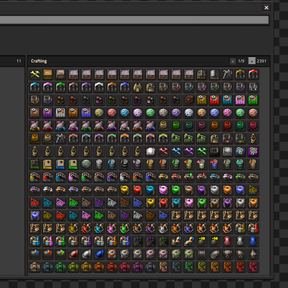
- Crafting: lists recipes whose main product is a stackable item. Fluid-only recipes and recipes without an item main product are not included.
- Blueprint results show up to four custom preview icons and fall back to Factorio's default blueprint icons when needed. Book contents are searchable only in Inventory and the open container. Factorio Blueprint Library records are not searched.
- Most text matching uses Factorio's internal item names, not translated display names. Custom inventory and blueprint labels are searchable.
Current networkfollows the player when crossing between logistics networks while Quicksearch is visible.- Closing a chest or wagon immediately removes its result section. Moving items through or closing a passive-provider chest also refreshes Logistics for the selected network. Other robot-only stock changes appear when Quicksearch reopens or another relevant update occurs.
- The interface supports screen sizes from 512×384 upward after Factorio interface scaling.
🚄 Responsive on large result sets
Quicksearch updates when relevant inventory, network, recipe, filter, or movement changes occur; it does no background searching while both views are closed. Typing filters the current results instead of searching every source again, and only the visible page is drawn. Books mode does not inspect book contents; optional Contained blueprints search stops after eight book levels or 2048 inspected slots per source and shows a warning if anything was omitted.
🧩 Compatibility and migration
- Factorio 2.1
- Requires only Base
- Does not require Space Age
- Open in Factory Search appears only when Factory Search is installed; it remains completely optional.
This is a replacement for the original Quicksearch and cannot be enabled alongside it or wuastbude-quicksearch. Disable the other implementation before enabling Quicksearch Enhanced.
Quicksearch Enhanced is a separate mod and does not import data from the original Quicksearch. Favorites, filters, window position, and other player settings start from their defaults.
🙏 Credits and license
Quicksearch Enhanced is an extensively redesigned derivative of Quicksearch by mpcomplete, whose original Mod Portal release is maintained by zysnarch.
Released under the MIT License. Quicksearch Enhanced is an independent maintained fork and is not an official release by the original authors.
Generative AI (OpenAI Codex and image generation) assisted with code, testing, documentation, and the packaged thumbnail artwork. All changes and final assets were reviewed and approved by the maintainer.