
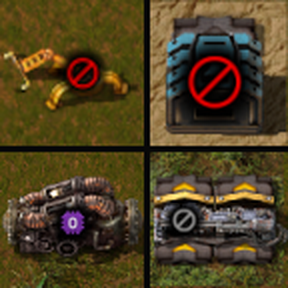
Place Filtered
Press N to change the currently held item into a pseudo-blueprint with alternate settings, such as a null-filter or limiting a chest. Press N again to switch back.
What's a "pseudo-blueprint"? If you converted from a real stack, the blueprint will think that it's a real boy item!
Left-click will construct the building, provided you're in building range. Holding Shift + Left-click will place a ghost like normal.
Supports
- Inserters
- Splitters
- Pumps
- Loaders
- Asteroid collectors
- Chests and Cargo wagons, by limiting their inventory slots
- Logistic Storage chests will have their filter set to the null item too
- Turrets and Artillery turrets/wagons, by disabling enemy targeting
- Mining drills, with a mod like Filter Mining Drills
Other alternatives
Although not strictly filters, it also changes a few other items to their "alternate mode":
- Deconstruction planner - switches to Trees/Rocks only
- Lamps - sets Always On and white colour
- Arithmetic and Decider combinators - passes the signal through unchanged
- Constant combinators - turns off output
- Display panels - always shows the first line
- Power switches - enables the connection
- Programmable speakers - sets range to Global and turns on Show Alert
- Train stops - sets Train Limit to 1
- Locomotives - don't change to the stop's colour
I suggest sharing this keybind with "Debug > Toggle entity" (at the very bottom of Controls), since they have quite similar functions.
Recommended companion mods
- Filter Helper: Shows a panel in the entity's GUI with relevant items.
- Preconfigure Placement: Open the entity GUI before placing it, and place copies with those settings - a more general approach to the problem.