
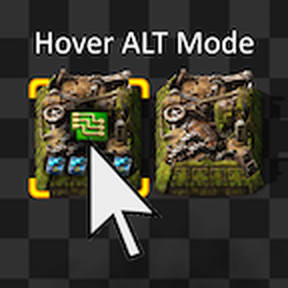
Hover ALT Mode
Admire the beauty of your factory, with ALT mode still at hand. Just point at what you want to know.
Shows the ALT mode icon for just the entity under your mouse cursor, while the ALT mode stays off. ALT mode no longer has to be permanent. Normal mode becomes a real alternative, without giving up what ALT mode tells you.
Shows
- Recipes — assembling machines, chemical plants, refineries, furnaces, crushers
- Fluids — pipes, underground pipes, storage tanks, pumps
- Ammo — gun, artillery, rocket and railgun turrets
- Modules — crafting machines, rocket silo, beacons, mining drills, pumpjacks, agricultural towers, labs
- Science packs — labs and biolabs, each at the slot it sits in, so the gaps show too
- Modules on their way — planned into a ghost or requested into a machine, each marked the way ALT mode marks them
- Chest contents — chests, logistic chests and landed cargo pods
- Wagon contents — cargo, fluid and artillery wagons
- Rocket cargo — what is waiting in the rocket, on the silo itself
- Cargo pods — what a pod is carrying, and the figure instead where the player is riding along
- Robot cargo — what a logistic or construction robot is holding, drawn on the robot and staying there the whole flight. A construction robot on a repair job shows its repair pack too, and a robot carrying both draws them overlapped the way ALT mode stacks them
- Hidden chests — the contents of a chest a mod tucks inside a building, which the cursor can never reach on its own
- Hidden machines — the fluid connections of a machine tucked inside a building the same way: each fluid where its pipes dock, with the arrow beside it. Their recipe stays hidden
- Filters — inserters, splitters and loaders of both sizes, blacklists struck through. The quality a filter asks for comes with it: the comparator beside the badge, the any quality symbol where it takes whatever it can get, and the badge on its own at full size where the filter names a quality and no item
- Splitter priorities — input and output side, and the output filter with its quality
- Combinator signals — constant combinators, up to 4 icons
- Combinator settings — arithmetic and decider combinators, what goes in above and what comes out below
- Target priorities — gun, laser, flamethrower, rocket, tesla and railgun turrets, up to 4 icons
- Asteroid filters — asteroid collectors, up to 6 icons
- Unresearched recipes — struck through, so you can see the machine will not run
- Ghosts — recipe, filters, signals, priorities, asteroid filters and planned modules
- Quality badges on all of the above, and on the entity itself in its lower left corner
- Plant quality — where a mod keeps track of what was sown, in the same spot ALT mode marks it
Settings
Every setting here is per player — off by default, no restart needed, and everyone in a multiplayer game chooses for themselves.
| Setting | Range | Default | What it does |
|---|---|---|---|
| Show extra icons | Off / On, normal mode only / On, normal and ALT mode | Off | Mining drill ore, pumpjack fluid, flamethrower fuel, planted seed |
| Show power bars | Off / On, normal mode only / On, normal and ALT mode | Off | Power bars on poles and substations, charge bar on accumulators. Factorio 2.1 only |
| Show counts | Off / On, normal mode only / On, normal and ALT mode | Off | The number on the icon, the way an inventory slot writes it. Turret ammo |
| Auto ALT mode | On / Off | Off | Switches the vanilla ALT mode on while a blueprint, a planner, a wire or a pipe is in hand |
Extra icons
Show extra icons for things ALT mode does not show anywhere:
- Mining drills — the ore being dug up, which follows the ground on a mixed patch
- Pumpjacks — the fluid coming out
- Flamethrower turrets — the fluid they are loaded with
- Agricultural towers — the seed being planted and the quality it carries
Quality on a seed does nothing in vanilla: the plant does not inherit it and the harvest comes back normal. Quality Plants fixes that, and with it the icon tells you what quality you are about to grow.
Power bars
Show power bars for something ALT mode draws nowhere at all:
- Electric poles and substations — two bars across the pole: production on the left, demand on the right. The larger of the two stands full and the other is drawn beside it to scale, so the balance of the network reads at a glance
- Accumulators — one bar for the charge, standing in a fainter track of the same colour over the full height. So an empty accumulator still reads as empty, and still says red.
They take vanilla's own colours for a power network — red below half, yellow up to full, and green only where the demand is covered completely.
Needs Factorio 2.1. A mod cannot read the electric network on 2.0, so the 2.0 build does not have them.
Counts
Show counts for something ALT mode leaves out: it puts the ammo icon on a turret, but never says how much is behind it.
- Turret ammo — the number in the lower right corner of the icon, the way an inventory slot writes it. Gun, rocket and railgun turrets, artillery turrets and artillery wagons
- It keeps up with the firing, counting down while the turret shoots
Auto ALT mode
Auto ALT mode switches the vanilla ALT mode on for you.
A blueprint in hand cannot be hovered. It hangs on the cursor, and what it is about to build is not on the ground yet to be pointed at, so this is the one place where hovering has nothing to offer and the real ALT mode is the only thing that says what all those machines will be making.
- Comes on while a blueprint, a planner, a wire or a pipe is in hand, and goes off again when it leaves
- Blueprints and blueprint books, deconstruction, upgrade and rail planners, the copy paste tool — and the planners other mods bring with them, which come along on their own
- Red and green wires. The copper wire is left out
- Pipes and underground pipes. Every machine around you shows which fluid belongs at each connection, all at once, so you can see how the pipes have to run — pipes from other mods come along on their own, and a pipe picked as a ghost counts too
- A blueprint taken from the blueprint library counts the same as one held as an item
- Does nothing at all for anyone who had ALT mode on already, and switches nothing off for them either
Notes
- Stands aside while normal ALT mode is on, so icons never double up. The extra icons are the exception, and only because ALT mode draws none of them
- Pipes show an icon on every segment, not every other one like ALT mode.
- Pumps show their filter, not the fluid inside them
- Chest and wagon contents, and constant combinator signals, can come out in a different order than ALT mode draws them. Vanilla is not consistent with itself there — the same chest, its contents untouched, is drawn one way and then another — so this is steadier rather than identical
- Artillery turrets have no target priorities, so there are none to show
- Agricultural towers have no module slots in vanilla, so their row stays empty without a mod that gives them some
- A cargo pod keeps its icons the whole way up. ALT mode stops drawing them at a certain height, where the pod's own graphic starts wandering against the rocket carrying it. The icons sit on the pod throughout either way, so this shows a few seconds longer than ALT mode rather than differently
- Anything that flies loses the cursor to what is under it. Vanilla ranks what the cursor picks by a fixed number, and flying things sit low in it: cargo pods at 20 and robots at 35, against 40 for ore, 45 for belts and rails, and 50 for machines, vehicles and trees. So a robot or a pod can be hovered where the ground beneath it happens to be clear, and nowhere else, however well the icons would sit. Raising those numbers is possible but would mean a passing robot stealing the cursor from the machine you are pointing at, which is a worse trade.
- In multiplayer the icons appear a moment later. Pointing at something is an input like any other: it travels to the server and back before the game acts on it. What this mod draws is part of the game itself, so it waits for that. Vanilla ALT mode does not wait, because the game draws it on your screen alone. The delay is the connection's and grows with it
- An entity that hides its own ALT mode info shows none of it on hover either
- A prototype can also switch a single icon off — its recipe, or the fluid in a tank — and that one is invisible to a mod while the game runs. Such an entity is known here by name instead, and the list only holds what has been reported. If something shows an icon on hover and none in ALT mode, please say which entity — that is all it takes to add it
Tried and dropped
Each of these was built, held against ALT mode and taken back out. Listed so nobody has to report it as missing:
- Offshore pumps — pointing at one already makes the game draw a small fluid icon at its output, and a second icon beside it says the same thing twice
- A matching halo — the dark backdrop behind an icon. ALT mode casts the icon's own shape; this lays a fixed soft blob there instead, and it is the one difference you can really see. Casting the shape came very close on most icons, but pointed ones came out as stars
Compatibility
Works with modded entities of the supported types.
Loaders and lane splitters are part of the base game but hidden, so they cannot be built without a mod that unlocks them. They were tested with AAI Loaders and Lane Balancers, and the two tile loader in the map editor.
Agricultural towers are the same kind of case: the module slots are part of the prototype, vanilla just leaves them at zero. Tested with Agricultural Tower with Modules.
Plants are a harder case. A plant cannot hold a quality at all — not something a mod can switch on — so the quality of the seed it grew from has to be remembered elsewhere. Quality Plants does that. That is where the badge on a plant comes from. It takes that mod in particular: the badge is asked for over an interface Quality Plants answers, so another mod giving plants a quality of its own has nothing this one can read.
Complete for vanilla
Everything vanilla ALT mode draws is implemented. If something is missing, or drawn differently from ALT mode, please report it in the Discussion tab.
Two things need no report: whatever is already named above under Notes or under Tried and dropped. Both lists are there so nobody has to write them up, and each entry says why it is the way it is. One of them is worth raising again only with an idea for how to solve it — and then it is very welcome.
Languages
English, German, French, Spanish, Polish, Czech, Russian, Simplified Chinese, Japanese, Korean
The settings menu is the only place this mod puts text at all — what it draws in the world is icons, and those need no translating.
Every language is AI translated, each one written with the wording vanilla Factorio uses itself, so an entity is called here what the game calls it. If something reads wrong in yours, please say so in the Discussion tab — a better line is easy to put in.
AI
Mod concept & design by Morlot.
Implementation developed with the help of Claude (AI assistant by Anthropic).