
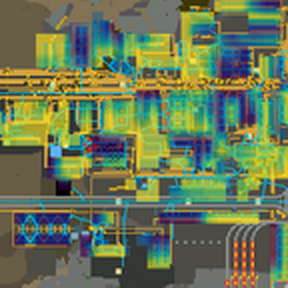
Nine heat map overlays rendered into chart view: damage taken, losses, defence coverage, machine utilization, wasted capacity, turret ammo, accumulator charge, fluid fill and train congestion. Answers where to go next rather than what is happening. Colours are ordered by brightness, so severity reads without relying on colour vision. Collectors run only while someone is looking at a view that needs them, so an unopened overlay costs nothing.
Providing the player with new tools or adjusting the game interface, without fundamentally changing gameplay.
Version: 1.0.0
Date: 2026-08-02
  Info:
    - First stable release. No functional change from 0.12.1; the version marks that the feature set is settled.
    - Nine views: damage taken, losses, defence coverage, utilization, wasted capacity, turret ammo, accumulator charge, fluid fill and train congestion.
    - Collectors run only while someone is looking at a view that needs them, so an overlay nobody has open costs nothing at all. Damage and losses are the exception and are always recorded, because a damage map that forgets the raid you missed has no reason to exist.
Version: 0.12.1
Date: 2026-08-02
  Changes:
    - The control panel now opens in the bottom right corner instead of below the top-of-screen buttons.
    - Mod portal thumbnail is now a real screenshot rather than a generated image.
Version: 0.12.0
Date: 2026-08-02
  Features:
    - Defence coverage view: how many turrets cover each cell, with thin cover drawn bright. Overlapping fire is the point of a turret line, so a stretch of wall covered by one turret is the weak spot even when the corner beside it has eight. Completes the damage story -- damage says where they hit, losses says why it worked, this says where the next one gets through.
    - A cell takes the thinnest cover among the ground it contains rather than the average, so a gap is not hidden by the cluster next to it. Coverage is a disc, not a square, since a box would claim cover 27% further out at the corners than the turret can actually reach.
  Changes:
    - Artillery turrets are excluded. Their range is measured in hundreds of tiles, so they would cover a base uniformly and flatten the contrast the view exists to show, and they do not stop a breach.
    - Only covered ground is drawn: ground with no cover at all reads as open map rather than as maximum danger. Showing true holes needs a notion of where your base ends, which the mod does not have.
Version: 0.11.0
Date: 2026-08-02
  Features:
    - Colour palette setting: viridis, magma or greyscale, switchable from the heatmap panel or the settings screen. All three are ordered by brightness, so severity reads without relying on colour at all; greyscale drops hue entirely for monochrome displays.
    - Mod portal thumbnail.
  Changes:
    - The palette is a global setting rather than per-player. The colour is written into the map's render objects, so per-player palettes would need a separate set of objects for each palette in use, which is exactly the cost the radius and cell budget exist to avoid.
Version: 0.10.1
Date: 2026-08-02
  Bugfixes:
    - Debug labels were unreadably small. They were drawn at a fixed size in world terms, which in chart view -- always zoomed out -- meant permanently tiny. They now keep a constant size on screen.
Version: 0.10.0
Date: 2026-07-31
  Features:
    - /heatmap-debug draws each cell's raw collector numbers as text on top of the current view, so a reading can be checked against a known test setup rather than guessed at from a colour. Only near you and capped at 250 labels, since text is expensive and unreadable zoomed out.
    - /heatmap-dump now takes an optional "x y", to inspect a cell you are not standing in.
  Changes:
    - Debug labels are per-player but stored in the save, so multiplayer clients agree on which render objects exist.
Version: 0.9.0
Date: 2026-07-31
  Features:
    - Cells now coarsen automatically when a base would draw more overlay cells than the render budget allows. The display cell doubles, which cuts the object count fourfold at unchanged coverage, and the panel says so -- a coarsened cell that claimed to be a 16-tile cell would misstate the resolution of everything on screen.
    - Coverage is never truncated to fit the budget. A partial map would silently lie about where the problems are, which is the one failure this overlay cannot afford, so resolution degrades instead.
  Changes:
    - The budget counts render objects rather than cells, so smoothing is accounted for: at smoothing 8 each cell is 64 objects and coarsening starts 64 times sooner.
Version: 0.8.0
Date: 2026-07-30
  Features:
    - Train congestion view: where trains are stuck waiting on a signal, with no path, or with a full destination. Deliberately stopped is not stuck, so trains loading at a station are excluded and a healthy network stays dark.
    - A cell's brightness is the fraction of time a train is stuck there rather than a snapshot, so a routine two-second signal wait does not register and a deadlock climbs to full brightness within about a minute. Full brightness is one train blocked continuously, which is an absolute scale: the same colour means the same thing on any base.
  Changes:
    - Sampled collectors can now opt out of the entity registry. Trains number in the hundreds even on a megabase, so the congestion collector reads the whole surface once a second instead of walking a registry round-robin, and keeps no membership.
Version: 0.7.0
Date: 2026-07-27
  Features:
    - Fluid fill view: mean fill of the pipe segments crossing each cell, so a starved run reads as a dark plateau ending sharply at the pump or consumer that bounds it. Samples whole segments rather than individual pipes, and covers cells from each segment's extent box, which over-covers bent runs but needs no pipe-graph walk.
Version: 0.6.0
Date: 2026-07-27
  Features:
    - Cell size can now be set to 4 tiles, and smoothing up to 8.
  Changes:
    - Base storage resolution lowered from 8x8 to 4x4 so a 4-tile cell is possible. Data is always collected at the base resolution and aggregated up, so this costs more in dense areas even at large cell sizes -- worth it only if you want the finer detail.
    - The control panel opens pinned to the right edge below the top buttons instead of in the centre of the screen. Still draggable.
  Bugfixes:
    - Cell transparency now blends correctly instead of washing bright colours out toward white. Render colours are premultiplied by their alpha, which is what Factorio's rendering expects.
Version: 0.5.0
Date: 2026-07-27
  Features:
    - Turret ammo view: the emptiest turret in each cell, so one dry turret in a wall of full ones stands out as the breach it is rather than being averaged away.
    - Accumulator charge view: the average buffer charge across each cell, for spotting a grid section that is browning out.
    - Both are level collectors -- a point-in-time reading, sampled and overwritten, with no ring buffer and no warm-up.
  Changes:
    - Entity registries and the round-robin sampler are now shared across sampled collectors, one registry namespace per collector. Each collector samples only where a view depending on it is being watched, so an unwatched view costs nothing.
Version: 0.4.0
Date: 2026-07-26
  Features:
    - Damage taken view: where your base got hit, including while you were away. Event-driven and always on, over a five-minute trailing window, so it keeps recording whether or not anyone is looking at it.
    - Losses view: where entities actually died, which is the breach the damage view cannot distinguish from a wall that merely absorbed a hit. Same collector, second counter.
    - Both use a log scale, because one nest attack dwarfs the rest of the map and a linear scale would render everywhere else black.
  Changes:
    - Damage and losses lead the view cycle, so toggling the overlay lands on damage first.
    - Drawing is now collector-agnostic: aggregation, the warm-up notion, and the dump command read a collector's declared cell shape rather than assuming the status counters. This is the groundwork the level and fluid collectors drop into.
Version: 0.3.0
Date: 2026-07-26
  Features:
    - Shortcut bar button, toggleable like the pollution overlay, sharing its toggle with Ctrl+H.
    - Control panel: pick the metric, set cell transparency, radius, cell size and smoothing, and read the scale, all without opening mod settings.
    - Transparency is adjustable at runtime. It is a global rather than per-user setting because alpha is written into the render object, and render objects are game state.
    - The overlay reopens on whichever metric was last selected instead of always resetting to the first.
  Changes:
    - The legend moved into the control panel. The standalone legend frame and its per-user visibility setting are gone; closing the panel now turns the overlay off.
  Bugfixes:
    - Changing transparency no longer gets swallowed by the unchanged-write optimisation, which compares quantised values and cannot see an alpha change.
Version: 0.2.0
Date: 2026-07-26
  Features:
    - Legend showing the colour ramp, the current scale ceiling, how many cells are drawn, and how many are still warming up below the sample floor. Per-user setting to hide it.
    - Optional smoothing. Each cell can be subdivided and blended bilinearly with its neighbours instead of drawing as a flat block. Off by default: object count scales with the square of the subdivision, so 2 is four times the render work and 4 is sixteen times.
    - Sample budget setting caps machines sampled per tick, so a large modded base takes more ticks per pass rather than more time per tick.
  Changes:
    - Missing neighbours are excluded from the interpolation weights rather than treated as zero, so isolated cells keep their colour instead of gaining a dark halo that looks like real data.
Version: 0.1.0
Date: 2026-07-26
  Features:
    - Utilization view: how busy the machines in each cell are, sampled round-robin at 6 Hz.
    - Wasted capacity view: idle fraction scaled by machine count, which answers "where should I go first" rather than "is this area busy".
    - Overlay renders into chart view via LuaRenderObject render_mode, so the engine handles per-client map visibility with no Lua branching.
    - Data is collected at a fixed 8x8 resolution and aggregated to the display cell size at draw time, so cell size can change at runtime without touching any collector.
    - Radius culling around the viewed position. Scan cost is linear in area and independent of entities found, so this is the primary performance control.
    - Machine statuses are classified by a whitelist. Anything unrecognised is excluded from the denominator and logged once, so an unknown status reads as "not counted" rather than as a bottleneck.
    - Runtime-global settings for cell size and radius. Both are global rather than per-user because render objects are game state.
    - Ctrl+H toggles the overlay, Alt+H cycles views, /heatmap and /heatmap-dump for direct control and inspection.