

Cargo Slot Signals
Make quality-items-loaded trains actually leave the station.
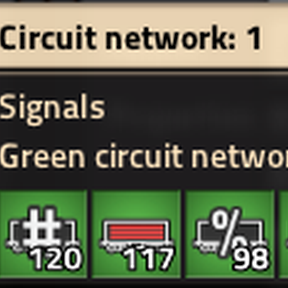
Cargo Slot Signals adds a small panel to every train stop that reads the cargo wagons of the train parked there and puts useful "how full is it really" signals straight onto the stop's circuit network. Open a train stop and tick what you want.
The problem it solves (quality items + trains)
Since Factorio 2.0, mining and quality mean that when you mine an ore patch you don't get one clean stream of items — you get a mix of qualities.
Normal, uncommon, rare and so on all count as different items, and each quality needs its own stack.
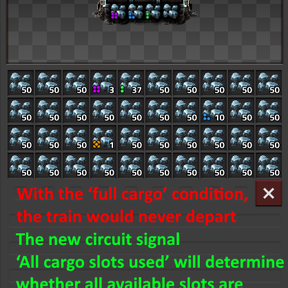
Now try to load a train with that mixed stream. The inserters spread the qualities across many slots, so lots of slots end up occupied but not full. Before long every slot in the wagon is taken by a partial stack of some quality, the belts behind the station jam with items that no longer fit… and the train just sits there.
Why? Because the vanilla "Cargo full" wait condition wants every stack filled to the top. With mixed qualities that almost never happens, so the condition never becomes true and the train never departs. Classic deadlock: full station, jammed belts, a train that waits forever.
The fix
The key signal this mod provides is "All cargo slots used". It becomes 1 (true) the moment every usable slot of the parked train is occupied — regardless of the quality inside and regardless of whether the tacks are full.
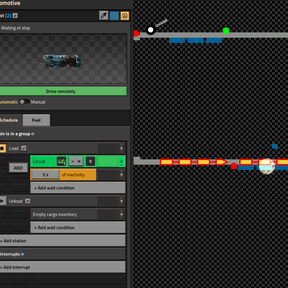
Set the train's wait condition to a simple circuit condition:
Cargo Slot Signals → "All cargo slots used" ≥ 1 → depart
…and the train leaves the instant it is genuinely full by slots. No more deadlock, no more jammed belts, and it works exactly the same whether you're hauling pristine single-quality ore or a mix of every quality tier.
Tip: pair it with an Inactivity condition. "All cargo slots used" can trigger while some stacks are still only partly filled (every slot is taken, but not necessarily topped up). If you add a vanilla Inactivity condition as well — for example "All cargo slots used ≥ 1" and "Inactivity 5s" — the train holds a little longer and gives those partial stacks a chance to fill up. It then departs only once loading has truly stopped: fullest possible cargo, and still no deadlock.
What you get
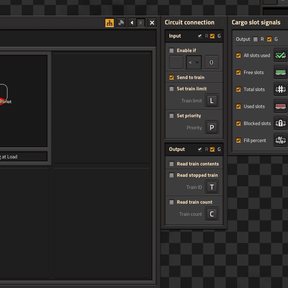
Open any train stop and you'll find a Cargo Slot Signals panel. Tick the values you care about; each one gets its own signal that you can freely reassign:
- All cargo slots used –
1(true) when every usable slot is occupied (the departure trigger) - Free slots – empty, freely loadable slots
- Total slots – every cargo slot on the train
- Used slots – occupied, freely loadable slots
- Blocked slots – bar-locked + filtered slots (capacity you deliberately keep free)
- Fill percent – how full the usable capacity is, 0–100
Bar-locked and filtered slots are handled for you: they're never counted as "free", so you don't have to compensate for them in your wait condition. All values update live while the train is parked, so changing a wagon's bar or filters is reflected immediately.
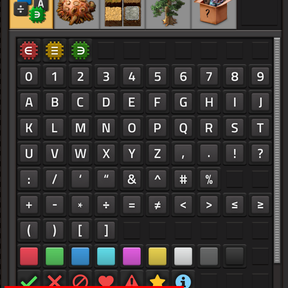
You can also choose whether the signals go out on the red or green wire (or both), just like the vanilla circuit panels. Default is green only.
Two things to keep in mind with the channel choice:
- Turning on both R and G doubles the values. Each signal is then placed on both networks, and the stopped train reads them combined — so "All cargo slots used" shows up as
2instead of1in your departure condition (compare against≥ 1, or just stick to a single channel). - If you want to read these signals elsewhere (lamps, further circuit logic), connect your wire to the train stop on the same colour you selected here — green signals need a green wire, red signals a red wire. Otherwise the values won't be where you're looking for them.
Everything is saved in blueprints and copy-paste, so once you've set up one loading station you can stamp it everywhere.
Performance / UPS
Short version: this mod is built to be cheap, and it scales with the number of stations that are actively loading — not with how many train stops you have.
A few things that keep it light:
- Unconfigured stops cost nothing. If you haven't ticked any signal on a stop, it does zero work. You can have thousands of train stops and only pay for the handful you actually use.
- No periodic spikes. The work is spread evenly across ticks instead of doing everything at once every half-second, so there's no stutter even with lots of configured stations.
- It only writes when something changes. A parked, fully-loaded or idle train doesn't keep poking the circuit network — updates only happen while values are actually moving (i.e. while a train is loading).
- The expensive bit is opt-in. Counting bar/filtered slots is the only pricey operation, and it only runs if you enabled a signal that needs it (Blocked, Used or Fill percent). If you just use the departure trigger, no slot scanning happens at all.
In practice the cost tracks the number of trains that are loading right now, which even in a large base is a small, bounded number. It's comfortable for megabases.
Good to know
- Automatic trains only. The signals reflect the train that is stopped at the station in automatic mode (i.e. it arrived via its schedule). Trains you place or drive manually are intentionally not tracked — this keeps the behaviour predictable and the mod cheap. Set a train to automatic and let it pull in, and the signals appear.
- Items only, not fluids. This is about cargo wagon slots.
- No new tech or recipe. The panel is available on train stops out of the box (train stops are already unlocked by Automated rail transportation).
AI
Mod concept & design by Morlot.
Implementation developed with the help of Claude (AI assistant by Anthropic).