
Auto Train Track
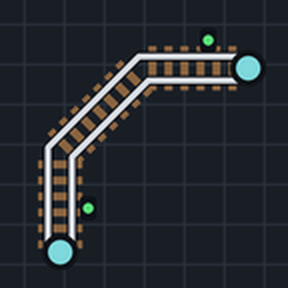
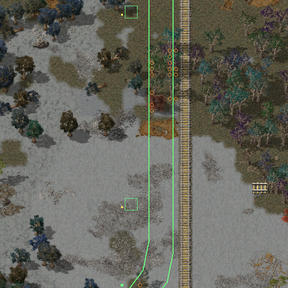
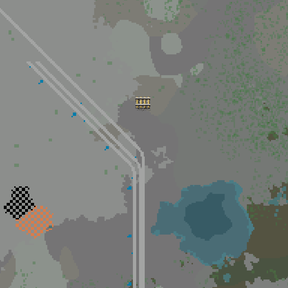
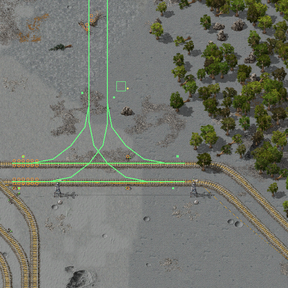
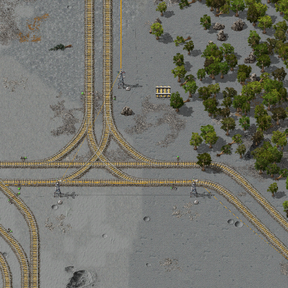
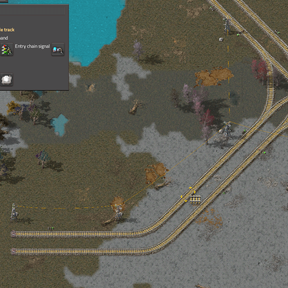
Click a start and an end, and get a rail line between them: single or double track, with signals, power poles and lamps if you want them. Preview the route, then place ghosts for construction robots or build it for free when the map allows it.
Controls
- Press Alt+T or use the shortcut to take the auto train track planner.
- Choose in the panel: Ghost or Free placement, Single or Double track, the traffic side for a double track, the signal spacing (0 for no periodic signals), the rail signal, the chain signal for crossing and junction entries and the rail planner, the electric pole (none by default) and, with a pole, the Lamps box and the lamp. Ghost placement is the default. The spacing starts at 0 for single track and 50 for double track.
- Click the start, then the end on the same surface. A click on an empty tile snaps to the rail grid; a click on the free end of a rail or rail ghost continues that rail; a click in the middle of a straight cardinal or diagonal stretch builds a T-junction there (see Junctions). Either endpoint can use any of these forms. With Double selected, a free-end click needs the matching free end on the partner track; a junction click can be on either track of the existing double line.
- Wait for the route preview, then click the route or press Build.
Right-click or Shift-click with the planner, or press Cancel, to cancel. Shift+T switches single and double track while you hold the planner. If construction is blocked, click the red marker to continue from the last completed rail. See Recovery for unfinished crossings and junctions.
Route rules
- Routes use straight, half-diagonal and curved rails of the chosen rail planner.
- Routes prefer fewer curves, then a shorter length. They run beside existing straight rails at the configured gap and keep clear of machines where possible.
- Trees and rocks on the route are cleared: marked for deconstruction with Ghost, removed with Free. Water and cliffs are avoided.
- A double track runs one way per track. Each track's signals stand on the right of its direction of travel; single track with periodic signals enabled is one-way, from the start to the end.
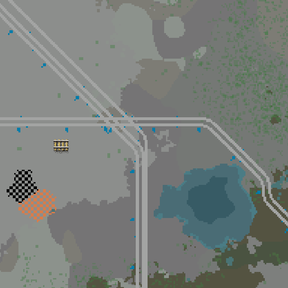
- Routes can cross existing straight ground rails and rail ghosts of your own force at supported non-parallel angles, including diagonal crossings. Rails of other forces are never crossed. Crossings have a high routing cost, so routes prefer to go around when practical. Existing rails stay in place.
- Crossings require chain signals before and rail signals after the protected area on both lines, even when periodic signal spacing is 0. The nearest signals or signal ghosts along the old straight segment determine its travel direction. Missing or conflicting direction evidence gives bidirectional protection; new single track with periodic signals off is also bidirectional.
- Nearby crossings share a protected area. Required signals take priority over periodic signals, poles and lamps. If existing signals, obstacles or track ends leave no room for this protection, the route cannot be built there; the search tries a detour where possible or reports that there is no room for crossing signals. An obstruction that appears during construction stops the build and allows a reroute.
- Poles stand right of the direction from the start to the end, outside the right-hand track and clear of its signals, as far apart as their wire reach allows. A taken spot moves a pole back to the last free spot in reach. Each lamp stands next to its pole, away from the track.
Junctions
- A click in the middle of an existing straight cardinal or diagonal stretch of your own force, real rails or ghosts, fits a T-junction there: either end of the route can start or end at one. The junction has every turning move, and the route continues from the end of its branch.
- Single track junctions join a single line. With Double selected, the click goes on either track of a double line at the configured spacing of 4, 6 or 8 tiles. Cardinal and diagonal junctions support all three spacings and both left-hand and right-hand traffic.
- The junction is fitted near the click, on the side of the line the route leaves from. If the spot nearest the click is taken, it slides a few tiles along the stretch.
- The existing straight rails of the stretch are kept and become the junction's main line. Its other rails are built new; existing rails are never removed or replaced.
- Each end of the junction gets a chain signal for trains entering it and a rail signal for trains leaving it. A single track junction signals both directions; a double track junction signals each track in its direction of travel. Existing signals outside the junction are not changed.
- Matching boundary signals are kept. Other signals, power poles and lamps of your own force inside the junction area are marked for deconstruction with Ghost and removed with Free; their ghosts are removed immediately in either mode. Foreign rails, signals, poles and lamps block the junction and are kept. Trees and rocks are cleared as on the route. Any other entity in the area blocks the junction.
- When the stretch is too short, is a curve, or has an obstacle everywhere the junction could go, the message reads "No room for a junction here." and a marker shows the obstacle or the missing rail. When the double line's existing signals drive on the other side, the message asks you to switch the traffic side in the panel. A click on a single track with Double selected says the partner track is missing.
- If the map changes before the build, a new obstacle in the junction area blocks the build, and the red marker offers the junction again. Signals, poles and lamps of your own force added after the preview are removed like the others; foreign infrastructure blocks the build.
Recovery
A blocked build keeps a red marker. Click it to continue from the last completed rail and finish the route. If rails have already been laid through a crossing, the reroute protects the retained rails together with the new route, placing the exit signals on the new path. An unfinished junction is kept for the retry too.
Unfinished crossings and junctions keep their markers when a retry fails, is cancelled, or you start another route. Several blocked builds can remain available at once. Cancelling a retry first returns its marker; cancelling again with no route selected drops the active recovery record and reports the locations of unfinished crossings or junctions. Already placed entities stay on the map, so finish any protection named in that message before using the line.
Practical limits
- Junctions need a long enough straight stretch and space for the complete template. Curves and half-diagonal stretches cannot host a T-junction. Existing branches or obstacles can prevent a fit even when the clicked tile looks free.
- Crossings need room for signals on both lines. Dense existing signals, nearby junctions, curves or track ends can force a detour or make a route impossible. Existing lines are not re-signalled beyond the protected crossing or junction area.
- Crossing areas are merged at a fixed distance, without considering train length. Leave enough room between separate areas for your longest train to clear them.
- Ghost placement leaves construction and deconstruction to robots. Free placement adds real entities without spending items when the map setting allows it. Existing main-line rail ghosts are kept in either mode; build them before running trains.
- Searches have a finite effort limit and can fail on long or tightly obstructed routes. Try a closer endpoint or leave more room around existing infrastructure.
Map settings
These settings apply to the whole map.
| Setting | Default | Effect |
|---|---|---|
| Allow free placement | On | Allows real entities to be placed without spending items. Turn off to require ghosts. |
| Route search budget per tick | 150 | Work units shared by all players' searches each tick. Higher values find routes faster but cost more time per tick. |
| Entities built per tick | 150 | Maximum number of rails, signals, poles, lamps, trees and rocks handled each tick while a route is built. |
| Route search limit | 5,000,000 | Work units a search may spend before giving up. |
| Double track spacing | 4 | Tiles between the centres of the two tracks on straight north-south and east-west runs (4, 6 or 8). |
| Gap to parallel lines | 4 | Routes prefer to run this many tiles from the edge of existing straight rails. |
Compatibility
Requires Factorio 2.0. Space Age is optional. Any rail planner item that provides straight, half-diagonal and both curved ground rails can be chosen. Elevated rails are not used yet.
Performance
Routes are calculated in the background with a fixed work budget per tick, shared by all players. Construction is spread over ticks in bounded batches. Long or difficult routes can take a while, and long routes across existing lines take longer to find than routes over open ground; a higher search budget finds them sooner at the cost of more time per tick.