
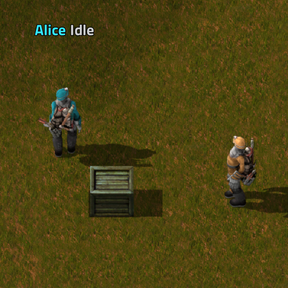
Workers Union adds autonomous human workers who build your factory the old-fashioned way.
Mods introducing new content into the game.
Version: 1.1.2
Date: 2026-10-23
  Major Features:
    - Factorio 2.1 only. From this version Workers-Union is made for Factorio 2.1; players on Factorio 2.0
      keep 1.1.0, the last version for it.
  Features:
    - Controller support. A Workers shortcut opens the Workers window from the quick panel (Tools), the
      shortcut bar or its own control. The station panel, the Workers window, worker windows and the Workers'
      Union Agreement all take the controller's focus. The shoulder buttons go to the previous and next page
      of the station panel and the Workers window. Text in a scroll area inside a scrolling page (the handbook
      on the Guide page, the agreement) can be stepped through and scrolls along. The live camera can be
      selected, and on a controller the agreement is signed with the tick alone.
    - Crew guns. A mobile crew can be given guns and ammo on its Mobile Crew page and shoots biters and other
      enemies within its gun's range by itself. The range is shown next to the slots and as a circle around
      each worker. "Shoot enemies", on the Mobile Crew page and in the Worker requests panel, takes effect at
      once. When the crew ends the guns go back to you, or home.
    - Crew armour. Crew workers have an armour slot, with its resistances and the worker's health shown next
      to it. When the crew ends it goes back to you if you are close, otherwise the worker wears it home and
      stores it at its station.
    - Crew orders. Open a crew worker that is following you (click it, or the open button on a controller) and
      its commands come up round it, no window, click off them to close: Stay close, Inventory (guns, ammo and
      armour next to your own, away from the station too), Scout a spot, Attack area, Come back, Send home,
      Hold fire and its Worker window. Scout and Attack switch to the map view: click a spot, or draw over
      enemy nests and worms and tick who goes. Scouts chart the way, report what they saw and come back.
      Attackers fight until the area is clear, each pulling back by itself when out of ammo or badly hurt, and
      you get one report of who came back, who pulled back and who died.
  Changes:
    - Plan routes is unlocked from the start, with the Grey Cup, instead of the Silver Cup. The Silver Cup
      keeps its walking, pockets and work speed bonuses.
    - Routes fill empty furnaces with raw items: what the furnace smelted last, else the ore there is most of
      in the route's Take from chests and the station. Plates only go in when there is no ore, so iron plates
      don't turn into steel by accident.
    - Mobile Crew: while following, workers run as fast as you (exoskeletons included), a little faster when
      behind, and go back to their own speed when they take a job or go home.
    - The handbook covers everything new, and tooltips are updated to match. On the Guide page the chapter
      list runs down to the Previous / Next buttons on taller screens.
  Bugfixes:
    - Mobile Crew: following was loose and stop-start. Workers now walk your trail directly and only use the
      pathfinder to reach it, or when something blocks it.
    - Mobile Crew: workers fell further and further behind a running player.
    - Mobile Crew: a worker could run round and round the player. Workers now cut across when your path loops
      back near them, step aside when you walk towards them, go round you instead of into you, and stay put
      once they are near you while you stand still.
    - Mobile Crew: following looked laggy, like a game out of sync, because workers stopped and set off again
      every few ticks. While you move they now keep walking and hold their distance with their speed.
Version: 1.1.1
Date: 2026-10-17
  Major Features:
    - Mobile Crew (Copper Cup): take some of a station's workers along with you. A new Mobile Crew page sits
      under Workers in the station panel: tick the workers, pick Follow only or Follow and work and a working
      radius (12, 24, 36 or 48 tiles), and press Deploy crew. They are the same workers, with their names,
      pockets and research bonuses, and still count at their station. They follow you on foot. On Follow and
      work they also build "Build with workers" blueprints, repair and salvage within the radius around you,
      as each worker's Helps with boxes allow,
      with materials from their pockets and from chests and belts nearby. When you move well past the radius
      for a while, work they started is dropped and they catch up. Send crew home ends the crew: they walk
      home, store what they carry and work for their station again. The page shows each worker's status and
      a summary (following, working, waiting, can't reach you, going home).
    - Mobile Crew: the crew waits while you are in a vehicle, on another surface, dead or offline, and goes home
      by itself after 5 minutes offline or on another surface. Changing force or leaving the game sends it
      home. A worker belongs to one player's crew at a time; workers on a route can't join. Nobody is
      teleported.
    - Emergency factory salvage (Copper Cup): when one of your buildings is destroyed, workers pick up the items
      left lying on the ground around it and bring them to their station. Tick "Emergency factory salvage" on
      a station's Settings page (off by default). Only items really on the ground are picked up: a destroyed
      building itself is gone and is never recovered, damaged buildings are repaired as before, and nothing
      standing is taken down. Workers wait while enemies are nearby and try again later; a full station means
      they keep the items until there is room. Salvage has its own line on the Priorities page, High by
      default, and each worker a "Help with emergency salvage" box. A crew on Follow and work salvages around
      you if its station has salvage ticked.
  Features:
    - Worker colours: the worker window and the Workers page have a Colour section with the 12 station
      colours, R / G / B sliders for any other colour, My colour (your player colour) and Reset colour. Tick
      "All workers at this station" to recolour the whole crew, including workers it gets later; unticked, only
      that worker changes. Stations keep their own colour on the map and in their label.
    - Smart construction (experimental, off by default): a second tick box under "Build with workers" in the
      blueprint window. Builders follow an order: floor tiles, power poles, machines, belts / inserters /
      pipes, everything else, modules last. Each builder finishes the patch it is in before moving on. A step
      with nothing to build it from is passed over for now and picked up again later.
    - Opportunistic hand-crafting (Settings page, on by default): builders and deliveries craft an item when its
      parts are close and the ready-made one is far enough away that crafting is clearly quicker. If the craft
      can't be done after all they go for the ready-made one. A builder that already carries the parts crafts
      on the spot.
    - Workers remember which chests supplied them. A chest that keeps handing out an item is tried first; one
      that turns out empty when they get there (inserters got there first) counts as a bit further away for a
      while. New and restocked chests are still found as before.
    - Hauling has a third mode, "Move everything, keep going": like a route from one chest to the other. When
      the source is empty the workers wait for more instead of ending the job. It runs until you cancel it.
    - New handbook chapters: Mobile crew and Emergency salvage.
  Changes:
    - The Workers page shows the worker itself next to its name, moving and in its own colours, like the
      Overview, instead of a fixed icon.
    - The live views of a worker (under Add worker, and the worker window's camera) are zoomed in further, so
      the worker can be seen clearly. The boxes keep their size.
    - The Overview's worker line also says how many workers are out with a crew or salvaging.
    - The station Settings page starts with the station's own Emergency factory salvage box, then the
      map-wide settings. Priorities: "Reset all to Normal" is now "Reset all to defaults" (salvage goes back
      to High).
    - Copper Cup also unlocks Mobile crew and Emergency salvage. Saves that already have it get both at once.
    - Claims on a chest end as soon as the worker that made them is removed, or the chest is gone, instead of
      after a minute. A claim now ends per item when that item is picked up.
    - Recipes with fluids or random products are no longer hand-crafted.
  Bugfixes:
    - Hand-crafting a recipe with more than one product only gave the main product; the others were lost.
      All products come out now.
  New Feature Fixes:
    - Opportunistic hand-crafting: a builder that already carried the parts took them home first instead of
      crafting on the spot.
    - Mobile Crew: a worker sent home could keep showing "going home" after it had arrived.
    - Opportunistic hand-crafting: on big jobs builders kept every leftover that any ghost's recipe used, so
      their pockets filled up and some items were given up on. They only keep what they can craft with right
      away; other leftovers go home as before.
Version: 1.0.1
Date: 2026-10-16
  Major Features:
    - VERSION 1.0 - the Worker Station's new panel, a Workers window, Plan routes, builders that finish the
      whole blueprint (tiles, modules, upgrades), walking through poles, inserters and pipes, and much more.
      Existing saves update by themselves: stations, workers, jobs and research are kept.
    - New station panel. Every Worker Station now opens it, stations already placed included: their storage,
      workers, jobs, routes and settings stay as they are. It replaces the chest window: your inventory on the
      left, and on the right a menu of nine pages (Overview, Workers, Jobs, Routes, Priorities, Area, Circuit,
      Guide and Settings). Both inventories work like the game's own (click, right-click, shift-click,
      ctrl-click). Pages that need research appear once it is done (Circuit: Copper Cup, Routes: Silver Cup,
      Priorities: Gold Cup) and disappear if it is lost. The panel keeps the same size on every page; a longer
      page scrolls inside it.
    - Workers window. The Workers button (top left) opens it, with the station panel's look and two pages.
      Workers lists every worker of your team with its station's number: pick one to see and change it, as on
      a station's Workers page. A long list scrolls instead of stretching the window. Settings has the
      map-wide settings, the same as a station's Settings page.
    - Live view: the selected worker, live, under the worker list on a station's Workers page and in the
      Workers window. Click it for the full worker window.
    - Plan routes (Silver Cup), on the station's Routes page. Press Scan now and the station lists the
      machinery and chests in its working area (or around it), sorted into Needs fuel, Needs ammo, Produces
      items, Consumes items and Storage. Tick what the workers should look after and how many to keep in each,
      assign workers, and they keep it going: burners fuelled, turrets loaded, machines and labs supplied,
      outputs emptied into the station or a drop-off chest.
    - Routes are smart: workers only visit what needs it, nearest first, and carry supplies for many buildings
      in one trip, every ingredient a building needs at once. They measure how fast each burner uses fuel and
      come back before it runs dry, leave turrets that are not firing alone, and hand-craft magazines from
      plates when there are none. They stand where builders would, on a free, open spot up to a player's reach
      away. Several workers can share a route, each station can have several routes (one tab each), and a
      route can let its workers help with building between rounds. Click a building's icon to tick it, or a
      building type in a group's header to tick every one of that type.
    - Builders finish the whole blueprint: tiles (stone path, concrete, refined concrete, landfill, space
      platform foundation and modded tiles), the modules a blueprint puts into its machines (right after each
      machine is built), and upgrade planner orders. Materials come from the station, your chests and belts,
      or are hand-crafted where a recipe allows it (landfill from stone, modules from circuits, faster belts
      from gears and slower belts). Tiles of "Build with workers" blueprints are laid automatically too.
    - Upgrade planner: mark buildings for upgrade, drag the Harvest tool over them and tick "Upgrade marked
      buildings". Workers swap them the way a player does: belt items and chest contents stay where they are,
      and the old buildings are carried home to the station when the job is done.
    - Build and deconstruct in one order: tick both "Build ghosts" and "Marked for deconstruction" in the
      Harvest window. Workers first take down marked things standing where a ghost goes, then build, then take
      down the rest, and finally try again any ghost they could not reach the first time.
    - Walk through buildings: new startup settings "Walk through power poles", "Walk through inserters" and
      "Walk through pipes" (all on by default). Players and workers walk through these buildings of every
      type, modded ones included, so a worker can no longer be shut into a mining lane. Vehicles, biters and
      gunfire still collide with them as before.
  Features:
    - Jobs page: each running job shows an icon for what it works on (wood, stone, the ore it mines, the item
      a haul carries, a blueprint, the upgrade planner). Copy opens the Harvest or Haul window with the job's
      area and choices filled in and only idle workers ticked; while the job still runs, the workers you pick
      join it. Automatic jobs and deliveries can't be copied.
    - Jobs page: jobs that finished or stopped can be cleared from Finished recently, one at a time or all
      with Clear list. New setting "Clear finished jobs from the Jobs page by themselves" (off by default;
      after 10 minutes, adjustable).
    - Select all and Unselect all buttons in the Harvest and Haul windows.
    - 100 worker names (was 12).
    - The handbook is written for the new station panel and Workers window, with new chapters The station
      panel, Job icons and copying jobs, Plan routes and Walking through buildings. Every chapter names the
      page where things are, and the chapter list scrolls so every chapter fits.
    - The Silver Cup's research now also unlocks Plan routes (shown in the tech tree).
    - /aw-chest-test has nine new rows: stone path tiles from bricks, landfill hand-crafted and laid on water,
      modules for a machine and for a machine ghost, a belt upgrade, a quality check, a miner line whose belt
      lane is closed off by poles, a dense three-lane mining field, a route keeping furnaces fuelled, and a
      route loading turrets with hand-crafted magazines.
  Changes:
    - Recipes: the Worker Station now costs 8 stone bricks, 10 wood and 10 iron plates; a Worker costs 1 fish,
      5 iron gear wheels and 5 iron plates. A station is now dearer than a worker, so adding workers is the
      cheaper way to grow.
    - Harvest and Haul windows opened from the toolbar no longer tick every worker. Opened from a station they
      tick its idle workers (all of them when none is idle).
    - The Workers button opens the new Workers window instead of the old overview. Its jobs list and debug
      counters are gone: each station's Jobs page lists its jobs, and /aw-jobs and /aw-stats give the numbers.
      Settings are a page of the window instead of a separate window.
    - The go-home rule reads more plainly: "When to go home", with "When its pockets are full" or "Go home
      after [N] items", and a line saying what the rule does.
    - The Harvest window offers "Build ghosts, tiles and modules (N)" and "Upgrade marked buildings (N)".
      Building and upgrading can be ordered together.
    - Testing mode also unlocks Plan routes, job priorities and working areas.
    - The Copper and Gold Cup descriptions, the research effects, the Harvest tool's description and the
      "Build with workers" tooltips mention tiles, modules, the upgrade planner and the panel page of each
      feature. The handbook's building chapter explains tiles, modules, upgrades and quality, and "What your
      workers are telling you" explains the new messages.
  Bugfixes:
    - Fixed builders skipping belts and poles inside the lanes of mining fields (a belt lane between two rows
      of drills, closed off by poles or by the drills meeting at its ends). Builders now reach as far as a
      player (10 tiles) and build into the lane from outside the drills. A closed-off spot is remembered, so
      no worker tries to walk into it again.
    - Fixed a dismissed worker's pockets being dropped wherever it stood. What it carries goes into its
      station; what does not fit is dropped next to the station.
    - Fixed higher-quality ghosts, upgrades and module requests being skipped without a word. Workers build
      with normal quality only, so the job's message now says how many were left for you or your robots.
  New Feature Fixes:
    - Plan routes: workers on a fuel-only route took plates out of furnaces. "Add to route" ticked new
      buildings in every group they belong to; it now ticks them only in the groups the route already uses.
    - Plan routes: stops between drills and furnaces showed "can't be reached" while the worker stood next to
      them. Route workers now pick a free, open spot like builders do.
    - Plan routes: ticking a building scrolled the list back to the top.
    - Plan routes: a building with two or more ingredients made its supply row jump around, and workers
      brought only one of the ingredients. The row now shows each ingredient's count and workers bring all of
      them.
    - Plan routes: the worker list ran into the Assign button.
    - Station panel: rows ran off the edge of the panel (Dismiss cut off, the Area page's right column
      clipped).
    - Station panel: the window changed size from page to page (Routes made it much taller).
    - Station panel: the Settings list used only part of the page.
    - Copy: copying a job that was still running put a second label on top of the first; the copy now joins
      the running job.
Version: 0.2.6
Date: 2026-10-12
  Major Features:
    - MAJOR UPDATE - the Workers' Union Handbook, smarter builders that plan their trips and find every chest,
      and fixes for the problems reported on the mod page.
    - The Workers' Union Handbook: an in-game guide to everything workers can do. Your first Worker Station
      comes with the handbook in its storage slots - right-click it to read it. 13 chapters: getting started,
      harvesting, hauling, building and deconstruction, repairs, Worker requests, carry rules, Recall and
      Cancel, circuit control, the five research Cups (with the ones your force already has), job priorities
      and working areas, what your workers' messages mean, and settings and commands.
    - Next to each chapter's title the handbook shows which research Cup the feature comes with (green once
      researched). Chapters that need research you have not done yet still explain the feature, with a note
      saying which Cup unlocks it and a button that shows it in the tech tree; the note disappears as soon as
      you research it.
    - Players of existing saves get the handbook in their inventory when they load this update (in their
      nearest station if their inventory is full; offline players when they next join). It also opens with the
      new Guide button in every station panel and with /aw-guide (for example /aw-guide haul). Lost it? The
      button at the bottom of the guide puts a new copy in your inventory.
  Features:
    - New setting (per player) "Job messages in chat": switch off the "Job #N complete / cancelled" chat lines
      for your jobs.
    - New admin command /aw-chest-test: an automatic test of how workers handle every kind of chest and belt
      in the game (base game and other mods), on a separate test surface, without any research. For every
      chest type: a worker hauls random items from its station into one chest of that type and on into a
      second one; the same again with a small carry rule so every haul takes several trips; two builders far
      from home have to find their materials in chests of that type next to their stations without taking the
      same item; and a builder far from home hand-crafts a belt line from iron plates kept in that chest. For
      every belt type (belts, underground belts, splitters): a builder far from home has to find its materials
      on that belt, and a leftover has to go back onto it. Every row is checked (nothing lost, nothing left
      behind) and the result is written to script-output/workers-union/chest-test.log in your Factorio folder,
      with a summary in chat. "/aw-chest-test watch" takes you to the test surface, "leave" brings you back,
      "clear" removes it.
  Changes:
    - Recall now means "come home and empty your pockets": the worker walks home, stores what it carries, then
      goes back to the same job. Cancel job stops the worker: it leaves its job, walks home and stores what it
      carries. The worker window has both buttons, the station panel has Recall all and Cancel all, and /aw-
      recall works like Recall.
    - Item deliveries to players no longer post "Job complete" in chat (the Worker requests panel already
      shows their progress). Job messages now only go to the player who gave the job, never to everyone.
    - Workers find materials in more kinds of chests: linked chests and infinity chests too, so modded chests
      of those kinds (for example from Space Exploration) are found.
    - A worker that is away from home also searches the chests around its own Worker Station, so chests next
      to the station are no longer "forgotten" when the worker happens to be far from them. Example: iron
      plates in a chest next to the station and a belt line being built far away - the first trip found the
      plates, but later trips started at the build site and the workers waited with "none in chests/belts
      nearby" next to a full chest. Now every trip finds them.
    - Two workers no longer count on the same items: a worker that heads for a chest reserves the items it is
      going to take, and other workers look elsewhere (or wait) instead of walking to the same chest for the
      same plates. This stops construction and Worker requests from fighting over the same materials.
    - Builders that hand-craft plan the trip first: they work out what the ghosts they are building need (down
      to the base materials, for example iron plates for a belt line) and fetch for as many of them as they
      can carry in one go, instead of at most 10 at a time. A 100-belt line from iron plates now takes one
      trip instead of ten. The worker's carry rule is respected.
    - Builders find a free spot to stand in tight blueprints (rows of mining drills, walled-in machines)
      instead of trying to stand inside other ghosts or buildings.
  Bugfixes:
    - Fixed hand-crafted leftovers being "returned" to the belt or chest the ingredients came from (iron
      sticks put on an iron plate belt). Only items that were taken from somewhere are put back there; crafted
      leftovers go to the worker's station.
    - Fixed workers fetching parts for something they could not finish crafting (a missing material nobody
      has), carrying the parts back and starting again in a loop. A worker now checks the whole recipe first
      and says "cannot make X: no Y nearby".
    - Fixed workers walking at a chest they could not get to, over and over, for good (found with /aw-chest-
      test on the odd-shaped crash-site wrecks). A worker that cannot reach a chest the usual way now tries a
      free spot right next to it; a worker that still cannot reach it looks for its materials somewhere else
      for a few minutes; and a haul whose chest cannot be reached ends with that reason instead of running
      forever.
    - Fixed "Build with workers" ghosts being dropped for good when they were waiting for a builder while the
      force lost the research for building. They now wait until building is possible again.
Version: 0.2.5
Date: 2026-10-10
  Info:
    - The changelog now lists version 0.1.3 (Factorio 2.1: 0.2.3) on its own, as it was released; its notes
      had been merged into 0.1.2 (0.2.2). No changes to the mod itself.
Version: 0.2.4
Date: 2026-10-10
  Major Features:
    - MAJOR UPDATE - the biggest Workers-Union update so far: a five-cup research tree, worker upgrades, job
      priorities, working areas shown on the map, and the Workers' Union Collective Agreement.
    - Research progression: five teacup technologies, one after the other, spread over the game.
      Grey Cup - Basic Workforce (30 red science, after Logistics): Worker Station and Worker recipes, the
      Harvest button (trees, rocks and ore), hauling between chests, and extra workers per station.
    - Copper Cup - Construction & Maintenance (75 red + green, after Logistic science pack and Repair pack):
      building ghosts and "Build with workers" blueprints, clearing things marked for deconstruction,
      repairing damaged buildings with repair packs (including damage from before you had it), Worker
      requests (deliveries to you) and circuit control of stations.
    - Silver Cup - Improved Workforce (150 red + green, after Steel processing): workers walk 30% faster,
      work 25% faster (mining, hand-crafting, placing buildings, repairing) and carry 10 more inventory slots.
    - Gold Cup - Advanced Workforce (250 red + green + blue, after Chemical science pack): one more worker per
      station, walking +20% and work +25% more, and Worker management (job priorities and working areas).
    - Green Cup - Master Workforce (400 red + green + blue, after Robotics): one more worker per station,
      10 more slots, walking +20% and work +50% more. Fully upgraded workers walk 70% faster (still slower
      than you), work twice as fast, carry 40 slots, and a station holds 5 workers.
    - Research upgrades every station and worker of your force at once, even workers in the middle of a
      job, and new workers and stations start with everything researched. Buttons and tick boxes for
      things you have not researched yet are greyed out and tell you which cup unlocks them.
    - Worker management (Gold Cup) - job priorities per station: Construction, Repairs, Deconstruction,
      Hauling, Gathering and Deliveries can each be set to Highest, High, Normal, Low or Disabled. Idle
      workers take automatic work (blueprints, repairs, deliveries) in priority order; if the most important
      job cannot be done right now (no materials, out of reach) they take the next one. Disabled means the
      station takes no new work of that kind, automatic or ordered; jobs already running finish.
    - Worker management (Gold Cup) - working area per station: press "Configure working area" and drag a
      rectangle anywhere on the surface (its own cyan tool, separate from Harvest). The station's workers
      then only accept building, repair and deconstruction work and haul destinations inside it; they can
      still walk outside it to get there or fetch materials. "Reset" goes back to the default (around the
      station). Gathering is still decided by the Harvest selection.
    - Working areas on the map: every configured working area is outlined on the map (M) in its station's
      colour - the colour its workers wear - with a faint fill and brighter corners. Only on the map, never
      in the game world. The station whose panel you have open is highlighted. "Show worker working areas on
      the map" in the station panel is your own setting; other forces never see your areas.
    - The Workers' Union Collective Agreement: the first time you place a Worker Station, the union asks you
      to sign its (very serious) agreement - biters, trains, raw fish, Gerald. Scroll to the bottom, tick that
      you read it, type "agree" and sign. Each player signs once; "Remind me later" brings it back after 10
      minutes. Players updating a save that already has stations are asked when they load it.
  Features:
    - The station panel shows the workforce tier at the top: the teacup of your highest cup, the tier name
      (for example "Tier 3 - Improved Workforce (Silver Cup)"), the next cup to research, the real bonuses and
      the jobs your workers can do. It updates by itself when research finishes while it is open.
    - New command /aw-research: your force's cups and the bonuses your workers get.
    - New command /aw-agreement: read the Workers' Union agreement again.
  Changes:
    - Saves from earlier versions keep everything they could do: forces that used workers get the Grey and
      Copper Cups researched automatically when loading. The Silver, Gold and Green Cups have to be researched.
    - Testing mode (startup setting, "skip the Grey and Copper Cup research") is now off by default - for
      everyone, including players who had it on before. Turn it on to have the Worker Station recipe and the
      Grey and Copper features without research; the bonus cups always need research.
    - The testing commands /aw-give, /aw-spawn, /aw-stuff and /aw-stress can only be used by admins (in single
      player you are the admin).
    - The "inventory full" setting at its maximum (20) now means completely full, so the extra slots from
      research are used.
    - Factorio 2.0 version: needs Factorio 2.0.56 or newer.
  Bugfixes:
    - Automatic building ignored the station's circuit condition (repairs and deliveries already obeyed it),
      so a station that was switched off could still claim a blueprint. It now waits like the rest.
    - Test commands typed into a dedicated server's console could crash the game.
Version: 0.2.3
Date: 2026-10-05
  Major Features:
    - Worker requests: workers hand-craft what you asked for when it is not available ready-made, from parts
      nearby.
  Features:
    - Progress above every job's area: a bar and a line such as "Trees - 34 / 120 - 86 left - about 2m 10s".
      Ore areas show how much was mined and how much is left in the area. Unreachable targets that were
      skipped are listed under the bar.
    - Job areas recount what is really left in them every second; an area with nothing left closes at once.
    - Tooltips on every button, box and setting, explaining what it does and how to use it.
  Bugfixes:
    - Fixed parts of a "Build with workers" blueprint never being built when its job was cancelled or its
      workers were recalled or dismissed; the unbuilt ghosts now go back to the automatic building queue.
    - Fixed damaged buildings never being repaired when their repair job was cancelled or its worker was
      recalled or dismissed (until they took new damage); they now go back to the automatic repair queue.
    - Fixed a harvest area sometimes staying on the map after everything in it was gone.
    - When "Builders may hand-craft missing items" is switched off, workers now say so ("hand-crafting is
      switched off in Settings") instead of only "none nearby" - this looked like workers could not make
      even basic items such as transport belts.
    - Fixed Worker requests never arriving for items that had to be crafted (for example transport belts
      when only iron plates were stored).
Version: 0.2.2
Date: 2026-10-05
  Major Features:
    - Several workers per station. A station still comes with one worker; press "Add worker" in its panel
      to add more, up to 3 per station (a setting). Each extra worker uses a crafted Worker item, taken
      from your inventory or the station. Dismiss sends a worker away and gives its Worker item back.
    - Workers repair damaged buildings with repair packs. Drag the Harvest tool over damaged buildings and
      tick "Repair damaged buildings", or let idle workers repair damaged buildings near their station
      automatically. Repair packs are fetched from stations, chests and belts; unused ones are put back.
    - Worker requests: a panel next to your inventory where you list items and amounts, and idle workers
      bring them to you when you are near a Worker Station - like logistic robots, from the start of the
      game. The worker follows you as you move. Deliveries can be paused, and the panel can be hidden.
    - Circuit network control for Worker Stations: "Work only while <signal> <comparison> <value>". Wire a
      station to a circuit network and its workers only take new work while the condition holds (for
      example "haul while iron plate < 100"). What a worker has in hand is finished first.
  Features:
    - New item and recipe: Worker (10 iron plate, 5 iron gear wheel, 5 wood), unlocked with the Worker
      Station.
    - Mining a station gives back the Worker items of its extra workers; if a station is destroyed they
      are dropped where it stood.
    - All workers of a station wear the station's colour.
    - New worker settings: "Repair damaged buildings nearby" and "Deliver to players nearby".
    - New map settings: workers per station, automatic repair on/off, and the delivery range (64 tiles).
    - New player setting: show or hide the Worker requests panel. New command: /aw-requests show | hide |
      pause | resume | clear.
    - The station panel shows a live status line for its circuit condition (signal value, working or
      waiting, or "no wire connected").
  Changes:
    - The station panel was reworked into a station view: a list of its workers (name, status, slots
      used, Dismiss) with Add worker, Harvest..., Haul..., Recall all and the circuit condition.
    - Each worker's own settings moved to its worker window (click its name in the station panel):
      rename, when to go home to store, and what it helps with (building, repairing, deliveries).
    - Harvest... and Haul... in the station panel preselect exactly that station's workers.
    - Workers only use, take and deliver normal-quality items, everywhere (materials, hauls, repair packs,
      deliveries). Ghosts of other qualities are not built.
    - The Worker Station's tooltip explains how to add extra workers.
    - First-use tips are switched off for now: they no longer match the reworked panels. They will return,
      updated, in a later version. (This also makes the download much smaller.)
  Bugfixes:
    - Fixed a worker sometimes staying behind, standing with items in its inventory, after its station was
      removed. Workers now check their station in every state (paused, waiting, stuck, walking or working),
      drop what they carry and leave if it is gone. If this safety net ever has to step in, a line is
      written to factorio-current.log to help track down the cause.
    - Removing a station also removes any worker still linked to it.
  Info:
    - Several of these features (extra workers per station, repair, deliveries, circuit control) are built
      with the upcoming tech tree in mind. For now they are available straight away; in a later version
      some of them will be unlocked through research, step by step.
Version: 0.2.1
Date: 2026-10-03
  Major Features:
    - Factorio 2.1 support. The mod is released for both Factorio 2.0 (version 0.1.x) and Factorio 2.1
      (version 0.2.x), with the same features.
    - Multi-level hand-crafting. Builders craft whole chains like a player does: an inserter from a circuit,
      a gear and a plate, the circuit from copper cable, the cable from copper plate - down to materials
      that cannot be hand-crafted. Works for every hand-craftable item, including modded recipes.
    - Video tutorials: every first-use tip now shows a short, silent, looping video above its text.
    - Stuck workers are rescued: a worker that is trapped, stuck, or walking without getting closer to its
      goal is teleported back to its station, stores what it carries and resumes its job. Waiting for the
      pathfinder never counts as being stuck.
  Features:
    - Builders use ready-made intermediates first (gears, circuits, cable...) and only craft what is missing.
    - Batch crafting: a builder crafts for up to 10 ghosts of the same item in one go, then builds them.
    - Items too big for a worker to carry the materials for (rocket silo, satellite, spidertron, nuclear
      reactor, power armor MK2) are skipped instead of blocking the job.
    - Workers are immune to belts and no longer get carried off their path by conveyor belts.
    - A harvesting worker that finds nothing free to work on (other workers took every target) walks home
      and stores what it carries, then goes back out when a target frees up.
    - Workers waiting where another worker needs to build step aside.
    - New tips: "Workers build your blueprint", "Workers overview" and "Worker window".
    - Tutorial videos for placing a Worker Station, the station panel, Harvest, Haul, Build with workers,
      workers building a placed blueprint, the Workers overview and the worker window.
    - The first tip now explains what a General Worker is.
    - New settings: "Rescue stuck workers" and "Rescue after (seconds)".
    - The overview counts how many workers were rescued.
  Changes:
    - Settings now open in their own window instead of inside the Workers overview.
    - The overview's jobs list shows "N workers: a, b, c +M more" (full list in a tooltip) instead of every
      name on one line.
    - Rewritten tip texts for the station panel, Harvest, Haul and Build with workers.
    - The Harvest tip now explains that workers also mine rocks and ore, clear things marked for
      deconstruction and build ghosts - not only cut trees.
  Optimizations:
    - Dragging the Harvest tool over a huge area no longer freezes the game: things are counted by the
      game instead of being fetched one by one.
    - Harvest jobs no longer scan their whole area when they start; parts of the area are scanned the first
      time a worker gets there.
    - Starting a job for hundreds of workers is much smoother: path requests are spread over a second and
      paths are stored far more compactly.
    - Debug lines are updated in place instead of being redrawn on every change.
  Graphics:
    - Added a mod thumbnail.
  Compatibility:
    - Hand-crafting works with Factorio 2.1's recipe categories: a recipe can belong to several categories,
      and the new "hand-crafting" category is supported.
  Bugfixes:
    - Fixed builders filling all their slots with one material when a job needed many different items.
    - Fixed spare crafted items (for example extra copper cable) going to the station instead of back to the
      chest their materials came from.
    - Fixed one failed material search pausing every builder on the job for 5 seconds.
    - Fixed ghosts being skipped when another worker was just walking past the spot.
    - Fixed builders blocking each other forever when parked on each other's ghosts.
    - Fixed the Active jobs list collapsing while the settings were open.
    - Fixed the Workers overview being stretched off the screen by jobs with many workers.
    - A tip whose video cannot be loaded no longer breaks the window it opens from (for example the worker
      window); the tip is shown without its video instead.