

Realistic Electric Trains Continued (2.0 + SE) — Version 0.6.1
About
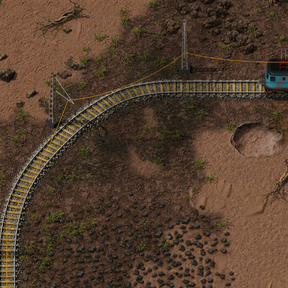
Realistic Electric Trains adds electric locomotives that draw power from overhead line poles placed alongside your railway network. Trains charge from the overhead line while running on electrified track, and coast on stored charge elsewhere. Unlike fuel-based trains, these require infrastructure investment — but reward you with lower running costs and no fuel logistics.
This is a community continuation of J_Aetherwing's original Realistic Electric Trains (0.4.5), ported to Factorio 2.0 with confirmed compatibility with Space Exploration 0.7.57 and Combat Mechanics Overhaul 0.7.2.
Mod name: Realistic_Electric_Trains_Continued_2SE
A Note on How This Was Made
This port was assembled with the assistance of Claude Sonnet 4.6 and Claude Fable 5 (Anthropic AI). The author (Ramasees) has limited coding experience — some Java and Python, but no prior Lua experience. The majority of the porting work, debugging, and feature implementation was carried out through an iterative dialogue with Claude, with Ramasees providing in-game testing, feedback, and design direction throughout.
If you're a modder curious about AI-assisted mod development, this project is a real-world example of what's possible — including all the dead ends, wrong turns, and eventual breakthroughs that come with it.
How It Works
- Research Electric Locomotives (unlocks locomotives, poles, and the Wire Connector tool).
- Place overhead line poles alongside your rails — they snap to the rail side on straights, diagonals and corners. Poles auto-connect to their neighbours along the track. Plain poles have no signal function and never affect train pathing; placing a signal/chain pole on top of a plain pole upgrades it in place, keeping its wiring.
- Connect any pole to your electric network with a copper wire. An overhead line only carries power when it is wired to a real electric pole — proximity to substations is not enough, just like real electrification. Unpowered poles show an "unplugged" icon.
- Electric locomotives charge while on electrified track and coast on stored charge elsewhere.
The Wire Connector (shortcut bar tool)
- Drag — auto-connect all overhead poles in the area to their nearest neighbours
- Shift+drag — disconnect all overhead line wires in the area
- Right-drag — rail power check: green = powered, orange = wires connected but no electricity, red = no coverage or disconnected
Even Pole Spacing (shortcut bar toggle)
Toggle on, then run along a track holding the place key: poles are placed at the configured spacing (default 13 tiles, map setting) and auto-connect as you go. Poles on the opposite side of the track are always allowed. Toggle off for completely free placement.
The Locomotives
| Tier | Top speed | Acceleration | Power draw | Notes |
|---|---|---|---|---|
| Vanilla (burner) | 259 km/h | fuel-dependent | — | for comparison |
| Electric Locomotive Mk1 | 216 km/h | 100% | 600 kW | no fuel, ever — but slower |
| Electric Locomotive Mk2 | 302 km/h | 140% | 1.2 MW | the straight upgrade |
| Modular Locomotive | 259 km/h | 120% | 1.8 MW base | equipment grid, see below |
Modular Locomotive
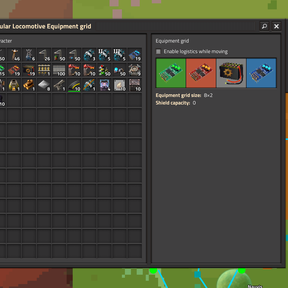
The Modular Locomotive has an equipment grid accepting up to 4 modules (any mix):
- Speed modules — up to ~415 km/h at 4 modules (power draw rises steeply)
- Acceleration modules — up to 216% acceleration
- Efficiency modules — up to −50% power draw with a small speed penalty
- Battery modules — +40 MJ stored charge each, for long unpowered stretches
A live stats panel on the equipment grid screen shows battery capacity, acceleration, top speed and power draw as you swap modules. Beware the warning when power draw exceeds what two poles can deliver.
Feature Status
| Feature | Status |
|---|---|
| Overhead line poles (plain / signal / chain signal) | ✅ Working |
| Placement + auto-connect on straights, diagonals and corners | ✅ Working |
| Trains charge on straights, diagonals and corners | ✅ Working |
| Grid connection strictly by copper wire (no supply-area leeching) | ✅ Working |
| Electric Locomotives Mk1 / Mk2 / Modular | ✅ Working |
| Modules apply real stat changes + live stats panel | ✅ Working |
| Wire Connector tool (connect / disconnect / power check) | ✅ Working |
| Even pole spacing toggle | ✅ Working |
| Automated train operation | ✅ Working |
| Space Exploration 0.7.57 / Combat Mechanics Overhaul 0.7.2 | ✅ Working |
Updating an existing save? Run /ret_rewire_all once in the console — it repairs and reconnects every pole placed under older versions. Updating from 0.6.0: plain poles are removed by the game on first load (their internal type changed so they no longer act as hidden one-way signals — this fixes pathing on bidirectional lines) — re-place them and run the command.
Known Issues / To-Do
- Elevated rails are not supported — poles refuse to place on them (with a refund) rather than breaking. Proper elevated support may come later.
- Rail Signal Planner compatibility — replacing an existing pole signal converts correctly, but gap-filling still uses vanilla signals; a drag-box electrification planner is planned for 0.7.
- Legacy 1.1 saves — diagonal track from pre-2.0 saves uses old rail geometry and is not auto-connected.
Found something else? Please report it in the discussion tab — recent fixes have come directly from player reports.
Roadmap
Armoured War Train (Planned — Separate Mod)
A companion mod is in early design. Current thinking: turret wagons that deploy while the train is stationary (like the artillery wagon, but faster) rather than the teleport-following turrets other mods use — plus an armoured locomotive, armoured wagons, and rail-laying equipment that follows ghost rails without construction bots. On hold while the deploy mechanics are prototyped.
Credits
Original Mod: J_Aetherwing — Realistic Electric Trains 0.4.5
2.0 Port, Testing & Design Direction: Ramasees
AI Assistance: Claude Sonnet 4.6 & Claude Fable 5 (Anthropic)