

Three planners in one window, opened with Ctrl + Shift + F or the shortcut bar button.
Everything is read from the live prototype tables of your running save. The mod does not
name a single other mod anywhere in its code, so it works with whatever mod set you happen to
be playing: a modded assembler has a crafting_speed like any other, a modded recipe has
ingredients like any other, and that is all the planner needs.
Factory
Ask for X per second of any item or fluid and get the line that produces it:
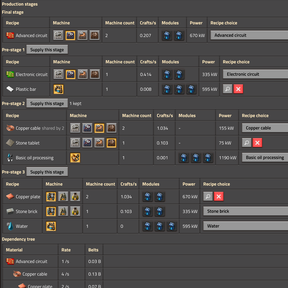
- Machine counts per production stage, solved as a linear system rather than walked as a
tree, so a shared intermediate is counted once and not once per branch. - Modules and beacons through the real effect chain:
effect_receiver, the per-machine
speed/productivity/consumption limits,allowed_effects,allowed_module_categories, the
recipe's ownmaximum_productivity, and your researched productivity bonuses. - Belt saturation, inserter throughput and power draw per stage.
- Raw inputs and surplus / by-products, listed separately - an over-supplied item is a
by-product, not a failed constraint. - Per stage you can override the machine, the recipe and every module slot
individually. A stage you already produce elsewhere can be marked as supplied: it leaves the
build and the blueprint but stays visible as a greyed-out shadow row, so you still see what
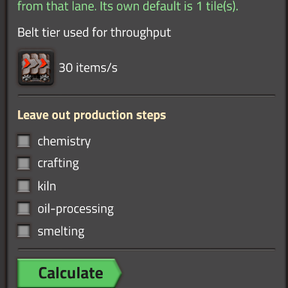
you are shipping in and what it saved you. - Whole recipe categories can be switched off - turn off smelting and every plate becomes
an input instead of growing a furnace park. - A dependency tree next to the stage tables, showing rates per branch rather than the
plan-wide sum. - Do the modules pay for themselves? solves the same plan three times - no modules, speed,
productivity - and compares. The two kinds trade in different currencies, so the answer is
not one score: speed buys machines and pays in power, productivity buys raw material and
pays in machines and power.
Create blueprint puts the whole plan into your cursor. Deepest stage on the left, the
product on the right - the direction the belts run anyway - with room between the columns so
connecting a stage to its consumer is two or three belts by hand, not a rebuild. Rows are as
long as one saturated belt can actually feed. Where an inserter's prototype allows custom
vectors, its reach is written into the blueprint rather than only assumed by the layout.
Power
The Electric Network Info window tells you what you are drawing. It does not tell you how much
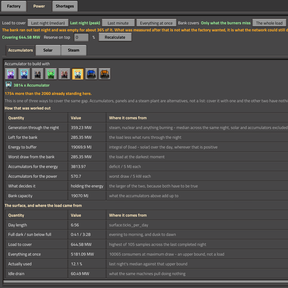
accumulator bank you need to get through the night. This tab does, on the surface you are
standing on:
- The day length and solar multiplier of that planet, and the real solar falloff curve, not
a vanilla-shaped guess. - The load you size against is switchable inside the results: last night's median, the
current draw, or everything running at once. The median exists because the last minute is not
a night. If the bank ran dry before the night ended, the pane says so instead of answering
confidently - a load measured through a brownout is a floor, not demand. - Charging current is not counted as demand, and beacons are not double-counted.
- A reserve percentage on top of the calculated figure.
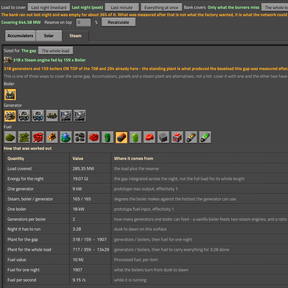
- Three sub-tabs - Accumulators, Solar, Steam - which are three ways to cover one
gap, not a shopping list. Steam reads every item with a fuel value out of the prototypes and
lets you pick the boiler, the generator and the fuel; it shows the fuel for the gap and, as a
comparison, the fuel for a whole night at full load. Counts are always given against the
plant you already have standing.
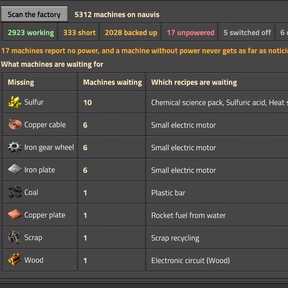
Shortages
Scans the crafting machines on your surface and ranks what they are waiting for -
"48 machines are waiting for copper cable, mostly electronic circuit". That number is in no
statistic: a stopped machine consumed nothing, so the production graph shows exactly zero for
the item that ran out. It comes from entity.status, which is the same source the alt-mode
warning icons use.
Notes
- Adds no entities, recipes, technologies or items. The only thing it ever puts into the world
is a blueprint you asked for. - Two map settings: the size cap for the solve, and the pipe throughput the planner reports
fluid lines against. Pipe throughput is not a prototype value - the engine derives it from
the length of the fluid segment - so it is an assumption, and it is labelled as one. - Optional soft integration with FNEI: if it is installed, a stage's recipe picker can open
the recipe there. Nothing depends on it. - Quality is deliberately out of scope. The planner plans normal-quality production.