
Super Factory (超级工厂)
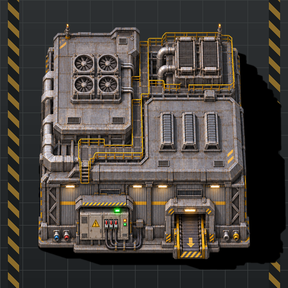
Pack an entire solved Factory Planner production line into a single factory building!
Super Factory is independently developed based on Quezler's Magic Huts. You still need to craft and insert the required machines and modules, supply ingredients, and connect power—while saving massive space and eliminating tedious internal belt and pipe routing. It coexists safely with Magic Huts in existing saves so you can migrate whenever you want.
✨ Key Features
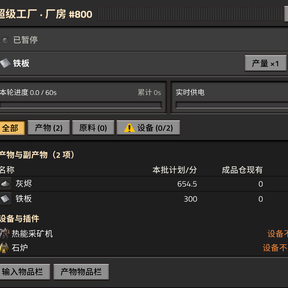
- Pick & Switch Plans in the GUI: The factory details panel shows live status, inventory, shortages, and real-time power at a glance. Search, preview, bind, or swap plans directly in the panel, use Stop after cycle for painless line changes, and send any plan back to Factory Planner for editing with one click.
- Scale Output Without Re-Planning: Adjust the output multiplier per factory (e.g.
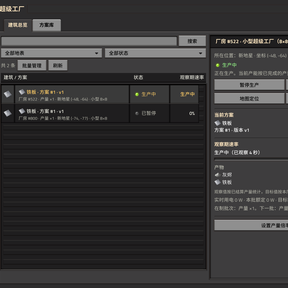
×1,×3) on the same plan without recalculating in FP or building more factories. Equipment, inputs, outputs, power, and pollution scale proportionally—preview and apply. - Global Management Center & Plan Library (
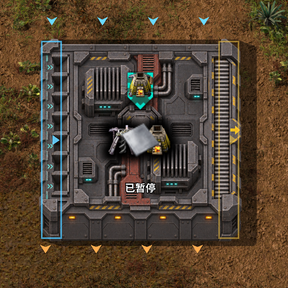
Ctrl + Shift + F): Filter factories by planet/surface or status, inspect real utilization, jump to map locations, and batch start/stop or rebind across pages. Share one plan across multiple factories, iterate versions (v2,v3, ...), and upgrade factories individually. - Clean 4-Sided I/O Layout: Items enter from the west and leave from the east; fluids enter from the north and leave from the south. Connect inserters or loaders along the entire left/right edges, assign and highlight fluid ports in the panel, and see everything clearly in Alt mode.
- Smooth Workflow & Lossless Relocation: Pause and resume without losing paid work, auto-stagger starts across factories, and paste logistic requests without overwriting your own sections. Normal mining packs progress, stored power, fluid balances, and outputs with the item (restored once in the same save), while blueprints preserve multipliers and port assignments.
- Simulated Mining & Partial Py Support: Run simulated mining inside a factory on open ground (without depleting map ore patches), plus support for deterministic Py loops including net solid fuel, ash byproducts, and canister/barrel return cycles.
🚀 4-Step Quick Start
- Solve a plan: Solve your target line in Factory Planner (with a specific planet or space platform selected) and press
Rto refresh. - Place a factory: Click the Super Factory icon in the FP toolbar (Left-click smallest fit / Middle-click at least medium / Right-click large) to place and auto-bind—or place a factory first and pick a plan in its GUI.
- Connect power & supplies: Insert the required machines and modules, connect power, feed items from the west and pick up from the east, and pipe fluids in from the north and out from the south (assign fluid outlets under Fluid ports).
- Start production: Click Resume production or press
Shift + P. Each batch settles every 60 seconds.
📦 Factory Sizes
- Small (8×8, 1× Wooden chest): 30 input slots | 8 east pickup tiles | 4 north inlets / 4 south outlets
- Medium (12×12, 1× Iron chest): 60 input slots | 12 east pickup tiles | 6 north inlets / 6 south outlets
- Large (16×16, 1× Steel chest): Expands with plan (up to 65,535 slots) | 16 east pickup tiles | 8 north inlets / 8 south outlets
⚙️ Requirements & Compatibility
- Factorio: 2.1 branch (minimum
2.1.24) - Required: Factory Planner (minimum
2.1.21; verified on2.1.21/2.1.22) - Optional: Space Age, GUI Unifyer, FilterHelper (
>= 0.2.22), partial Py support (pycoalprocessing) - Not yet supported: Recipes with spoilage, quality modules/quality changes, probabilistic/random outputs, fluid or heat fuel, net power generation, or negative emissions.
Credits
Super Factory is independently developed based on Quezler's Magic Huts. Thank you to Quezler for releasing the original project under the MIT License.
超级工厂(Super Factory)
把工厂规划师(Factory Planner)算好的整条产线,直接装进一座厂房里!
超级工厂基于 Quezler 的魔法小屋(Magic Huts)独立开发。你依然需要造出机器与插件入库、接入电力与原料,但能大幅节省占地、告别繁琐的内部走线。已有魔法小屋的存档可放心共存,随时按需迁移。
✨ 核心亮点
- GUI 面板自由选/换配方:全新厂房详情面板,运行状态、库存、缺口与实时供电一目了然;支持在面板内直接搜索、预览、绑定或随时更换方案,配合「本轮后停机」无痛换线,还能一键将方案反向送回 FP 二次编辑。
- 原方案直接扩产:同一套方案支持单厂独立调整产量倍率(如 ×1、×3),无需回 FP 重算或多造厂房,设备、耗料、产出、功率与污染等比放大,预览通过即可应用。
- 全局管理中心 & 方案版本库(
Ctrl + Shift + F):按星球/状态查厂、看实际利用率、地图定位、跨页批量启停与换绑;一套方案可供多厂复用,支持 v2、v3 版本迭代,逐厂自由升级。 - 固定四面接口,走线极度舒适:物品西进东出,流体北进南出。左右整边可接机械臂或装卸机,流体口支持面板编号分配与高亮定位,开 Alt 模式清晰可见。
- 丝滑体验与无损搬家:支持暂停续作、多厂自动错峰开工、粘贴物流箱请求不覆盖原有分区;正常拆除随厂打包进度、存电、流体余额与成品(同存档恢复一次),蓝图完整保留倍率与管口配置。
- 模拟采矿 & 部分 Py 支持:支持在空地上厂内模拟采矿(不耗地图原矿),并兼容部分 Py 产线的固体燃料净耗、灰烬副产物及返桶/返罐类确定性循环。
🚀 4 步快速上手
- 算产线:在 Factory Planner 中算好目标产线(选好对应星球/平台),按
R刷新数据。 - 放厂房:点 FP 工具栏的超级工厂图标(左键最小规格 / 中键至少中型 / 右键大型),放下即自动绑定;也可先放厂房,再在 GUI 面板里自由选方案。
- 接水电:放入所需机器与插件,接通电力;按西进东出接物品物流,按北进南出接管道(出液需在「流体接口」分配编号)。
- 开机:点「恢复生产」或按
Shift + P,每 60 秒结算一整批产物。
📦 厂房规格一览
- 小型(8×8,1×木箱):30 格输入|东侧 8 取货位|北 4 进液 / 南 4 出液
- 中型(12×12,1×铁箱):60 格输入|东侧 12 取货位|北 6 进液 / 南 6 出液
- 大型(16×16,1×钢箱):随方案扩容(最高 65,535 格)|东侧 16 取货位|北 8 进液 / 南 8 出液
⚙️ 依赖与兼容性
- 游戏版本:Factorio 2.1 分支(最低
2.1.24) - 必需模组:Factory Planner(最低
2.1.21,已验证2.1.21/2.1.22) - 可选兼容:太空时代(Space Age)、GUI Unifyer、FilterHelper(
>= 0.2.22)、部分 Py 产线(pycoalprocessing) - 暂不支持:含腐败物、品质插件/品质变化、概率/随机产出、液体/热能燃料、净发电或负排放的配方。
致谢
超级工厂基于 Quezler 的 Magic Huts 独立开发。感谢 Quezler 以 MIT 许可公开原项目。