
This is a simple mod that is intended to be used when playing Space Age without enemies.
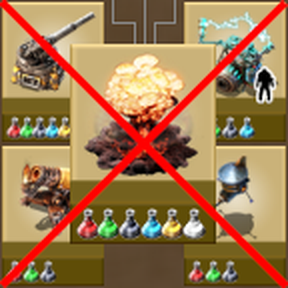
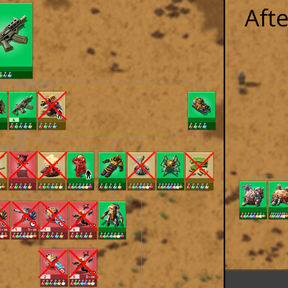
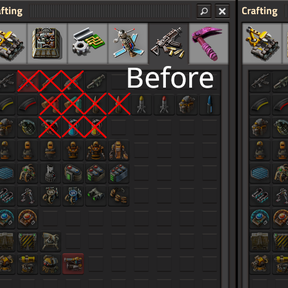
It hides military technologies, recipes and items that don't serve any purpose outside of combat, like most guns, turrets that are ineffective against asteroids, or combat robots.
The mod is designed to be simple and non-invasive. You can add it to an existing save file and remove it again later without any consequences. By default, it doesn't remove anything from the game, it only sets the "hidden" flag in some prototypes. Some technology prerequisites are slightly adjusted, however, and there are some optional settings which modify technologies a bit more, but nothing drastic.
Technologies that you have already researched will be hidden as well, but they will stay unlocked, so if you disable the mod, everything will be back to normal. Items and entities that you have already crafted or placed will still exist, but the recipes for them will be inaccessible and you can't find them in Factoriopedia.
In other words, the mod does not alter the gameplay that much, it only removes "clutter" from the technology tree, crafting menu and Factoriopedia.
NEW: Since version 1.1.0, you can now optionally remove the military science pack as well! All technologies that use military science will be adjusted accordingly, removing military science from the research costs (without adjusting any other costs) and removing/replacing the military science pack prerequisite (usually replaced by Military 2). The science pack itself will still exist but is hidden (to reduce the risk of mod incompatibilities). There is currently no option to remove the "Military 1-4" technologies, because that would require too many changes for the purpose of this mod.
If you are looking for a more immersive experience, I highly recommend to check out Pacifist instead, which will remove enemies and combat technologies from the game completely, as well as altering the technology tree and recipes accordingly.
You might also be interested in some of my other mods, like Throwable Capture Bot which removes the need to carry a rocket launcher around.
Usage
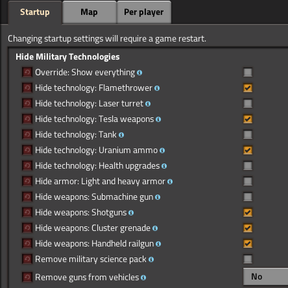
Simply install the mod. There are several technologies that will always be hidden, while some others can be optionally hidden or unhidden using the mod startup settings. Removing the mod will restore everything back to normal.
If you only want to disable the mod temporarily (for example because you want to craft a single land mine for some reason), there is a setting "Override: Show everything". With this setting, everything that would be hidden by the mod will be visible as if the mod wasn't there. However, this setting does not affect any changes to technology prerequisites, nor does it override the "Remove military science pack" or "Remove guns from vehicles" settings.
List of changes
The following technologies and recipes will always be hidden (unless "Override: Show everything" is enabled):
- Land mine
- Atomic bomb
- Artillery: Artillery turret and wagon
- Combat robots: Defender, distractor, destroyer
- This includes the "Follower robot count" and "Electric weapons damage" upgrades.
- Combat equipment: Discharge defense and personal laser defense
- Poison and slowdown capsules (recipes unlocked by Military 3)
- Tank cannon shells (tanks themselves are optional)
Additionally, there are settings for the following technologies, recipes and items:
- Flamethrower: Flamethrower turret, flamethrower gun and ammo (default: hidden)
- Laser turret (default: visible)
- This includes the "Laser" base technology, since all other technologies depending on it are always hidden.
- The "Laser shooting speed" and "Laser weapons damage" technologies now have laser turrets as prerequisite, because they only affect laser turrets.
- Tesla weapons: Tesla turret and handheld tesla gun (default: hidden)
- The "Electric weapons damage 3-∞" technologies are adjusted so that they don't require level 2, because level 1 and 2 only have a bonus for combat robots and depend on them.
- Tank (default: visible)
- Tank cannon shells are always hidden, though.
- Uranium ammo (default: hidden)
- Health upgrades (default: visible)
- Light and heavy armor (default: visible)
- The "Heavy armor" technology is always visible, since the modular armor depends on it. Only the recipe is hidden.
- Submachine gun (default: visible)
- Shotgun, combat shotgun and shotgun ammo (default: hidden)
- Cluster grenade (default: hidden)
- Handheld railgun (default: hidden)
- The railgun turret is always visible.
The following technologies and recipes are explicitly never hidden:
- Gun turret, firearm magazine, piercing rounds magazine
- Rocket turret, rocket, explosive rocket
- Railgun turret, railgun ammo
- Wall and gate
- Grenade (used for the military science pack)
- Energy shield and energy shield MK2
- Rocket launcher (needed to launch capture robots, and ingredient for other items)
There are also the following additional features that can be enabled in the mod settings:
- Remove military science packs: Removes the military science pack from all technologies and hides the science pack.
- Remove guns from vehicles: Removes the guns from vehicles, either all of them or only those that cannot be used because their ammo is hidden.
Mod compatibility
The mod uses hardcoded lists of prototype names, which means that it will not automatically hide any technology or item added by other mods. It checks for the existence of prototypes before accessing them, so there shouldn't be any crash if another mod removes something that would be hidden by this mod.
Currently, there is explicit support for:
- AAI Vehicles: Warden: Hide electro bolter ammo.
- AAI Vehicles: Ironclad: Hide mortar bombs.
The mod is not compatible with Pacifist, but combining those mods wouldn't make a lot of sense anyway.
If you encounter any mod incompatibilities, or would like to have options to hide technologies or recipes added by a specific mod, feel free to reach out. However, I can't promise that I'll add support for every mod.
Support
Feel free to report bugs and mod incompatibilities, or to request new features either on the Discussion page or in the GitHub issues.