
Frequently Asked Questions
What is this mod designed for?
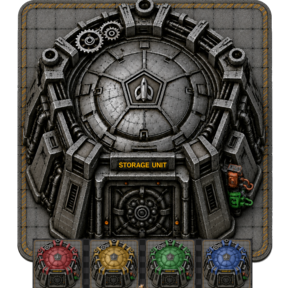
The Filtered 9×9 Steel Chest was originally designed for UPS-conscious megabases and other large automated factories that need a Rocket Silo-sized storage buffer.
It is particularly well suited to builds involving:
- Quality processing
- Recycling arrays
- Ore-voiding systems
- Large centralised item buffers
- High-throughput inserter layouts
- Storage-focused designs that would otherwise use Rocket Silos
The chest provides a simpler, storage-focused alternative without the rocket-launching and orbital-delivery functionality of a Rocket Silo.
Broader Appeal / Other Uses
While this was the original purpose behind the mod, other players may find different uses for a large 9×9 filtered container. To give the mod broader appeal and make it suitable for a wider range of factory designs, many of its features can be customized through the startup mod settings, including the availability of Logistic varients passive provider/requester/buffer/storage.
Configuration options can be found under:
Settings → Mod settings → Startup
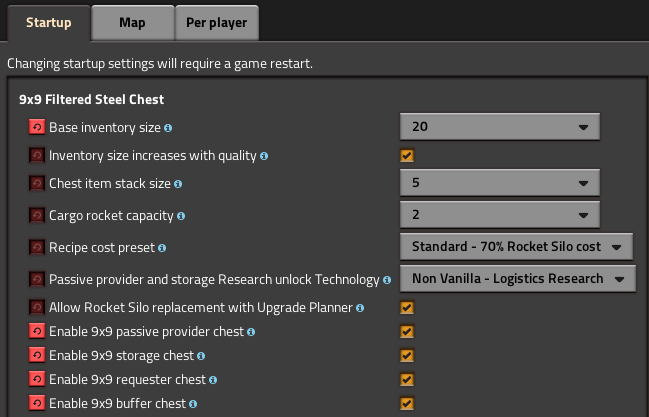
These settings allow users to adjust features such as the base inventory size, quality-based inventory scaling, chest item stack size, cargo rocket capacity, recipe cost, and Upgrade Planner compatibility.
Is this intended to replace Rocket Silos completely?
No.
The mod is intended specifically as an alternative for builds that use Rocket Silos primarily because of their:
- 9×9 footprint
- Large inserter-accessible perimeter
- Central inventory
- Suitability as a large processing buffer
It does not replace the normal purpose of Rocket Silos for launching rockets or supporting orbital logistics.
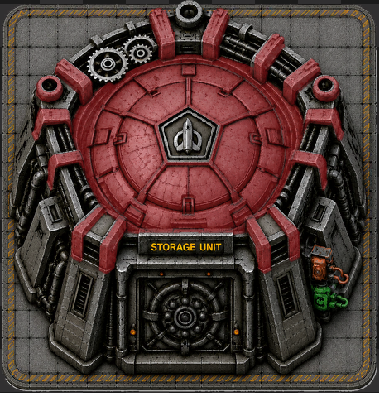
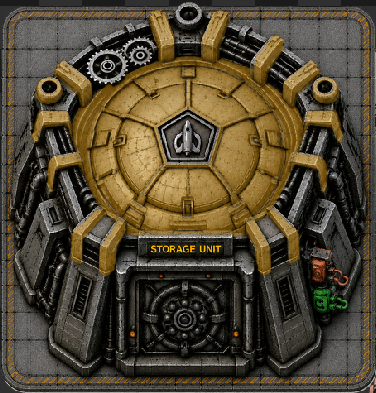
Where are the Logistic Variants (Passive Provider, Requester, Buffer, Storage) ?
They must be turned on in the mod settings, Disabled by default. I dont like to clutter up factorio build menus with excess items unless people specifically turn them on.
Settings → Mod settings → Startup → Enable 9x9 passive provider chest
Settings → Mod settings → Startup → Enable 9x9 storage chest
Settings → Mod settings → Startup → Enable 9x9 requester chest
Settings → Mod settings → Startup → Enable 9x9 buffer chest
Factorio must reload the mods after changing this setting.
Where is the Logistic Variant Active provider ?
Did not make one.
I did not think it made sense as an entity 9x9. If I get requests I can add this in the future.
Where are they in the build menu?
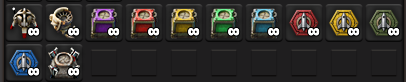
They appear next to the vanilla 1×1 logistic chest variants in the build menu. A screenshot is included on the mod information page for reference.
Because the full 9×9 entity is difficult to recognise at build-icon size, each variant uses the coloured rocket hex from the entity instead. This makes the icons clearer and helps distinguish the passive-provider, storage, buffer, and requester variants at a glance.
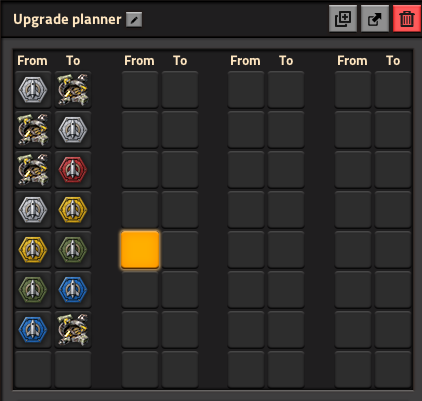
Logistic Varients work with the upgrade planner?
Yes.
Any of the different 9x9 logitic chests and be configured in a upgrade planner to replace each other including the standard 9x9 steel chest and the rocket silo, but only if the upgrade planner mod setting is enabled.
Does the Logistic Variants have any Animations?
Yes,
Like vanilla logistic chests, the 9×9 variants support Factorio’s built-in robot-door behaviour. I created a custom hatch animation that opens the rocket in the middle when logistic robots collect or deliver items, then closes again afterward.
The animation uses the game’s existing prototype system and built-in Factorio sound assets. It requires no custom on_tick scripting or continuous runtime processing, so it does not add the kind of ongoing UPS overhead associated with scripted animations. All vanilla and no additional overhead.
Why use this instead of a Rocket Silo?
The chest retains the practical layout benefits of a Rocket Silo-sized entity while using standard Factorio container behaviour.
This makes it more suitable for situations where a Rocket Silo would otherwise be used only as a storage container.
The mod does not add continuous on_tick processing for the chest. However, extremely large inventories can still require additional processing when accessed by many inserters, so users should choose an appropriate inventory size for their factory.
Why does the chest have 10 inventory slots by default?
The default is 10 inventory slots to support the original Rocket Silo replacement use case without automatically creating an excessively large inventory.
The default provides a focused, filterable buffer while allowing users to increase the capacity through the startup mod settings.
The inventory size can be changed under:
Settings → Mod settings → Startup → Base inventory size
Factorio must reload the mods after changing this setting.
Can I increase the chest inventory size?
Yes.
The base inventory size is configurable through a dropdown in the startup mod settings.
Available values are:
102040801002004008001,2002,4003,8007,600
A small value creates a focused processing buffer, while a large value turns the entity into a high-capacity item-storage silo.
Very large inventories may reduce performance when many inserters repeatedly access the container.
What is the maximum configured chest size?
The maximum selectable base inventory size is currently 7,600 slots at Normal quality.
When quality-based inventory scaling is enabled, higher-quality chests can contain more slots.
With a base size of 7,600:
| Quality | Inventory slots |
|---|---|
| Normal | 7,600 |
| Uncommon | 9,880 |
| Rare | 12,160 |
| Epic | 14,440 |
| Legendary | 19,000 |
These values remain below Factorio's inventory-size prototype limit.
The largest options are intended for specialised high-capacity storage systems and may not provide the best UPS performance when heavily accessed.
Does chest quality increase its storage capacity?
This is configurable.
Use:
Settings → Mod settings → Startup → Inventory size increases with quality
When enabled
The selected inventory size is treated as the Normal-quality base capacity.
Higher-quality versions receive Factorio's normal quality-based inventory increase.
When disabled
Normal, Uncommon, Rare, Epic, and Legendary chests all use the same selected base inventory size.
Disabling quality scaling is useful when blueprints or production systems require predictable storage capacity across every quality level.
Can I configure the chest item's stack size?
Yes.
Use:
Settings → Mod settings → Startup → Chest item stack size
This controls how many unplaced Filtered 9×9 Steel Chest items can occupy one inventory slot.
It affects the chest item when stored in:
- Player inventories
- Logistic chests
- Cargo wagons
- Machines
- Other containers
It does not affect:
- The number of slots inside a placed chest
- The stack size of items stored inside the chest
- The capacity of each internal inventory slot
Can I configure how many chests fit in a cargo rocket?
Yes.
Use:
Settings → Mod settings → Startup → Cargo rocket capacity
This setting controls how many Filtered 9×9 Steel Chest items can fit into one standard cargo rocket.
The mod calculates the chest item's cargo weight from the selected rocket capacity.
- A lower capacity makes each chest item heavier, while a higher capacity allows more chest items to be transported in one rocket.
This setting affects transportation of the chest item only. It does not change the storage capacity of a placed chest.
Can I change the crafting cost?
Yes.
Use:
Settings → Mod settings → Startup → Recipe cost preset
The following presets are available.
Cheap
Uses a simplified structural recipe based on:
- Pipes
- Concrete
- Steel plates
This option is intended for players who want the chest primarily as a practical storage building.
Standard
Uses a reduced Rocket Silo-style recipe.
This provides a meaningful late-game cost without requiring the full material cost of a functional Rocket Silo.
Rocket Silo Equivalent
Uses the same ingredient quantities as the vanilla Rocket Silo recipe.
This option is suitable when the chest should act as a direct economic replacement for a Rocket Silo.
Can the Upgrade Planner replace Rocket Silos with this chest?
Yes.
The mod includes a startup setting that allows a configured Upgrade Planner to replace Rocket Silos with Filtered 9×9 Steel Chests.
The setting is enabled by default and can be changed under:
Settings → Mod settings → Startup → Allow Rocket Silo replacement with Upgrade Planner
Restart or reload Factorio after changing the setting.
Then:
- Create or obtain an Upgrade Planner.
- Right-click the Upgrade Planner.
- Configure the following mapping:
Rocket silo → Filtered 9×9 Steel Chest
The replacement is not automatic.
Blank Upgrade Planners will not replace Rocket Silos because the mod does not assign the chest as the Rocket Silo's default next_upgrade.
This reduces the risk of accidentally replacing operational Rocket Silos.
Construction robots require:
- Filtered 9×9 Steel Chests inside the logistic network
- Construction-network coverage
- Storage space for the removed Rocket Silos
Emptying a Rocket Silo before replacing it is strongly recommended.
Do setting changes require a restart?
Yes.
The configurable options are startup settings because they modify Factorio prototypes such as:
- Container inventory size
- Quality-based inventory scaling
- Chest item stack size
- Chest item cargo weight
- Recipe ingredients
- Upgrade Planner compatibility
After changing one of these settings, Factorio must restart or reload the installed mods before the new value takes effect.
Do AAI Loaders work with the chest?
Yes.
AAI Loaders can transfer items into and out of the chest.
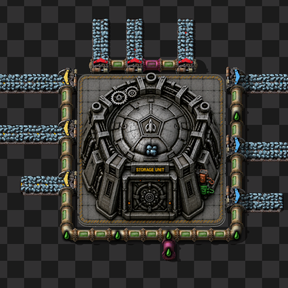
The visible concrete pad is considered part of the entity artwork and footprint. This was intentional so that loaders and inserters placed against the building do not appear visually disconnected or awkward.
Can inserters access the chest from every side?
Yes.
The 9×9 footprint provides a large perimeter for inserters, recyclers, loaders, and other compatible item-transfer entities. The concrete tile underneath the container is considered part of the entity, so that give a clean way inserters and other mods like loaders can interact cleanly. Images of this on the information page.
This is one of the main reasons the chest works well as a replacement for storage-only Rocket Silos.
Are the inventory slots filterable?
Yes.
The chest uses player-filterable inventory slots.
Each slot can be assigned an item filter, making the chest suitable for:
- Quality sorting
- Controlled recycling
- Multi-item processing buffers
- Ore-voiding systems
- Preventing unwanted items from entering reserved slots
The inventory also retains Factorio's inventory-limiter bar.
When is the chest unlocked?
The chest is unlocked alongside the Rocket Silo technology.
The mod also supports existing saves where Rocket Silo technology was already researched before the mod was installed or updated.
In those saves, the chest recipe is enabled during the mod configuration update.
Does the mod add continuous scripting overhead?
The chest itself uses standard Factorio container behaviour.
The mod does not require continuous on_tick processing for:
- Chest storage
- Inventory filtering
- Quality scaling
- Upgrade Planner compatibility
- Configurable prototype settings
The existing-save compatibility script runs when the mod configuration changes rather than continuously during normal gameplay.
Very large inventories can still increase the work performed by Factorio when many inserters access them, even though the mod does not add any continuous scripting overhead.