
Parallel Belt Builder 2.0
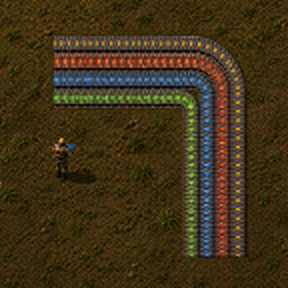
Parallel Belt Builder is a Factorio 2.0 mod for quickly drawing and placing multiple parallel transport-belt lines.
Version 2.0 completely redesigns the building workflow.
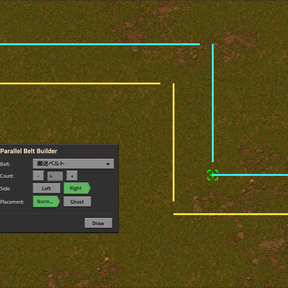
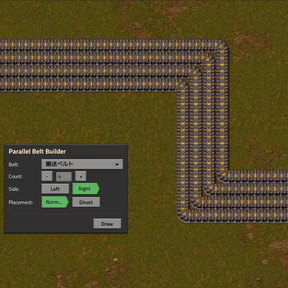
Instead of recording an already-built reference belt, PBB now gives you a dedicated drawing tool. Draw a virtual route, preview the result, and release the drag to place the entire belt group.
Features
• 1 to 16 parallel belt lanes
• Dedicated virtual belt drawing tool
• Straight and L-shaped routes
• Multiple anchor points for longer or more complex paths
• Horizontal-first / vertical-first L-bend switching
• Left or right parallel expansion
• Automatic underground-belt planning for obstacles
• Underground routes are calculated independently for each lane
• Blocked positions are clearly marked in the preview
• Normal and Ghost placement modes
• Automatic support for compatible modded transport belts
• Existing matching belts and belt ghosts are reused without consuming items
• Factorio standard Undo / Redo support
• Lightweight preview designed for large multi-lane layouts
How to use
- Optionally hold the transport belt you want to use.
- Open Parallel Belt Builder from the shortcut bar or with the configured shortcut key.
- Select:
• Belt
• Count (1–16)
• Side (Left / Right)
• Placement mode (Normal / Ghost) - Drag with the PBB drawing tool to create a virtual route.
- Release the drag to place the planned belts.
Controls
• Ctrl + Alt + Q — Toggle Parallel Belt Builder
• F — Switch the current L-shaped segment between horizontal-first and vertical-first
• R — Add an anchor point and continue drawing from there
• Factorio clear-cursor control — Cancel the current drawing
• Draw button — Re-acquire the drawing tool after cancelling
All shortcuts can be changed in Factorio's control settings.
Automatic underground belts
When a planned belt encounters an obstacle, PBB attempts to replace that section with underground belts.
Each lane is planned independently, so only the lanes that actually need underground belts are converted.
Underground distance limits are read from the selected belt prototype, allowing compatible modded belts to work automatically.
If no valid underground route can be created, the affected position is marked as Blocked and is left unplaced.
Placement modes
Normal:
PBB places real belts when the required items are available.
If individual items are missing, only those entities are placed as ghosts.
Ghost:
All planned entities are placed as ghosts.
Editor and cheat mode can place entities without inventory requirements.
Existing belts
Existing transport belts with the same prototype and direction are treated as part of the route and are not replaced or charged again.
Equivalent transport-belt ghosts are handled the same way.
PBB does not automatically remove or replace conflicting entities.
Undo
Each PBB placement is integrated with Factorio's standard Undo system.
A single PBB build operation can normally be removed with one Undo action, including normal belts, underground belts, and ghosts created by that operation.
Notes
• Count starts at 1 whenever PBB is opened.
• Count 1 can be used as a convenient single-belt drawing tool.
• PBB does not perform general pathfinding around obstacles.
• PBB does not remove buildings, cliffs, or other obstacles.
• Existing underground belts are currently not reused as part of a planned route.
• Modded transport belts are supported when their prototypes expose the required compatible belt and underground-belt information.
Factorio version: 2.0