Search the Mod Portal by entering a search term.
To search for specific phrases, surround them with double quotes (").
The mod portal will match your query against the mod title, internal name, summary, and username of the mod owner.
To further refine your search, use the sidebar on the left. Enable the checkboxes to limit the search results to selected categories and tags or use the ban button to exclude them.
You can reset your filters by clicking the active tab on the top.
There's a lot of caching on this page. It can take several hours for new mods and updates to show up in search results.

Adds buttons and hotkeys to increase or decrease the speed of the game, now with configurable speed increments and limits. Each button's increment can be customized via mod settings. Hot Keys: (Minus / Plus / Shift+Minus / Shift+Plus / Alt+Minus / Alt+Plus).
Providing the player with new tools or adjusting the game interface, without fundamentally changing gameplay.
Auto pauses the game when all players are AFK for N minutes
Providing the player with new tools or adjusting the game interface, without fundamentally changing gameplay.
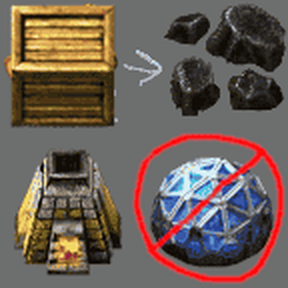
Adds a recipe for turning wooden chest into 1 coal in the furnace, without research.
Providing the player with new tools or adjusting the game interface, without fundamentally changing gameplay.

When mining an inserter, also mine an item it dropped on the ground before-hand. Miniloader support.
Providing the player with new tools or adjusting the game interface, without fundamentally changing gameplay.

A few functions about map chart tags. Includes alignment to chunks, auto-append position or chunk coordinates to tag text. (Locale: English, Deutsch, 正體中文, 简体中文, Português Brasileiro)
Providing the player with new tools or adjusting the game interface, without fundamentally changing gameplay.

Providing the player with new tools or adjusting the game interface, without fundamentally changing gameplay.
Providing the player with new tools or adjusting the game interface, without fundamentally changing gameplay.

Adds a hotkey (default: SHIFT + M) to toggle manual and automatic mode when hovering over a train.
Providing the player with new tools or adjusting the game interface, without fundamentally changing gameplay.

Adds a Button to respawn the current player. Useful if stuck on some other surface.
Providing the player with new tools or adjusting the game interface, without fundamentally changing gameplay.

Providing the player with new tools or adjusting the game interface, without fundamentally changing gameplay.
Providing the player with new tools or adjusting the game interface, without fundamentally changing gameplay.

Providing the player with new tools or adjusting the game interface, without fundamentally changing gameplay.

Export Researched technologies - e.g for import into FactorioLab
Providing the player with new tools or adjusting the game interface, without fundamentally changing gameplay.
Providing the player with new tools or adjusting the game interface, without fundamentally changing gameplay.
Prints the entire data.raw table to the log on run. Useful for modders and tool devs.
Providing the player with new tools or adjusting the game interface, without fundamentally changing gameplay.

Providing the player with new tools or adjusting the game interface, without fundamentally changing gameplay.
Providing the player with new tools or adjusting the game interface, without fundamentally changing gameplay.

Change the icon of ping... in something more italians... Original mod author: Linver
Providing the player with new tools or adjusting the game interface, without fundamentally changing gameplay.
Providing the player with new tools or adjusting the game interface, without fundamentally changing gameplay.
Auto pause game until a minimum online player count is reached; fork of Auto Pause by Hornwitser
Providing the player with new tools or adjusting the game interface, without fundamentally changing gameplay.