
Time Control
Control the day/night cycle on each planet individually. Set any surface to always day, always night, or normal cycle with a simple click.
Features
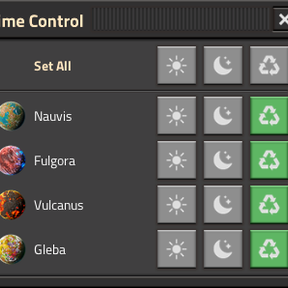
- Per-planet control — Each planet gets its own day/night setting
- Three modes — Day (frozen at noon), Night (frozen at midnight), Normal (natural cycle)
- "Set All" button — Apply the same mode to every planet at once
- Planet icons — Visual identification with each planet's icon
- Space platform aware — Platforms are automatically excluded (always_day has no effect on them)
- New surfaces — Automatically default to day mode when discovered
- Space Age optional — Works with or without the Space Age DLC
How to Use
- Click the Time Control shortcut button (Nauvis icon) in your shortcut bar
- A panel shows all your planets with three buttons each: Day, Night, Normal
- Click a mode to apply it to that planet
- Use Set All to change every planet at once
- Press Escape or the X button to close