
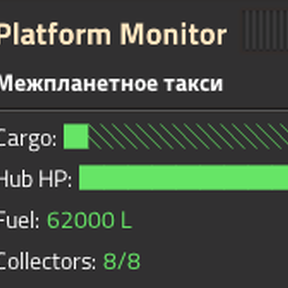
Space Platform Flow Monitor
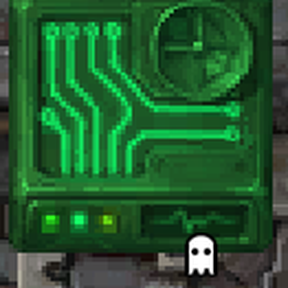
Reads data from all your space platforms and outputs it to the circuit network via virtual signals. Place a monitor on each platform and manage your entire fleet from the planet surface.
Features
Cargo signals
- Used inventory slots
- Total inventory slots
- Fill percentage (0–100)
Hub signals
- Hub HP as a percentage
- Repair active (0/1)
- Repair packs in hub inventory
Fuel signals
- Thruster fuel (litres)
- Oxidizer (litres)
Collector signals
- Collectors total
- Collectors active
- Collectors blocked
Flight signals
- Platform speed
- ETA to destination (seconds)
- In transit (0/1)
- From / To location (surface index)
- Platform weight (tonnes)
Alert signals
- Alert level (0 / 1 / 2)
- Damage taken per tick
Ammo signals
- One signal per ammo type (non-zero only)
Delivery request signals
- One item signal per item type currently requested from a planet
Monitoring Panel
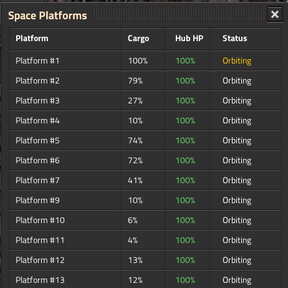
Opens via the toolbar button (satellite icon). Shows a table of all platforms with real-time data. The fleet overview panel has been significantly expanded in v0.1.2 — see Fleet Overview Panel section below.
HUD Overlay
When standing on a platform, a compact HUD displays cargo fill, hub HP, combined fuel level, collector status, and flight info in real time.
Minimap: A live minimap of the platform is shown at the top of the HUD. You can disable it with the "Show Minimap in HUD" per-player setting to save screen space.
Toolbar Button
The toolbar button (satellite icon) behavior depends on where you are:
On a planet surface: toggles the fleet overview panel on/off.
On a platform (default — "Both" mode): cycles through three states:
1. Platform HUD — detailed status of the current platform
2. Fleet Overview — table of all platforms (same as the planet panel)
3. Closed — no panels shown
The cycle mode is configurable per player — you can choose "Platform HUD only", "Fleet overview only", or "Both" (the full cycle).
Fleet Overview Panel
The fleet overview shows a table of all monitored platforms with columns for Name, Cargo %, HP %, Fuel (litres), and Status. Click any platform name to open remote view on that platform (camera only — your character stays where it is). Rows are color-highlighted: red tint for critical alerts, yellow for warnings.
Sorting: Click any column header to sort the table. Click again to reverse the order. The sort indicator (▲/▼) shows the current sort column and direction. Sort preference is saved per player.
Manual reorder: Use the ▲/▼ buttons on the right side of each row to move platforms up or down manually. Manual order is saved per player and persists until you click a column header to switch back to automatic sorting.
Tooltip: Hover over a platform name to see a detailed breakdown: cargo slots (used/total), hub HP, thruster fuel and oxidizer separately, collector status, flight info (ETA, speed), and repair packs.
Alerts
Hub HP, fuel level, collector blocked, and damage alerts fire for all connected players when thresholds are breached. Critical alerts (level 2) play a warning sound to draw attention. Fuel thresholds are set in absolute litres (default: warning at 500 L, critical at 100 L).
Alert History
Switch to the "History" tab in the fleet overview to see a log of the last 50 alert events. Each entry shows the platform name, alert type, event status (fired/cleared), and game time (HH:MM:SS matching Factorio's clock). Click a platform name to navigate to it via remote view.
Sorting: Click the Platform, Alert, or Time column headers to sort. Click again to reverse the sort direction (▲/▼). Sort preference is saved per player.
Platform Groups
Organize your platforms into named groups for quick filtering in the fleet overview.
- Click "Create Group" button on the Fleet tab
- In the dialog: enter a group name, check the platforms to include, click "Create"
- Use the dropdown on the Fleet tab to filter by group, or select "All platforms" to see everything
- Click the pencil icon (✏) next to the dropdown to edit the selected group's platform membership
- Click the trash icon (🗑) to delete the selected group
- Groups are per-player and persist across sessions
Installation
- Place a Space Platform Monitor on a platform surface
- Connect it to the circuit network
- Signals update every N ticks (configurable, default 60)
To monitor a platform from the planet surface, place a monitor on the planet and select the target platform in the configuration dialog.
Requirements
- Factorio 2.0+
- Space Age DLC
Master Platform Monitor
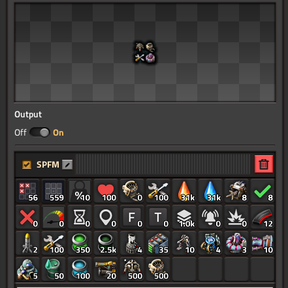
A special combinator (with red-tinted icons) that aggregates data from platforms that have a basic Platform Monitor installed. Each monitored platform's signals appear in a separate section labeled "SPFM [Platform Name]".
Configuration: Click the master monitor to open its native combinator GUI — a configuration panel appears anchored to the right side. Check which platforms to track. By default all monitored platforms are selected. Uncheck platforms you don't need. Click "Confirm" to save. The configuration panel automatically appears whenever you open the master combinator.
Place anywhere: on a planet surface, in orbit, or even on a platform. Platforms without a basic monitor are not included.
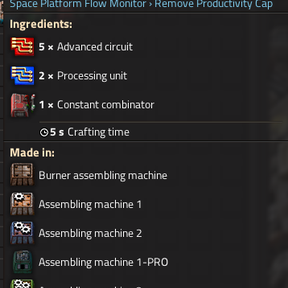
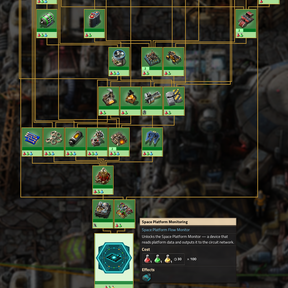
Recipe: 2× Constant Combinator, 5× Processing Unit, 10× Advanced Circuit. Unlocked by the "Space Platform Monitoring" technology.
Settings
| Setting | Description |
|---|---|
| Update interval | How often to poll platform data (ticks). Default 60 = once per second |
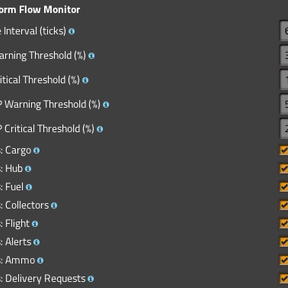
| Signals: Cargo / Hub / Fuel / Collectors / Flight / Alerts / Ammo / Requests | Enable or disable each signal group individually |
| Hub HP warning threshold | HP % below which a warning alert fires |
| Hub HP critical threshold | HP % below which a critical alert fires |
| Fuel warning threshold | Combined thruster + oxidizer level (litres) below which a warning alert fires (default: 500) |
| Fuel critical threshold | Combined fuel level (litres) below which a critical alert fires (default: 100) |
| Show HUD overlay | Show status overlay while standing on a platform |
| Show Minimap in HUD | Show a live minimap of the platform inside the HUD overlay |
| Show planet panel | Show platform monitoring table on planet surface |
| Toolbar button on platform | Which panels to cycle when pressing the toolbar button on a platform: Both (HUD → Fleet overview → Close), Platform HUD only, or Fleet overview only |
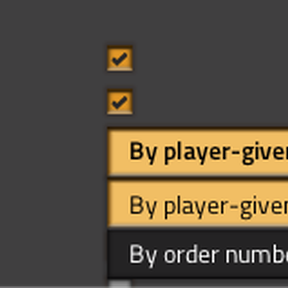
| Platform name display | Show player-given names or order numbers (Platform #1, #2…) |
| Fleet panel: platforms to show | "All platforms" shows every platform. "Only monitored" shows only platforms with an SPFM combinator installed |