
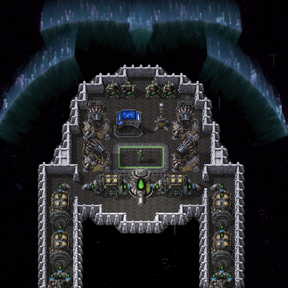
Liquid Nuclear Rocket Fuel for Space Exploration
Get the most out of your spaceship rocket fuel by adding a bit of radioactivity! Introducing Liquid Nuclear Rocket Fuel - a power-dense alternative to standard rocket fuel for Space Exploration spaceships.
⚠️ Installation Required - valid as of SE Version 0.7.56
IMPORTANT: This mod requires manual editing of two Space Exploration script files to work properly. Without these modifications, nuclear fuel will NOT work in booster tanks.
See the full installation instructions below for detailed step-by-step guidance (2 code changes across 2 files).
Features
- New Fluid: Liquid Nuclear Rocket Fuel - uranium-enhanced rocket fuel for spaceships
- Two Production Methods:
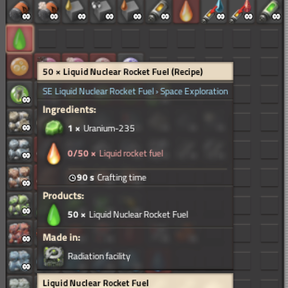
- Centrifuge: 50 liquid rocket fuel + 1 uranium-235 → 50 nuclear liquid rocket fuel (90 seconds)
- Alternative: 1 nuclear fuel cell → 50 nuclear liquid rocket fuel (7 seconds in fuel refinery)
- Full Barrel Support: Store and transport nuclear fuel in barrels
- Research: Unlocked with Kovarex Enrichment process
- Flamethrower: Use Liquid Rocket Fuel, Liquid Nuclear Rocket Fuel, and Pyroflux as Flamethrower turret fuels
- Compatible: Works with Space Exploration 0.7.56+ spaceships
How It Works
Use Liquid Nuclear Rocket Fuel in Space Exploration spaceship rocket booster tanks just like regular liquid rocket fuel. The enhanced energy density provides the same propulsion as standard fuel, making it a direct alternative for spaceship missions.
Crafting Recipes
- Primary Recipe: Process liquid rocket fuel with uranium-235 in a centrifuge
- Alternative Recipe: Convert nuclear fuel cells directly in a fuel refinery
- Barrels: Fill and empty nuclear fuel barrels for storage and transport
Balance
Liquid Nuclear Rocket Fuel has comparable energy density to standard liquid rocket fuel, balanced by higher production costs requiring uranium-235 or nuclear fuel cells. This maintains gameplay balance while providing a nuclear alternative to standard rocket fuel.
Compatibility
- Requires Space Exploration mod (version 0.7.56 or higher)
- Factorio 2.0+
- Side benefit: Removes fuel restrictions from all booster tanks, allowing storage of any fluid (though non-fuel fluids may be consumed during takeoff)
Future Plans
- Integration with more SE systems
- Potential performance enhancements for nuclear-powered ships
- Nuclear flamethrower ammo
Notes
- Research unlocked with Kovarex Enrichment technology
- Installation modifications are mandatory - see below
- Type
/se-nuclear-fuel-helpin-game for installation reminder - This mod is not affiliated with the creators of Space Exploration
Installation Instructions
This mod requires editing 2 sections across 2 Space Exploration script files. These changes remove fuel type restrictions from booster tanks, allowing nuclear liquid rocket fuel to work.
Important: Reapply changes whenever Space Exploration updates. Keep these instructions for reference.
Note for SE 0.7.56+: The old single-file
spaceship.luapatch no longer applies. The launch check and integrity check now live in separate files. The old Change 1 (commenting outallowed_fluidin the booster config) must NOT be applied — doing so will cause a startup crash.
Installation Steps
1. Locate and Extract the Mod
- Navigate to your Factorio mods folder
- Find:
space-exploration_X.X.XX.zip(e.g.,space-exploration_0.7.56.zip) - Copy the exact filename
- Right-click the
.zipand extract it - You'll have a folder and
.zipfile
2. Open the Files for Editing
You need to edit two files inside the extracted folder:
space-exploration_X.X.XX/scripts/spaceship.luaspace-exploration_X.X.XX/scripts/spaceship-integrity.lua
Open both in a text editor (Notepad, Notepad++, VSCode, etc.)
3. Make the Two Changes Below
Use Ctrl+F to locate each section via the SEARCH FOR text.
Change 1: Disable fuel type check during launch
File: scripts/spaceship.lua — in the get_compute_launch_energy function (around line 379)
Search For:
local booster_config = Spaceship.booster_types[tank.name]
      if spaceship_is_attempting_launch and fluid.name ~= booster_config.allowed_fluid then
        -- Only the correct fuel in the correct booster tank counts as available launch energy.
        -- This is disincentivized using integrity
        goto continue
      end
Change To:
local booster_config = Spaceship.booster_types[tank.name]
      -- if spaceship_is_attempting_launch and fluid.name ~= booster_config.allowed_fluid then
      --   -- Only the correct fuel in the correct booster tank counts as available launch energy.
      --   -- This is disincentivized using integrity
      --   goto continue
      -- end
Action: Comment out the 5 lines by adding -- at the start of each.
Change 2: Disable integrity stress penalty for wrong fluids
File: scripts/spaceship-integrity.lua — in the calculate_integrity_stress function (around line 353)
Search For:
local booster_config = Spaceship.booster_types[container.name]
    if booster_config then -- This is a booster tank
      local fluid = container.get_fluid(1) -- All boosters are storage tanks which always have only one fluidbox
      if fluid and fluid.name ~= booster_config.allowed_fluid then
        -- This booster contains the wrong fluid! We cannot prevent this due to filters on storage tanks not working.
        -- So disincentivize it by making the container stress much higher. Thematically if you put the wrong fluid
        -- in a rocket booster it might not handle it well.
        fluid_type_multiplier = 10 -- big number
        breakdown_key = container.name .."+".. fluid.name
      end
    end
Change To:
local booster_config = Spaceship.booster_types[container.name]
    -- if booster_config then -- This is a booster tank
    --   local fluid = container.get_fluid(1) -- All boosters are storage tanks which always have only one fluidbox
    --   if fluid and fluid.name ~= booster_config.allowed_fluid then
    --     -- This booster contains the wrong fluid! We cannot prevent this due to filters on storage tanks not working.
    --     -- So disincentivize it by making the container stress much higher. Thematically if you put the wrong fluid
    --     -- in a rocket booster it might not handle it well.
    --     fluid_type_multiplier = 10 -- big number
    --     breakdown_key = container.name .."+".. fluid.name
    --   end
    -- end
Action: Comment out the 10 lines by adding -- at the start of each.
4. Save and Re-ZIP
- Save Both Files
-
Save
spaceship.luaandspaceship-integrity.lua, then close your editor -
Copy Name and Delete Original ZIP
-
Copy the exact original filename from your mods folder, then delete the file
-
Compress the Modified Folder
- From the Mods folder, enter the unzipped space-exploration folder (no version number)
- Right-click and select "Compress to ZIP" (or "Send to > Compressed folder" on Windows)
-
This creates a new
.zip -
Rename the New ZIP
- Rename to exactly match the original (e.g.,
space-exploration_0.7.56.zip) -
Version and format must match precisely
-
Clean Up (Optional)
- Delete the extracted folder, keeping only the
.zip
5. Test in Game
- Launch Factorio
- Load/create a test world
- Console:
/cheat all - Build spaceship with rocket booster tanks
- Fill with nuclear liquid rocket fuel
- Attempt launch
- If successful, done!
Troubleshooting
- Game crashes/won't load: Syntax error. Only add
--; don't delete anything. Redownload SE to start over. - Mod version mismatch: Filename must match exactly (no typos/spaces).
- Launch fails with integrity error: Ensure both changes were applied — verify you edited
spaceship-integrity.lua, not justspaceship.lua. - After SE update: Line numbers may shift; use the SEARCH FOR text to find the correct locations and reapply.
What These Changes Do
- Change 1: Removes the check that prevents launching if booster tanks contain a fluid other than
se-liquid-rocket-fuel - Change 2: Removes the 10x integrity stress penalty for having "wrong" fluids in booster tanks
Side Effect: Any fluid can be stored in booster tanks without penalty. Non-fuel fluids may be consumed during takeoff (not fully tested).
File Location Reference (SE 0.7.56)
| Old location (pre-0.7.56) | New location (0.7.56+) |
|---|---|
spaceship.lua booster config |
shared.lua — do not modify |
spaceship.lua launch check |
scripts/spaceship.lua (Change 1) |
spaceship.lua integrity check |
scripts/spaceship-integrity.lua (Change 2) |
Backup Recommendation
Backup the original .zip outside your mods folder before editing.