

Quality Glow
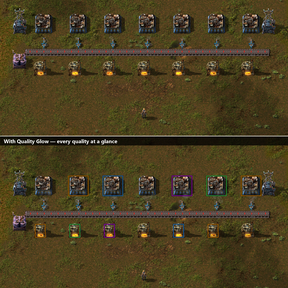
See the quality of your buildings at a glance. In vanilla, a legendary assembler looks almost exactly like a normal one: the only clue is a tiny badge in a corner. Quality Glow marks every uncommon, rare, epic and legendary building in its official quality colour, so a mixed factory becomes readable instantly.
Why it helps
- Spot where your legendary machines are, and put your best modules there.
- See which buildings are still normal and should be upgraded first.
- Catch a blueprint that placed the wrong quality.
Features
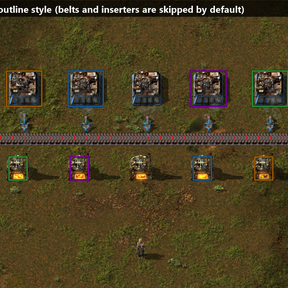
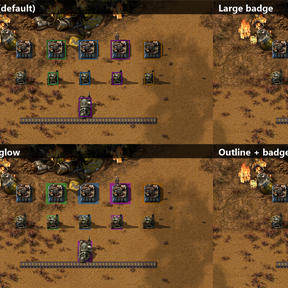
- Four styles: outline (default), ground glow, large badge, or outline + badge.
- The outline has a dark backing, so it stays readable on any terrain (even orange legendary on desert sand).
- Minimum quality: for example, only mark epic and legendary.
- Always visible or Alt mode only.
- Logistics skipped by default: belts, pipes, inserters, poles, walls, lamps and rails are not marked to avoid clutter (can be enabled).
- Per-player hotkey to show or hide the markers (default Shift + Alt + Q).
- Change settings in-game: all settings are map settings, no restart needed.
- Markers follow building, rotation, flipping, cloning and upgrades, and vanish with the building.
- Uses the quality prototypes' own colours: modded qualities work too.
- Fully localised in English and French.
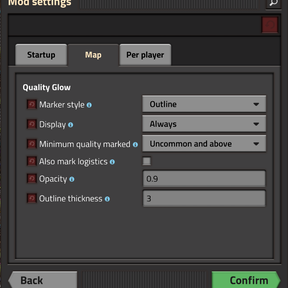
Settings (Settings → Mod settings → Map)
- Marker style — Outline, Ground glow, Large badge, Outline + badge.
- Display — Always, or Alt mode only.
- Minimum quality marked — Uncommon and above (default), Rare and above, Epic and above, Legendary only.
- Also mark logistics — off by default.
- Opacity — default 0.9.
- Outline thickness — default 3 pixels.
Requires the Quality mod (included with Space Age). Without it, the mod simply does nothing.