
Portable Nested Chests
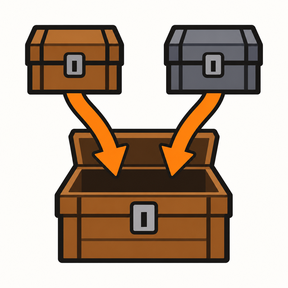
Pick up wooden, iron and steel chests with their contents still inside. Carry them in your inventory, place them somewhere else, or put packed chests inside other chests.
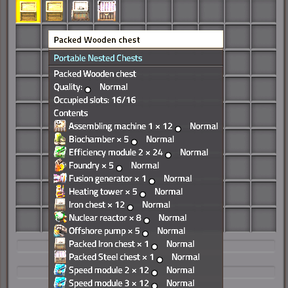
Hover over a packed chest to see what it contains before placing it.
How it works
Put items into a wooden, iron or steel chest.
Pick up the chest as you normally would.
You receive one packed chest, containing the items that were inside it.
Place the packed chest on the ground to restore the chest and access its contents.
The chest does not need to be completely full. Even a chest containing a single item will be packed.
For example, if an iron chest contains 1,000 stone, picking it up gives you one packed iron chest. Place it again and the 1,000 stone will still be inside.
There is no separate packing recipe, special button or additional research. The existing crafting and research requirements for the original chests remain unchanged.
Supported chests
This feature applies to the three standard chest types:
Wooden chest
Iron chest
Steel chest
Logistic chests and additional chest types introduced by other mods are not included.
Inventory space and stacking
Non-empty chests: each packed chest occupies one inventory slot and does not stack with other packed chests.
Empty chests: remain ordinary chest items and keep their normal stacking behaviour. The vanilla stack size is 50; changes made by other mods still apply.
To return a packed chest to an ordinary empty chest item, place it, remove its contents, then pick it up again.
Chests inside chests
Packed chests can be stored inside other chests.
For example, you can put a packed wooden chest and a packed steel chest inside another wooden chest. Picking up the outer chest gives you one packed item containing both inner chests and their stored contents.
To reach the items inside:
Place the outer chest.
Take out the packed inner chest you want.
Place that inner chest to access its contents.
You can repeat this through multiple layers. The mod does not impose a fixed nesting-depth limit.
Preview contents without placing the chest
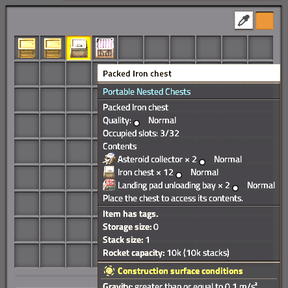
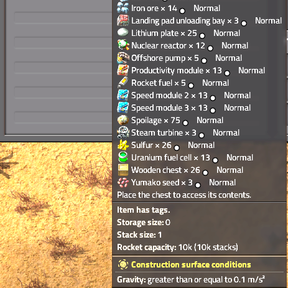
Hold your mouse over a packed chest in an inventory to display its contents tooltip. No click is required.
The preview shows:
The items directly inside that chest.
Item quantities and qualities.
Occupied inventory slots and the saved chest capacity.
A packed chest inside another chest appears as a packed item in the list. The preview does not expand every nested layer. Place the outer chest to retrieve and inspect its inner chests individually.
The inventory-slot icon remains a chest icon. Contents are shown in the hover tooltip, without an additional window or control. Very long item lists may exceed the available tooltip space on smaller screens.
Quality, capacity and item data
The mod uses the chest’s actual inventory capacity when it is picked up. This includes capacity changes made by other mods and bonuses from all five standard quality levels when Quality is enabled.
It does not increase the original chest’s slot capacity itself.
Item quality and stored item data are retained, including blueprints, partially used ammunition, durability and equipment contents. The chest’s own quality, health and inventory bar settings are also retained.
Perishable items continue to spoil while packed. Packing a chest does not freeze freshness. Spoilage changes are reflected in the preview as it refreshes.
Robots and placement
Construction robots can pick up and place packed chests.
A ghost for a packed chest requires a real packed item from the available supply. It does not specify which contents that packed chest must contain, so do not rely on a ghost to select a particular loaded chest.
If unpacking is blocked, the packed chest is returned. If the receiving inventory has no room, it may be returned to the ground nearby.
If another mod or setting reduces a chest’s capacity below its saved capacity, unpacking is refused and the packed chest is returned intact. Restore the previous capacity before unpacking it.
Requirements and compatibility
Requires Factorio 2.1.23 or later within the 2.1 series.
Space Age and Quality are optional.
This is a standalone mod. The Cave is not required.
English and Russian localisation are included.
Packed chest items have no crafting recipes or automatic recycling recipes.
Stored contents are not added to the packed chest’s transport weight.
Mods that clone or replace packed items instead of moving the original items are not supported. Compatibility with every mod combination is not guaranteed.
Before disabling or removing the mod
Place and unpack every packed chest first, including all nested layers.
Packed contents depend on this mod’s saved data. Removing the mod while packed chests still exist can cause those contents to be lost.
Also unpack affected chests before removing mods that provide items or quality tiers stored inside them. Keep a backup of your save before changing your mod setup.