
Planet Settings
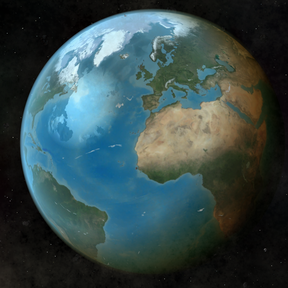
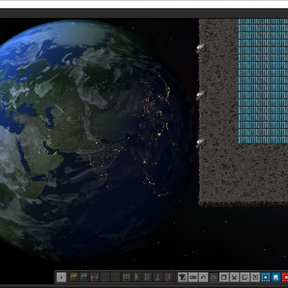
In Factorio 2.1, there are new planet images which are visible from space platforms.
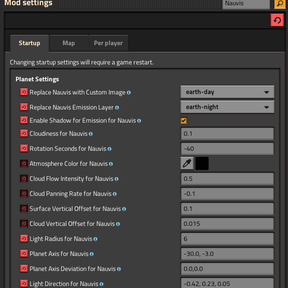
These entities have a lot of properties such as cloudiness, rotation speed, atmosphere color, light color etc.
But the properties are not modifiable from the game menu, so I wrote this mod to tweak them.
Full List of Options
- atmosphere_color
- cloud_flow_intensity
- cloud_panning_rate
- cloud_vertical_offset
- cloudiness
- emission_scales_with_shadow
- light_color
- light_direction
- light_intensity_contrast
- light_radius
- parallax_strength
- planet_axis
- planet_axis_deviation_amplitude
- planet_axis_deviation_seconds
- planet_emission
- planet_normal
- planet_reflectivity
- planet_surface
- position
- radius
- rotation_seconds
- specular_color
- specular_intensity
- surface_vertical_offset
Custom Planet Images
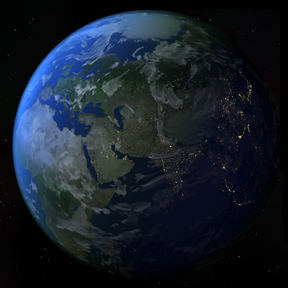
Also, you can replace planet textures with real Earth image from NASA or Solar System Scope.
Sprites to choose:
- Earth Day (Solar System Scope)
- Earth NASA (a bit darker)
- Earth Night
- Jupiter
- Mercury Enhanced Color
- Mercury Monochrome
- Moon
- Neptune
- Sun
- Venus
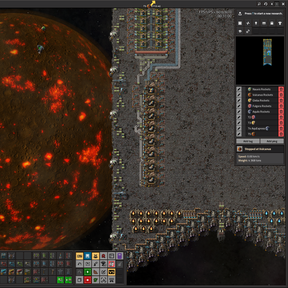
There is an option to enable or disable emission, which provides additional texture. By default, it is only used on Vulcanus but other planets can benefit, too.
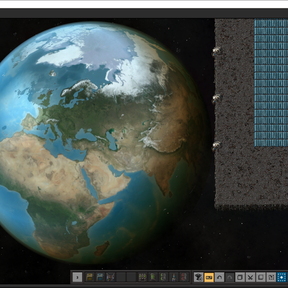
Emission can be used for day & night cycle. For example:
1. Pick "Earth Day" for Nauvis texture
2. Pick "Earth Night" for Nauvis emission and enable Emission Shadow Scaling
3. Tweak other things to your liking: change light amount, sun angle, pick light blue-ish atmosphere color.
Aaaaand you get this;
Hope that helps.
FAQ
I want to see Gleba Pentapod anus crater!
The clouds are too dense in Gleba, which makes it difficult to see the surface. With this mod, you can decrease "Cloudiness for Gleba" value to 0.01 to see more clearly.
Do I have to use Earth?
Short answer No. First of all, you can use this mod to alter default settings with official Factorio Space Age 2.1 assets. Or match any planet to any image you like.
Who will use this mod?
Normal players can use, but I had "modders" in mind while writing this mod. I'm sure creative people will generate custom planet images in the near future. With this tweaker tool, they can work easier on their projects.
Why did you choose Earth image for Nauvis?
So far, there are no equirectangular projection images for Factorio 2.1 planets. For 2.0 version, there were lots of Visual Planets* extensions, but they are not compatible with 2.1 planet image system.
I wanted to try out the new capabilities of API, or "PlatformBackdrop" object to be more precise. And in order to verify my attempts, I used the planet which I know the most, as you can guess that is Earth. So I could answer my own questions "Does this lightning look natural?", "Does this coverage align?", "Is reflection correct?", "Do shadow and terrain correspond?", "When does the city lighting in the night show up?" etc.
By tweaking parameters exposed, I can test myself how each parameter affect view. As project is open source, the modders can use this codebase to tweak their planet images.
Why did you choose Mercury image for Vulcanus?
In game assets are 2k (2048x1024) for Vulcanus but there are 4K (4096x2048) equirectangular maps for Solar system planets. So I chose Mercury, the closest planet to Sun for replacement.
Can I use 2.0 "Visible Planets in Space" together with this?
Currently, no. Because Visible Planets in Space disables/removes the new planet models this mod is altering. Until that is fixed in the future, activate only one mod for the time being.
Credits
- NASA SVS, NASA/Goddard Space Flight Center Scientific Visualization Studio, The Blue Marble Next Generation data is courtesy of Reto Stockli (NASA/GSFC) and NASA's Earth Observatory.
- Solar System Scope, Sourced from Messenger, Viking and Cassini spacecrafts, and, of course, the Hubble Space Telescope.