Ore-ganizer

by 0n0w1c

Take control of your resources!

Tweaks
5 days ago
2.0
4.33K
Environment Mining Fluids Cheats

b (Resolved) Question: BP

15 days ago

Not sure if I doing something wrong here but for me it seem like the BP part for the drills isn't working properly

If I make a blueprint of each and trying to stamp it down sometimes it won't let me stamp it down (not sure why) but if I use copy/paste it seem to work perfectly fine. I haven't done much testing of it yet but I'll let you know when I figure out exactly how to reproduce this issue in particular.

I had that as an issue yesterday but since it didn't seem to work properly I removed those PB's and just went with copy/paste but i'll give it another shot to see if I can reproduce this and let you know exactly how this issue happens for me

15 days ago

I've made a BP of each Coal, Copper, Iron & Stone and when I placed each of them down as a BP with Coal as the selected one in the selector all the BP came out as Coal when they got built. Not sure if that's an actual bug or not done implementing it yet. But I'm not complaining since I can use copy/paste

15 days ago

There are two modes for blueprints, there is a startup setting to select.
The blueprints can include the resource or not.
Copy & paste and the pipette (Q) also work, in particular ways.

If the blueprints do not include the resource, then you must select a resource before it can be placed.

15 days ago

Blueprint Resources are toggled on in the settings

15 days ago

Hmm, I am unable to recreate the issue.

  1. Enable the Blueprint Resources setting
  2. Selected a resource
  3. Place Resource mining drills
  4. Create the blueprint
  5. Place the blueprint, it should place the drills and the resource

The drill ghosts will be blue when attempting to place the blueprint, and that is expected. The blueprint will work as expected when placed.

Once the blueprint is created, it will always behave as it was created. Changing the startup setting after a blueprint is made, does not change how that blueprint works.

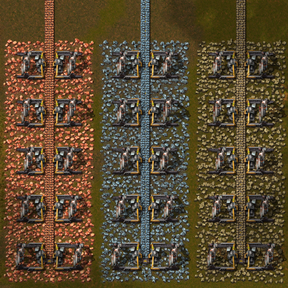
15 days ago

Awryt, at first it looked like the correct resource were under the correct BP but once it got built it changed to what I had in the selector instead of what were there when the BP were created. I'll try to make a new BP of each again and see once more

15 days ago

Awryt, at first it looked like the correct resource were under the correct BP but once it got built it changed to what I had in the selector instead of what were there when the BP were created. I'll try to make a new BP of each again and see once more

My new Bp's seem to be working perfectly now, most've done something wrong unless there is an rare bug there somewhere.
I had the setting toggled on before as well I'm 99% sure

well it's working now so i'm sorry for wasting your time with this.

Keep up the good work :=)

15 days ago

No worries, glad you have it working. It is confusing, due to the "tricks" that are performed in the scripting.

I did find another issue to resolve when testing, so I will be updating soon. The spot resource is not removed if a ghost Resource drill is deleted, that was placed by a blueprint that is also placing the resource.

14 days ago

awryt, I noticed that too, I didn't think much of it but glad you fixing :=)

New response
