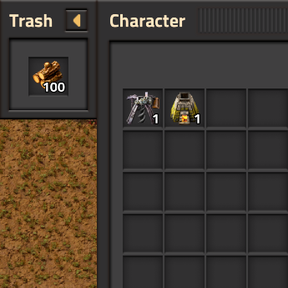
Providing the player with new tools or adjusting the game interface, without fundamentally changing gameplay.

I've been using this mod as a trash slot for a while, so when I saw your mod today, I thought I'd provide an idea to distinguish it from previous mods by allowing the user to retain their last deleted item, like you can in Terraria. But I'm delighted to see you've already done it!
Some ideas for improvement/polish:
Finished:
You can do inventory sounds like this:
player.play_sound{path = "item-pick/inserter"}
player.play_sound{path = "item-drop/inserter"}

Thanks so much, I really appreciate feedback, I don't think I can detect the hovered item but I could delete the item stack on the cursor, I'll look into it. Anyway these are great suggestions and I'll start working on them soon.
Yes, I quickly learned to appreciate the value of good feedback when I started modding, so I'm happy to return the favour. :)
Here's another mod I was thinking of. This one has a keybind to show/hide the Trash button.
I have another suggestion for you, but this one is a bit more challenging so you may want to leave it for last: An extensible item denylist.
Here's a good example of how to do this in valves-lib; you'd declare something like this in data.lua:
data:extend{
    {
        type = "mod-data",
        name = "inventory-trash-slot",
        data = {
            denylist = { }
        }
    },
}
Other mods can depend on you and add items they don't want to be deleted like so:
data.raw["mod-data"]["inventory-trash-slot"].data.denylist["cube-ultradense-utility-cube"] = true
In your control.lua runtime code, you can access this list via:
prototypes.mod_data["inventory-trash-slot"].data.denylist
The primary example is Ultracube if you hadn't guessed, which must not be deleted or duplicated under any circumstance.
EDIT: You may also be interested in using styles if you plan on making more GUI mods, but you can probably get away with not using them for this one.
That's an interesting concept but seems quite ambitious, I am using the vanilla styles currently but I haven't prototyped any custom ones.
The most important thing to know about styles is that you can assign a "parent" to inherit properties from vanilla styles. Ctrl + F6 in-game will allow you to inspect the styles of any GUI.
Some feedback for 0.2.1:
[controls]
toggle-gui-keybind=Toggle Trash slot
sprite-button-tooltip=Warning: Items will be permanently deleted.\n__CONTROL__toggle-gui-keybind__ to toggle.
so if the user rebinds the key, the tooltip will change the next time you assign to button.tooltip.
By the way, when I suggested making a button to collapse the Trash slot, I was talking about a clickable "Minimise" button on the GUI that shrinks it into a collapsed state. In this collapsed state, the title would be gone and only the Minimise button would be present, and it would now have a "trashcan" icon.
The reason for this is that it's hard to remember keybinds when the GUI is hidden, as a lot of mods will define and compete with each other for keybinds (I use another one that defines Shift + G even.)
I realise this is a lot to do so you'll want to leave that for later. You may also want to have a look at Compact Recipe Pins where I ended up using both methods.
Thanks, I didn't even realise that keybinds were automatically exposed, that's a bit of an obvious oversight ig. I'll try fix the quick stuff first but I may need to take some time with some of it.
I updated the original post to reflect the changes you've made so far. In 0.3.0, I've noticed that the Trash item may or may not disappear when you re-open the GUI, depending on which container the GUI belonged to.
I came up with a little demo to show you the "collapsed" Trash GUI. Run these commands in-game:
/c x = game.player.gui.relative.add{type="frame", anchor={gui=defines.relative_gui_type.controller_gui,position=defines.relative_gui_position.left}}
/c x.style.padding = 1
/c y = x.add{type="sprite-button", style="frame_action_button", sprite="trash_red_transparent"}
The only trouble will be creating the corresponding Minimise button. You'll need to get rid of caption = "Trash" and implement your own title bar.
raiguard's Factorio Library may be of interest to you. I haven't used this personally, but he defines some styles here that could be helpful to you.
EDIT: _CodeGreen's GUI Library might be more relevant. It has functions that allow you to create a frame with title buttons directly.
That's a good example, I wasn't sure where to start with a collapsed icon and couldn't find a good style for it, I'm not sure about a minimise button tho, would I have to transition all my gui elements to glib?
Would I have to transition all my gui elements to glib?
You don't need to use the library, it depends if you want to get your hands dirty - it'll be a good exercise to try this yourself.
You will need to implement your own title bar. When you give a top-level frame a "caption" property, Factorio makes one for you but you can't add your own elements to it, so you'll want to get rid of that.
Your entire GUI could be laid out like this:
If you've ever done HTML, I'm using "flow" a little bit like you would use DIV elements to organise the arrangement.
When you toggle Minimise, you would change the visibility of shallow_frame, trash_slot_title and trash_slot_title_spacer.
EDIT: It may also help you to know that frame.anchor is writable - you could re-assign this in on_gui_opened and then you only need to look after one GUI object.
Yeah that seems simple enough, do you think it's worth implementing open and close buttons because it doesn't seem like a super important feature
Technically speaking, your mod has been feature-complete since Day One - it deletes items and that's all it needs to do. The rest is just how I would polish it in my opinion.
(If it seems like I'm holding you to an unfairly high standard, it's probably true. These criticisms apply to the other two trash mods as well, but this one is new with new ideas, and you're present and willing to listen, so here I am.)
Trash Slot adds a non-trivial amount of width to the Inventory GUI (which is used all the time) for a feature which is used uncommonly (deleting items). On my screen, the Inventory actually begins to cover the minimap and I'm considering turning off "Flat Mode" (so I'd have Crafting/Logistics tabs instead).
You did add the keybind, and it's discoverable through the tooltip. But imagine if every program in Windows started asking you to use a keybind to minimise them, and each program was a different keybind. The Minimise action relates solely to the GUI, it should be part of the GUI context.
I've mocked together some images for you:
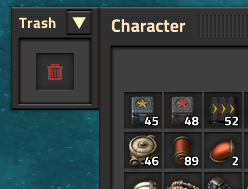
Minimised: (sprite-button width and height are 30px)
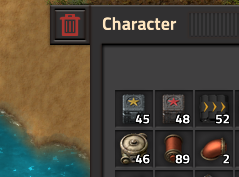
This (above) isn't the Trash slot, it's a restore button similar to the one you made in version 0.3.1. Maybe use the grey sprite to make it stand out less.
I would also make a per-player setting called "Move to HUD" which puts the slot on gui.top and looks like this:
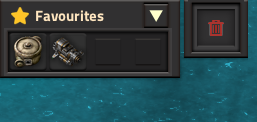
Notice the title is gone, there is no Minimise button and the shallow_frame padding is reduced to 8px. Or you can get rid of shallow_frame completely which I think looks a bit better.
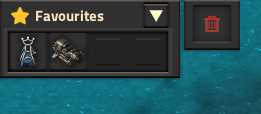
When the player toggles the "Move to HUD" setting, the GUI should always become un-minimised in its new state.
The "Toggle Trash Slot GUI" keybind would become unbound by default since it's no longer critical. Using the keybind when the GUI is in the HUD (gui.top) would toggle trash_slot_frame.visible.
I also amended the OP with some new suggestions which I'll repeat here:
I really appreciate your help with polishing, this mod has definitly come a long way. That analogy does make sense and I suppose forcing people to memorise keybinds isn't very player friendly. Anyway I'm interested in where you think the minimised icon should be placed, even if there is a setting where it should go by default. I put it in the corner because I thought it looked better but it is a bit disconeccted from the inventory gui.
The Minimise button would be next to the title when the GUI is on gui.relative (see second image). You can see all four images, can't you?
To be clear, the third and fourth images, and the "Move to HUD" setting in general, relate to the entire Trash Slot GUI. The sprite-button being shown is the trash slot where you place items, not the Restore button. In this example, the HUD version of the GUI does not have a Minimise button or a title bar.
This is why I suggested making the Restore button a grey trash icon instead, to disambiguate it.
Personally I prefer having the restore button in the corner so I'll leave that at least for now, but I'll definitly add a button to minimise.
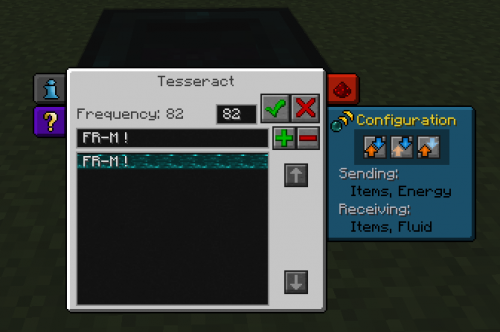
I don't know if you ever played the Thermal Expansion mod for Minecraft, but I had this sort of GUI attachment in mind.
In the centre, the grey element is the machine's main control panel, and on the left and right-hand sides are various configuration panels that you can expand or collapse by clicking on their icons.
The red, top-right panel for instance shows you redstone behaviour, how the machine will respond to redstone signals.
Oh okay, that's slightly different to what I had in mind, I was imagining that you would disable the trash slot for a length of time if you didn't want to use it because it looks quite obtrusive and a collapsed icon to the side doesn't really help that. But for toggling on and off it might be better, I think the tab to the side design lends itself more to a multiple tab setup tho.
I could add both as a toggle setting though I suppose.
I think the tab to the side design lends itself more to a multiple tab setup tho.
Who's to say other mods won't start doing the same? I guess the canonical example of how to do this properly would be the "Circuit network" and "Logistic network" buttons on the title bar when you open an inserter's GUI. Except we can't alter the native title bars to put buttons in.
I'm just posting to tell you that item tooltips don't show quality. You can fix this on your calls to set_gui_icon by changing
{type = "item", name = storage_stack.name}
to
{type = "item-with-quality", name = storage_stack.name, quality = storage_stack.quality.name}
Thanks, I don't have space age so I don't really notice stuff like that without already knowing about it. I still feel very on the fence about where to put the collapsed gui icon but I won't change it till I decide.
Good job on 0.3.2, everything seems to work exactly as described in the changelog. I like the new implementation of the Trash slot w/ minimise button.
Only problem I noticed is that the Minimised button (in gui.top) has a tooltip that says "Shift + G or click to enable", but the keybind is ignored unless you have an inventory open.
If you're going to stick with this design of having the Minimised button in gui.top, you may want to look into mod-gui, it's a library container that lets mods put their HUD buttons in one place (see where Informatron is in this image).
On to my opinion, and why I'm pushing for the design that I posted in Post 11.
In 0.3.2, you cannot hide the Trash Slot GUI, you can only choose one of two places for it to live: In the inventory where it lets you delete items, or in the HUD where it exists only as a shortcut to return to the inventory.
This "Minimised" button is almost the same size as the proper Trash Slot and it looks very similar. It might as well be the full trash slot, with Restore working on say, the right-click.
So now we're in a scenario where you can choose between the Trash Slot being in the inventory, and being in the HUD, which is what the "Move to HUD" setting would have done.
I think perhaps you've taken the idea of Minimising programs in Windows, where programs are associated with icons in the taskbar at the bottom in a separate place. If you're following this analogy, creating a shortcut might be a good route. Shortcuts have a native interface to hide them if users don't want to see it.
However, I don't think a trash slot needs its own Shortcut.
Funny enough, I ended up using all three methods in Compact Recipe Pins:
Not that CRP is any example of how you should do things (it's my first mod). I tend to regard Filter Helper as a good reference for how to make a relative GUI, and it doesn't do any of the above - it always displays in context.
Yeah I made the shortcut only open the inventor because originally the logic was the same for toggling on or off and I didn't consider changing it.
That mod library looks very helpful, I was looking for a way to get consistent icons but couldn't find anything.
The reason I am sticking with this design, is that I don't want to have the minimise button so the the gui is smaller, I want it to move away from the centre of attention. If the smaller icon is still attached to the inventory it still stick out and the minimising doesn't really help, bu by moving in into the corner it is no longer super noticible or distracting, even if it is a similar size.
Anyway thanks for the advice, I'll definitly use the mod-gui library.
Also could you explain shortcuts, they sound interesting and I couldn't find anything on google.
Something I forgot to say earlier: the deleted item buffer when you open chests/wagons etc. is a different buffer to the one that you get in your inventory. If you put an item in the Trash Slot for a chest, then close/re-open the chest, the item is cleared out.
I noticed that you have a separate storage_stack vs temp_stack in the source code so I assume this is intentional to some degree, but it's quite confusing and is probably going to cause someone to lose items by accident.
By Shortcuts, I'm talking about the Shortcut bar that has a lot of toggles on it. It's not too hard to code, read up on LuaPlayer::set_shortcut_toggled and the on_lua_shortcut event.
Before it was introduced in Factorio 0.17, mod-gui was a kind of "unofficial" library added to core by the developers, whereas shortcuts are the newer thing that you should use. (It really bugs me that Factory Planner still uses both mod-gui and has a shortcut button.)
With your goals in mind, I've come up with
You change the Minimise button on the relative GUI so the arrow faces left instead of down. Give it a tooltip saying "Move to HUD".
This action moves the entire Trash Slot GUI to gui.top. Now, the arrow faces right and the tooltip says "Move to Inventory". Clicking this also opens the inventory if player.opened == nil.
There is no keybind associated with this.
In both states, you make the "Trash" title text smaller (like I had in my mockup) and slim down the shallow_frame padding, so it's both smaller and consistent between the two positions.
You create a new Shortcut bar button, possibly make this style = "red" with a white icon like the Deconstruction planner.
The shortcut button has two functions:
The keybind (unbound by default so people don't delete things accidentally) now does the same thing as the shortcut, and the shortcut should reference the keybind in its tooltip too (to be clear, the mod will only have one keybind).
(In the control's description, you suggest the keybind which the control ought to have.)
Shift + Del with a real item in the cursor to "delete" it (move to storage_stack). Play "item_drop" sound and put some flying_text on this so it's absolutely clear what happened.Shift + Del in the other case to toggle visibility of Trash Slot, wherever its previous position was
That sounds like a good idea, I am a bit busy atm so I may not be able to finish it for a while. I did intentionally clear the gui on other entities because I wanted an apperance of 1 slot per entity and they all share one item stack although I later realised it's still attached to the player inventory so having one consistent one probably makes more sense. The main issue with having the slot in the top bar is that there are seperate gui definitions but I can work around that.
What do you mean about not showing the gui in remote view? When I open the cursor selection on the map the gui isn't present.
Opening a container entity (chests, wagons etc.) will show the Trash Slot even in Remote View. It's a really pedantic thing, you can make it low priority.
It's also technically possible to have an item in the cursor in Remote View: Blueprints and other planners.
Specific feedback for 0.3.3:
The name of the mod-data prototype is in the global namespace, so you'll have a conflict if another mod declares a "denylist" mod-data. I suggested using
data.raw["mod-data"]["inventory-trash-slot"].data.denylist
for this reason, and it gives you room to put other tables inside your data if you want. Or you could call it "inventory-trash-slot-denylist" instead.
EDIT: Forgot to mention, some flying_text feedback would be useful too. You can set up the LocalisedString like this (in translation.cfg):
[inventory-trash-slot-error]
item-in-denylist=__1__ cannot be deleted!
then the warning message is
local msg = {"inventory-trash-slot-error.item-in-denylist", player.cursor_stack.localised_name}
I've made the changes you suggested, let me know if the mod needs any more polish otherwise I'll start on the gui changes soon.
Yes, that all seems good to me. You may want to write a "denylist.txt" file with some information about how to add to the list, or write it directly in the mod Information.
Other than that I'm out of ideas, except for the things we discussed already.
I did find a bug when testing, for which I've opened a new thread.
Also, the mod is becoming long enough that you may want to start refactoring: moving long blocks into their own functions, putting independent code into its own modules etc. Update the Github side too.
I'd say the code is quite readable at the moment and isn't in dire need of extra comments. If you're like me and you'll forget everything after six months, you'll want to add some more.
In contrast, I was looking at FARL the other day to see how feasible it would be to port it. It's totally mystifying to read, directions are hard-coded into the mod as raw numbers. I can see why it hasn't been updated.
Actually, here's an annoying one that I just thought about. The game has quite a few different "player controllers" which can be used in scenarios etc. This won't affect normal gameplay, it's mostly just bug-proofing for the future.
In general, you can never assume that a player will have a character, or even an inventory to put items into.
They're all listed here and I'll repeat them for your convenience:
You can use this command to switch to the different controllers for testing:
game.player.set_controller{type=defines.controllers.spectator}
Don't worry about cutscenes, I don't think the GUI is interactable during cutscenes.
That seems like a bit of an oversight, I'll definitely fix that, I'm currently working on the gui overhaul. You originally suggested using the same keybind for deleting items and moving the gui, do you think I'd be better with a seperate one for deleting, shift x for example. Or I could remove the toggling keybind with the new system, l'm not really sure what would be best.
I still like what I wrote in "An Alternate Design" (except I changed Shift-G to Shift-Del), you may want to re-read it carefully.
To expand on this, each player will have three independent state variables that control their GUI.
(I like to give each player their own storage table in storage.p[player.index])
There's no point putting any of these in hidden "runtime-per-user" settings because they won't persist between saves.
Clicking the Shortcut button with no item in hand (or pressing the keybind which is now equivalent) will toggle showSlot only.
Clicking the Shortcut button with an item in hand will NOT toggle showSlot; it "deletes" the item (put it in storage_stack).
The set_shortcut_toggled state of the button should correspond with the showSlot variable (true by default).
With all of the above in place, the keybind does exactly the same thing as the Shortcut button, and is no longer necessary to use the mod so it can be unbound by default. (And it should be, it deletes your items!)
I don't know if you've ever played Minecraft modpacks where the mods all define key controls that conflict with each other, and to get them to work, you need to manually open up Control settings and re-assign them all.
Now imagine installing 100 mods in Factorio, and the cat steps on the keyboard and activates some special mod function. How easy is it to identify what the cat did, and how to reverse it?
I've finished most of the ideas in your concept, however I have been doing some testing and I don't really like the dual function of the shortcut. Using it to delete items works well and is intuitive, but also feels unnecessary, as there is already a button and keybind for toggling the gui and I don't think it is needed to fully disable the gui.
I don't really like the dual function of the shortcut. Using it to delete items works well and is intuitive, but also feels unnecessary, as there is already a button and keybind for toggling the gui
Which button is this? The arrow button should be the only way to change hudMode, and the Shortcut button (and keybind) are the only way to change showSlot.
EDIT: In case it wasn't clear, showSlot = false IMPLIES frame.visible = false always. It has nothing to do with where the GUI is.
I meant I don't want the shortcut to disable the gui and it will only delete items.
Okay. Overall, my aim is to give users the choice of having the Trash Slot display either:
And make it easy to retrieve when it's been hidden. This is primarily why I suggested the dual-purpose shortcut. If I have to start rummaging around the Controls menu for which pair of keys gets me the Trash Slot..
I'll wait and see how you do it, then I'll give specific feedback.
Specific feedback for 0.4.0:
Shift + G to enable or disable.
Other than that it seems to work exactly as described, well done!
My previous post is a good summary of my opinion. In particular, there is still no way to completely hide the GUI.
Also I strongly disagree with having Shift-X bound to "Delete item" by default (it shouldn't be bound at all). I accidentally hit Ctrl-X (Cut) in my testing, and I guarantee you I'll do the reverse when I want to use Cut.
Yeah I can see the problem it's just I feel like if it's unbound most people will never bother to bind it or even notice, maybe that's an indication that it's not necessary for them though. Tbh I don't feel like there is a need to completly hide the gui as having it in the hud is unobtrusive enough.
I thought of a few more things:
I came up with a mock version of a reduced GUI:
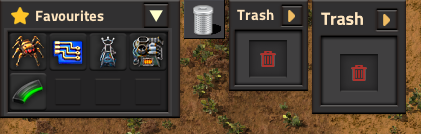
From left to right for comparison:
These are the changes that you'll need to make to create_trash_slot_gui to implement it:
-- From 5 to 2
frame.style.left_padding = 2
frame.style.right_padding = 2
frame.style.bottom_padding = 2
-- New
frame.style.top_padding = 2
frame.style.maximal_width = 80

-- New
titlebar.style.horizontal_spacing = 2

title.style = "subheader_caption_label" -- instead of "frame_title"
-- New
-- Add a tooltip in case "Trash" is translated to a long word
title.tooltip = title.caption
title.style.left_padding = 2
-- Cause the title to collapse into a "Words..." format if needed
title.style.horizontally_squashable = true

-- From 2 to 0
move_button.style.top_margin = 0

shallow_frame.style.top_padding = 8
shallow_frame.style.right_padding = 13
shallow_frame.style.left_padding = 13
shallow_frame.style.bottom_padding = 6
Thanks, for the suggestions, that looks much cleaner. I added more top and bottom padding to get a more square look but it overall looks much more balanced. Before I release the update, do you think it's worth adding flying text for force deleting an item, or is it obvious enough?
Before I release the update, do you think it's worth adding flying text for force deleting an item, or is it obvious enough?
Even though you need to manually assign the keybind now, I have been known to accidentally hit the wrong keys, and forget what my keybinds are. For a potentially destructive action that can be triggered by accident, I would definitely tell the player "Trashed item from cursor" or "Moved X to Trash".
(If your mod didn't have that crucial storage_stack that allows recovering the last deleted item, I would actually urge you to remove the keybind entirely.)
EDIT:
force deleting an item
Oh right you mean Ctrl-Clicking the Trash Slot. I thought you meant the "trash item" keybind (previously on Shift-X).
It could be useful to show, so the player can know for sure what happened the first time they do it. I would actually write it into the tooltip as well, a second line saying "Ctrl-Click to wipe the slot".
(Generally speaking, it's good to assume that your users won't read the mod description, or that they're clumsy on the keys like me.)
I added more top and bottom padding to get a more square look but it overall looks much more balanced.
Funny, I'd say my mock interface makes the overall GUI look more square. shallow_frame is squashed down, and the title bar makes up the rest of the square, if that makes sense.
I won't obsess over a few pixels though. Overall I'm quite happy with 0.4.2; I don't have any feedback for this version except for one bug that I've posted separately.
Also, because I'm still feeling really stubborn about the dual-shortcut function, I actually wrote an add-on mod which implements the GUI hiding function on top of yours.
I won't publish it yet out of respect, in case you want to make some further changes.
I can see what you mean, I personally don't really consider the frame in the shape so I'll keep it like it is. You're definitely welcome to publish an addon mod if you think it's an improvement, I'm not planning on changing anything at the moment.