
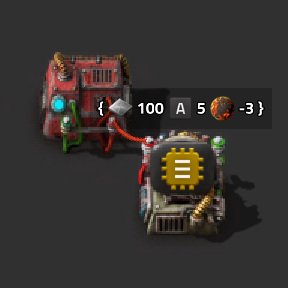
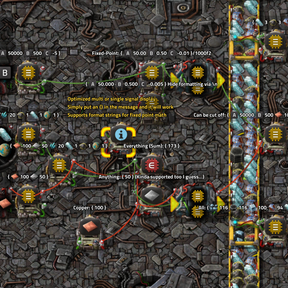
Easy to use multi/single signal display, useful for debugging or monitoring circuits.
- Updates every tick
- Great performance thanks to get_signals_changed() API (0.16ms even with 100 visible displays, if only a few signals change every tick)
- Signals are displayed with a 1 tick delay compared to the signals in the hovered GUI (vanilla circuit controlled entities also react 1 tick later)
How to use
Simply connect a display panel to a circuit and:
- Select the signal to display via the icon on the left
- Put a
{}anywhere in the message - Make sure the condition on the right is true so the message actually gets displayed
- Consider enabling show in alt mode
Special signals:
- Everything - Sum all signals
- Each - Show all signals as a list with icons and counts
- Anything - Shows first signal
For convenience, automatically sets text to "{}" and condition to any!=0 if any of the 3 special signals are selected first
Format strings
Shows integer values by default
I currently choose not to display large number as 1.0k or 5M like the game does, as I find they round too aggressively, but this could be implemented
Supports format strings for decimals (fixed point math) like /1000f2 anywhere in the message, which will transform 123456 into 123.46
Pro tip: put the format string in a second line so the game automatically hides it in alt-mode like:
Rocket Weights: {}
/1000f20
Notes
- If you have suggestions, issues or concerns with performance, let me know in Discussion!
Stops updating while the GUI is open to make editing text easier
The reason {} are included in the visible message is to allow blueprinting, copy settings, undo/redo, add/remove wires despite them being hard or impossible to correctly detect in the API.
That is also why the format string is outside the {}, as anything outside the {} is persisted and anything inside is constantly overridden by the mod.
Displays should not longer get stuck not updating, as they are now polled for undetectable changes (1 per tick, so it may a few seconds if you have hundreds)
Sadly in alt mode we are limited in how much text will be displayed, so with too many signals it might get cut off.
On top of that there is a 500 character limit for the message text for display and for edits by the player, but not by script
which visually can cause a rich text icon to be cut off and be revealed like { [iron] 1000 [copper] 900 <many more> [item=ex
It's possible to prevent by cutting off the whole icon, but should rarely be visible if you mainly use it for alt mode
Luckily the lua side appears to be unaffected by the 500 character limit, if it was, the } could be cut off and the display could break
If you find situations in which displays stop updating due to this, please report
Inspired by Signal-Display by AckEmma