
Factory Night Watch
Keep your multiplayer factory producing after the last player leaves, then pause
the game when a configured condition needs someone's attention.
Designed for cooperative multiplayer and dedicated servers. Supports the base
game and Space Age on Factorio 2.1; tested with Factorio 2.1.24.
Configurable safety pauses
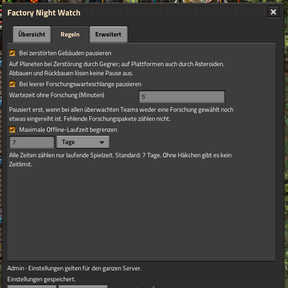
- Structure loss: pause after a monitored building is destroyed by enemies
on a planet, or destroyed on a space platform, including asteroid damage.
Walls, gates and robots can be ignored. - Research finished: pause when every monitored force has no selected or
queued research for a configurable period. Default: 5 simulation minutes.
Selected research waiting for science packs does not count as an empty queue. - Offline time limit: stop after a configurable offline duration. Default:
7 simulation days. The limit can be disabled. - Circuit conditions: monitor a signal on a red or green circuit network.
Select connected circuit entities; explicitly choose red/green and input/output
if several networks are found. Choose the signal and quality, comparison,
threshold and continuous delay.
Use ordinary combinators for more complex logic.
Rules trigger only while nobody is connected. Any connected player, including
an AFK player, keeps offline protection on standby.
In-game controls
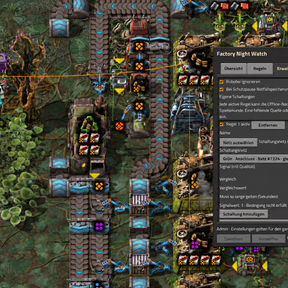
Open the radar shortcut in the bottom-right shortcut bar, or use /fnw-gui.
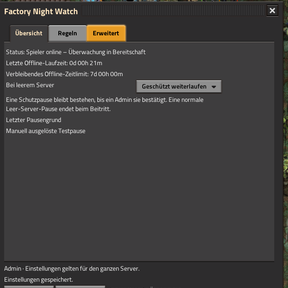
- Overview: operating mode, offline duration, remaining limit and last alarm.
- Rules: structure loss, research queue and time limit.
- Advanced: exceptions, emergency saves, circuit conditions and compatibility.
All players can view status. Admins can change settings, test a pause and
acknowledge alarms. Edited forms have Save/Discard controls and detect changes
made by another admin.
Circuit rules show the current network ID, wire colour and surface. The source
position is stored separately, so View alarm location can open remote view
even after the selected source entity has disappeared. Viewing the location does not
release the pause or teleport your character.
Additional building exclusions
In Advanced → Additional building exclusions → Add building exclusion, select
an entity using the native picker, then Save. Add/remove rows for individual
building prototypes, such as a transport belt or gun turret. Each entry applies
to that exact variant in every quality on all monitored surfaces. Other variants
of the same class remain protected. The existing wall/gate and robot switches
continue to apply independently.
The list affects structure-loss alarms only. Area exclusions can be used alongside
it; research, offline limits and explicit circuit rules (including missing-source
fail-safes) stay active. Up to 128 entries are supported; duplicates are merged
on save. Missing prototypes from removed mods remain listed by internal name and
can be removed; they do not block saving other settings. The list is stored in
the save and uses the same Save/Discard and multi-admin conflict checks.
Excluded areas
In Advanced → Excluded areas → Draw excluded area, drag a rectangle on the
planet or platform, give it a name and Save. Empty land can be selected too;
new buildings placed there are automatically covered. Up to 64 rectangles can be
enabled/disabled, removed or inspected using View area. Viewing opens remote
view with a persistent outline in world and map views. A small panel shows whether
there are unsaved changes and offers Back to excluded areas or Save and return
for all pending settings. Viewing alone never saves. Returning ends the preview
and removes both outlines; zooming does not. The pause is not released.
Exclusions suppress structure-loss alarms only, for every building type whose
centre lies inside the rectangle. Top/left edges are included; bottom/right edges
are excluded. Overlapping rectangles form a union. Each area belongs to its exact
surface: other planets/platforms at the same coordinates are unaffected. Renaming
a surface keeps its areas; deleting it does not transfer them to a replacement.
Explicit circuit conditions (including missing-source fail-safes), research and
time-limit alarms remain active. Changes use Save/Discard and admin conflict
protection, and are stored in the save.
Pause behavior
A safety alarm pauses the entire simulation, including other planets and
platforms. It stays paused until an admin acknowledges it in the GUI or with
/fnw-resume; joining the server does not clear an alarm.
Alternatively, choose Pause immediately for a normal empty-server pause that
resumes when someone joins. Existing manual pauses and safety alarms are kept.
Timers use simulation time. Paused or stopped-server time does not count.
Offline timers, circuit rules and alarms are stored in the save.
Installation
Install the same mod version on the server and every client. For a dedicated
server, set auto_pause=false in server-settings.json so protected offline
running can operate. The separate GitHub Docker updater can configure this for
the supported server layout, but is not required to use the mod.
English and German GUI, settings and messages are included. Synthetic surfaces
such as Blueprint Sandboxes are excluded from monitoring. Additional force and
surface-name exclusions are configurable.
Important limits
This mod reacts to detected events; it does not make buildings invulnerable,
predict attacks or undo damage. Circuit rules are sampled once per simulation
second. An enabled rule with a missing source entity or selected connector network triggers
an offline safety pause; an absent signal in an intact network reads zero.
Up to three rotating emergency saves can be requested after an alarm. These
are not automatic rollbacks and do not replace regular backups. Direct entity
deletion by another mod may bypass normal destruction events.
Feedback and development
Bug reports are welcome. Include the Factorio and mod versions, enabled rules,
other relevant mods, expected behavior and steps to reproduce. Redact passwords,
tokens and private server details from logs.
Developed with AI-assisted coding tools for code generation, documentation and
review. Maintained by dermalla. Development
uses automated regression tests, headless-server integration tests and in-game
checks. The installed mod does not use an AI service during play.
Licensed under the MIT License.