
Custom Recipe Loader
Create, clone and synchronize custom recipes directly in-game, with control over recipe visibility, Factoriopedia presentation and recycling behavior.
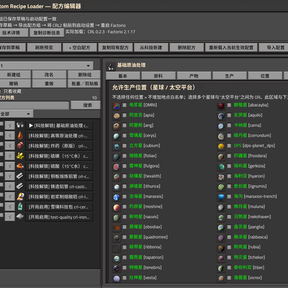
CRL is a visual recipe editor designed for modded games, large modpacks and multi-planet setups. It reads the prototypes actually loaded by Factorio, so vanilla and modded items, fluids, technologies, machines, crafting categories, modules, planets and surface properties can be used without writing a separate recipe mod.
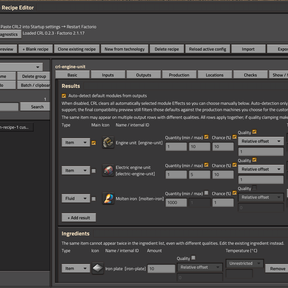
Recipe editing
- Create blank recipes, clone existing recipes, or build new recipes around existing game content
- Add item and fluid ingredients and products
- Configure fixed or ranged amounts, independent output probability, fluid temperature and main products
- Keep cloned CRL recipes separate from their source recipes
- Factorio 2.1 quality-aware ingredients and products, including fixed quality and relative quality offsets
- Manage multiple recipes and recipe groups in one editor
- Search, favorites, batch operations, copy/cut/paste, undo/redo and automatic/manual backups
- Native hover previews and Alt-click Factoriopedia navigation for ingredients, products, machines, modules and locations
Draft edits remain separate from the configuration currently loaded by the game until they are exported and applied.
Recipe visibility and Factoriopedia
CRL can control how existing game recipes are presented without deleting or rewriting their underlying prototypes.
- Find game recipes by the item or fluid they produce
- Hide or restore recipes separately for each CRL recipe group
- Batch-select recipes and preserve visibility changes in history and exported configurations
- Explicitly hide the original recipe associated with a CRL recipe
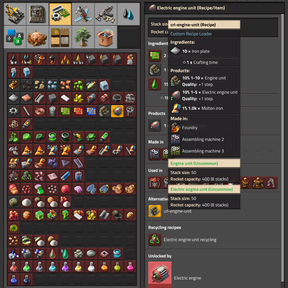
- Select one CRL recipe as the primary Factoriopedia recipe for a product
- Keep other CRL recipes available through Factorio's native alternative-recipe presentation
Selecting a CRL recipe as primary also hides its selected original recipe. This changes recipe visibility and Factoriopedia presentation; it does not replace recipe assignments already stored in machines or blueprints.
Recycling control
CRL can also customize recycling when the loaded game or modpack provides a compatible recycling recipe.
For each item, choose either:
- Automatic recycling based on its primary CRL recipe, or
- Manual recycling with independently configured inputs, crafting time and outputs
Automatic recycling is available only when CRL can derive an unambiguous rule from a deterministic single-item output without incompatible quality settings. It returns 25% of the solid ingredients required per produced item; fluid ingredients are not returned.
Manual rules can define output amounts, ranges and probabilities.
Automatic and manual rules are mutually exclusive for the same item. CRL checks eligibility, recipe conflicts and the loaded result instead of silently guessing when a recycling route is missing or ambiguous.
Production, modules and locations
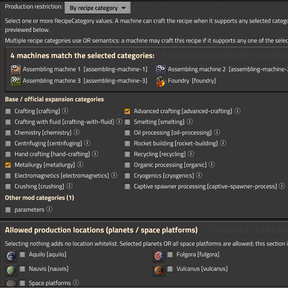
Recipes can use either crafting categories or explicitly selected production machines.
CRL can:
- Preview machines compatible with the current recipe
- Discover machines and crafting categories added by other mods
- Explain why a machine is unsuitable
- Configure module effects and optional ModuleCategory restrictions
- Derive sensible module compatibility from recipe outputs and production machines
- Restrict production to selected planets or compatible Space Platforms
- Apply advanced SurfaceProperty conditions
- Browse surface properties added by Factorio or other mods
- Preview matching planets, surfaces and platform-detection results
Space Age is optional. Mod-added planets and surface properties are discovered dynamically rather than relying on a fixed vanilla-only list.
Validation, groups and synchronized export
CRL validates configurations before they are applied, including prototype references, duplicate IDs, production restrictions, quality settings, recipe-visibility rules and recycling conflicts.
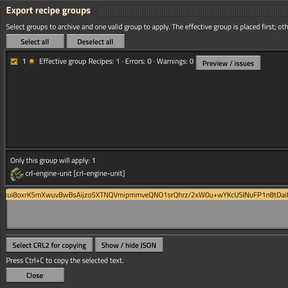
Recipes can be organized into independent groups. Multiple groups may be stored in one exported configuration while one valid group is selected as the effective startup configuration.
Loaded-result diagnostics compare CRL's expected configuration with the prototypes actually present after the game finishes loading, helping identify changes introduced by other mods or load-order interactions.
The normal workflow is:
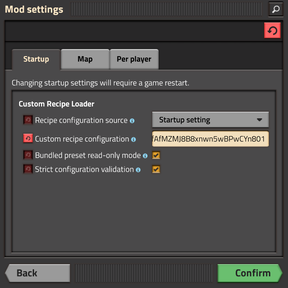
Edit → Validate → Export CRL2 → paste into Startup settings → Restart Factorio
Because CRL recipes are data-stage prototypes, the synchronized Startup Setting ensures that multiplayer servers and clients load the same effective recipe configuration.
Compatibility and interface
- Factorio 2.0 and 2.1
- Space Age optional
- Quality optional on Factorio 2.1
- Base-only games remain supported
- Designed for large modpacks and mod-added content
- Multiplayer configuration editing restricted to administrators
- English, Simplified Chinese and Russian localization
- Open with the shortcut button,
Ctrl + Shift + R,/crlor/custom-recipes
Custom Recipe Loader — 自定义配方加载器
直接在游戏内创建、复制并同步自定义配方,同时控制原版/Mod 配方的显示方式、游戏图鉴中的主配方以及回收规则。
CRL 是面向 Mod 环境、大型 Modpack 与多星球存档的可视化配方编辑器。它直接读取 Factorio 当前实际加载的 Prototype,因此无需另外编写配方 Mod,即可使用原版或其他 Mod 添加的物品、流体、科技、生产设备、制作类别、插件、星球与地表属性。
配方编辑
- 创建空白配方、复制已有配方,或基于现有游戏内容建立新配方
- 添加物品/流体原料与产物
- 设置固定或随机数量范围、独立产出概率、流体温度与主要产物
- CRL 复制出的配方与来源配方保持独立
- Factorio 2.1 支持带品质的原料/产物,包括固定品质与相对品质偏移
- 在同一个编辑器中管理多个配方与配方组
- 搜索、收藏、批量操作、复制/剪切/粘贴、撤销/重做以及自动/手动备份
- 原料、产物、机器、插件和地点支持原生悬停预览,并可通过 Alt+左键打开游戏图鉴
保存到草稿不会立即改变当前游戏实际加载的配置;只有导出并应用后的生效组会在重新启动游戏后应用。
配方显示与游戏图鉴
CRL 可以控制现有游戏配方的显示方式,而不需要删除或直接重写这些配方的 Prototype。
- 根据某个物品或流体查找所有产出它的游戏配方
- 每个 CRL 配方组独立设置需要隐藏或恢复显示的游戏配方
- 支持批量选择,并将显示规则保存在历史记录与导出配置中
- 单独指定 CRL 配方需要隐藏的原配方
- 将某个 CRL 配方指定为对应产物在游戏图鉴中的主配方
- 其他相关 CRL 配方继续通过 Factorio 原生的备选配方机制显示
将 CRL 配方设为主配方时,会同时隐藏所指定的原配方。该功能改变的是配方可见性和游戏图鉴中的展示关系,不会替换机器或蓝图中已经保存的配方选择。
回收规则
当当前游戏或 Modpack 中存在兼容的回收配方时,CRL 可以进一步控制物品的回收方式。
每个物品可以选择:
- 根据其 CRL 主配方生成的 自动回收规则,或者
- 独立设置输入数量、制作时间和返还产物的 手动回收规则
自动回收只会在规则可以明确推导时启用,例如配方具有单一且确定数量的物品产物,并且不存在不兼容的特殊品质规则。自动模式按照每件产物所需的固体原料返还 25%;流体原料不会返还。
手动模式可以独立设置返还物品、数量范围与概率。
同一物品的自动与手动回收规则互斥。CRL 会检查自动回收适用条件、规则冲突以及实际加载结果;当回收路径缺失或存在歧义时会明确报告,而不是自行猜测。
生产设备、插件与地点
配方既可以使用制作类别,也可以直接限制到指定的生产设备。
CRL 支持:
- 预览能够生产当前配方的机器
- 自动发现其他 Mod 添加的机器和制作类别
- 显示机器不适用当前配方的具体原因
- 设置插件效果与可选的插件种类限制
- 根据产物和生产设备推导合理的插件兼容性
- 将生产限制到指定星球或兼容的太空平台
- 使用高级 SurfaceProperty 条件
- 查询 Factorio 或其他 Mod 添加的地表属性
- 预览匹配的星球、当前存档地表以及太空平台识别结果
Space Age 为可选依赖。CRL 会动态发现 Mod 添加的星球和地表属性,而不是依赖固定的原版星球列表。
校验、配方组与同步导出
CRL 会在应用配置前进行校验,包括 Prototype 引用、重复 ID、生产限制、品质设置、配方显示规则以及回收规则冲突。
配方可以组织到相互独立的配方组中。一次导出可以保存多个配方组,同时从其中选择一个通过校验的组作为实际启动时使用的配置。
加载结果核对会比较 CRL 期望生成的配置和 Factorio 完成加载后实际存在的 Prototype,从而帮助判断其他 Mod 或加载顺序是否修改了相关设置。
基本流程:
编辑 → 校验 → 导出 CRL2 → 填入启动设置 → 重启 Factorio
由于 CRL 配方属于 Data Stage Prototype,最终配置通过同步的 Startup Setting 加载,因此多人游戏中的服务器和客户端会使用相同的实际配方配置。
兼容性与界面
- Factorio 2.0 / 2.1
- Space Age 可选
- Factorio 2.1 的 Quality 可选
- 支持仅安装 Base 的游戏
- 面向大型 Modpack 与大量 Mod 内容
- 多人游戏中的实际配置修改限制为管理员
- 支持 English / 简体中文 / Русский
- 可通过快捷按钮、
Ctrl + Shift + R、/crl打开