


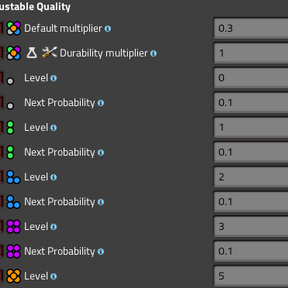
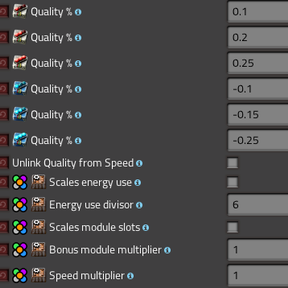
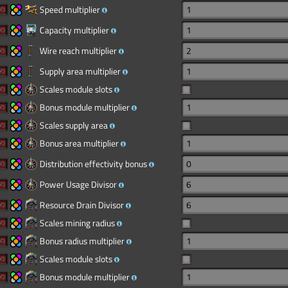
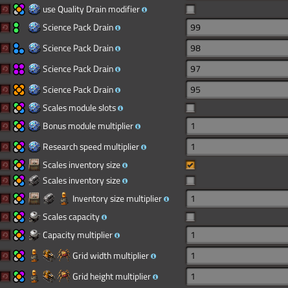
Adjustable Quality
Description
Adjustable Quality puts the power of Factorio's quality system directly into your hands. Through concise startup settings you can fine-tune how quality levels affect every available adjustment point provided to us by WUBE. Use it for subtle balance tweaks, dramatic hyperscaled progression, harsher energy requirements, or to craft tailored configurations for modpacks and multiplayer servers — all with clear, reversible controls and broad compatibility with other mods.
Highlights
- Default-first design: Vanilla values and behavior are preserved until you change them. All adjustments are opt-in startup settings applied at game start, so changes are predictable and reversible. This mod only exposes and modifies existing prototype values — it does not add new entities or perform runtime hacks — making it safe to use alongside other mods.
- Levels & Names: Change level values and display names for Normal, Uncommon, Rare, Epic and Legendary — plus extra tiers when supported. (Feel free to request your favorite quality tier mod to be added!)
- Upgrade Probability & Jump Control: Tune how often items upgrade between tiers and use "Maximum Quality Jump" to limit how many tiers a single upgrade can skip.
- Stat Scaling: The Default multiplier is a single, powerful knob that amplifies most modifiable stats — machine speed, production throughput, capacities, range and more — so you can tune pacing from subtle balance adjustments to full-on hyperscaling.
- Science Packs: The Durability multiplier increases the value of "tool" items (including science packs and repair packs), making higher-quality packs deliver proportionally larger research and durability benefits — rewarding players who invest in quality.
- Lab Drain & Research: Optional per-tier science pack drain plus lab research speed and module slot scaling.
- Module Scaling: Adjust the Quality percentages of Quality and Speed modules, or enable "Unlink Quality from Speed" to separate module effects.
- Production & Module Slots: crafting machine speed, module slots, and inserter speed to tune factory pacing and throughput.
- Energy & Power: energy usage scaling for assemblers and furnaces, beacon power usage, accumulator capacity and robot energy to shape power demands.
- Storage & Logistics: inventory and container sizes, cargo and fluid wagon capacity, equipment grid dimensions, roboport charging/station counts, and logistic cell charging behaviour.
- Beacons & Distribution: beacon supply area, distribution effectivity, and beacon module slots to control beacon influence.
- Mining & Resources: mining drill resource drain, mining radius and mining module slots to adjust depletion and productivity.
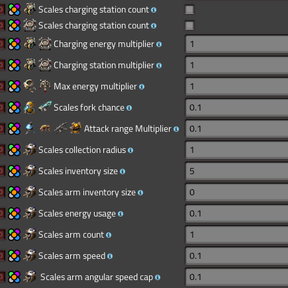
- Space Age: Asteroid Collectors are exposed for tuning — collection radius, arm inventory and counts, arm speed and angular caps, energy usage scaling, and inventory increases.
- Combat & Range: attack range scaling and weapon fork-chance adjustments for Tesla-style weapons.
- Other: electric pole reach and supply area, and additional minor prototype options exposed for fine-tuning. Everything we can adjust is in here!
- Compatibility: Works with vanilla Factorio, Space Age or Space Exploration. Applicable adjustment points are exposed for each mod that is enabled.
- Extra Tier Support: Supports Additional-Qualities and its infinite tiers and Quality-Plus-Plus.
How it works
- Where to change settings: Adjustable Quality exposes its options as startup mod settings (find them in the Mods settings screen).
- When settings take effect: Startup settings are applied during Factorio's data stage. That means changes require restarting the game for the new values to appear in-game.
- What the mod changes: At startup the mod updates existing prototypes (modules, machines, beacons, labs, miners, vehicles, etc.) to reflect your chosen scaling.
- Safety and limits: Most settings include sensible minimum and maximum clamps so you can safely tune values up or down. Some options accept negative or greater-than-one values to allow penalties or amplified effects wherever allowed.
- Quick testing tips: Make small, incremental changes and test them in a fresh or backed-up save. Apply the settings and the game will automatically restart, then inspect tooltips and entity stats to verify results.
- Advanced notes: When mods like Additional-Qualities, Quality-Plus-Plus, Space Age or Space Exploration are installed, extra configuration options appear and are handled the same way.
- Server users: To use this mod on a server, first configure the options on your local machine. Fine tune the desired settings, then save. Open
%appdata%\Factorio\Modsand copy themod-settings.datfile into the mods folder of your sever.
Suggested settings
Hyperscaled with larger areas:
- Uncommon: 2
- Rare: 4
- Epic: 7
- Legendary: 11
Hyperscaled with more powerful effects:
- Default multiplier: 0.6
- Science / repair-pack durability multiplier: 2
Name suggestions:
- Normal → Basic
- Uncommon → Improved
- Rare → Advanced
- Epic → Refined
- Legendary → Optimized
- Extras: Calibrated, Honed, Tempered, Perfected
Acknowledgements
Inspired by code from Easy Quality and Additional Qualities.
Warning
- Reducing quality levels mid-game is not recommended; lowering tiers can cause items to be lost from equipment grids. Make changes at game start or back up saves before experimenting.
- Extremely high values for some settings can break the game UI. Specifically module slots going very high can negatively impact your ability to see entities below them. Also be careful with adjusting the values of asteroid collectors too high as they are very costly for CPU calculations with extreme arm lengths and angles.