
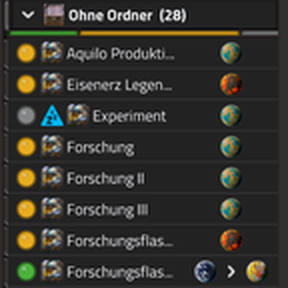
Organize space platforms in named, color-coded folders with a panel in the remote view. Search, favorites, route, location and schedule group views, build progress, pause buttons and more. Now with Japanese and Korean.
Providing the player with new tools or adjusting the game interface, without fundamentally changing gameplay.
Transportation of the player, be it vehicles or teleporters.

First I'll just say, this is a magnificent mod, absolutely fantastic work.
I have some thoughts that might be able to help reduce visual clutter, and fix some inconsistencies with the how the names are organised alphabetically.
I like to list my platforms with the symbols found in the pencil menu, so my Nauvis' haulers would be named [planet=nauvis] [item=thruster] (name of platform 01, 02, etc). Natively, factorio respects the alphabetisation of the symbol name, so that [planet=aquilo] would come before [planet=nauvis], however in your mod it doesn't and follows only the first listed alphanumeric characters, so there's an inherent mismatch with the game's established naming conventions; my solution has been to use the manual ordering, but it would be cool not to have to worry about that.
The other question is would it be possible to split the option to "hide location and status" into separate tabs, and potentially add an option for hiding the type of starter pack used for the platform?
I really like the traveling indicators but I don't have as much use for the status indicators, so an option to hide them separately instead of together would bee choice, or perhaps to move the status indicators over to the right to clutter the names less?
Also, showing what type of starter pack I used seems kinda pointless, because every platform has used the same starter pack, so its just added noise of the icon when you're hunting through names :/
Again tho, these are minor points of feedback; this is a modlist staple now as far as I'm concerned, so thanks for your mahi <3

Hi izzet_the_bard,
thanks for the great feedback and the kind words, I really appreciate it!
Sorting with symbols: good catch! Right now the mod strips the symbols before sorting, so [planet=aquilo] and [planet=nauvis] land in the same group. I’m looking into an option to sort by the full name including the symbols, so it follows the game’s order. I’ll let you know when it’s in, then you can check it against your naming scheme.
Status and location: that one is already in the works and almost done. In the next update, which should be out in the next few days, the colored status dot and the location/status column can be hidden separately, so you can keep the travel indicators and drop the status dot (or the other way round). Moving the status dot to the right side is a good idea too, I’ve put it on my list.
Starter pack icon: I think you can already hide that one. The update that just went up today (2.1.18 / 2.1.19) has an option to hide the default platform icon (Settings → Icons tab). If you’re on an older version, updating should make it show up. The scroll bar can be hidden in the next update as well.
Thanks again!
cheers,
Amageddon
Outstanding; have pushed the update and its working great!
This might be insane, but my fav part is how granular you can be with the size of the gui; it's a feature that almost never exists with other mods, and is more than even the base game, so its surprising how much you miss the capacity to resize windows until its unavail 😅
If you're ok with some more QA, I've got a few more potential suggestions/improvements:
Currently, pressing the space map button at the top of your menu takes you first to the vanilla surfaces menu, where you then have to press the button again before moving there, is it possible to reduce this to one step? I dont ever want to have to look at the vanilla list again, you've ruined it for me 😂
I use the drawing board mod (https://mods.factorio.com/mod/drawing-board), which adds a unique blank surface so you can test designs without enabling debug/edit mode or needing to exit to a test world.
In the vanilla list, it appears in an "Other" heading, underneath the "Planets" and "Platforms" headings, and this alternate surface type then doesn't appear to be put into folders, favourited, etc, unlike planets and platforms.
The current solution is to open the vanilla menu (bleh) to find these "Other" surfaces, and this issue might be a unique edge case for the DB mod, or it might extend to any surface added by other mods that dont have the "Planet" or "Platform" heading/class/title/group/family (lua is a mystery and I cant read).
the timer that appears next to platforms that are currently under construction (the ~x minutes in small text) is causing some large scale flickering.
When a platform is in a scenario where its not getting a missing construction item, the text saying how many minutes it will take to complete is larger than the coloured progress bar. This then causes the whole row to increases in height, which then bumps all the rows below it, creating a larger flicker that is far more visible than just the counter alone. Note, this happens regardless of how many px the row height is set to.
While a cool idea and one that promotes granularity (my fav thing), I think the coloured progress bar bar alone is a good enough indicator of how the build progress is going and the time in minutes seems somewhat arbitrary, particularly when the whole build is stalled on a single item; like if I accidentally place a blueprinted item that's of a quality that I don't stock and is therefore never going to receive, it seems unlikely that the build will be completed in ~8 mins 😂
I wouldn't have noticed this without the previous note, but this is regarding the "Under Construction" heading/list header that appears when a ship is being build/modified.
It seems like a potential oversight that this is the only header that you ~cant~ hide or adjust in the settings. If there was an option to hide or move the header to say, the bottom of the list after your other folders, it would solve the list flickering issue, and if like me, you've got ships that are in a permanent testing/reconstruction state, give the player an option to choose where they sit instead of defaulting to the top underneath the favs
Regardless, absolutely phenomenal work; I went to your page to see if you had other mods to explore and was shocked to find that this absolute banger was your first!
Thanks again!
Hey izzet_the_bard,
Thanks a lot for the kind words and for the great feedback, and for the upcoming writing session, too :D
Funny enough, it’s not really my first mod, just the first one I actually published, because this is the first one I was happy enough with to put out there. Knowing it works for you like this makes my day!
About the space map: sadly that’s not doable, neither through the API nor through a hotkey. I’ll keep an eye on it though, since it bugs me as well, and if Factorio ever opens that up, I’ll change it right away.
For the other points I can’t promise anything yet, but they should all be doable. Maybe even in the next update, or at least a part of them.
Keep the feedback coming, it’s really helpful!
cheers, Amageddon
Outstanding; have pushed the update and its working great!
This might be insane, but my fav part is how granular you can be with the size of the gui; it's a feature that almost never exists with other mods, and is more than even the base game, so its surprising how much you miss the capacity to resize windows until its unavail 😅If you're ok with some more QA, I've got a few more potential suggestions/improvements:
Currently, pressing the space map button at the top of your menu takes you first to the vanilla surfaces menu, where you then have to press the button again before moving there, is it possible to reduce this to one step? I dont ever want to have to look at the vanilla list again, you've ruined it for me 😂
I use the drawing board mod (https://mods.factorio.com/mod/drawing-board), which adds a unique blank surface so you can test designs without enabling debug/edit mode or needing to exit to a test world.
In the vanilla list, it appears in an "Other" heading, underneath the "Planets" and "Platforms" headings, and this alternate surface type then doesn't appear to be put into folders, favourited, etc, unlike planets and platforms.
The current solution is to open the vanilla menu (bleh) to find these "Other" surfaces, and this issue might be a unique edge case for the DB mod, or it might extend to any surface added by other mods that dont have the "Planet" or "Platform" heading/class/title/group/family (lua is a mystery and I cant read).the timer that appears next to platforms that are currently under construction (the ~x minutes in small text) is causing some large scale flickering.
When a platform is in a scenario where its not getting a missing construction item, the text saying how many minutes it will take to complete is larger than the coloured progress bar. This then causes the whole row to increases in height, which then bumps all the rows below it, creating a larger flicker that is far more visible than just the counter alone. Note, this happens regardless of how many px the row height is set to.
While a cool idea and one that promotes granularity (my fav thing), I think the coloured progress bar bar alone is a good enough indicator of how the build progress is going and the time in minutes seems somewhat arbitrary, particularly when the whole build is stalled on a single item; like if I accidentally place a blueprinted item that's of a quality that I don't stock and is therefore never going to receive, it seems unlikely that the build will be completed in ~8 mins 😂I wouldn't have noticed this without the previous note, but this is regarding the "Under Construction" heading/list header that appears when a ship is being build/modified.
It seems like a potential oversight that this is the only header that you ~cant~ hide or adjust in the settings. If there was an option to hide or move the header to say, the bottom of the list after your other folders, it would solve the list flickering issue, and if like me, you've got ships that are in a permanent testing/reconstruction state, give the player an option to choose where they sit instead of defaulting to the top underneath the favsRegardless, absolutely phenomenal work; I went to your page to see if you had other mods to explore and was shocked to find that this absolute banger was your first!
Thanks again!
Hey izzet_the_bard,
a few more cups of coffee and a few less nerves later, I think it's done. Version 2.1.27 should have everything you asked for, except the space map button. Sorry, mods simply can't open it.
The "Other" surfaces now have their own section and sort in with the planets if you use the organizer. The build timer doesn't make the rows jump anymore, and you can put the "Under Construction" group at the top, at the bottom, or get rid of it.
Would you give it a try and tell me if it works for you? I'm off to bed now. Have fun with the update!
cheers, Amageddon
Bro phenomenal effort. Everything is working as expected; the "stalled" text substitution is elegant and now that its static is a good visual reminder of stuff thats still to-do, and a great check against things that have been configured wrong accidentally, nice one!
No stress about the space map, we respect hard-coded limitations in this house hahaha
The only thing I found is that as soon as the "drawing board" surfaces were made visible, another surface called rcomb_graph_surface that I had never seen before was now visible; its completely empty and the only thing i can think it ~might~ be from is power grid comb (??) so thats a fun secret to uncover hahaha
Since I have several of the drawing surfaces I have now put them into a colapsed folder so theyre hidden unless I need them, I just put the rcomb surface in there with them, so is manageable.
There might be more surfaces like this from other mods that are hidden but in use by other mod makers, so could a fix to this be a toggle to completely hide a surface from being visible the main lists? It could put them into a folder behind the scenes that is then invisible or hidden from view rather, which might be simpler than hiding a surface entirely?
I imagine this could have use-cases for some platforms to; having it be like a deep storage option for surfaces that you just dont want to see, or were set 200 hours ago and haven't been touched since haha
Regardless, you've absolutely gone above and beyond, so thanks for putting up with me; those prev mods when?? 👀
The Comb Zone
Hey, I’m happy about your feedback again, as always!
I’ll have a look at what I can do about the surfaces. As for rcomb_graph_surface: I honestly can’t explain that phantom surface either.
cheers, Amageddon
Good morning izzet_the_bard,
my wife has cursed me a few times and the coffee machine has seen me more often than my bed, but I can tell you now: the mod can do it!
Ctrl+click = hide (the entry moves into a collapsed “Hidden” section at the end of the list, another Ctrl+click brings it back)
Ctrl+Shift+click = hide permanently (it disappears from all lists and can be brought back through the Manage window)
It works for platforms, planets and other surfaces, so rcomb_graph_surface can finally disappear.
Have fun with it, and if anything else comes to mind, just let me know!
cheers Amageddon