
Space Platform Organizer - Enhanced
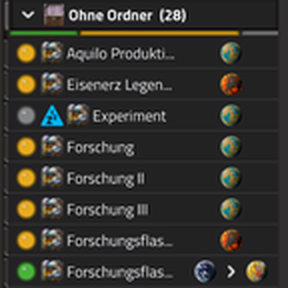
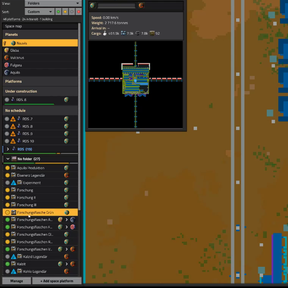
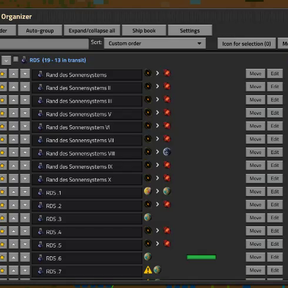
The remote view lists every space platform in one endless row. This mod turns that list into a panel with named, color-coded folders, so you find the right platform in seconds, even with dozens of them.
The five things you will notice first
- Folders and subfolders with colors, icons and notes, plus favorites, "Recently visited" and search
- Status at a glance: colored status dots, filter buttons (in transit / in orbit / paused / no schedule) and a status bar per folder
- Live preview when you hover a platform: route, progress, speed, weight, arrival time and main cargo
- Create several platforms at once with a ship blueprint book and a live material check
- Backup, recycle bin and automatic backup file, so a mistake never costs you your folders
Sorting and organizing
- Folders and one level of subfolders, custom colors, icons and notes, a colored stripe and a status bar per folder
- Favorites, "Recently visited", search, view by folder or by location
- Sorting A-Z / Z-A with natural numbers and Roman numerals, by build progress, or your own custom order; optionally symbols in names count when sorting
- Auto-grouping by keywords with an editable rules window; new platforms are sorted automatically or offered an assign dialog
- Optional: folders, favorites and a custom order for planets
- Delete platforms from the Manage window, after a confirmation that lists their names
Status, markers and preview
- Status filter buttons next to the search field, combinable, or as one button that cycles through the filters
- A colored status dot in front of every platform; warning icons for paused platforms and platforms without a schedule (optional)
- Build progress bar with time estimate for platforms under construction
- Finished platforms without a schedule get their own group, so you notice them at a glance
- A marker for the platform you are looking at and a player figure for the planet or platform your character stands on
- Preview on hover (can be switched off)
Make it look the way you want
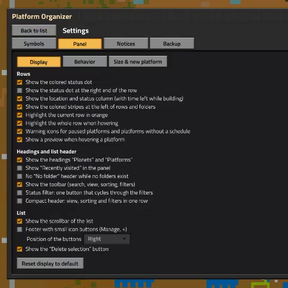
The settings (gear button next to the search field) have three pages for the display:
- Hide the status dot, the location and status column, headings, colored stripes or the scrollbar; or put the status dot at the right end of the row
- Set the indent of subfolders and the row height
- Compact header: view, sorting and filter in one row
- Toolbar (search, view, sorting, filters) can be hidden completely; the gear button moves to the title bar
- Footer with small icon buttons (Manage, +), placed left, in the middle or on the right
- Highlight the whole row or only the button under the mouse (reacts instantly on servers with a higher ping)
- Hide the panel in remote view when zooming in, like the game's own list
- One button resets all display options; sliders for panel height and width (in percent of the screen)
New platforms
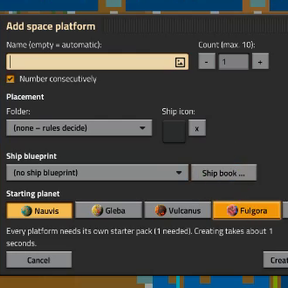
- Extended "Add space platform" dialog: up to 10 platforms at once, consecutive numbering, target folder, ship icon and start planet
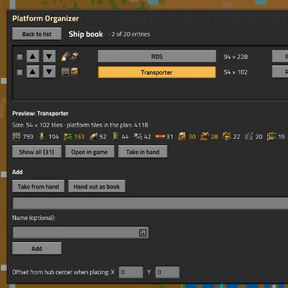
- Ship book: up to 20 ship blueprints per savegame (from your hand, a blueprint book, your personal storage or pasted text), reorder, rename, preview the parts per quality level, hand the book out as a real blueprint book and read it in again in other savegames
- Automatic ship blueprint on new platforms as soon as their hub exists
- Live material check: shows whether the logistic network of the chosen planet holds enough material for the selected ship and lists what is missing
- A "Space map" row at the top of the list, like in the original list, and a "To folders" button on the original list
Backup
- Export folders, rules, assignments, favorites, icons, notes and panel settings as text; import with a preview and a choice per section (skip / add / replace)
- Recycle bin for deleted folders (restore with rules and assignments) and an automatic backup file (every 30 minutes, can be turned off)
Good to know
- Requires Space Age. Open the panel with the shortcut bar button, Ctrl+Shift+P or /spo.
- Works with Factorio 2.0 and 2.1: the mod page offers a file for each game version, both with the same features. Support for Factorio 2.0 will end soon; the 2.1 file stays the main version, and the older 2.0 files remain available for download.
- Build progress, time estimate and the material check are approximations; the check only compares with the current stock of the logistic network and does not count items on their way.
/spo_checkprints a self-test to the chat, handy for bug reports.- Languages: English, German, French, Spanish, Simplified Chinese and Russian. The Russian translation was contributed by weydarkend. The French, Spanish and Chinese texts, and the newer Russian ones, were made with the help of AI and have not been checked by native speakers yet. Corrections are very welcome.
Credits
Based on SpacePlatformOrgUI by AkitaAttribute (MIT license). Thanks to Ingo_Igel for the detailed feedback on the layout, the markers and the icons, and to weydarkend for the Russian translation.