
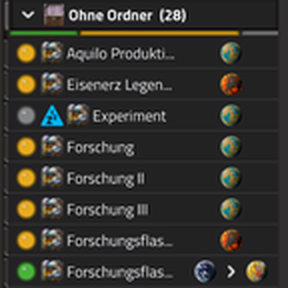
Sort your space platforms into named, color-coded folders in the remote view (M). Subfolders, favorites, search, status filters, auto-grouping, build progress with time estimate, markers for the platform you look at and where your character stands. Create several platforms at once with a ship blueprint book and a live material check. Backup export/import, recycle bin. English, German, French, Spanish, Chinese, Russian. Based on AkitaAttribute/SpacePlatformOrgUI (MIT).
Providing the player with new tools or adjusting the game interface, without fundamentally changing gameplay.
Version: 2.1.25
Date: 2026-10-29
  Changes:
    - Version for Factorio 2.1. The features are the same as in 2.1.24; only the game version in the mod information changed.
Version: 2.1.24
Date: 2026-10-29
  Features:
    - New option "Show the status dot at the right end of the row" (settings, tab "Panel", page "Display"). The colored dot moves behind the location and status. Part of the backup.
    - New option "Footer with small icon buttons (Manage, +)" (page "Display"). The two wide footer buttons become small icon buttons; a drop-down sets whether they sit on the left, in the middle or on the right. Part of the backup.
  Changes:
    - The option for the status dot is now called "Show the colored status dot".
    - French, Spanish, Chinese and Russian: the texts of the new options were translated with the help of AI and have not been checked by a native speaker yet; corrections are welcome.
  Bugfixes:
    - Narrow panel: the footer buttons no longer widen the panel, which left an empty strip on the right at narrow widths (for example 180 px).
    - Settings, size slider for the width: the slider now starts at the value that gives the minimum width of 180 px (before, it either started too high or had a stretch where nothing changed).
Version: 2.1.23
Date: 2026-10-29
  Changes:
    - Version for Factorio 2.1. The features are the same as in 2.1.22; only the game version in the mod information changed.
Version: 2.1.22
Date: 2026-10-29
  Features:
    - New option "Show the toolbar (search, view, sorting, filters)" (settings, tab "Panel", page "Display"). Turned off, the panel starts with the list right away; the gear button moves to the title bar. The current view and sorting stay, search and status filters are not applied while the toolbar is hidden. Part of the backup.
  Changes:
    - Notice: support for Factorio 2.0 will end soon. The file for Factorio 2.1 stays the main version; the older 2.0 files remain available for download.
    - French, Spanish, Chinese and Russian: the texts of the new option were translated with the help of AI and have not been checked by a native speaker yet; corrections are welcome.
  Bugfixes:
    - Panel header, wide panel: the drop-downs "View" and "Sort" are now aligned; "View" sat 2 pixels further to the right.
    - Settings, page "Behavior": the option for sorting with symbols and the option for planets now stand under their own headings ("Planets" was an empty heading).
Version: 2.1.21
Date: 2026-10-27
  Changes:
    - Version for Factorio 2.1. The features are the same as in 2.1.20; only the game version in the mod information changed.
Version: 2.1.20
Date: 2026-10-27
  Features:
    - The settings tab "Panel" is split into three pages: Display, Behavior, and Size & new platform. A button on the Display page resets all display options to their defaults.
    - New display options: hide the colored status dot, the location and status column, the headings "Planets" and "Platforms", the colored stripes and the scrollbar of the list. The scrollbar is only hidden visually; the mouse wheel still scrolls.
    - New option "No 'No folder' header while no folders exist": until you create a folder, platforms are shown as a plain list.
    - New option "Hide the panel in remote view when zooming in": like the game's own list, the panel is only shown while the map is open.
    - New sliders for the indent of subfolders (0-30 px) and the row height (24-40 px). The row height also applies to the headings.
    - New option for the status filter: one button that cycles through the filters (all, moving, in orbit, paused, no schedule) instead of four buttons.
    - New option "Compact header": view, sorting and status filter in a single row. Saves two rows at the top of the list.
    - New option "Highlight the whole row when hovering". Turned off, only the button under the mouse lights up; this reacts instantly, also on servers with a higher ping, where the row highlight can lag behind the mouse.
    - New option "Take symbols in names into account when sorting" (default off, as before): sorts by the full name including symbols like [planet=nauvis], the way the game does.
  Changes:
    - The checkbox "Hide location and status in the panel" was replaced by two separate checkboxes (status dot, location and status column). An existing setting stays in effect until you change one of them.
    - The new options are part of the backup.
    - French, Spanish, Chinese and Russian: the texts of the new options were translated with the help of AI and have not been checked by a native speaker yet; corrections are welcome.
  Bugfixes:
    - The "To folders" button no longer appears over other windows opened in the map, such as the train group, the rename pen or the Manage window.
Version: 2.1.18
Date: 2026-10-25
  Features:
    - Preview: hovering a platform in the panel shows a live view next to the panel, with route, progress, speed, weight, arrival time and the main cargo. It can be switched off in the settings (tab "Panel").
    - Warning icons in front of the platform symbol for paused platforms and platforms without a schedule. Checkbox in the settings (tab "Panel").
    - Checkbox "Highlight the current row in orange" in the settings (tab "Panel").
    - Checkboxes in the settings (tab "Symbols") to hide the default platform and folder symbols; symbols you chose yourself stay visible.
    - Gear button next to the search field: opens the settings directly.
  Changes:
    - Calmer rows: thin separator lines instead of zebra stripes; the stripe in front of platforms uses a softer version of the folder color; section headings (Planets, Platforms, Under construction ...) are a little lighter.
    - The orange highlight (hover and current row) now covers the whole row, from the marker to the status, in the color of the original list.
    - The status bar of a folder is now a thin bar below the folder name, as wide as the list.
    - The marker column only appears in the row that has a marker; all other rows no longer reserve space for it.
    - Status dots are smaller and sharper.
    - Panel header: filter buttons are as high as the drop-downs, "View" and "Sort" stand in white in front of the drop-downs (wide panel), the search icon is white. The footer buttons use bold text.
    - English: the button "New platform" is now called "+ Add space platform", like in the original list, and so is the title of its window.
    - French, Spanish, Chinese and Russian: the new texts (preview, warning icons, settings) were translated with the help of AI and have not been checked by a native speaker yet; corrections are welcome.
    - Thanks to Ingo_Igel for the detailed layout feedback that shaped most of these changes.
  Bugfixes:
    - The option "Do not show the panel automatically when opening the map" (2.1.16) left you with no panel in a game with only one surface, for example a new game, because the original list does not exist there. In that case the panel is shown now, and the "Space map" row is hidden there.
Version: 2.1.17
Date: 2026-10-22
  Changes:
    - Version for Factorio 2.1. The features are the same as in 2.1.16; only the game version in the mod information changed.
Version: 2.1.16
Date: 2026-10-22
  Features:
    - New option "Do not show the panel automatically when opening the map" (settings, tab "Panel"): when it is on, opening the map shows the original list with a "To folders" button; one click shows the panel until you close the map. Off by default; the choice is part of the backup.
  Changes:
    - French, Spanish, Chinese and Russian: the texts of this option were translated with the help of AI and have not been checked by a native speaker yet; corrections are welcome.
Version: 2.1.15
Date: 2026-10-21
  Changes:
    - Version for Factorio 2.1. The features are the same as in 2.1.14; only the game version in the mod information changed.
Version: 2.1.14
Date: 2026-10-21
  Changes:
    - Panel width: the slider in the settings (tab "Panel") now works in percent of the screen width (4-25 %, at least 180 pixels) and shows the resulting pixels next to it. Existing widths are converted automatically.
    - Backup tab: the explanations for auto backup, export and import are now tooltips behind a small "?" next to the headings.
Version: 2.1.13
Date: 2026-10-20
  Changes:
    - Version for Factorio 2.1. The features are the same as in 2.1.12; only the game version in the mod information changed.
Version: 2.1.12
Date: 2026-10-20
  Changes:
    - Russian: the texts that were still missing (planets, deleting platforms, symbol legend) were added with the help of AI and have not been checked by a native speaker yet; corrections are welcome.
  Bugfixes:
    - Spelling and wording corrected in the German and English texts: for example "Platform Organizer" in the German welcome window now matches the rest of the texts, the quotation marks in the English texts are unified, and a few German terms and spellings were fixed.
Version: 2.1.11
Date: 2026-10-19
  Changes:
    - Version for Factorio 2.1. The features are the same as in 2.1.10; only the game version in the mod information changed.
Version: 2.1.10
Date: 2026-10-19
  Features:
    - Delete platforms: new trash button in the Manage window, to the right of "Move selection". It permanently deletes the ticked platforms after a confirmation that lists their names; platforms in transit are marked. The button can be hidden with a checkbox in the settings, tab "Panel" (the choice is part of the backup).
Version: 2.1.9
Date: 2026-10-18
  Changes:
    - Version for Factorio 2.1. The features are the same as in 2.1.8; only the game version in the mod information changed.
Version: 2.1.8
Date: 2026-10-18
  Features:
    - Organize planets (optional, off by default): new checkbox "Organize planets (folders, favorites, custom order)" in the settings, tab "Panel". When on, the planet list in the panel gets its own folders, favorites and a custom order, and the search also finds planets (by internal name, e.g. "nauvis"). A new button "Planets" in the Manage window (only visible when the option is on) opens an area to create, rename, sort and delete planet folders, assign planets, mark favorites and move planets up or down. Switching the option off keeps your setup.
    - Planet folders have their own color and symbol: choose a symbol (item, fluid or signal) and one of the 8 colors for every planet folder; the symbol and color appear in the panel.
    - The planet folders, assignments, favorites, order, symbols and colors are part of the backup (category "Panel settings").
    - Russian translation, contributed by weydarkend. A few newer texts (for "Organize planets") are not translated yet and appear in English.
  Changes:
    - Thanks to weydarkend for the Russian translation.
Version: 2.1.7
Date: 2026-10-18
  Changes:
    - Version for Factorio 2.1. The features are the same as in 2.1.6; only the game version in the mod information changed.
Version: 2.1.6
Date: 2026-10-18
  Features:
    - New "Backup" tab in the settings: export folders, auto rules, platform assignment with custom order, favorites, platform icons and notes, and panel settings as a single text. Pick what to include.
    - Import from pasted text with a preview: for each section choose Skip, Add or Replace. The text is checked first (format, checksum, valid values) and nothing changes until you click Apply. Platforms are matched by name.
    - Recycle bin in the Backup tab: deleted folders (with their rules and assignments) and folders replaced by an import can be restored. The last 5 are kept; restoring never overwrites existing data.
    - Automatic backup: every 30 minutes (only when something changed) and when the Manage window is closed, a backup text is written to script-output/spo-backup-<map seed>.txt for each player. Can be turned off in the Backup tab or the mod settings.
    - Short introduction window the first time the panel is shown, plus a "Help" button in the settings to open it again. Existing games with folders or favorites are not interrupted.
    - New translations: French, Spanish and Simplified Chinese. These were translated with the help of AI and not yet checked by native speakers; corrections are welcome.
    - Status bar next to every folder (also when the folder is collapsed): small colored segments show how many platforms are in transit, in orbit, paused or without a schedule. Hover a segment for the count. In a narrow panel the bar is shorter so folder names stay readable.
    - Colored stripe in the folder color at the folder header and at the platforms inside it.
    - Drawn folder symbols (open or closed, in the folder color) replace the chest icon as the default; your own folder icons and the default icon from the settings still take priority.
    - Status dots in front of the platform names and on the filter buttons now use the game's own status lights (glossy green/yellow/gray/red), so they match the game and stay sharp on 4K.
    - Alternating row backgrounds (zebra stripes) in the platform lists of the panel, so long lists are easier to follow.
    - Sharper symbols on high-resolution screens (4K): all drawn arrows and folder symbols are now 64x64 images (with smaller mip levels) shown at the same size as before. The expand/collapse arrows of the folders use the game's own icons.
    - Player figure: the planet or platform your character is standing on shows the character icon in the list, even if you are looking at something else. On platforms the figure takes priority over the marker for the viewed platform. Own icon and a checkbox to hide it are in the settings, tab "Symbols".
    - The yellow highlight of the viewed row is only shown when the symbol that would mark it is switched off: for planets when the player figure is off, for platforms when the marker is off. With both on, the symbols alone show where you are and where you are looking.
    - Checkbox in front of "Marker for viewed platform" (settings, tab "Symbols"): the "you are here" marker can be switched off. The column stays so everything keeps its alignment.
    - Tip when assigning a new platform: the assign dialog reminds you to turn on "Auto request missing construction materials" at the platform hub (a mod cannot switch this on by itself). New tab "Notices" in the settings with a checkbox to hide the tip; the choice is part of the backup.
  Changes:
    - Planet list uses the same flat, striped rows as the platforms instead of separate boxes; the empty marker column has no box.
    - The default "you are here" marker is now the game's map-marker signal instead of the yellow arrow, and it only appears on platforms (the planet you look at stays highlighted). The favorite star is the game's star signal. Both are 64 px icons from the game and stay sharp on 4K. Your own marker icon still takes priority.
    - Panel header: the status filter buttons moved from the search row to the right end of the sort row, so the search field gets the full width and the "X" sits directly behind it. In a narrow panel the sort drop-down drops the word "Sort:" (it moves to the tooltip) so everything fits; only in an extremely narrow panel (below about 230 px) do the filter buttons get their own row.
    - Panel header: search field, "X", drop-downs, filter buttons, list and footer buttons now end flush on the right edge (previously the "X" and the drop-downs were a few pixels off).
    - Panel: platform rows and the folder arrows sit closer to the left edge (less empty space on the left).
    - Panel: the "you are here" marker now has its own narrow column in front of the name (empty for all other rows), so status dots, symbols and names of all platforms and planets stay on one line even on the platform you are on.
    - Panel: the build progress of a platform is a thin bar (5 px) below its entry instead of inside the row; the remaining time stands to the right of the bar, in the width of the location column, so the columns stay aligned for all rows.
    - The folder header in the panel no longer shows "· n in transit"; the status bar shows it instead.
    - Thanks to Ingo_Igel for the detailed feedback on the layout, the marker and the icons, which shaped many of these changes.
  Bugfixes:
    - Clicks in the panel (for example on a planet) could get lost: the whole list was rebuilt every time the build progress of any platform changed. The progress bars, the remaining time and the tooltips are now updated in place; the list is only rebuilt when something else changes (status, location, name, folder).
Version: 2.1.5
Date: 2026-10-17
  Changes:
    - Version for Factorio 2.1. The features are the same as in 2.1.4; only the game version in the mod information changed.
Version: 2.1.4
Date: 2026-10-15
  Features:
    - Status filter buttons next to the search field (in transit, in orbit, paused, no schedule): click to show only those platforms, click again to switch off; several can be combined and the tooltip shows the count. The heading names the active filters.
    - Colored status dot in front of every platform name (green = in transit, yellow = in orbit, gray = paused, red = no schedule).
  Changes:
    - The "Filter" drop-down was replaced by the filter buttons; the "View" drop-down now uses the full width. A filter chosen earlier is carried over.
Version: 2.1.3
Date: 2026-10-14
  Features:
    - Adjustable panel size: new setting "Folder panel maximum height" (per player, in percent of the screen height; 100 = down to the bottom, the previous behavior).
    - Settings window (tab "Panel"): sliders for the panel height and width, each with a number field for typing a value (e.g. 90) and a Default button.
    - Space map: like in the original list, the first row "Space map" (above "Planets") replaces the header button. It switches to the original list, where the space map entry is at the top; a "To folders" button on the right end of that row leads back.
    - Platforms without a schedule that are finished now appear in their own group "No schedule" (like "Under construction") and leave it by themselves; the yellow warning triangle in the list was removed. The manage window keeps its marker.
  Changes:
    - Space map panel: sub-headings (Planets, Platforms, ...) are dark bars like in the original list.
    - Space map panel: the platform status is its own button inside the row; clicking it works like clicking the name.
    - Space map panel: the space reserved for the scrollbar is only used when the list actually scrolls; the search row keeps a fixed width so the "X" does not jump.
    - Space map panel: no gaps between the rows of planets and platforms, like in the original list; the folder arrows and the arrows between planets are lighter and easier to see.
    - Space map panel: "Recently visited" is cleared with a small trash can; the search "X" sits on the same vertical line, header and drop-downs use the full width.
    - Ship book: more even spacing in the window; the explanatory line above the list was removed.
    - Removed the /spo_perf measuring command and the built-in timing code; the mod does the same work with less overhead.
  Bugfixes:
    - The small "x" buttons (clear search, clear recently visited) are now a centered "X".
    - Letters such as "g" and "p" are no longer cut off in the small buttons (Manage, New platform).
    - Default names of added ship blueprints and the label of a handed-out ship book follow the game language.
    - The error notice of the map panel is now translated.
    - German and English texts reviewed and unified (spelling, terms, quotation marks).
Version: 2.1.1
Date: 2026-10-10
  Features:
    - /spo_perf measure: measures for 10 seconds how much time the mod uses in the background (progress, map panel, list), for performance reports.
    - Symbols in names: all name and note fields of the mod (new platform, rename, folders, ship book) have the game's icon button; symbols in names are ignored when searching, sorting and matching auto-group rules.
  Optimizations:
    - Much cheaper build progress tracking: finished platforms are only re-counted about every 30 seconds (platforms under construction about once per second), a quick check notices new ghosts, e.g. after pasting a blueprint. The map panel checks for changes at most every 30 ticks.
Version: 2.1.0
Date: 2026-10-08
  Major Features:
    - New "New platform" dialog: create several platforms in one go, with folder, ship icon, blueprint and start planet.
    - Ship book: a collection of up to 20 ship blueprints per savegame, managed in the manage window.
  Features:
    - New platform dialog: create up to 10 platforms at once; they are created one after another to avoid stutter.
    - New platform dialog: consecutive numbering that continues after the highest existing number (can be switched off).
    - New platform dialog: choose a target folder and a ship icon; without a choice the auto-group rules apply.
    - New platform dialog: choose a ship blueprint from the ship book; the preselected one is the default.
    - New platform dialog: live check whether the logistic network of the chosen planet holds enough material for the selected blueprint (per quality level); missing items are listed. The platform hub and the starter pack contents are not counted.
    - New platform dialog: can be switched back to the simple dialog in the settings.
    - Ship book: add blueprints from your hand, a whole blueprint book, an entry from your personal storage, or pasted text.
    - Ship book: reorder, rename and delete entries; mark one as the preselected blueprint.
    - Ship book: left-click a name to see its parts per quality level (with a "show all" toggle for long lists); right-click opens the blueprint like in the game.
    - Ship book: hand it out as a real blueprint book (names kept) and read it in again in other savegames via your personal storage.
    - Ship book: new platforms get the chosen ship blueprint placed automatically as soon as their hub exists (optional offset from the hub center).
Version: 2.0.0
Date: 2026-10-07
  Features:
    - Folder panel in the remote view (M) that replaces the long native surface list; draggable, remembers its position, can be hidden or switched back to the original list.
    - Named, color-coded folders with custom icons and notes; one level of subfolders (they inherit the parent color). Create, rename, recolor, reorder and delete folders.
    - Assign platforms one by one or in bulk; new platforms are detected and either sorted automatically by keyword rules or offered an assign dialog.
    - Auto-grouping by keywords (also "Parent/Child"), optionally remembered as a rule for new platforms.
    - Create and rename platforms from the panel.
    - Bulk icon: give all ticked platforms the same icon in one step.
    - Custom order: sort mode "Custom order" with up/down arrows per platform inside its folder; the order is stored and survives switching to A-Z, Z-A or build sorting and back.
    - Favorites (star or Shift+click), "Recently visited" with clear button, search by name or location.
    - View by folder or by location; filters: all, in transit, in orbit, paused, no schedule; sort A-Z, Z-A or by build progress.
    - Build progress bar with a time-left estimate for platforms under construction, and a message when a platform is finished.
    - Warning icon and an optional chat notice for finished platforms that sit in orbit without a schedule for more than 5 minutes.
    - Manage window with all functions and a settings menu (default symbols, option to hide the recently visited list), shortcut bar button, hotkey Ctrl+Shift+P, commands /spo, /spo_show, /spo_map.
    - /spo_check: self-test that reports which game API functions work in your game.
    - Mod settings: panel width, length of the recent list, assign dialog, finished-build message, no-schedule notice, build measuring speed.
    - "Space map" button in the panel: switches to the original list (which contains the space map entry) and brings the panel back automatically when you pick another surface (or via a small back button).
    - "Select all" button per folder in the manage window to mark every platform of a folder at once (click again to unmark).
    - Folder dialog (new and edit) with name, parent, color and icon; a single "Edit" button per folder. New folders without a choice use the default folder icon.
    - Auto-group rules: match type "contains keyword" or "whole word", folder color/icon for new folders, optional platform icon applied to every matching platform (also to newly built ones), several rules per folder, rules are kept even when nothing matches yet.
    - Rules window (button "Rules" in the auto-group dialog): edit keywords, match type, target folder and icon, reorder with arrows, delete.
    - Natural sorting for A-Z / Z-A: numbers by value (2 before 10) and Roman numerals (V before IX).
    - Platform edit dialog (name, folder, icon, note) with fixed columns and shortened long names in the manage window; folder dialog also holds note and delete.
    - Option to show both lists at once (original Factorio list and the mod panel), and an option to hide location/status in the panel.
    - English and German locale.