
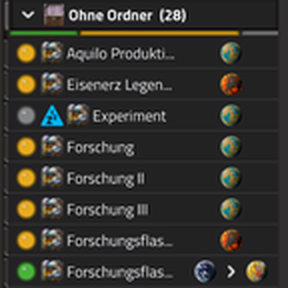
Sort your space platforms into named, color-coded folders in the remote view (M). Subfolders, favorites, search, status filters, auto-grouping, build progress with time estimate, markers for the platform you look at and where your character stands. Create several platforms at once with a ship blueprint book and a live material check. Backup export/import, recycle bin. English, German, French, Spanish, Chinese, Russian. Based on AkitaAttribute/SpacePlatformOrgUI (MIT).
Providing the player with new tools or adjusting the game interface, without fundamentally changing gameplay.
Transportation of the player, be it vehicles or teleporters.

Hi,
I came across your mod on Reddit, and I think it's great! After trying it out today, I wanted to give you some feedback.
Some of these things may already be on your to-do list, but there might be some things you haven't thought of yet, or that looks different from an outside perspective.
As far as I can tell, it's possible to use your mod with version Factorio 2.1 (experimental) — you just need to adjust the corresponding entries in 'info.jason'. This would be of particular interest to all the players of the experimental version and other modders looking to integrate your mod as a dependency into their Factorio 2.1-compatible mods. Moreover, if Factorio 2.1 becomes stable, all players will be able to carry on playing with your mod right away.

The 'g' and 'p' in the 'Manage', 'New platform' and 'Space map' buttons at the top and bottom are cut off. This appears to be somewhat inconsistent.
What the purpose of the yellow triangles in front of the individual surfaces or platforms was, since they aren't expanded like folders are? For me, the orange colour seems to be enough, as in the original version.
The black colour of the arrows on the open and closed folders, as well as the arrows between the planets, makes them barely visible. In this case, white would be more visible.
As it is not possible to create a direct link to the space map, it would be useful to allow the user to set the maximum height of the window themselves, rather than limiting it by the maximum possible height. This would enable the window to be positioned so that the 'Space Map' entry in the main menu is still visible above the top edge of the window, with the modded menu itself lying above the original menu but not extending beyond the bottom of the game window.

Personally, I would prefer a design that is closer to the original.

Hi Ingo,
thanks a lot for the feedback, I’m glad you took the time to look at it. Some of your points are already in progress, and I’ll keep working through the rest. The mod is still work in progress, so there’s more to come with the next updates.
If you spot anything else, I’m happy to hear it.
Cheers,
Amageddon
Hi Amageddon,
it's great how quickly you're rolling out updates! I've just taken a look at version 2.1.5, and I find the status filter buttons really helpful.
Here's some more feedback on what caught my eye when I looked at version 2.1.5.
The arrows and dots that you are using appear blurry in 4K. If I'm correct, you're using 16x16 icons. Perhaps you could take a look at the Factorio game files for 32x32 icons? For example, under 'Factorio/data/core/graphics/icons/mip', there are both arrows and 'collapse' and 'expand' icons for folders in 32x32. Under 'Factorio/data/core/graphics', there's also a 'status.png' that matches your dots in 32x32. It may also be worth checking out the Factorio game files for future content. This is especially true when you consider that the more icons that conform to the Factorio standard, the more cohesive the whole thing looks.
With the new dots in front of each platform and the planet icons on the right, the indentation of the dots and collapse/expand icons inside the button area is now more noticeable. It might be worth temporarily removing or reducing the indent to see what looks better in the overall layout.
I hope repeating the following question doesn't come across as rude. I'm genuinely interested in the reasoning behind this design decision and whether I'm overlooking an interesting feature. What the purpose of the yellow up arrow in front of the individual surfaces, since they aren't expanded like folders?

It seems counterintuitive that the 'X' to clear the search entry isn't next to the search field. Instead, the status and filter buttons come first.
Furthermore, the status filter buttons make the search field extremely small if you keep the window width fairly narrow. From my perspective, it might make sense to place the status filter buttons on the same line as the sort options. Thematically, that seems to fit better to me.

Once again, this ended up being longer than I expected.
One final tip: it's best to get feedback from others as well, and to question my comments because my feedback only reflects one perspective on your mod.
With that in mind, have fun modding!
Hi Ingo,
Thanks again for your detailed feedback. I really appreciate you taking the time to look so closely. It helps me a lot.
First, the answer to the question you rightly asked twice: The yellow arrow is the default “you are here” marker. It appears in front of the planet or surface you are currently on, as long as you haven’t picked a custom icon for it. You can change it under Settings → Symbols → “Location marker”. So there’s no big secret behind it, but nothing explained it either. Having to ask twice is a flaw in the mod, not on your side. That’s why I’ve now added an explanatory text and a tooltip there. It will come with the next version.
On your other points:
32x32 icons: Thanks for pointing me to the game files. I’m happy to take that on board and will include it in the next version. The arrows and dots looking blurry at 4K bothers me too, and a look that matches the game is exactly what I want.
Indentation of the dots and expand/collapse icons: I’ll take a look and try out what works better in the overall layout.
Search “X”, status filters and line wrapping: Your observation makes sense to me. The X belongs right next to the search field, and the filter buttons shouldn’t squeeze the search field. I’m considering moving them onto the sort line and letting them wrap depending on the window width.
Cut-off letters, off-center buttons and window height: I’ve noted all of this from your first post and will work on it.
To be honest: I still don’t think enough about the arrangement of some symbols, otherwise I wouldn’t have to revisit things twice. Your view from the outside is therefore gold, because I no longer see some things myself. You’re right that your feedback is just one perspective, but so far it has helped me more than most feedback I’ve received.
If anyone else is reading along: your opinions on layout, icons and features interest me just as much.
Best regards
Amageddon
Hi, Amageddon
I'm glad my feedback is helpful to you.

Idea: What about adding a marker displaying the character icon (Factorio/data/core/graphics/icons/entity/character.png) in addition to the 'You are here' marker that always appears in front of the surface or platform on which the character is located?
By the way you can find a star icon under "Factorio/data/base/graphics/icons/signal/signal-star.png".
I just realised that almost all the icons are 64x64, just like the planets you are already using. For proper rendering in 4K, you might therefore need a 64x64 icon. If you can't find a suitable 64x64 icon, I'd be happy to try converting a 32x32 icon. I have some experience of doing that kind of things.
Regarding the question you posted to others, if you change the title of this discussion to something like 'Layout Discussion', it will be clearer to others what the discussion is about, and they may be more likely to contribute.
Best regards
Ingo
Hi Ingo,
thanks for the great feedback, I really appreciate it!
The signal map marker as the default makes a lot of sense, and a checkbox to switch the marker off is a good idea too. I’ll definitely look into that for the next version. The character marker is a cool idea as well, I’m still thinking about how to fit it in nicely. And thanks for the star icon path, that saves me some digging.
I’ll also change the title to “Layout Discussion”, good point.
Cheers,
Amageddon
Hi Amageddon,
Thanks for the great mod — the folder system for space platforms has been a huge quality-of-life improvement.
I wanted to suggest extending the same interface to planets. Right now planets are still a flat list in remote view, while platforms get folders, colors, search, status filters, and favorites. It would be very helpful to organize planets the same way — by folders/groups, with colors, icons, search, and filters.
I understand planets and platforms are different entities in the API and this might be a lot of work, but from a user perspective the remote view already treats them as one list, so a unified system would feel natural.
Have you considered this, or is it already on your roadmap? Thanks again for all the effort you put into the mod.
Hi Weydarkend,
thanks for the kind words and the idea! I hadn’t planned it so far, mostly because the vanilla game only has five planets, so a folder tree would be quite empty. It starts to make sense with modded planets though, so I’ll think about it. If you play with a lot of planets, which of these would help you most: favorites, search, or real folders?
Cheers,
Amageddon
That’s it for today, I ended up working on this a lot longer than planned. Thanks to everyone for the feedback so far, I’ll go through the new suggestions tomorrow. Good night!
Cheers,
Amageddon
Hi Amageddon,
thanks for the quick reply! Have a good night!
To answer your question: real folders and a favorites list would help the most. When playing with mods, the list of planets gets really huge, so some organization is a must.
Also, it would be awesome to have a custom sort option, allowing me to manually reorder the planets in the list. Thanks
Hi Amageddon,
Because I really enjoy using it, I went ahead and created a full Russian localization for it. I've translated the controls, settings, and interface texts so Russian-speaking players can use the mod comfortably.
Would you be willing to include it in the official mod? I have prepared the ru locale file, you can download it here: https://drive.google.com/file/d/1ht3L_MSdF-L0SsjPOmZEz091rshFNzfN/view?usp=sharing
Keep up the great work!
Hi weydarkend,
I hadn’t thought about Russian at all, so thanks a lot for taking the time to translate it! I’ve included it and plan to release it tonight with the new version. You’re credited in the changelog.
Cheers,
Amageddon
Hi Amageddon,
thanks for adding my locale, аlso, a huge thank you for the planet sorting - it’s excellent.
the translation was made through a AI, so there may be errors, let me know if you need to make a locale for other languages
Hi Amageddon,
I've been taking some notes while playing since Sunday (Version 2.1.8) and wanted to share them with you again.
If some of this is worded a bit too directly, please know that it's all just meant as a suggestion.
Somehow, the length has gotten a little out of hand.
So, enjoy reading. Cheers
Your thumbnail only shows the planets, so wouldn't a thumbnail with platforms be more suitable?


The table alternates between displaying individual entries in grey and dark grey, making the whole thing look cluttered, unstructured and overloaded, as the comparison image below shows. Given the number of symbols, it is important that the layout is clear and structured so that users can maintain an overview and quickly find the entry or information they are looking for.

I think the following points also contributes to this feeling:
Perhaps the status dots in front of the individual entries could be made smaller again. On the one hand, they look blurry (32x32 pixels instead of 64x64), and on the other, they seem oversized.
Set the width of the status display behind the folder to match the width of the planet transit display behind the platforms.
I think the colour coding at the start of the rows for folders and platforms is very good, but it looks like some kind of effect has been applied that causes abrupt colour changes within the elements. Using a solid colour background with varying saturation levels for folders and the platforms they contain might achieve a more subtle effect.

In my opinion, the new icon area in front of the planets and platforms for the character and location icons has the following drawbacks:
If “Marker for viewed platform” is enabled, I wouldn't disable the orange highlighting of the active entry. The icon looks so small and inconspicuous that way, and it gets lost among all the other icons and symbols. The orange highlighting of the current platform/planet could also be implemented as a separate checkbox in the options.

Dots cannot have multiple colours at the same time. For example, they can be both unscheduled and paused.
One idea would be to add optional warning icons in front of the platform icons.
- Warning icon for paused platforms: Factorio/data/core/graphics/icons/alerts/destination-full-icon.png
- Warning icon for platforms without a schedule: Factorio/data/core/graphics/icons/alerts/no-path-icon.png
Based on what you've done so far, I'll describe below what I think might work well. Where I've written 'optional' in brackets, this means that it can be enabled or disabled individually via a tick box in the settings.
(Always left-aligned): Location icon (optional); player icon (optional); planet symbol followed by the name (as in the original).
I would display the player icon before the planet, indenting that line accordingly (as with the location icon in previous versions). The same applies to the location icon. So, combining the two: a left-aligned location icon followed by the character icon, then the planet symbol and the planet’s name. This would also allow the entire line to be highlighted when the mouse hovers over it or when it’s selected.
Color coding with high color saturation, icon (optional), text, quantity, status bar (optional). In other words, just as it is now.
(Always left-aligned): Color-coded highlighting with reduced saturation, status dot (optional), location icon (optional), player icon (optional), warning symbol for “Paused” and “No schedule” (optional), platform icon (optional), and name, transit/position info (optional).
Make it possible to disable the default icon for platforms and folders, just as with the “Player figure” and “Marker for viewed platform.” However, still display icons if a user has explicitly selected an icon for a folder or platform.

Maybe it's just me, but has the font size decreased, or are my eyes just tired? To improve readability, try using a bold font or adjusting it to match the font sizes in the header section.
In addition to the 'Manage' button, a gear icon could perhaps be added to the header (see the 'Header' section). This would mean that clicking 'Manage' would open the 'Manage' menu only, and clicking the gear icon would open the 'Options' menu only.
In English, your mod says 'New platform', but the button is labelled '+ Add space platform' in the original. The title of the window that opens as a result is different, too.


Hi Ingo_Igel,
a big, fat THANK YOU! I just read through your notes on 2.1.8 and I’m honestly impressed. You didn’t just say what felt off, you put the whole panel next to the original, dug out the icon paths and thought through how every row could look. I know that took you a lot of time.
And it paid off, big time. Your notes are the reason the panel looks and feels so much better now. Most of it is already in there, and the rest I’ve thought about a lot. Without your feedback I would never have gotten there this fast.
So, really: thank you for the effort, I appreciate it a lot!
Oh, and could I write you a message in the Factorio forum sometime?
Cheers, Amageddon
Hi Amageddon,
Feel free to message me. If you have a Discord account, you can also join the Factorio server and send me a direct message from there.
I'm excited about this mod, and I appreciate how receptive you've been to feedback. The smaller text and extra visibility are promising. But for me, what I'm gaining in visibility, I'm losing because the interface is much more "busier" than I'd like. I'd love a few display options to make the list easier to scan, primarily just giving me a bit more granularity over what parts I'm able to display/disable and perhaps having a bit of control over the indent.
In no particular order, allow me to respond to your kind requests for input with a laundry list of unreasonable demands. :)
Now, given my near infinite amount of time and good natured willingness to dive right into Adobe Illustrator and draw something up for you -- I naturally used AI to have a couple of mockups done. But I hope these give you a bit of an idea of what I'm (personally) looking for. Less distractions when possible, the more options the better. There are versions with title-bar controls, a compact toolbar, and both of these would allow for a narrower panel overall.
Thanks again for a great mod, and for fielding our suggestions in here like a champ. I borrowed Ingo_Igel's penchant for directness (I hope that's okay, it helps reduce the text a bit, but I certainly don't mean to be rude or critical) and then I decided to get into a length battle with all of you, because hey, I just reduced some text, so why not!
My main priority is keeping names and locations/routes visible while reducing repeated information and excessive indentation. The narrower example shows how that could also reclaim some screen space.
I know individual toggles add maintenance work, but just breaking a few of these out (as opposed to just lumping them in to one "compact" vs "not" choice in the options) would be very appreciated. These are preferences for my playthrough; I can see why other players would want the additional status information, but for me, it's very distracting.
Thanks again for being open to suggestions. It's exciting to follow this project as it develops! Examples follow.
Two different approaches, one super compact, and one with a redesigned toolbar that wastes less vertical space. (Click any image for full size.)


Hey No.Springs,
Thanks a lot for the great feedback! And the text really isn't that long :D The more detailed, the better for me and the mod. So thank you very much for that.
I'm thinking about how to get the other points implemented, and then I'll see what I include. Ideally, the mod can end up being customized entirely to your liking, with individual toggles instead of one big compact mode.
By the way, a few of your points will already be in the next release.
cheers, Amageddon
That's great, Amageddon!
I also had a question. I noticed that the built-in display just kind of shows up when you first hit M, but then at some point (maybe when you zoom in?) it just sort of goes away.
I've never really noticed it before but because yours is a little bit larger, I noticed that when I was on a remote view planet working on something it was always there and I had to sort of move it out of the way.
I wonder if it's possible to have yours "auto hide" the same way Wube does? That would be a neat feature.
Speaking of neat features: playing around with it last night, I absolutely love the auto grouping feature. And making 10 ships, with a shared naming convention, based off of the blueprint I had in my hand--geez dude, what manner of witchcraft is this? Wild stuff, and super super useful!
Hope you have a lovely weekend.
Haha, witchcraft, I like that :D Really glad the auto grouping and building from a blueprint work so well for you!
Your hint about the auto hide is a good one. On my side the panel stays put in remote view no matter how far you zoom in, while the game hides its own list. I’ll add this as an option, so it can auto hide the same way.
Have a great weekend too!
cheers, Amageddon