

Recursive Resource Calculator (Fork)
A maintained fork of Recursive Resource Calculator by Herddex, with support for quality and beacons, faster editing, and many calculation fixes.
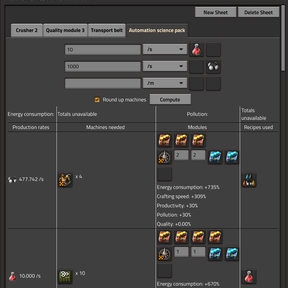
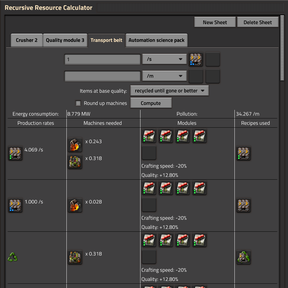
Tell the calculator what you want to make and at what rate. It breaks each product down into raw resources and generates a report showing:
- The production rate of every item and fluid along the way.
- The number of machines each recipe needs.
- The energy consumption and pollution of the entire production line.
How to use
- Press ALT + X (the default shortcut) to open the calculator. Press E to close it.
- In a sheet, select an item and its quality, or a fluid, enter the desired production rate, and press Compute.
- In the report, choose the recipe, machine, modules, and beacons for each row.
- Add more sheets for separate builds.
Quality (Factorio 2.0)
- Quality modules affect the calculations for every recipe row: some of the output is produced at a higher quality and appears as byproducts.
- Quality targets: request rare gears, for example, and the calculator builds a quality loop that repeatedly crafts with quality modules and recycles items below the target quality.
- The report shows one row per quality tier, with its machines, recyclers, and upgrade chances.
- Each tier has its own recipe, machine, and modules. For example, you can cast normal-quality gears from molten iron and assemble higher-quality gears from recycled plates.
- All recyclers in a loop form a single pool with a shared machine type, module setup, and recycling recipe.
- Higher-quality items produced elsewhere on the sheet feed into the loop instead of appearing as leftovers.
- Each sheet lets you choose what happens to base-quality items returned by a casting loop: leave them as leftovers, use them in another crafting recipe, or recycle them until they are consumed or upgraded.
- A stage with no running machines explains why, for example, when no items of the required quality are available to it.
- Loop settings are stored per item and quality and shared across all sheets.
Fast editing
- Picker windows for modules, machines, and beacons show all choices in a single grid, with qualities displayed as icons. Click once to select, then double-click, click the green tick, or press Enter to confirm. Right-click a slot to empty it or a beacon group to remove it.
- Selecting a module for a completely empty row of slots fills the whole row.
- Pipette key (Q by default; uses your configured binding):
- Press Q while hovering over a module slot to copy the module, then over another slot to paste it.
- Press Q while hovering over a machine to copy it along with all its modules and beacons, then over another row's machine button to paste the setup.
- Press Q while hovering over a beacon group to copy it, then over another group or the add button to paste it.
- Left-clicking while holding the copied item also pastes it. You can keep pasting into other rows for as long as you hold the item.
Modules and beacons
- Each row shows the module slots available for the selected machine at its quality and offers only modules accepted by both the machine and the recipe.
- Beacon groups let you choose the beacon type and quality, the number of beacons that reach each machine, the number of machines sharing each beacon, and the modules inside each beacon.
- Beacon effects account for distribution effectivity, quality, beacon profile, and beacon count. Energy consumption counts each physical beacon once.
Excess products
- Reprocess leftovers: select a recipe that consumes a byproduct directly from its row, such as cracking, recycling, or venting. The recipe's inputs and outputs are included in the sheet's calculations.
- Burn excess fuel in reactors (such as the heating tower), boilers, and burner generators. Their pollution is included in the calculations, and burnt results, such as spent fuel, are added to the sheet.
Sheets and report
- Target fluids as well as items. Targets for the same item and quality in multiple rows are added together.
- Round up machines displays whole machine counts while keeping rates, energy consumption, and pollution exact.
- Long messages wrap instead of stretching the table.
- If a sheet cannot be solved, it lists the recipes in use and identifies the rows causing problems. All controls remain available so you can adjust the setup.
Accurate calculations
- Recipes that list the same product multiple times, such as spoilage variants, no longer produce inflated machine counts.
- Catalysts, such as those used in Kovarex enrichment, are handled correctly.
- Productivity bonuses are added together, capped at the recipe's maximum, and excluded from catalyst amounts.
- Machine quality is taken into account when calculating machine counts.
- Recipes with extra crafting categories can use machines from any of those categories.
- The solver handles more systems, including those that combine very small and very large amounts.
Good to know
- This is a separate mod from the original. Sheets saved with the original do not carry over.
- Disable the original while using this fork: both use ALT + X to open the calculator.
- Factorio 2.1: quality is not calculated yet, and the mod has not been tested in a Factorio 2.1 game.
- The recycling icon in quality loops requires the quality mod (Factorio 2.0) or the recycler mod (Factorio 2.1). Without it, the rows display text instead.
- Beacon effects are calculated exactly. Factorio 2.0 rounds them internally, so the in-game tooltip may differ slightly.
- Each player can set Decimal precision from 1 to 6 digits; the default is 3.
Versions
| Mod version | Factorio |
|---|---|
| 1.1.33 | 2.0 |
| 1.1.34 | 2.1 (same code; quality is not calculated; not yet tested in a Factorio 2.1 game) |
Source and credits
- Source code: github.com/dw3105/recursive-resource-calculator
- Original mod, design, and thumbnail by Herddex. Licensed under the MIT license.
- Found a bug? Please post in the Discussion tab.