
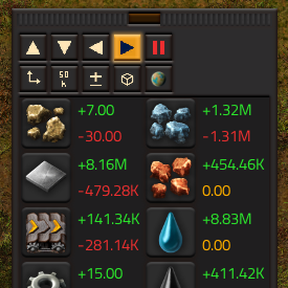
This mod adds UI that lets you see you production/consumption rates for selected items while you play the game.
Providing the player with new tools or adjusting the game interface, without fundamentally changing gameplay.
Version: 2.4.0
Date: 2026-11-03
  Features:
    - UI scale. Click the new scale button to switch the window between sizes S, M and L. M is the original size. Works on top of Factorio's own UI scale.
    - Added a configurable keyboard shortcut for switching the UI scale (unset by default)
Version: 2.3.2
Date: 2026-11-03
  Fixes:
    - Fix: small performance glitch
Version: 2.3.1
Date: 2026-11-03
  Fixes:
    - Fix: plugin running in debug mode
Version: 2.3.0
Date: 2026-11-01
  Features:
    - Auto-hide mode. Click on the eye button to toggle auto-hide on/off. When on, the window will shrink and expand as you mouse enters or leaves the window boundary.
Version: 2.2.1
Date: 2026-10-31
  Fixes:
    - Fix: TPU crashing when an item set in the table no longer exists in the game (e.g. removed by a mod).
    - Fix: TPU shortcut bar button not indicating if TPU is on or off.
Version: 2.2.0
Date: 2026-10-30
  Features:
    - You can now click on slot text and then click on another slot's text to swap them, making reordering your table a bit easier
Version: 2.1.0
Date: 2026-10-29
  Features:
    - Fluid support! Empty slots can now be toggled between item/fluid types.
    - Added a unit selector. Now you can switch the production rates between units/stacks.
    - Added a Pause/Play button allowing you to temporarily pause the rates at their current values.
    - Add the ability to toggle buttons on/off for a truly minimal UI.
  Changes:
    - Moved the window drag handle to the left side in horizontal mode. Makes more sense, loks better.
Version: 2.0.0
Date: 2026-10-28
  Changes:
    - Full code rewrite - better, faster, stronger
    - Factorio 2.1 support
    - Cleaner UI elements
    - Space age support
    - Added support for all rate intervals (5s to 1000h)
    - Clearer button icons
    - Added shortcut bar button for toggling the window on/off
    - Added a configurable keyboard shortcut for toggling the windown on/off (unset by default)
    - Max columns/rows is now set at 100. Should be enough slots for everyone's needs
    - Added a planet selector that allows seeing stats for the selected planet only
Version: 1.1.1
Date: 2023-05-25
  Changes:
    - Fix a multiplayer desync causing issue
Version: 1.1.0
Date: 2023-05-13
  Changes:
    - Better, more consistent GUI
    - Now showing two digits after the decimal point
    - New button to toggle between total production/consumption rate display and a production-consumption difference display
Version: 1.0.1
Date: 2023-04-24
  Changes:
    - Fix game a crashing bug when turning the mod at runtime
    - Fix numbers overlapping layout issue
Version: 1.0.0
Date: 2023-04-23
  Changes:
    - Initial release