
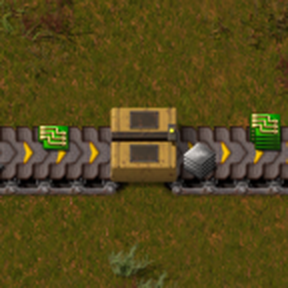
Inline belt box: sorts mixed belt items per lane into full stacks and releases them as stacked belt items.
Mods introducing new content into the game.
Augmented or new ways of transporting materials - belts, inserters, pipes!

Hey there! :)
I'm playing with Space Exploration and "Advanced Belts 2.0" (Modder: Duvaichon) and the belt speeds are influenced by "Belt Speed Multiplier" (Modder "Jobus").
It might be asking a bit much, but could you add these belts to your sushi packers, but with individual speeds? (By having the sushi packers always adjust their speed to the speed of their respective belt.)
If I'm correct, there are a total of 6 belts: 4 from Advanced Belts 2.0 and 2 from Space Exploration (one space belt and one deep space belt, in several colors).
Thanks for the request! Done in 0.1.11 (Factorio 2.0) / 0.2.11 (2.1).
One note: stacked output needs belt stacking research. Without Space Age, add Stack Inserters or Infinite Belt Stacking; without any such research the packer passes items through one by one.
Also fixed on the way: a load crash with Advanced Belts 2.0 + Space Age together, and blue packers now reach full belt speed.
Wow, das was lightspeed! Thanks a lot. :)
"One note: stacked output needs belt stacking research. Without Space Age, add Stack Inserters or Infinite Belt Stacking; without any such research the packer passes items through one by one."
Sure, I know, thats why I'm using the mod "Space Exploration Integration: Stack Inserters and Belt Stacking" (by xkyouchoux).
Everything works fine! All Sushi Packers are integrated in their color and they also respect the belt speed, changed through the "Belt Speed Multiplier"-Mod. Thats awesome!
One last thing: I know why you dont added the Sushi Packer for the normal space belt (the white one), because it has the same speed than the express belt, but the color dont match! :D
Can you please add the space variant for the space belt? One most deeper reason: Every Sushi Packer needs the splitter of their belt level, but in space you dont produce express belts (and below). That means, the white Sushi Packer (for space belts) need a special receipe, that dont need the "previous" Sushi Packer (because, there is no below "space" for space). Maybe just double the other item costs for the receipe?
[Edit]
Could you also consider translating your mod into German? :)
Glad it works! Both wishes are in 0.1.12 (Factorio 2.0) / 0.2.12 (Factorio 2.1):
Deutsche Übersetzung ist drin — wenn dir ein Begriff komisch vorkommt, schreib es gern hier.
Also in this release: yellow and red boxes use less script time.
Wow, Dude, you are awesome! :D
Quick like a rocket and perfect in implementation.
Thanks a lot! I already love your mod.
Can you say how UPS-friendly your Sushi Packers are?
Mostly yes. The box is scripted (Factorio has no built-in "pack items into a belt stack" entity), so each box costs some script time, unlike a plain belt.
Measured: 200 yellow sushi packers running at full flow cost about 4 ms per tick of script time. That is roughly 0.02 ms per box, on a slow shared 4-core cloud VM. A normal gaming PC should do better, but I haven't measured one. An idle box only checks its belt every ~30 ticks, so boxes with nothing to do cost very little.
I also ran a long test (30 hours of game time, boxes built and removed over and over). Memory and mod state stayed flat, no leak.
So a few dozen boxes won't show up at all. Hundreds at full flow will show up in the script time of the F4 -> show-time-usage debug view. If you do build a big one and see a drop, please post your numbers here!
I placed 5 extreme packers (the one after turbo/green) and its running on 0,4 ms. Sounds a bit much for only 5 Sushi Packers.
Nice mod, really, but I will probably refrain from using them in larger numbers.
You were right, and thanks for measuring it. The figure I gave before (about 0.02 ms per packer) was for yellow packers only. The old packer paid script time for every single item, so fast packers cost far more.
0.1.21 (Factorio 2.0) / 0.2.21 (Factorio 2.1) is on the portal now, and the packer works differently inside: hidden inserters pull the items in and put the finished stacks out, one set per belt lane. That is the game engine's work, not script. The script only looks at each packer about twice per second.
I rebuilt your setup (Space Exploration + Advanced Belts 2.0 + Belt Speed Multiplier x2 + SE stacking, 5 extreme packers at full belt) and measured script time per tick on my test machine, a slow shared VM:
So the five packers themselves went from about 0.8 ms to about 0.02 ms. Whole update time of the scene with packers was the same as with plain belts, within noise. Your PC should show smaller numbers than these; I would be glad to see them.
It is still not free: the hidden inserters are real entities, so a packer costs a little entity update time instead. On belts above 144 items/s (your extreme belt at x2 is one) a packer carries a few more of them.
What you will notice in game:
One known limit: on belts faster than the turbo belt that carry more than 24 item kinds per lane, the belt in front of a packer can still back up.
After the update, I got this error message:
Error loading mods: Error while loading entity prototype "sushi-packer-belt" (transport-belt): Different frame counts (expected 64, but has 8) in animation layers of sushi-packer/graphics/entity/sushi-packer/yellow/sushi-packer-yellow-east.png in property tree at ROOT.transport-belt.sushi-packer-belt.belt_animation_set.animation_set.layers[0]
Modifications: Sushi Packer › Belt Speed Multiplier › Increase/Decrease Circuit Wire Max Distance › Space Exploration
Mods that need to be disabled:
• sushi-packer (0.1.22)
• beltspeedmultiplier (1.0.4)
• increase-circuit-wire-max-distance (1.0.0)
• space-exploration (0.7.52)
It seems: The error here is due to a faulty sprite animation in the graphics file of the yellow conveyor belt from Sushi Packer after the update.
Thanks for the report, and sorry for the trouble.
I tried to reproduce it on Factorio 2.0.77 with Sushi Packer 0.1.22, Space Exploration 0.7.52, Belt Speed Multiplier 1.0.4 (x2), Increase Circuit Wire Max Distance 1.0.0, Advanced Belts 2.0 and SE stacking. It loads without errors here, also with an old save from 0.1.14 updated to 0.1.22. The new 0.1.23 loads fine with the same mods too.
Your error names a prototype "sushi-packer-belt", but no released version of Sushi Packer has ever had one with that name (the yellow packer is "sushi-packer-body"), so something in your game differs from mine. To find it, could you post:
Once I can make it crash here, the fix goes out fast.
Hey ho! :)
I downloaded your latest version, but still the same problem. 0.1.14 is the last stable for me.
It seems that the "Belt Speed Multiplier" mod is causing the error, or at least its speed increases.
"Different frame counts (expected 64, but has 81) in animation layers of sushi-packer/graphics/entity/sushi-packer/yellow/s_h-packer-yellow-east.png in property tree at ROOT.transport-belt.sushi-packer-body.belt_animation_set..."
Your new sushi packers apparently aren't adjusting to the changed values. Can this be?
I am using the "Speed factor" of 1.42857 (thats because I wanted the last, orange belt to be 150/s). Try this also please.
You are trying simple "x2", perhaps that won't trigger the error.
I'm playing Factorio 2.0.77 and Space Exploration 0.7.75
My mod-list:
Found it, thanks for the mod list! The crash comes from Black Rubber Belts. It draws belts as 8 frames played several times, and Sushi Packer only counted the 8. That gives "Different frame counts (expected 64, but has 8)" with the arrow-quadrupled style. Version 0.1.25 (Factorio 2.0) / 0.2.25 (2.1) fixes it: the packer now matches the belt's real animation length. I tested every Black Rubber arrow and rail style, plus your full mod list, and all of them load. I couldn't get the "has 81" number to appear with any of your mods. If you still see an error after updating, please post your whole factorio-current.log (it's in %APPDATA%\Factorio).
Wow, you really got it! Works perfectly fine now. :)
That's really very thoughtful of you to download my full mod list to make sure everything works smoothly.
My tips weren't very helpful, sorry, I guess I oversimplified things.
One VERY little thing: It seems like you're sorting your Sushi Packers by belt speed, right? This results in a different sequence than with conveyor belts, splitters, tunnels and loaders. (After "Supreme" always comes "Space" with all these objects. Not your Space-Sushi Packers, they're between "Elite" and "Extreme", instead of also being after "Supreme".).
Just a minor visual change. IF you want, you can just add it in the next update. No need to do a separate update for that. :)