

Spidertron Manager
Manage your spidertrons without chasing them across the map.
How grouping works
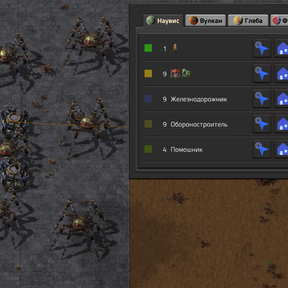
This mod organizes your spidertrons into groups automatically. A "group" is simply every spidertron on your current surface that shares the same name. Give several spidertrons the same name, and they become one squad you can command together. Give them different names, and they become separate squads. No extra tagging, no complex setup — just names.
Features
- One window, all your spidertrons — see every spidertron on the current surface, grouped by name, each group colored to match the vehicles.
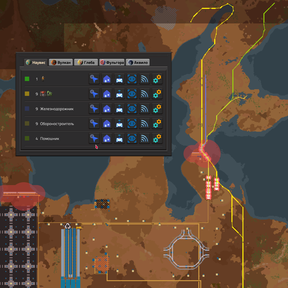
- Multi-surface UI — each surface (planet) has its own dedicated tab, which automatically switches when you change surfaces, giving you instant access to all your groups.
- Group commands — give an order to an entire group with a single click.
- Control Group — remotely take control of a single spidertron in the group, while the rest of the group automatically follows the leader.
- Follow me — your spidertrons follow your character around the base or into the field. Improved logic: spidertrons now navigate to the exact location where they were called. If you move sufficiently far away, they will recalculate their path to your new position until they are close enough to resume standard following behavior.
- Go to location — pick any point or area on the map and send the group there. When an area is selected, the spidertrons are spread out across it instead of piling onto one tile.
- Go home — assign a home point or home area and recall the group whenever you need it. Returning spidertrons are distributed across the home area.
- Smart routing — request a calculated route that avoids obstacles and can cross water and lava, just like a manually driven spidertron.
- Default movement mode — choose between "Straight line" or "Pathfinding" as your default movement method in player settings. The alternate method remains available via Shift+Click.
- Group settings — change one spidertron's settings and apply them to the whole group.
- Remote control made easy — get a spidertron remote with the whole group already selected.
- Convenient interface — the window remembers its position, stays open when you open the map, and updates automatically when spidertrons are built, destroyed, or renamed.
- Surface-aware — the toolbar shortcut automatically disables itself when there are no spidertrons on your current surface.
Opening the manager
Click the Spidertron Manager icon on the toolbar, or press the assigned shortcut key (U by default).
Click it again to close the window. If you have no spidertrons on the current surface, the shortcut is disabled automatically.
Using the manager
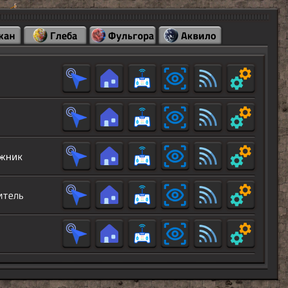
Each row in the window represents one group: its color, its name, and how many spidertrons belong to it.
| Button | What it does |
|---|---|
| Follow me | The group follows your character. |
| Go to location | Select a point or an area on the map; the group heads there. |
| Go to home | Send the group to its saved home point or home area. |
| Control Group | Remotely control one spidertron in the group, while the rest follow the leader. |
| Give remote | Places a spidertron remote in your cursor with the group preselected. |
| View | Centers the map on the group so you can find it quickly. |
| Settings | Opens the spidertron settings; your changes are applied to the entire group. |
Mouse modifiers
Hold a modifier key while clicking a button for extra behavior:
| Modifier | Effect |
|---|---|
| Shift + click | Requests the alternate movement method (e.g., if default is "Straight line", this requests a calculated pathfinding route). Useful across rivers, lava lakes, and cluttered areas. |
| Ctrl + click on Go to home | Lets you choose a new home point or home area for the group. |
Choosing a point or an area
After clicking Go to location (or assigning a home), move to the map and select your destination: * Click a tile — all spidertrons head to that spot. * Drag an area — the spidertrons are distributed across the area, each taking its own position.
If you change your mind, drop the selection tool from your cursor — the manager window returns.
Setting up a home
- Open the manager.
- Ctrl + click Go to home for the group you want to configure.
- On the map, click a point or drag out an area.
From now on, Go to home recalls the group to that spot, spreading the vehicles out if you defined an area. Homes are stored per group and per surface.
Tips
- Give your spidertrons the same name to control them as one group. Different names create separate groups — that is the whole trick.
- The color square next to a group matches the spidertron's color, making large fleets easier to read.
- Use Go to location with an area when parking a fleet — it keeps the vehicles from stacking on top of each other.
- Use Shift + click when the direct route crosses water, lava, or dense construction. Pathfinding takes a moment, but the route is much safer.
- Commands only affect spidertrons on the surface you are currently on.
Feedback
If something does not work as expected, include your Factorio version, the mod version, and a short description of what happened. Bug reports and suggestions help make fleet management better for everyone.